The simulation is done. Now comes the hard part – How automated post-processing cuts review time in CFD workflows
This post explores how a browser-based automation dashboard simplifies Simcenter STAR-CCM+ post-processing, helping engineering teams move faster from simulation results to design decisions.
The solver finishes its run. Great!
This is where the time goes. Not in the simulation, but in everything after it: Engineers have to hunt down files across remote servers, launch manual scripts, wait for graphics to render, juggle spreadsheets to check specifications, and piece together comparison reports for design reviews. Each step is small. What if we could change that? What if reviewing a simulation felt as connected and intuitive as browsing a shared workspace?
From simulation to insight: How we’re making quality control simpler and smarter through a unified dashboard
The Unified Automation Dashboard, a browser-based workspace is built to bridge the gap between heavy-duty engineering simulations and rapid, everyday decision-making. This dashboard runs on your own workstation and handles the conversation with Simcenter STAR-CCM+ on the remote High-powered computing environments (HPCs) system. Enter your connection details once, pick your simulations, and review everything in one place. The engineering calls stay with you.
Too many steps between data and decision
The dashboard runs on your workstation and connects to the HPC system, where Simcenter STAR-CCM+ opens your simulation and extracts the images and data. It works on simulations that have already converged. It doesn’t run the solver, and it doesn’t judge the design. You choose the right simulations and specification, and the remote setup has to support the analysis you want.
Simcenter STAR-CCM+ can show you vehicle aerodynamics and thermal behavior before anyone builds a prototype. But a simulation only pays off once its answers reach the people making the decisions. With this kind of Simcenter STAR-CCM+ post-processing automation, the meeting starts with “here’s what we’re seeing” instead of “give me a minute to find the file.” The decision is still yours. The dashboard just gets you there sooner.
Bringing Clarity to the Review Process
High-powered computing environments are extremely efficient at crunching massive numerical models. But they aren’t always designed for the repetitive, human-centric tasks that follow:
- Did I pick the right file version?
- Is this calculation still running, or did it fail quietly in the background?
- How do I compare different designs side-by-side without opening five different windows?
The new dashboard doesn’t replace physics or engineering intuition it amplifies it. By bringing secure remote access, automated file discovery, and side-by-side comparison into a single dashboard. Teams often run these reviews separately. Here they sit side by side:
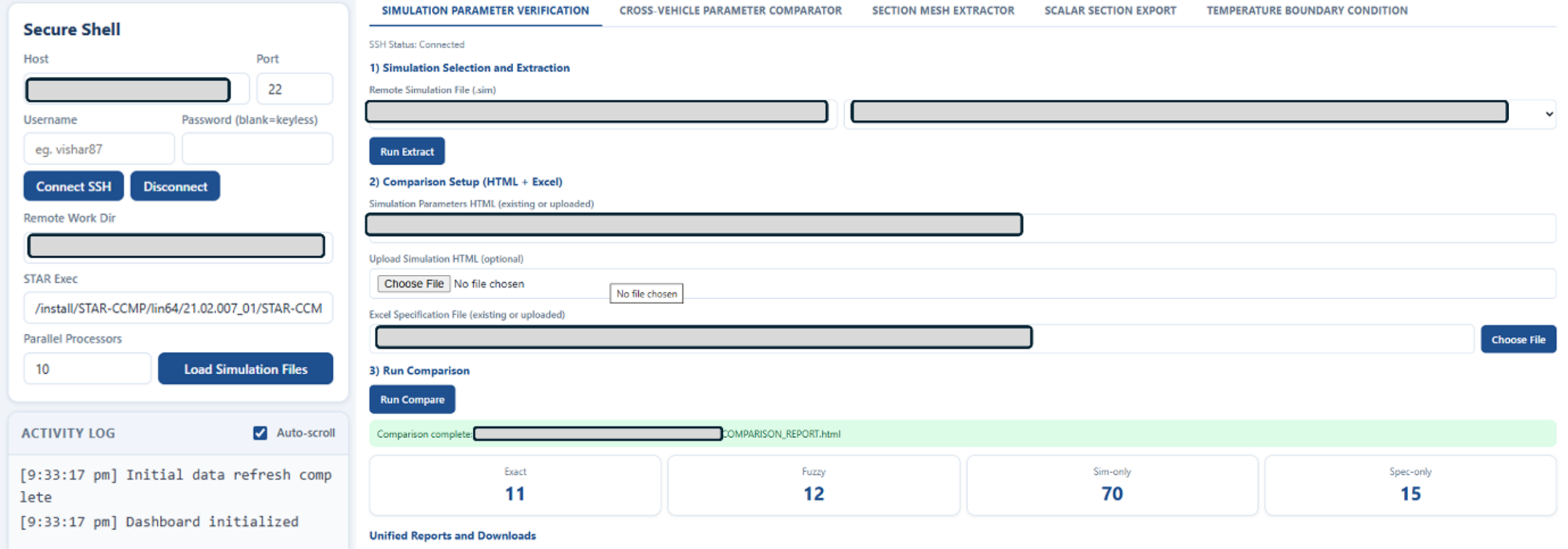
Instant Specification checks – Instead of manually cross-referencing simulation outputs with massive spreadsheet datas, the dashboard automatically compares parameters, flagging exact matches, fuzzy similarities, and any unexpected differences or missing data.
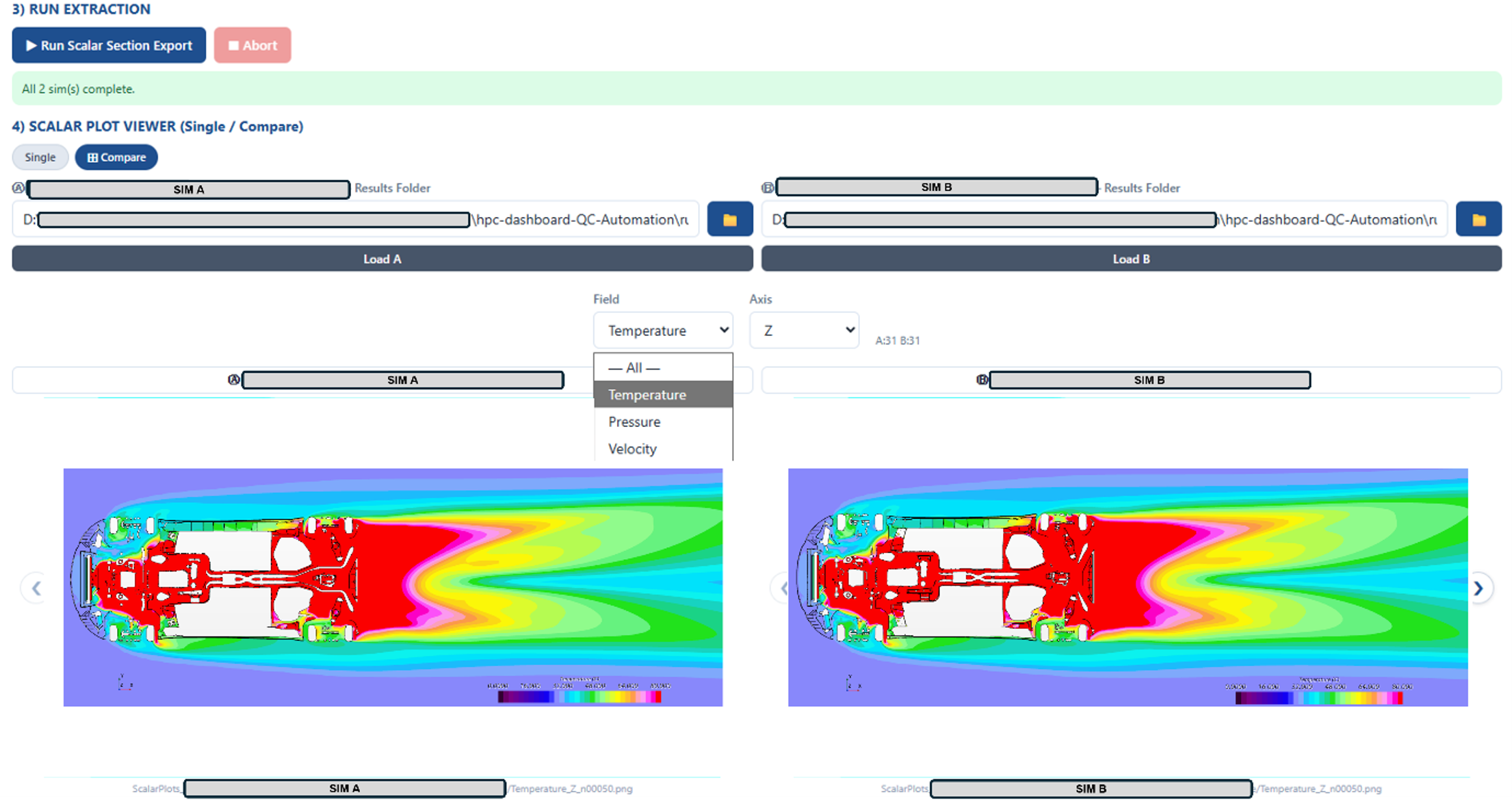
Side-by-Side Design comparison – Want to see how a small geometry tweak near a wheel-well or an underbody member affected the airflow or pressure? The dashboard serves a synchronized navigation which lets you slice through the exact same cross-sections simultaneously, catching design discrepancies early.
Self-Contained Reporting – The dashboard packages extracted parameters, mesh visuals, and scalar fields (like temperature, pressure, velocity) into clean, ready-to-share outputs.
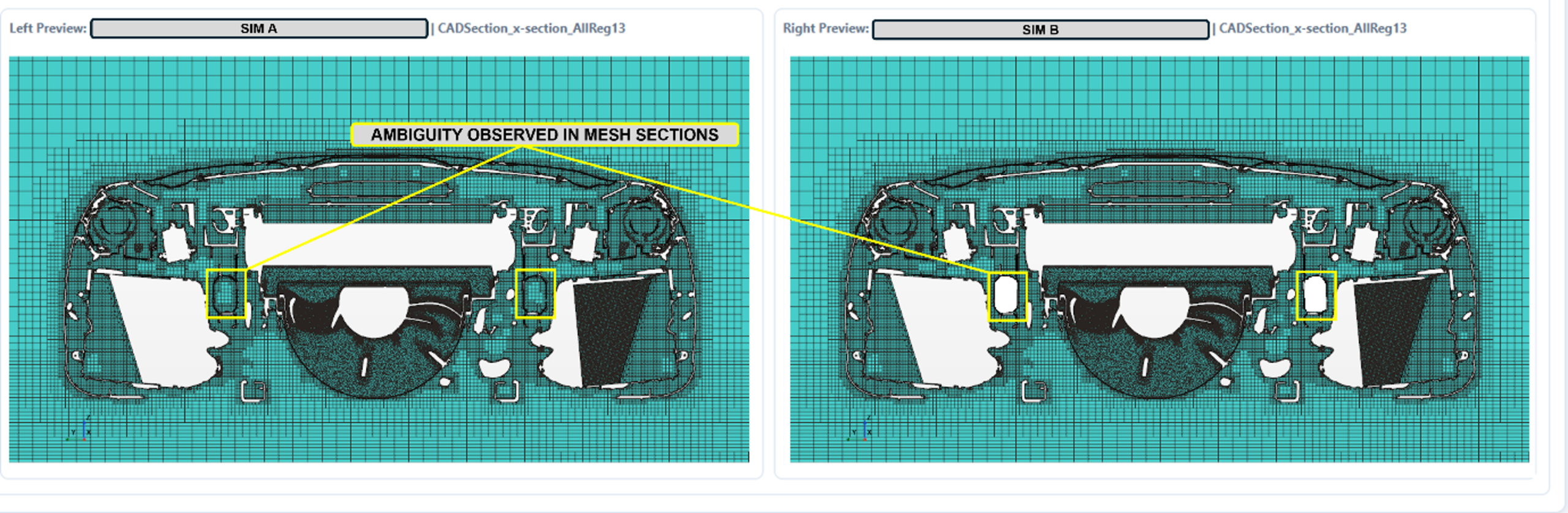
Each check has its own tab, and all work the same way: pick your simulations, run the check, review the results. For a related approach to quality checks, read this blog: Using existing structural and fluid data to train Simcenter PhysicsAI.
Why it matters – Faster post-processing means faster design decisions
While the time savings are substantial, the true value goes deeper:
- For Engineers: It removes the friction of file management. Teams can spend less time fighting scripts and more time interpreting physical behavior and innovating.
- For Project Leads & Non-Technical Stakeholders: Complex CFD (Computational Fluid Dynamics) data becomes transparent. Because the results are organized, visually intuitive, and traceable back to their exact source, everyone from product managers to executives can understand why a design decision was made.
- For Organizations: It establishes a common, standardized language for quality control. Different teams can adopt consistent review habits while still using the specialized tools and macros that fit their specific workflows.
What happens when simulation talks back
As simulation workflows grow more automated, the environments we use to review them must evolve too. Looking to the future, we envision integrating AI-assisted insights into the dashboard—not to replace human judgment, but to act as a helpful co-pilot. Imagine a system that can automatically flag thermal hotspots, spot aerodynamic drag anomalies, or suggest where a geometry change could improve heat conduction, while instantly linking those recommendations back to the underlying simulation data. Rest of Judgment and validation stay firmly with the engineer.