Use existing structural and fluid data to train Simcenter PhysicsAI
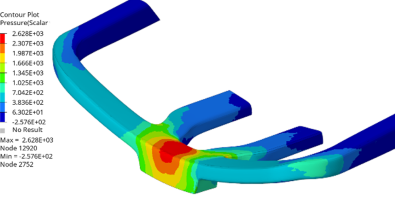

Every structural team has a data repository like this: Hundreds of solved models sitting on a network drive – bracket studies, crash runs, modal analyses, the DOE someone kicked off last quarter and never fully mined. Once the report went out, that data stopped providing insights to the team.
Simcenter™ PhysicsAI™ software can change what happens with that data. It reads the results you already have, including Simcenter™ Optistruct® software, Simcenter™ Radioss® software, Simcenter™ Nastran software and Simcenter™ STAR-CCM+™ software, then trains a geometric deep learning model on them and predicts full 3D field results on new geometry in seconds instead of hours. No new solver runs required to get started. The training data is work you already paid for.
What is Simcenter PhysicsAI
Simcenter PhysicsAI is a predictive modeling tool integrated into Simcenter™ Hypermesh™ software platform.
It is also included in Simcenter™ Inspire™ software, Simcenter™ Simlab™ software and just recently announced Simcenter STAR-CCM+. An added benefit is it can be used for structural, fluid or multiphysics workflows. It uses geometric deep learning to build fast predictive models directly from CAE data, and the important word there is “geometric”. Traditional surrogate models need you to parameterize the design first. Define the variables, set the ranges, and stay inside that box. If a new concept has a different topology, a new surrogate needs to be parameterized.
Simcenter PhysicsAI doesn’t work that way. It learns from the mesh itself, so it handles varied geometries and different topologies without user-defined parameters. It also accepts non-geometric inputs like material properties and boundary conditions as features alongside the shape. And it predicts full 3D field results, not just a scalar KPI. You get a contour plot, not a number. That’s what makes it interesting for structures specifically. A single peak-stress value tells you whether a part passed. A predicted field tells you where it’s going to fail and what to change.
The solvers
Here’s the part that tends to surprise people: Simcenter PhysicsAI is not picky about where the data came from, its solver neutral. It ingests results from most of the major structural solvers directly.
If your shop runs Simcenter Optistruct for optimization, Simcenter Radioss or LS-DYNA for impact, Simcenter Nastran because a customer requires it and Simcenter STAR-CCM+ for advanced fluid analysis, each solver can feed their own training pipeline. You are not being asked to consolidate on one solver, or to re-run anything in a new format. The existing archive is the input.
That matters more than it sounds. The usual blocker on AI surrogate modeling isn’t skepticism about the math; it’s the assumption that adopting it means a resource and time-intensive project. When the tool reads what you already have, the starting cost of both resources and time, drops to a much more reasonable investment.
How the workflow runs
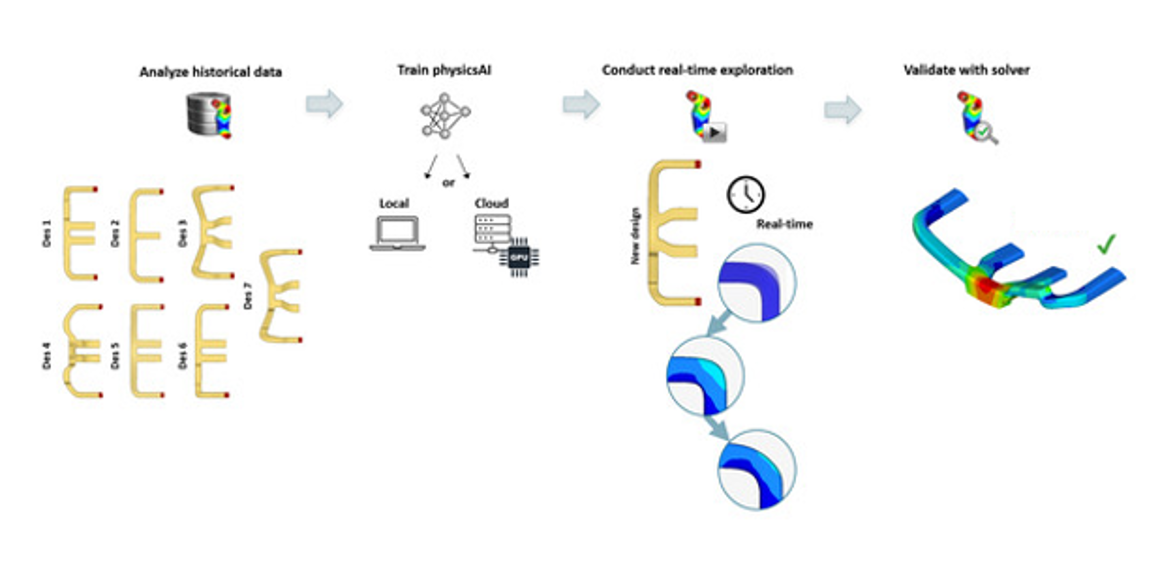
The process is straightforward: Create a project, build a dataset (or use existing dataset), train a model, test it, predict new variants. Check out this simple Step by Step walkthrough for a more detailed explanation.
A dataset is just a collection of simulation results, then you point Simcenter PhysicsAI at these datasets. From there you choose input features (coordinates, part labels, thickness, material), pick your output responses (field data, KPIs, or curves), and select an architecture. There are three network architectures to choose from, and the choice is practical rather than academic:
- Graph Context Neural Simulator (GCNS) is the default. Lower memory requirements, good general-purpose starting point.
- Transformer Neural Simulator (TNS) is mesh-invariant and faster on GPUs, and it handles transient results better, which is where crash and drop-test data lands.
- Shape Encoding Regressor (SER) is the fastest, but it only produces KPIs and curves, not fields.
Training runs locally or gets submitted to HPC. Best practice is to start small. Test on a smaller subset of your training data (around 20% is ideal) with default hyperparameters just to confirm the pipeline works, then scale up. This is designed to be run by the simulation user, not handed off to a data science team.
Knowing when to trust the prediction
The fair objection to any surrogate is: How do I know it’s accurate on the design I haven’t solved yet? Simcenter PhysicsAI answers that in two ways.
First, validation is built into the data split. The best practice is to partition the data set with 80% to training, and a validation set held back once you have more than 13 samples. You get mean absolute error and loss curves as standard output.
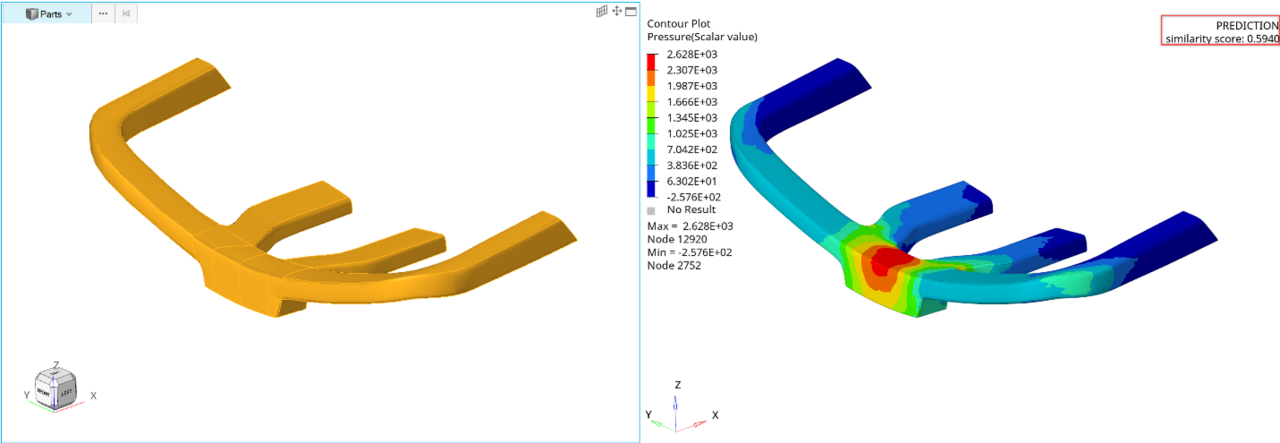
Second, every prediction carries a Geometric Similarity Score. It runs from 1.0, meaning the new geometry closely matches what the model was trained on to 0 which means it is not closely matched. A prediction with a 0.9 similarity score is a screening result you can act on.
Siemens documentation is straightforward about the underlying dependency: a Simcenter PhysicsAI model is only as good as the data used to train it (just like all AI models). Curating the dataset does more for accuracy than tuning hyperparameters. That means pulling outliers, dropping inconsistent parts, and trimming to the timesteps and components that actually matter.
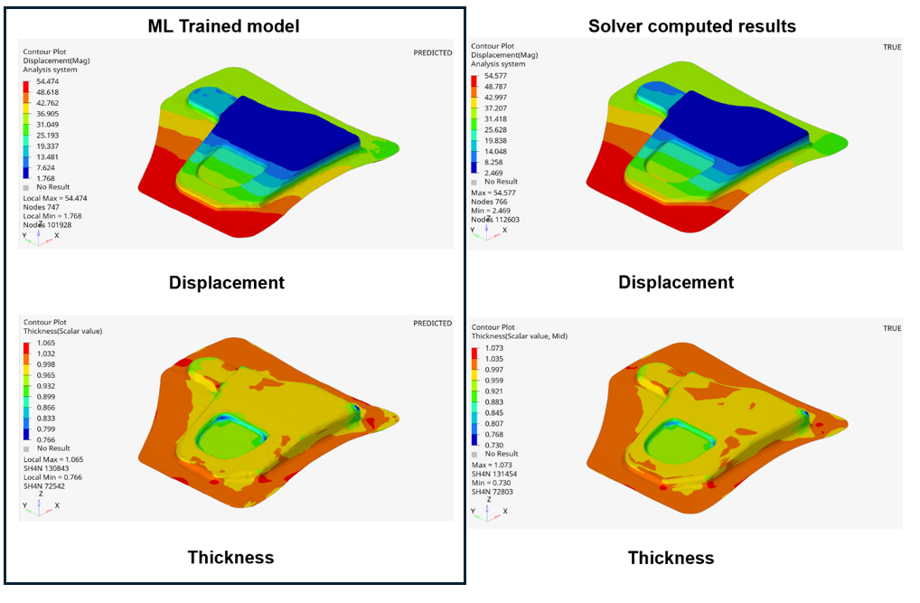
The image below shows you results from inside Simcenter™ Inspire™ Form software comparing a trained model using Simcenter PhysicsAI on the left, to actual solver results on the right. The results show a less than 1% discrepancy between the two scenarios.
Where this fits
Simcenter PhysicsAI complements your solvers, it does not replace them. Full-fidelity structural and fluid solver runs remain the validation reference, and any serious workflow keeps them there.
What changes is the front end of the process. You can evaluate hundreds of variants in a fraction of the time, select the handful of results that look promising, and spend the expensive solver time on designs that earned it. In most cases, simulation’s real obstacle has never been physics, it’s how many possibilities you can afford to explore before the deadline forces a decision.
Turn existing simulation data into a reusable engineering asset
Simcenter PhysicsAI complements full-fidelity simulation rather than replacing it. Structural and fluid solvers remain essential for detailed analysis and final validation. Simcenter PhysicsAI adds value earlier in the process by helping engineers evaluate more design variants and identify the most promising options before committing resources to additional solver runs.
More importantly, it gives existing simulation data a continued purpose. Results that were originally generated for a specific project can be used to train predictive models and support future design exploration. This allows engineering teams to build on work they have already completed instead of starting from scratch with every new design question.
The opportunity is practical: use the simulation data you already have to explore more possibilities, focus detailed analysis where it matters most, and make informed design decisions sooner.