What’s new in Teamcenter

Teamcenter continues to evolve to help companies manage the increasing complexity of today’s products, connecting data, processes and people across the entire product lifecycle.
Recent releases focus on what matters most to our customers: stronger core PLM capabilities, better cross-domain collaboration and AI that is embedded directly into everyday work. From expanding the digital thread to bringing actionable insights into context, each release is designed to help teams move faster, make better decisions and reduce friction across engineering, manufacturing, quality and service.
Explore what’s new in the latest Teamcenter releases below.
Leading the latest wave of innovation, Teamcenter 2606 brings expanded AI, deeper digital thread visibility and new productivity capabilities into everyday workflows.
New in Teamcenter 2606
Advancing AI built for PLM and productivity, expanding the digital thread
What changed:
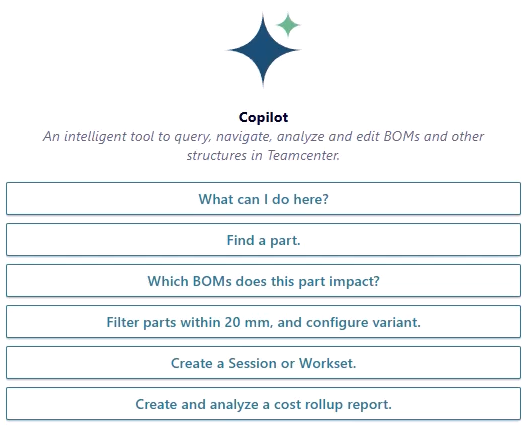
New in Teamcenter 2606, we’ve expanded AI across more product lifecycle workflows, improved everyday usability, and strengthened digital thread visibility for complex products. This release extends Teamcenter Copilot into MBSE and quality scenarios, introduces the BOM Agent, brings PLM context into Microsoft 365 Copilot, and adds practical enhancements across collaboration, administration, and visualization.
Why it matters:
Teams can work faster with less friction, access more relevant product information in context, improve cross-domain collaboration, and move work forward more efficiently across engineering, manufacturing, quality, and supplier ecosystems.
Key enhancements:
- Teamcenter AI BOM agent for guided, agentic BOM change workflows
- AI-powered MBSE inside Teamcenter Copilot
- Knowledge Pulse for preparing PLM data for analytics and AI
- Microsoft 365 Copilot integration with Teamcenter knowledge and actions
- AI-enhanced quality and compliance workflows
- Smarter change management with AI recommendations and rules-based routing
- Blue-green deployment to accelerate upgrades with less disruption
- Expanded self-service administration for Teamcenter X
- Personalized home page across the Siemens Xcelerator portfolio
- Teamcenter integration with Power BI
- Unified multi-discipline product configuration
- Native Microsoft Office browser-based editing and co-authoring in Teamcenter
- Improved simulation usability and relaunch visibility
- Faster digital thread visualization and large-scale impact analysis
- Improved quality inspection planning with SAP integration
- Supplier onboarding and compliance workflow enhancements
- Service lifecycle and aftermarket process improvements
- Manufacturing planning inside Teamcenter Copilot
- Modernized user interface for Product Cost Management
- Enhanced 3D visualization in the web client
Building on this momentum, Teamcenter 2512 strengthened AI-driven insights and collaboration across engineering, manufacturing and downstream teams.
New in Teamcenter 2512
Stepping into the Future with Enhanced Collaboration and AI
What changed:
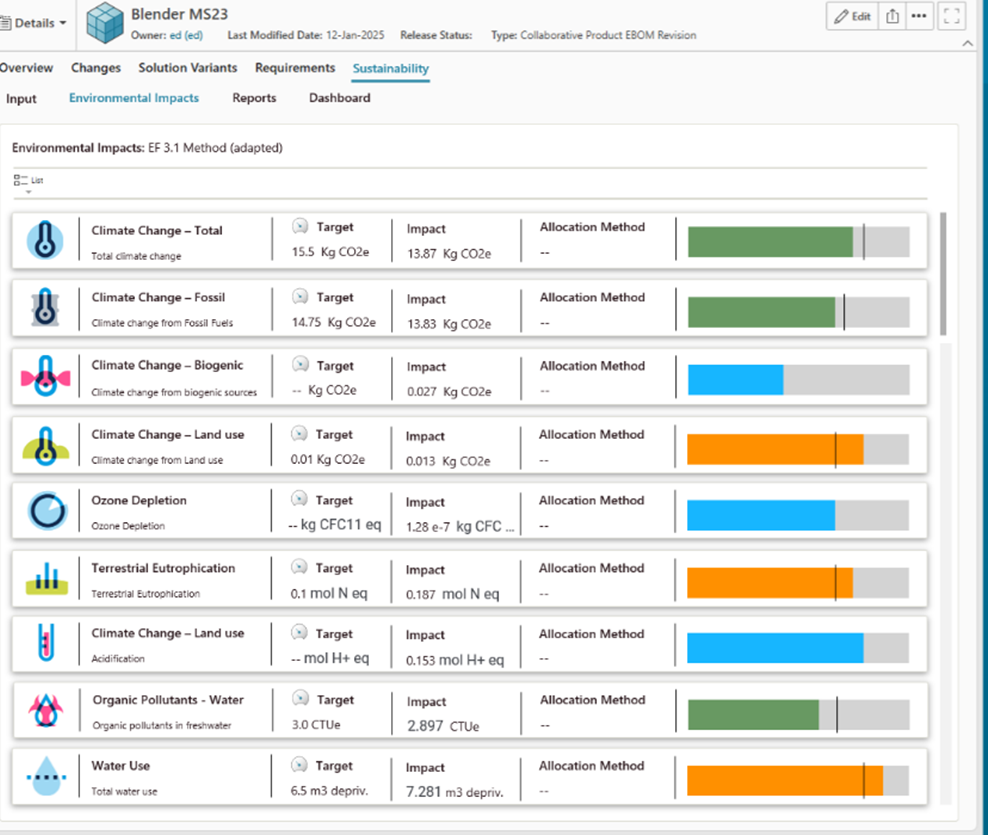
New in Teamcenter 2512, we’ve expanded AI capabilities with deeper domain context and enhanced collaboration across engineering, manufacturing, and downstream teams. Teamcenter Copilot continues to evolve toward greater domain awareness, enabling more relevant responses based on product data relationships and workflows.
Why it matters:
Teams can find relevant product information faster, collaborate more effectively across functions, and make informed decisions earlier in the lifecycle.
Key enhancements:
- Improved user-interface with work modes and dashboard style home page
- Usage BOM and new color management capabilities
- Digital thread navigation
- Agile, automated workflows
- Intuitive table editor for BOP cost calculations
- Faster, seamless visualization
- Electrical-Mechanical digital mock-up
- AI powered Teamcenter Sustainability Lifecycle assessment
- AI powered BOP-builder
- AI for quality and compliance
- AI to generate Service Plans from service documents
Earlier in the year, Teamcenter 2506 focused on embedding AI into everyday tasks while improving usability and cross-domain visibility.
New in Teamcenter 2506
Continuous Innovation for a Smarter PLM
What changed:
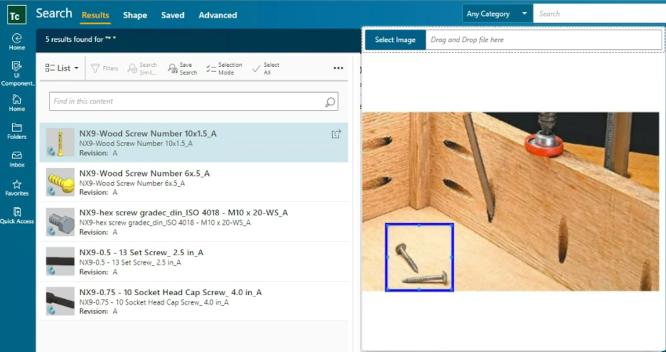
New in Teamcenter 2506, we’ve embedded AI-assisted productivity features into everyday PLM workflows while strengthening cross-domain collaboration and analytics. User experience improvements reduce friction for common tasks across roles.
Why it matters:
Users spend less time searching for information and more time executing tasks, improving productivity and visibility across product development activities.
Key enhancements:
- Expanded Teamcenter Copilot
- AI assisted visual search
- More pre-configured Teamcenter X tiers
- Teamcenter Visualization available on Teamcenter X
- Teamcenter Product Cost Management available on Teamcenter X
- High-volume, high-velocity product change management
- Custom 3D visualization in your own photorealistic scenes
- Connected Teamcenter Product Cost Management and Supplyframe
- Upgrades for semi-conductor and process industries
- Discussion threads for model elements
- Systems Modeler for SysML® v2
- Semantic integration model with new self-service capabilities
Setting the stage, Teamcenter 2412 introduced key usability enhancements and data management improvements to support more efficient product development.
New in Teamcenter 2412
Boosting Efficiency with a Focus on User Experience and Data

What changed:
New in Teamcenter 2412, we introduce photo-realistic visualization through the Teamcenter Digital Reality Viewer and deliver targeted user experience improvements. Data management enhancements support the accuracy, accessibility, and security of product information.
Why it matters:
Teams can review designs more effectively, streamline common workflows, and reduce delays caused by incomplete or inaccessible product data.
Key enhancements:
- Teamcenter Digital Reality viewer powered by NVIDIA Omniverse
- AI powered search
- Extended benchmark database with reference processes and machines for battery cell and battery module manufacturing
- Pre-configured templates for the semiconductor industry
- Teamcenter X, now available on Microsoft Azure
- Product Support Data Management
- Updated user experience for cost and carbon footprint calculations
Explore More!
- What makes Teamcenter the top choice in PLM?
- Teamcenter Copilot
- What is Teamcenter X?
- 2026 Beta Event
- What is PLM?
Need more? Contact us today!
No matter how you choose to deploy Teamcenter,
you get the same proven solutions designed to help you innovate faster.