Product configuration in Teamcenter: From siloed configurators to intent-driven decisions

Product configuration is the process of defining, validating and managing product variants across sales, engineering and manufacturing. Teamcenter enables organizations to manage product configuration using a single model that supports role-specific experiences while maintaining a common source of truth.
Most companies struggle with product configuration for one simple reason—because that capability is fragmented.
Sales teams configure offers in one system. Engineering validates feasibility in another. Manufacturing plans execution somewhere else. Each configurator is optimized for its domain but disconnected from the others.
The result? Misalignment, rework, and constant effort to keep configurations synchronized.
The problem: Disconnected product configuration across domains
Many organizations use separate tools for product configuration, sales configuration, engineering validation and manufacturing planning, creating disconnected decision-making processes. When configurators are separated across marketing, engineering, and manufacturing:
- Product definitions diverge across systems
- Dependencies must be manually maintained
- Validation happens too late in the process
- Teams lack confidence that what is sold can actually be built
Even when integrations exist, they introduce overhead; synchronization logic, data duplication, and ongoing maintenance.
The shift to single, multi-disciplined product configuration
Teamcenter introduces a different approach that eliminates redundancy, automates dependencies, and improves accuracy.
Rather than maintaining separate configurators, Teamcenter Product Configurator enables a single, multi-discipline configuration model that spans the entire product lifecycle.
This approach centralizes product configuration across engineering, sales and manufacturing so every team works from the same configuration model:
- Eliminates redundant configuration logic
- Keeps all domains aligned on a single source of truth
- Enables validation across disciplines early and continuously
But the real innovation is how different users interact with that single model.
Introducing intent-driven product configuration
Not every user needs the same level of detail or the same configuration experience.
A sales user needs a simplified, customer-facing view. An engineer needs technical completeness and validation. Manufacturing needs production-relevant constraints.
Teamcenter addresses this with intent-driven configuration.
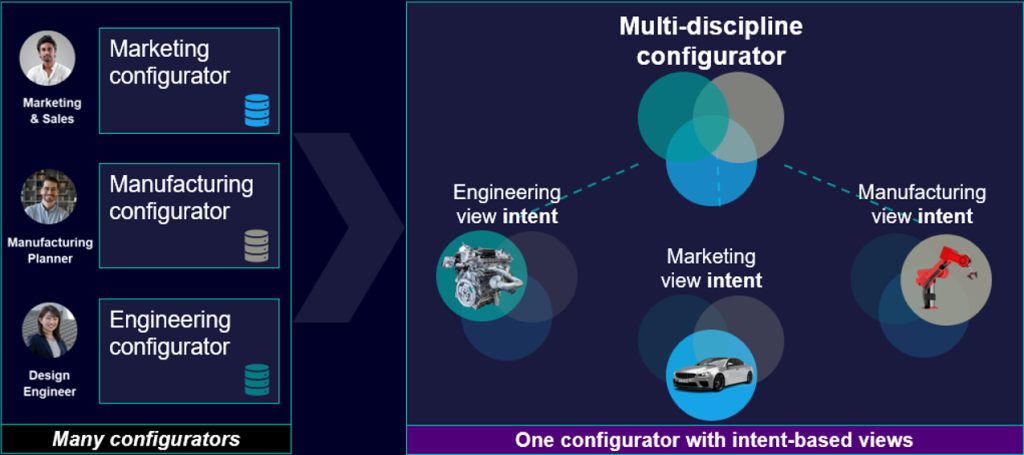
Intent-driven product configuration allows organizations to present different configuration experiences to different users while maintaining one underlying configuration model. The result is simpler decision-making without sacrificing validation or governance.
What is intent?
Intent is a property that defines the relevance of configuration content for a specific domain. This allows the system to dynamically tailor the configuration experience without changing the underlying model.
One model, role-specific views
This is what makes modern product configuration scalable across multiple disciplines without requiring separate configuration systems.
With intent-driven product configuration:
- The same configuration model is used across all domains
- The user selects an intent profile (for example, marketing or engineering)
- The system automatically filters features, families, and constraints accordingly
For example:
- In a marketing intent, customer-facing options and packages are visible, while engineering-specific complexity is hidden
- In an engineering intent, the full technical definition is available, including all required validation rules
- In a manufacturing intent, only production-relevant features and constraints are shown
The experience then becomes simpler for casual users, more powerful for expert users, and consistent across the lifecycle.
How intent-driven product configuration works in practice
Intent-driven product configuration is embedded directly into the Teamcenter Product Configurator experience.
Users can:
- Filter features by intent in the Variant Configuration view
- Flag configuration families with specific intents (sales, engineering, manufacturing)
- Filter variability and constraints in tools like Variability Explorer and Variant Condition Editor
- Apply configuration settings to limit variant creation to intent-relevant options
- Define default intents via preferences to streamline usage for casual users
Constraints are also handled intelligently:
- Constraints are automatically recognized based on their derived intent
- Expert users can override intent when needed
This ensures configurations remain valid and complete without exposing unnecessary complexity.
From synchronization to validation
One of the biggest advantages of this approach is the ability to validate product configurations early, without relying on multiple systems.
Instead of configuring in sales, exporting to engineering, then re-validating later, you can configure once and validate across disciplines immediately. This reduces downstream issues and accelerates time to value.
The outcome: aligned decisions, faster execution
By moving from siloed configurators to a single, intent-driven configurator, organizations achieve:
- Lower cost by eliminating redundant systems and synchronization effort
- Improved accuracy through a shared configuration model
- Faster decisions with role-specific, focused experiences
- Greater confidence that what is sold is feasible to engineer and manufacture
A simpler way to manage complexity
Product variability will always be complex but managing that complexity doesn’t have to be.
Intent-driven product configuration in Teamcenter allows you to:
- Keep a single, consistent model
- Tailor the experience to each role
- Make faster decisions with confidence
Learn how Teamcenter Product Configurator helps organizations modernize product configuration, reduce configuration complexity and validate product variants earlier across the lifecycle.
Frequently Asked Questions
What is product configuration?
Product configuration is the process of defining and validating product options, features and variants. It helps ensure products can be sold, engineered and manufactured consistently across the lifecycle.
Why is product configuration difficult in large organizations?
Many organizations manage configuration data in separate sales, engineering and manufacturing systems. This often creates duplication, manual synchronization and validation challenges.
What is intent-driven product configuration?
Intent-driven product configuration allows different users to view and manage configuration data according to their role while working from the same underlying model.
How does Teamcenter support product configuration?
Teamcenter Product Configurator provides a unified configuration model that supports validation across disciplines while maintaining a single source of truth.
What are the benefits of a single product configuration model?
A single model improves accuracy, reduces maintenance effort, accelerates validation and helps ensure that products sold can be engineered and manufactured efficiently.
🧠 Make smarter decisions with AI-powered PLM
🚀 Start fast and grow with Teamcenter X
🚗 Take the Teamcenter X 30-day test drive
🌟 Learn more about Teamcenter solutions