Introducing Teamcenter 2606

Buckle up because we have a lot to show you in Teamcenter 2606! This release is packed with meaningful updates across AI, collaboration, visibility and control, and there is a lot here that teams can start putting to work right away. The common thread through all of it is simple. We’re helping people spend less time chasing information, managing handoffs and working around friction, and more time moving products forward. So yes, this is a longer one, but for good reason. Let’s get to it!
AI that helps teams move faster
Teamcenter 2606 makes AI built for PLM one of the clearest themes of this release, bringing new agentic capabilities, smarter assistance, and more intelligent automation directly into everyday PLM work. That means faster answers, less manual effort, and smarter decisions made in context. Teamcenter Copilot provides a consistent AI experience across the product lifecycle, supporting information access, contextual understanding, and decision-making in the flow of work. And with the introduction of our first Teamcenter agent, we mark an important step forward: from AI that helps users navigate complexity to AI that can help move work forward, with enterprise governance and people still in control. Here are a few of the AI enhancements:

The Teamcenter AI BOM agent marks an important step toward agentic PLM. Instead of just helping users find information, it can understand BOM context, propose changes and act on them, executing multi-step workflows on your behalf, with human oversight. This allows teams to move from manually assembling impact analysis and change execution to a more guided, end-to-end process built on real BOM data, rules and lifecycle context.
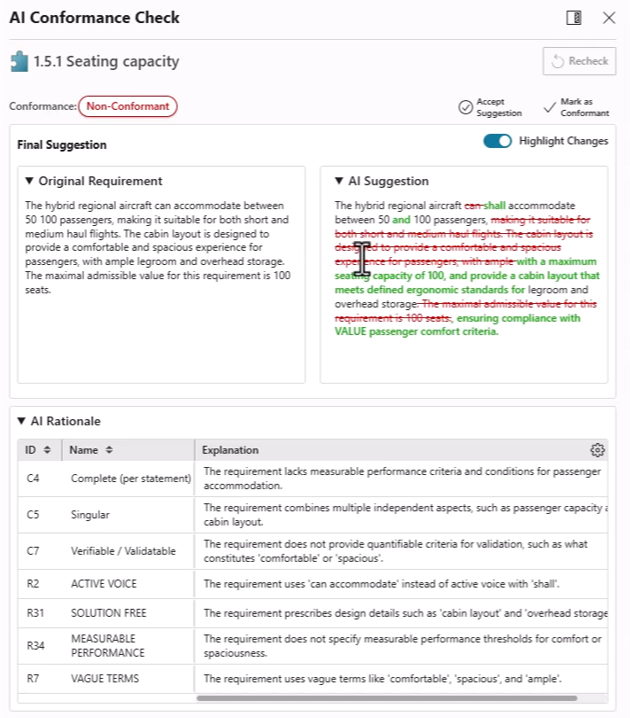
With AI-powered Model Based Systems Engineering (MBSE) inside Teamcenter Copilot, you can improve requirement quality, identify key parameters and close verification gaps more efficiently.
- AI checks requirements against configurable INCOSE-based rules, suggests recommended changes side by side, and can flag issues such as conflicting systems of measure
- Engineers speak the language of math, and it’s not always easily understood by the rest of us! MBSE AI capabilities in Teamcenter interpret requirements and help you create parameters, link them in context and make sure everything is tracked and aligned for downstream simulation tools
- AI recommends test cases and tracks coverage as requirements evolve
Introducing Knowledge Pulse in Teamcenter! This solution helps you surface, connect, and prepare PLM data for downstream analytics and AI use cases. It enables organizations to use high-speed APIs to move beyond static exports by making product data, such as BOMs and relationships, more accessible and usable in platforms like Snowflake or other data platforms.
The new Microsoft 365 Copilot integration extends Teamcenter knowledge into the flow of everyday work, combining PLM context with information from systems like SharePoint, OneDrive, email and other enterprise sources.
The result is a more unified Copilot experience that can deliver consolidated answers across systems and even support PLM actions such as:
- intelligently find similar problem reports based on the description of an issue
- view and perform your workflow tasks that are due
- finding similar problem reports
- combine insight and intelligence form documents in SharePoint or OneDrive with content in Teamcenter documents, requirements, and drawings
- look for emails related to Teamcenter parts and PRs
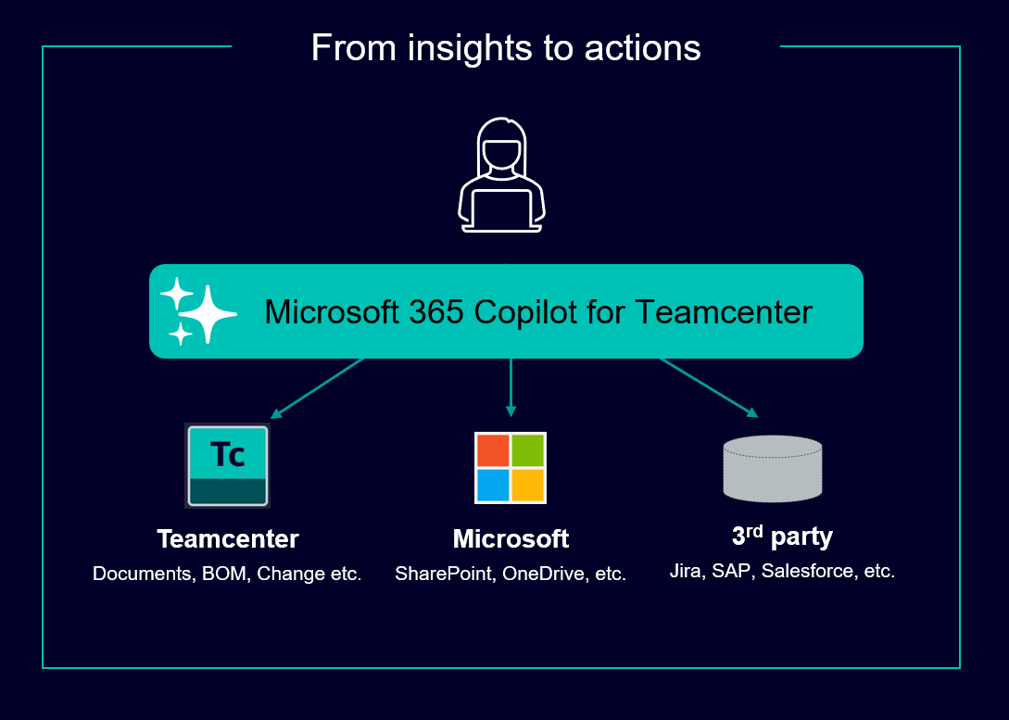
Just as importantly, information stays where it lives and remains governed by the security of the source systems, with Teamcenter data continuing to be managed securely in Teamcenter.
Quality and compliance management inside Teamcenter Copilot brings AI into everyday quality work across audits, problem solving, FMEA, control planning, training and more. It helps teams create quality objects and documentation faster, with AI-generated suggestions that users can review before inserting, reducing manual effort while improving consistency across processes. Just as importantly, built-in prompt validation and output guardrails help you apply AI in quality workflows with stronger governance and control. Read more about What’s New in Teamcenter Quality 2606.
Teamcenter Change Management is getting smarter with new AI and rules-based capabilities that reduce manual setup in change workflows. Get AI recommendations for workflow templates and task assignments based on past usage, and automatically route work using configurable rules. New views for impacted items and participants, along with bulk revert for BOM changes, also make it easier to review and manage changes at scale. The result is faster setup, more consistent execution and less time spent on workflow administration.
Manufacturing planning inside Teamcenter Copilot now helps planners generate initial plans from natural language prompts and detailed specifications, giving teams a faster starting point for planning work. Built-in guardrails help keep changes within the intended scope, reducing manual effort while keeping users in control.
Teamcenter Copilot can now use metadata, not just files, helping teams uncover relevant context in problem reports, change requests and other PLM records. By drawing on text such as issue descriptions, findings and resolutions, it helps engineers find similar past problems faster, reuse existing knowledge and troubleshoot more efficiently.
More control in the cloud with Teamcenter X
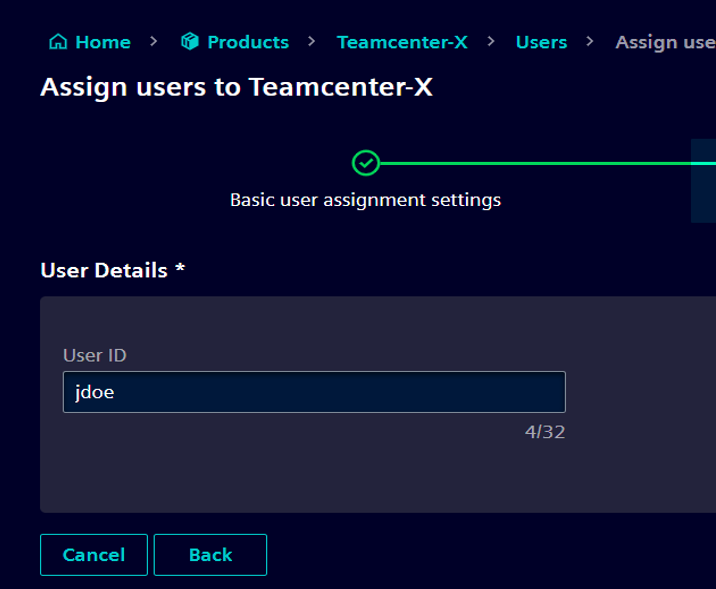
For Teamcenter X customers, Teamcenter 2606 expands self-service administration in the cloud, giving teams more direct control over key configuration and monitoring tasks. Teams can now manage things like translations, stylesheets, queries and integration monitoring more directly. This gives administrators more control over the operations of their PLM deployment.
Everyday work gets easier
Teamcenter 2606 introduces productivity improvements that make everyday PLM work simpler, more connected, and easier to act on.
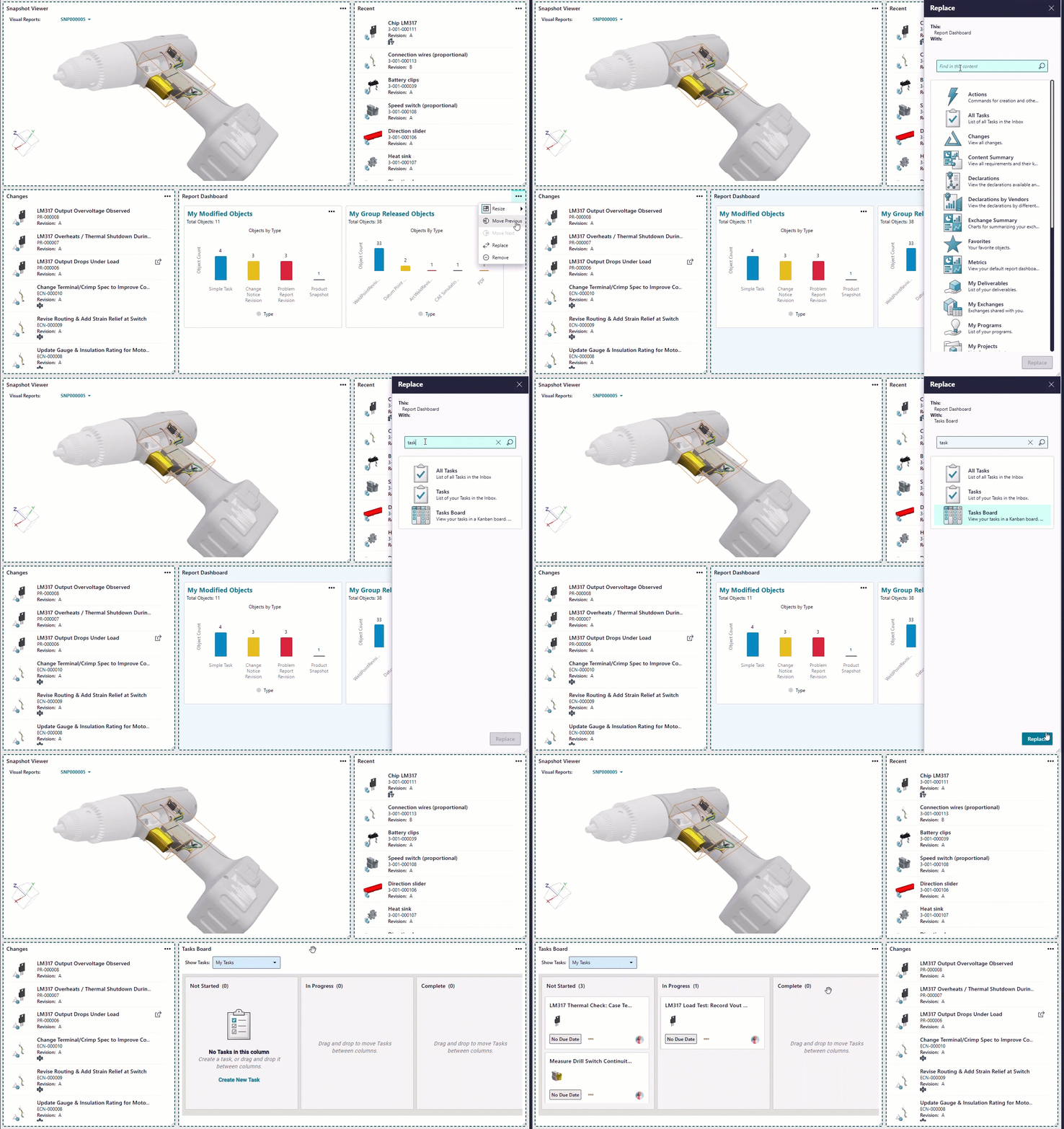
The personalized home page is becoming a true command center for your workday. Instead of a one-size-fits-all landing page, each user can choose exactly what matters most to them, whether that is tasks, changes, reports, dashboards, a 3D viewer, a Gantt chart, etc. They can shape the page around their role, priorities and workflow, so the right information and next steps are always front and center. And this is not limited to one experience: the same configurable home page is expanding across applications in the Siemens Xcelerator portfolio, creating a more consistent, personal starting point for work across the digital thread.
The new Teamcenter integration with Power BI helps you securely bring Teamcenter product and process information into the reporting environment you already use. Create dashboards and reports to track processes, surface trends and outliers, and improve visibility into changes, BOMs, program plans, and schedules. Out-of-the-box templates help you get started quickly, while flexible reporting options make it easy to adapt those reports or create new ones that combine Teamcenter data with information from enterprise systems such as ERP.
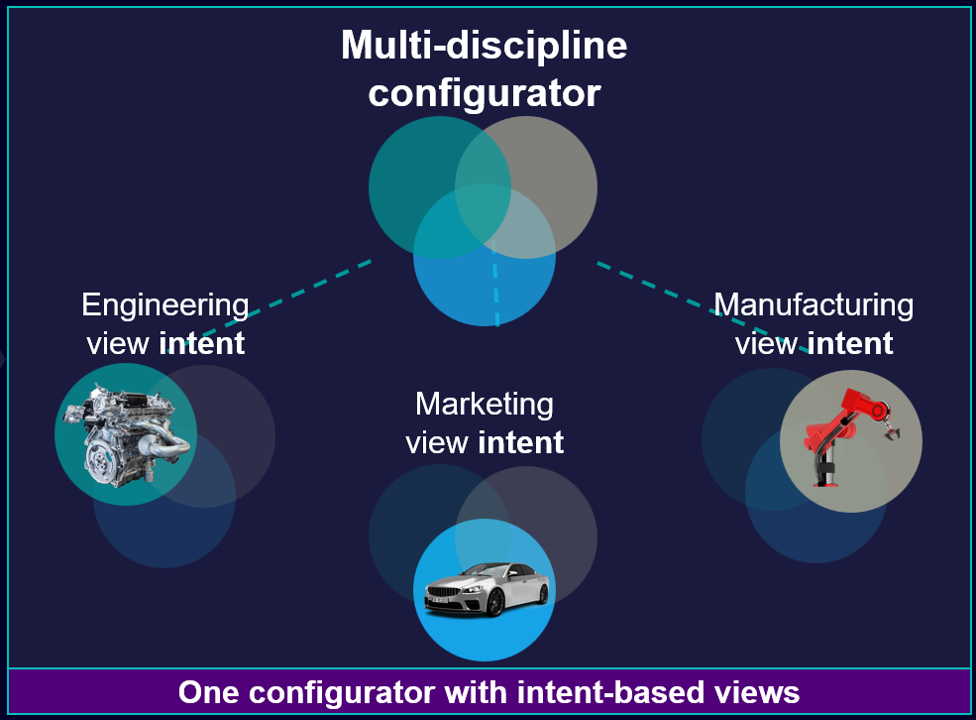
Move from siloed configurators to unified multi-discipline product configuration. We’ve extended Teamcenter Product Configurator so multiple company disciplines can work together on configurable products anywhere in the lifecycle process. With intent-based views, each discipline can limit the scope of the configurator families and features that they work with, while all disciplines work on the agreed upon configurable products that will go to market. This gives sales confidence that what they configure in Teamcenter reflects how the product is defined by engineering, right from the start.
With the seamless Teamcenter Office integration in Teamcenter 2606, you can access current Microsoft Office editing features in the browser and co-author material. Manage Office files with both Teamcenter and M365 security in effect at every stage of the document lifecycle. Work with larger files, files with macros and custom properties. Co-author using the Share or Open in Desktop application directly from the edit session, without extra steps in Teamcenter.
Product Cost Management gets a more modern, intuitive user experience with an updated interface that makes navigation clearer and everyday work easier. By reorganizing key functions and improving access to information, the new design helps users move through tasks more efficiently with less friction. Learn more about what’s new in Teamcenter 2606 for Product Cost Management.

Simulation users get a more streamlined experience, with updates that make it easier to review simulation relationships, work with system simulation parameters and relaunch studies with more confidence. In Active Workspace, refined relations views give analysts a clearer picture of connected simulation objects, requests, parameters and datasets. Review and modify key input and output parameters directly from the overview of 1D models and analyses. Enhanced launch history highlights changed or missing inputs and explains why a simulation cannot be rerun. The result is faster review, fewer surprises and better visibility into simulation readiness.
More visibility across complexity
Teamcenter 2606 improves visibility across complex, multi-domain product lifecycles by connecting more information across domains and making change impact easier to understand.
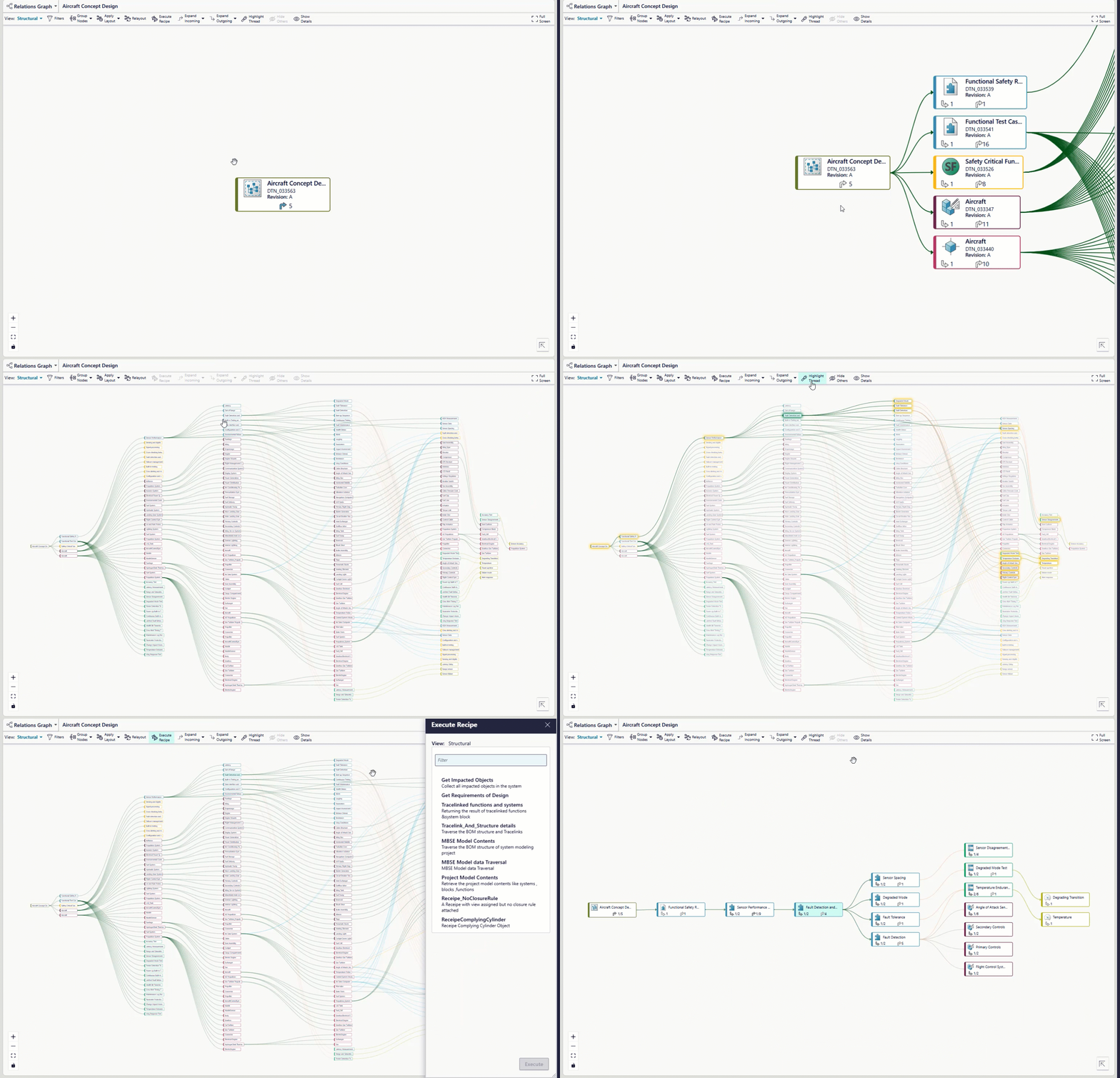
Navigate and visualize the digital thread at scale across your multi-domain product model with an 80% increase in performance. We make it much easier to see and understand the digital thread connecting your data, so you can quickly perform comprehensive impact analysis across complex product structures, with 10 times more content visible at once. This large-scale impact analysis helps you understand how changes ripple across all the data connected in Teamcenter, from requirements, tests, design objects, to BOMs, simulation, manufacturing and more.
Teams working with very large products, such as ships or aircraft, can now duplicate massive product structures more efficiently and reliably, even when those structures include millions of parts. This makes it much easier to reuse and adapt complex product structures at scale, helping teams move faster with greater confidence.
The Teamcenter Digital Reality Viewer (DRV) enhances Color BOM visualization and adds a new widget for Mendix. By combining Color BOM, introduced in Teamcenter 2512, with Teamcenter DRV, you can evaluate variants, colors and finishes in a photorealistic, BOM-driven experience that helps catch issues earlier. The new Teamcenter DRV widget for Mendix extends that value by making it easier to bring live 3D product visualization into custom applications. Together, these capabilities make high-value visualization more accessible across more roles and workflows.

Tighter requirements and change orchestration between Teamcenter and Polarion enable teams deliver software-driven products by connecting software, systems and mechanical domains more effectively. Requirements defined in Teamcenter can flow into software requirements managed in Polarion, making it easier to share information across teams while improving consistency and traceability. Workflows are also more tightly coordinated, so changes in Teamcenter cannot be completed until related Polarion tasks are finished. The result is better alignment, stronger completeness and more confidence that connected work is ready to move forward.
Better quality planning, insight and execution
Teamcenter 2606 adds quality improvements that help teams connect planning, inspection and execution with better traceability and less manual effort.
Seamless quality inspection planning between Teamcenter and SAP connects engineering change, inspection planning and execution in a more continuous process. Teams can create inspection plans in Teamcenter within the context of a change notice, transfer them to SAP at release, and link approved quality results back to the original plan. That means less manual rework, fewer errors from recreating inspection criteria downstream, and better traceability from product change through inspection outcome.
With Teamcenter Quality, teams can now compare master and variant FMEAs more easily, with clearer root-cause visibility and less duplicate work. That helps surface risk earlier and resolve issues faster.
Qualification updates improve visibility into workforce readiness with clearer matrices, automated renewals and better notifications. This reduces administrative effort and helps teams stay prepared for audits and regulatory requirements.

Quality audit and assessment updates give teams clearer views of status, strengths and gaps, while making audits easier to run. The result is faster insight, better transparency and a more efficient process.
Keeping supplier collaboration and compliance on track
Teamcenter 2606 includes practical supplier collaboration and compliance updates that reduce onboarding friction, speed validation and help teams keep compliance data current with less effort.
Simplified supplier onboarding makes it easier to bring suppliers in smoothly and assign the right tasks without unnecessary setup or manual effort. Collect supplier and external user details in a spreadsheet, import that file directly into Teamcenter, and create supplier accounts in bulk instead of entering each record manually. New users can be assigned to the appropriate groups and roles during import, which reduces setup work and helps suppliers get access to the right information faster. The same spreadsheet-based process also supports ongoing updates, so teams can correct or refresh supplier information without repeating the onboarding process from scratch. Detailed import reports show which users were created successfully and which records need attention, making it easier to resolve issues quickly when onboarding large groups of suppliers.
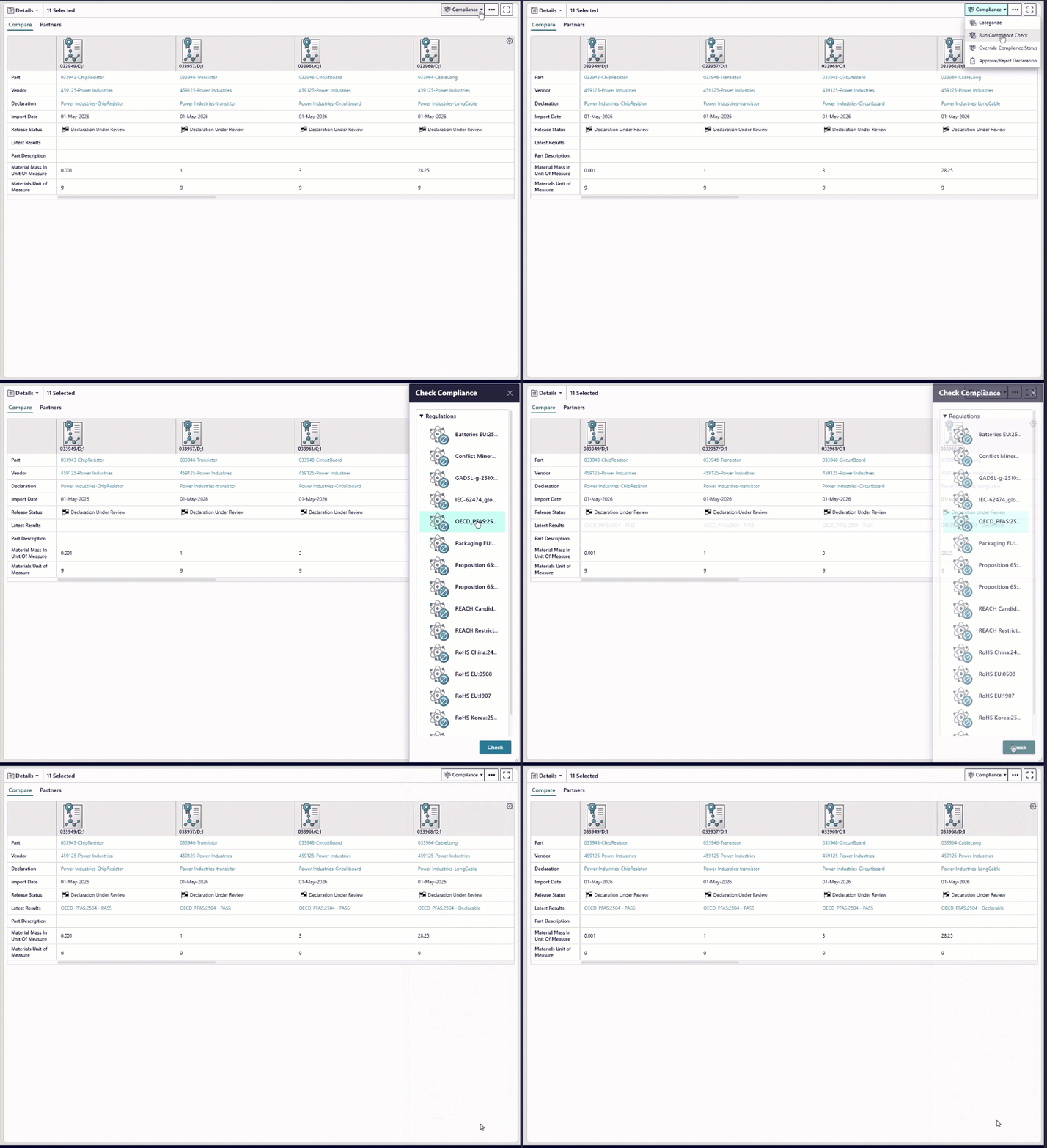
Another important improvement is tighter control and efficiency across compliance workflows. Control who can view and modify material composition information to help protect sensitive data and support internal security guidelines. You can also review and categorize supplier declarations more efficiently with better filtering, sorting and bulk handling. Support for PFAS regulations expands the out-of-the-box compliance coverage alongside regulations such as REACH, RoHS and Conflict Minerals. Accelerate compliance checks across complete and complex product structures with faster grading. And with the ability to apply compliance categories in bulk across parts and materials, you can update or override compliance status more quickly when regulatory requirements change.
More flexibility across the extended product lifecycle
Teamcenter 2606 introduces service lifecycle improvements that give teams more flexibility in managing service data, service structures and aftermarket processes. New reports and business rules ensure the integrity of end item acronym code data. With the addition of usage-based parts in service BOM (SBOM) views, better alignment of spare definitions in the SBOM, and new additions to fault codes, you get improved data consistency, and more flexibility in managing service structures. Service planning updates enable you to reassign service discrepancies, ensuring issues are resolved more efficiently. Control serialized asset data throughout the asset lifecycle with key updates to service asset and service event management. And finally, generation of complex product and service quotes fast with our latest updates to the Teamcenter SLM for Salesforce app.
Manufacturing teams also gain more flexibility and control across production planning and execution. Updates to MBOM and BOP authoring make it easier to manage manufacturing structures, while occurrence-level change tracking helps teams apply more targeted updates with greater precision. Enhanced visualization capabilities allow planners to interact directly with product views as they build and refine plans. Process manufacturers benefit from improvements to enterprise recipe management, including more flexible PERT diagram layouts and additional flow types. Together, these updates help teams manage manufacturing complexity more efficiently while supporting higher-quality outcomes.
So, how do you get all this stuff faster?
We’ve made it easier to upgrade so you can realize value from our latest capabilities faster. Blue-green deployment lets you keep your production environment running while an upgraded environment is prepared and kept in sync in parallel. When you’re ready, you can switch over with far less downtime. It is a practical way to adopt new Teamcenter innovation faster, without as much disruption to the business.

And this is not just for customers moving from the latest release forward. This approach can help customers on older Teamcenter versions too, giving them a smoother path to getting current. Or, if you want to take upgrades off your plate altogether, Teamcenter X is the cloud option where we handle upgrades for you, helping you stay current with less effort from your team.
Teamcenter 2606: built for momentum!
So, yes, that was a lot and honestly, that is exactly the point. Teamcenter 2606 is full of practical innovation that can help teams move faster, reduce friction and work through complexity with more confidence across the product lifecycle. If something here caught your attention, or you want to dig deeper into any of these updates, reach out. We would love to show you more.
🧠 Make smarter decisions with AI-powered PLM
🚀 Start fast and grow with Teamcenter X
🚗 Take the Teamcenter X 30-day test drive
🌟 Learn more about Teamcenter solutions
Table of Contents