Teamcenter Office integration: Browser editing and co-authoring made simple

With Teamcenter 2606, Siemens delivered a new, streamlined way to work with Microsoft Office files, bringing familiar, high-performance editing and collaboration capabilities directly into the Teamcenter experience.
The Teamcenter Office integration enables users to create, edit, share and co-author Microsoft Office documents directly within Teamcenter using browser-based Microsoft 365 capabilities while maintaining Teamcenter governance and lifecycle management.
This Microsoft Office Integration in Teamcenter is built on Microsoft SharePoint Embedded (SPE) and aligns with Microsoft’s cloud-first direction. It enables organizations to take full advantage of modern browser-based Office capabilities. Users can create, edit and co-author documents in real time using the same intuitive experience they expect from Microsoft Teams or SharePoint Online, while Teamcenter continues to manage the full product lifecycle and protect critical data.
See it in action below:
Work the way users expect without leaving Teamcenter
For users, the impact is immediate.
With the Teamcenter Office integration, users can work with Microsoft Word, Excel and PowerPoint files within Teamcenter using the same browser experience found in Microsoft 365 applications. This includes support for:
- Track changes and rich editing capabilities
- Larger files, including those with macros and custom properties
- Editable content fields and document properties
- Real-time co-authoring using familiar sharing actions
Instead of relying on a Teamcenter workflow to enable collaboration, users can share a file directly from the edit session and begin co-authoring immediately. This reduces friction and accelerates decision-making, especially in review and change processes.
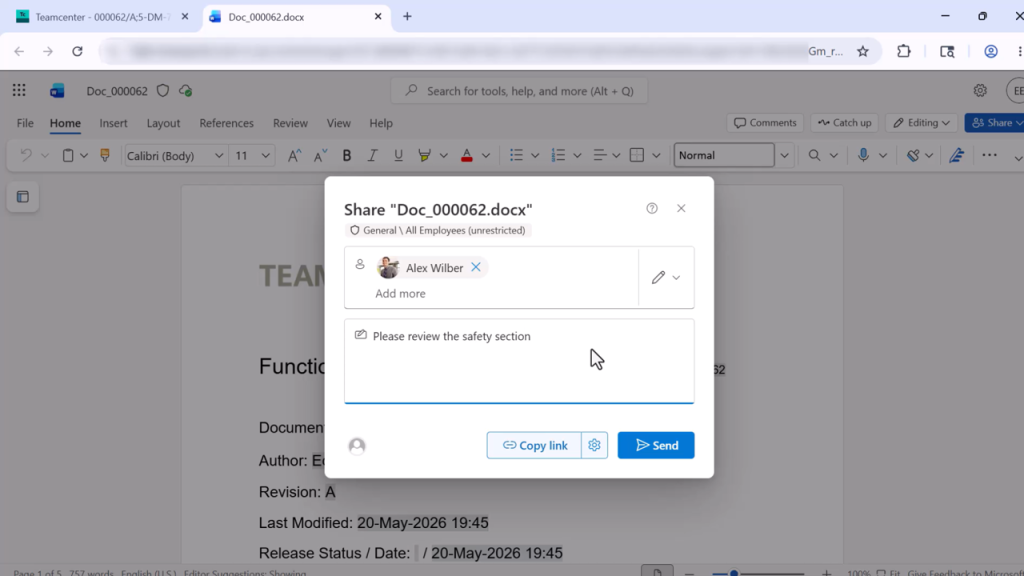
When full functionality is needed, users can select “Open in Desktop” directly from the browser session. Edits are automatically saved back into the secure Teamcenter container upon check-in. There is no duplication, no manual upload and no loss of control.
The experience stays consistent with how users already work in Microsoft Office while remaining fully integrated with Teamcenter.
One file managed with both Teamcenter and Microsoft security
This Microsoft Office Integration in Teamcenter enables Office files to be managed with both Teamcenter and Microsoft 365 security in effect at every stage of the document lifecycle. Unlike file-sharing approaches that create multiple copies of a document, the Teamcenter Office integration maintains a controlled source of truth while enabling secure collaboration.
Files remain:
- Accessible only through Teamcenter
- Stored in a secure SharePoint Embedded container
- Governed by Teamcenter access controls
- Enhanced with Microsoft Information Protection capabilities
This approach allows organizations to support collaboration while maintaining strict control over intellectual property and compliance requirements.
Users gain flexibility, while administrators retain full oversight of access and data protection.
Faster collaboration with fewer steps
How does the Teamcenter Office integration improve how teams collaborate day to day? Users can share, review and co-author documents directly within Teamcenter without launching separate workflows or manually transferring files.
Users can share directly from the edit session and co-author in real time without additional setup inside Teamcenter. This removes the need to initiate workflows just to enable collaboration and helps teams move faster.
Browser editing capabilities have also expanded. Users can now work with change tracking, editable properties and full document content directly in the browser. Support for larger files and more complex document structures ensures that teams can stay productive without switching tools.
The result is faster iteration, quicker reviews and more efficient collaboration across teams.
Simpler Teamcenter Office integration deployment
The Microsoft Office integration in Teamcenter is designed to reduce complexity for IT and administrators. This means:
- No additional server infrastructure required
- No client installation needed
- No complex system configuration
Instead, administrators connect Teamcenter to their existing Microsoft Entra environment, register the SharePoint Embedded application and configure a secure container. Once the configuration is complete, the system is ready to support browser-based editing and collaboration.
This streamlined setup reduces deployment time and lowers ongoing maintenance effort.
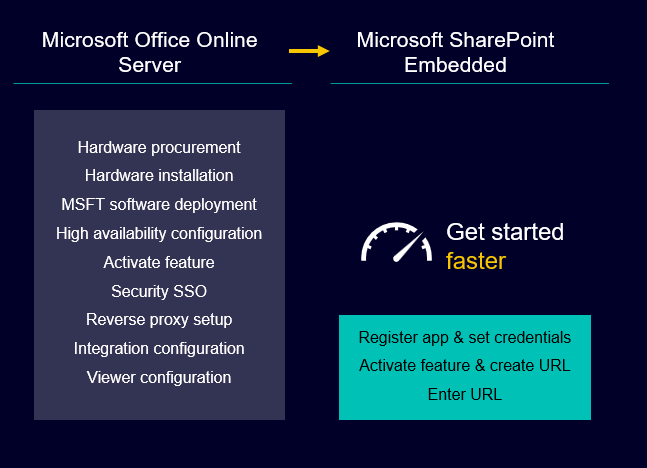
Get started faster with a Microsoft Office experience native in Teamcenter
Staying current with modern Office capabilities
Microsoft is moving fully toward SharePoint Online for browser-based Office experiences and deprecating older platforms. Organizations planning their Microsoft Office Online Server migration can use the Teamcenter Office integration to align with Microsoft’s current browser-based Office strategy.
Teamcenter 2606 aligns with this direction by adopting SharePoint Embedded, ensuring compatibility with current Microsoft capabilities while delivering a modern editing and collaboration experience.
For customers using the previous Microsoft Office Online Server integration, it is important to plan ahead. That technology has been deprecated and will reach end of life in December 2026. Support for that integration in Teamcenter X will end at that time, and it will be removed entirely in Teamcenter 2706.
Moving to the new integration ensures continued support and access to the latest Office capabilities.
Maximize the value of your Microsoft investment
Most organizations already use Microsoft 365 across their business. This Microsoft Office Integration in Teamcenter extends that value into Teamcenter by bringing Office editing and collaboration directly into PLM processes.
Users gain a familiar way to work with documents, while organizations maintain a single source of truth for product data and documentation.
Frequently Asked Questions
What is the Teamcenter Office integration?
Teamcenter Office integration enables users to create, edit, share and co-author Microsoft Office documents directly within Teamcenter while maintaining product lifecycle governance and security.
Can users co-author documents in Teamcenter?
Yes. The Teamcenter Office integration supports real-time co-authoring using Microsoft 365 browser capabilities and familiar document sharing workflows.
Does the Teamcenter Office integration support Microsoft Word, Excel and PowerPoint?
Yes. Users can work with Microsoft Word, Excel and PowerPoint documents directly from Teamcenter using browser-based editing or desktop applications when needed.
How are documents secured in the Teamcenter Office integration?
Documents remain governed by Teamcenter access controls while also benefiting from Microsoft security capabilities delivered through SharePoint Embedded.
Why is SharePoint Embedded used for Teamcenter Office integration?
SharePoint Embedded provides modern Microsoft 365 browser editing and collaboration capabilities while allowing Teamcenter to manage document lifecycle processes and access control.
A better way to manage Microsoft Office content in PLM
This seamless Microsoft Office Integration in Teamcenter simplifies how teams create, edit and collaborate on Office content.
It removes extra steps, reduces complexity and enables faster collaboration while keeping documents secure and managed within Teamcenter. The result is improved productivity, better adoption and a scalable approach to managing Office files in PLM environments.
Teamcenter 2606 delivers a modern Teamcenter Office integration that works the way users expect while keeping control where it matters most.
Ready to modernize document collaboration? Explore how the Teamcenter Office integration helps teams securely create, edit and co-author Microsoft Office documents while maintaining a single source of truth for product data.
🧠 Make smarter decisions with AI-powered PLM
🚀 Start fast and grow with Teamcenter X
🚗 Take the Teamcenter X 30-day test drive
🌟 Learn more about Teamcenter solutions
Table of Contents


