What’s new in Teamcenter Quality 2606

Discover how Teamcenter Quality 2606 delivers smarter workflows and AI-driven capabilities to boost productivity
Teamcenter® Quality software streamlines quality and compliance management from design through manufacturing. Built on the Teamcenter backbone, it enables organizations to leverage product and process information and share cross-departmental workflows, supporting a closed-loop quality (CLQ) management approach. Teamcenter is part of the Siemens Xcelerator business platform of software, hardware, and services.
The Teamcenter Quality 2606 spring release delivers powerful enhancements designed to boost usability and expand AI-powered features. From extended functionality to smarter Teamcenter Copilot prompts and modernized themes, this release helps manufacturers optimize their quality and compliance processes with greater efficiency and consistency.
Overall enhancements in Teamcenter Quality 2606
Teamcenter Quality 2606 features several enhancements across the overall software.
Leverage different themes – The latest update significantly improves the visual experience across all quality modules. Users can now choose between framed, light, and dark themes. This enhances readability, usability, and comfort, especially during long analysis sessions.
Extensions in quality checklists – Quality checklist management features intuitive icons that indicate where attachments, issues, findings, or predefined quality actions are located — enabling faster navigation. Users can also easily distinguish between documents preassigned in the master data and those added during active use.
Expanding Teamcenter Copilot use for quality and compliance management
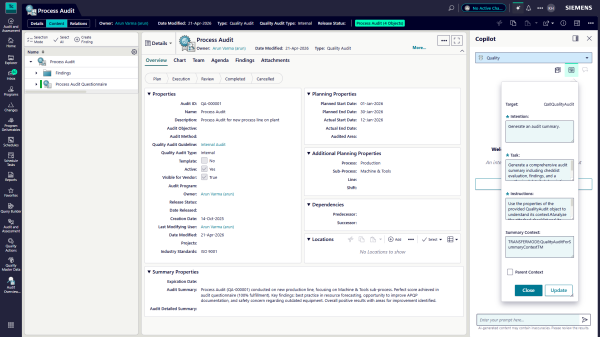
Teamcenter Copilot software brings AI-powered assistance to every Teamcenter Quality module, helping users tackle repetitive and complex tasks by reducing manual effort, accelerating process creation, and boosting consistency and compliance. With guided, context-aware assistance, it supports users of all experience levels through out-of-the-box or custom prompts, delivering tailored suggestions directly within quality workflows. With Teamcenter Quality 2606, Teamcenter Copilot introduces key enhancements that help customers leverage AI capabilities more efficiently.
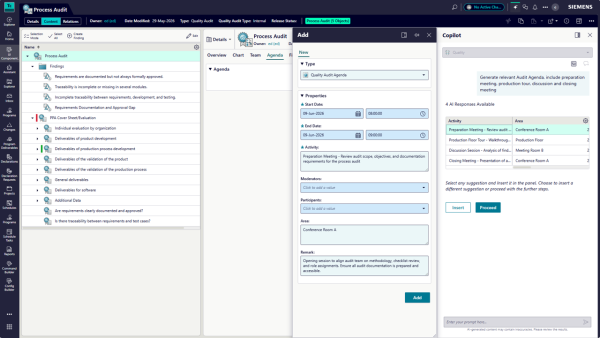
- Display AI results in table format – Users can review AI suggestions in a table format before inserting them, enabling efficient comparison across multiple columns and faster decision-making on which suggestions to apply.
- Configurable prompt levels – Teamcenter Copilot introduces a three-level prompt configuration. Level 1 is the system prompt, providing preconfigured access to suggested use cases such as creating findings, audit reports, or problem-solving objects. Level 2 allows users with the necessary permissions to modify the system prompt into a tailored version. Level 3 enables direct chat interaction with Teamcenter Copilot, asking specific questions based on Level 1 or Level 2 results.
More intuitive usage in FMEA creation and maintenance
Teamcenter Quality Failure Mode and Effects Analysis (FMEA) module allows manufacturers to apply the methodology and assess potential risks associated with product and process failures. Teamcenter Quality 2606 includes several improvements to enhance user experience and make navigation more intuitive, especially for complex tasks.
- Align and compare master with variant FMEA – Enhanced comparison capabilities feature optimized alignment to quickly identify and group relevant elements. Users can select individual comparison criteria to compare complete FMEA structures or narrow scope to specific levels.

- Failure cause actions as root causes – Root cause visibility within the risk analysis view integrates mitigation directly into the FMEA process for faster, more informed decisions.
- Adjustment between item and FMEA structure – Generate FMEA structures based on existing item structures from sources like bill-of-material (BOM) and bill-of-process (BOP). As iterations occur, FMEAs can be adapted to changes, with options to revise top-level elements during alignment.
- Form sheet enhancements – FMEA guidelines are visible and editable within form sheets. Filters can be saved and reused, tied to their creation guidelines.
- Additional usability updates – Multi-object selection, cleaner net-view layout, improved split-view and compare displays, drag-and-drop support for external elements, and repositioned commands enhance user experience.
Enhancements in inspection planning management
The Teamcenter Quality Control and Inspection Planning module supports inspection planning combined with control plan management. Teamcenter Copilot also supports teams to speed up creating new control and inspection plan objects by generating suggestions for inspection definitions, control methods, and reaction plans. Teamcenter Quality 2606 introduces enrichments that strengthen quality insights and visualization.
- Updated PMI table layout – The product manufacturing information (PMI) table view for control plan and inspection operations features a refreshed layout and updated balloon colors.
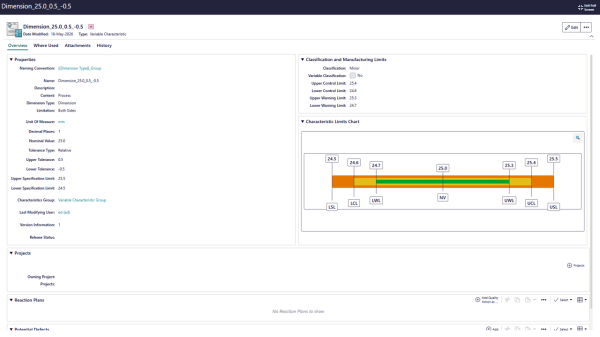
- Graphical visualization of characteristics limits – Characteristic tolerances are presented graphically, allowing teams to view upper and lower control and warning limits in a chart for faster interpretation and decision-making.
- Detailed SPC rules – Inspection planners can select appropriate statistical process control (SPC) rules based on the process or characteristic, defining criteria such as control limits, trend rules, and run rules. Users can also select control chart types and subgroup sizes when assigning control methods.
Enhanced user experience for continuous improvement
The Teamcenter Quality Problem Solving and Issue Management modules provide structured workflows for managing quality issues, driving root cause analysis, and tracking related actions. Teamcenter Copilot supports users by generating proposals, including insights for root causes in Ishikawa or Five Whys analyses, as well as various types of quality actions within problem-solving processes. Teamcenter Quality 2606 release enhances these modules with new usability features, improving the visual experience and simplifying continuous improvement and change management processes.
- Icons for better object visualization – Dedicated icons across quality issue management and problem-solving speed up recognition and simplify navigation. Each quality issue type, such as customer complaints or nonconformances, has its own distinct icon, making categories identifiable at a glance. Root cause analysis also receives a visual upgrade, making it easier to follow the structure of Ishikawa or Five Whys analyses.
- Streamline collaboration with suppliers – Users can engage directly with suppliers through the Supplier Quality Hub, part of the Siemens Xcelerator business platform, enabling suppliers to create quality actions and identify root causes within the problem-solving process. Authorized users can delete key objects with mandatory confirmation and automatic stakeholder notifications. It also supports internal use, enabling non-Teamcenter users to participate in quality processes.
Drive consistency in quality action management
Teamcenter Quality 2606 delivers improvements to Teamcenter Quality Action Management module, giving teams better visibility into context and status, and enabling faster creation and reuse of actions.
- AI capabilities for quality action management – Teamcenter Copilot automates quality action creation by extracting key information and generating prefilled, context-tailored suggestions for problem-solving or FMEA. An integrated chat function provides ongoing guidance and support.
- Add-ons for quality actions to capture additional information – Users can enter a proposed due date when the original cannot be met, and the additional information field supports rich text, including formatted text, graphics, and images.
- Save and add as command – The save-as function automatically copies dependent actions from the original template, preserving the complete action structure. Teams can also filter actions by subtype for a more precise and faster selection process.
Increase transparency in audit and assessment
The Teamcenter Quality Audit & Assessment module provides configurable workflows, questionnaires, and reusable templates to streamline audit planning, execution, and closure. Teamcenter Quality 2606 delivers significant improvements to the module. Audit trail and follow-up features have been enabled across key modules, including Audit & Assessment, Quality Action Management, and Quality Project Management, covering processes like advanced product quality planning (APQP) and production part approval process (PPAP).
- Enriched AI use cases for audit and assessment management – Teamcenter Copilot supports auditors by analyzing audit data and historical master data to propose findings, draft summaries, and generate AI-powered suggestions that users can review, customize, and apply.
- Graphical representation of chapter results – A spider chart visualizes audit results at the chapter level, enabling teams to quickly identify strengths and weaknesses. Users can select other checklist levels for automatic visualization in the chart.
Proactively identify training and qualification needs
The Teamcenter Quality Training & Qualification module streamlines employee development by enabling systematic creation and maintenance of individual qualification and training profiles. Teamcenter Copilot supports this by generating suggestions for qualification units, definitions, profiles, and profile groups. Teamcenter Quality 2606 delivers improvements, including an extended qualification matrix, optimized requalification processes, enhanced notification emails and upgraded qualification records to support audit readiness.
- Extended qualification matrix – Users can filter profiles by responsible user, plant, and department. Hot-linked status icons provide instant access to qualification definitions and records.
- Optimized requalification process – Requalification applies only to expiring qualifications, with due dates automatically aligned to the preceding record. Linked records are displayed together for full visibility into the requalification chain.
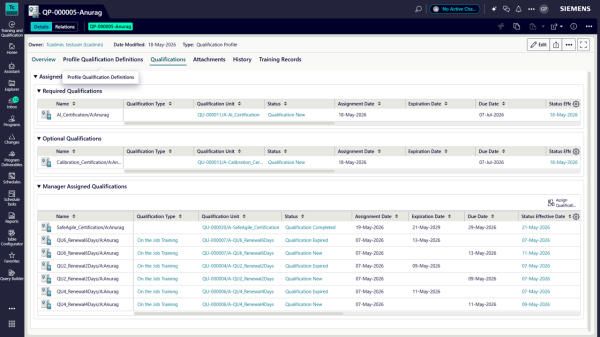
- Scheduled requalification with reminders – Organizations define when requalification should begin before expiration. Reminders automatically trigger workflows and notify trainees, while training coordinators retain the flexibility to initiate requalification manually.
- Configurable notification emails – Organizations can tailor email subject lines and content to their needs. A dynamic table auto-populates with key qualification details such as due date and change reason, with the option to add custom properties.
Key benefits of Teamcenter Quality 2606
- Reduce effort and simplify FMEA creation and maintenance
- Streamline inspection planning with advanced visualization
- Expand flexibility for more comprehensive assessments
- Accelerate training and qualification workflows
- Elevate usability for a consistent audit experience
- Boost quality and compliance processes using AI-powered suggestions
Curious to learn more about Teamcenter Quality 2606?
Want to learn more? Explore the Teamcenter Quality 2606 release notes for a detailed list of capabilities, or visit our website to discover more about quality management and compliance with Teamcenter Quality.