What’s new for Teamcenter Workflow in Teamcenter 2506 and 2512
In the digital enterprise, agility is everything. Whether you’re managing engineering changes, product releases, or compliance reviews, your workflows must be flexible, secure, and efficient. Teamcenter 2506 and 2512 introduce powerful new capabilities that make it easier than ever to model, execute, and adapt business processes—without sacrificing control.
What is Teamcenter Workflow?
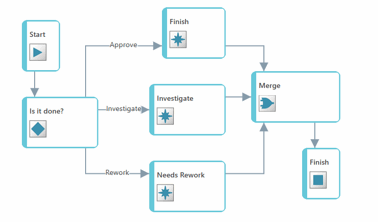
A Teamcenter workflow is a structured, repeatable process made up of ordered tasks. These workflows guide product data through its lifecycle—from creation and review to release and beyond. Each task can be interactive (assigned to users) or programmatic (automated by the system), with conditional routes and access controls to ensure the right people are involved at the right time.
Teamcenter delivers more agile PLM workflow
Workflows are designed using task templates—modular components that define the behavior of each step.
You can:
- Assign participants manually or programmatically
- Set access controls and authentication
- Use handlers (executable code) to enforce business rules
- Configure conditional paths based on data or decisions
Once defined, these templates are used to execute real-world processes with consistency and precision. Learn about workflow capabilities for every Teamcenter Author. And more about best practice workflows in PLM.
What’s new in Teamcenter for workflow
🔁 Retain prior approvals to avoid rework
Rework doesn’t have to mean starting over. Teamcenter 2506 allows you to retain prior approvals when a task is restarted. This saves time and avoids unnecessary re-approvals, especially in iterative review cycles.
👥 Dynamic participant management
Staffing changes? No problem. You can edit workflow participants mid-process and reassign tasks automatically when dynamic participants are updated. You can also grant access to specific users, roles, or groups to manage assignments.
🛠️ Empower users with assignment control
Give the right people the authority to update workflow participants—even if they’re not originally assigned. This is configurable based on workflow templates, task properties, and user roles or profiles.
🔄 Real-time task reassignment
When a dynamic participant is changed, Teamcenter identifies all impacted tasks—across all active workflows—and reassigns them automatically. Users are notified via system alerts and email, ensuring transparency and accountability.
🔧 Use flexible rules to automatically assign change tasks
With the release of Teamcenter 2512, you can tailor your workflow by configuring task assignments based on specific characteristics of a change and the items that are being modified. This approach allows you to build a flexible assignment matrix that can accommodate a wide range of property types and scenarios.
🎯 Set task assignment criteria
By developing assignment criteria that use operators like “and,” “equal to,” “not equal to,” “less than,” and “greater than,” you can ensure that tasks are automatically routed to the most appropriate individuals or groups. This streamlines your process and also helps ensure that each change is handled by the right team members, increasing both accuracy and efficiency.
What makes Teamcenter Workflow more agile PLM?
Implementing the Teamcenter 2506 and 2512 workflow functionality can give your teams greater agility, for the following benefits:
✅ Faster cycle times — Avoid redundant approvals and streamline rework.
✅ Greater flexibility — Adapt to staffing changes without restarting workflows.
✅ Improved governance — Control who can make changes, and when.
✅ Enhanced collaboration — Keep everyone aligned with real-time notifications and task visibility.
Summary
Teamcenter 2506 and 2512 transform transforms workflow management from a rigid process into a dynamic, responsive system. With smarter approvals, flexible participant control, and automated reassignment, your teams can stay agile and focused—no matter how complex the process. Explore workflow capabilities for every Teamcenter Author and best practice workflows in PLM.
Ready to modernize your workflows?
👉 Learn how to get started with Teamcenter X SaaS
👉 Take a Teamcenter X free 30-day trial
🧠 Make smarter decisions with AI-powered PLM
🚀 Start fast and grow with Teamcenter X
🚗 Take the Teamcenter X 30-day test drive
🌟 Learn more about Teamcenter solutions
Table of Contents