Engineering Change Workflow in Teamcenter X: Standardize Change from Planning to Release

Product designs rarely stay the same from concept through release. New requirements, design improvements, manufacturing feedback, and quality findings often lead to modifications that must be reviewed and approved before implementation.
A structured engineering change workflow helps teams plan changes, evaluate impacts, coordinate reviews, and maintain a complete history of decisions. When change information is disconnected across spreadsheets, emails, and documents, it becomes difficult to understand what is changing, who is responsible, and how the modification affects the broader product lifecycle.
Teamcenter X brings change requests, impacted products, supporting documentation, approvals, and stakeholders together in a single environment. Teams can follow a consistent engineering change workflow while maintaining visibility and traceability from proposal through release.
This is the fourth video in our series exploring Teamcenter X use cases, from project scheduling and requirements management to document management, engineering change workflows, integrations, and reporting.
While Teamcenter X supports a wide range of change management capabilities, this video focuses on a common use case: managing an engineering change from initial planning through release.
🎥 Watch the video here
Want to watch this video series from the beginning?
👉 Save the YouTube playlist to get notified when new episodes are released.
Engineering change workflows are one part of a broader product change management strategy in Teamcenter. If you’re looking for a complete overview of how organizations manage change requests, impact analysis, approvals, implementation, and release activities across the product lifecycle, explore our guide to product change management.
Managing Engineering Changes
Before modifications are delivered, teams must document, review, and evaluate the proposed change.
The engineering change workflow begins with a complete record of the request, supporting information, initial designs, and the business process used to guide the change through completion.
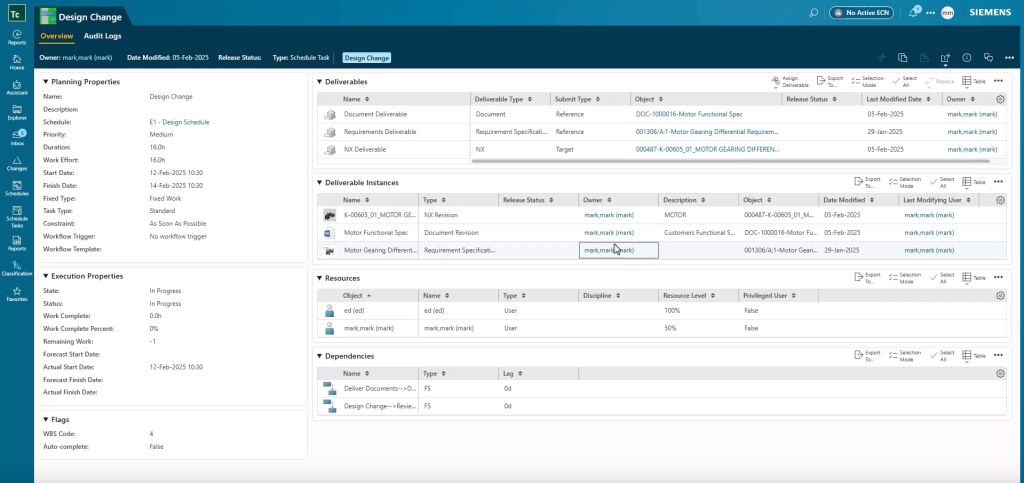
Product designers can access their assigned tasks and quickly identify work that requires attention. In this example, a design change has been requested for the motor gearing differential. Opening the task provides visibility into the associated information, assigned resources, and supporting materials needed to begin the work.
With the information organized in a single location, teams can quickly understand the scope of the change and the work required. This approach helps engineering teams establish a repeatable engineering change process while reducing delays caused by disconnected data.
Keeping the Change Connected
A successful engineering change workflow depends on maintaining a connection between the change request and the product data it affects.
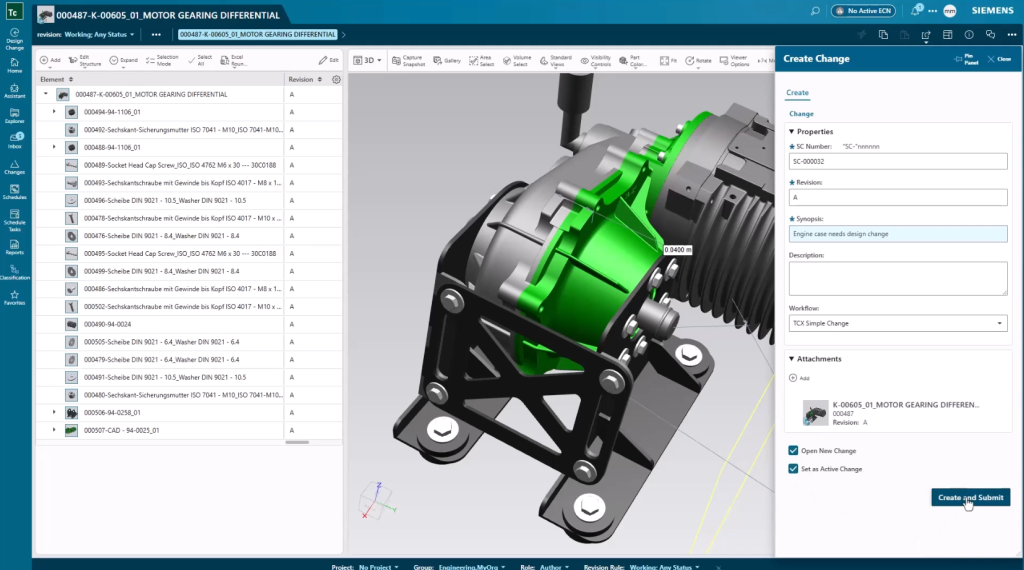
To begin the process, the designer reviews the existing design along with markups and collaboration history. A change record is then created and linked directly to the design.
This connection ensures that modifications remain associated with the engineering change throughout execution. Team members can also add reference information and supporting documentation so that everyone involved in the workflow has access to the information required to make decisions and complete their tasks.
Keeping information connected reduces manual effort and improves visibility across teams participating in the change process.
Impact Analysis in the Engineering Change Workflow
Before changes move forward, teams need to understand what products, documents, and requirements may be affected.
As part of the planning process, impacted items are identified and associated with the change. Product revisions can then be created and the change summary updated to reflect the intent of the modification.
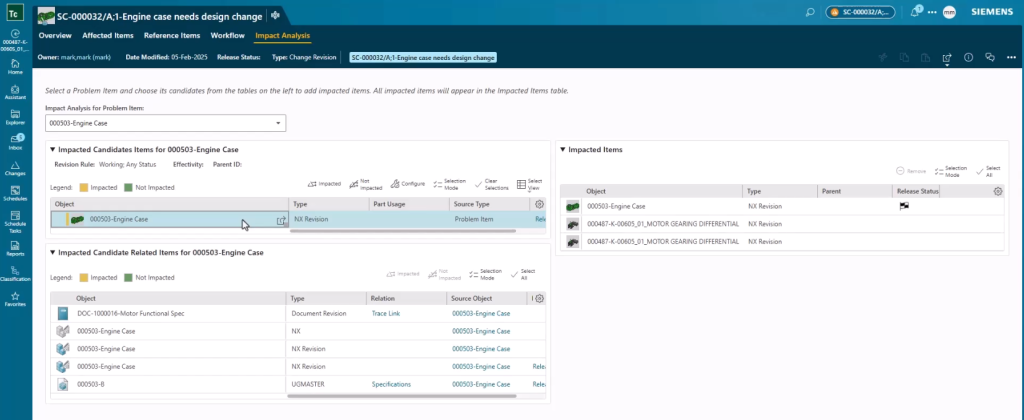
Teamcenter X provides impact analysis capabilities that help teams understand how the proposed change affects related designs, requirements, and other connected information. Viewing these relationships gives stakeholders the context needed to evaluate the change before approval.
This visibility helps organizations avoid surprises and make better-informed decisions throughout the engineering change workflow.
Reviewing and Approving Changes
Engineering changes often involve multiple teams and stakeholders.
A standardized engineering change workflow helps ensure that reviews and approvals are completed consistently across the organization. Teamcenter X captures the work performed, comments provided, decisions made, and approvals received throughout the process.
The result is a complete and auditable history of the change. Teams can easily understand what work was completed, who approved it, and how decisions were made before the modification is released.
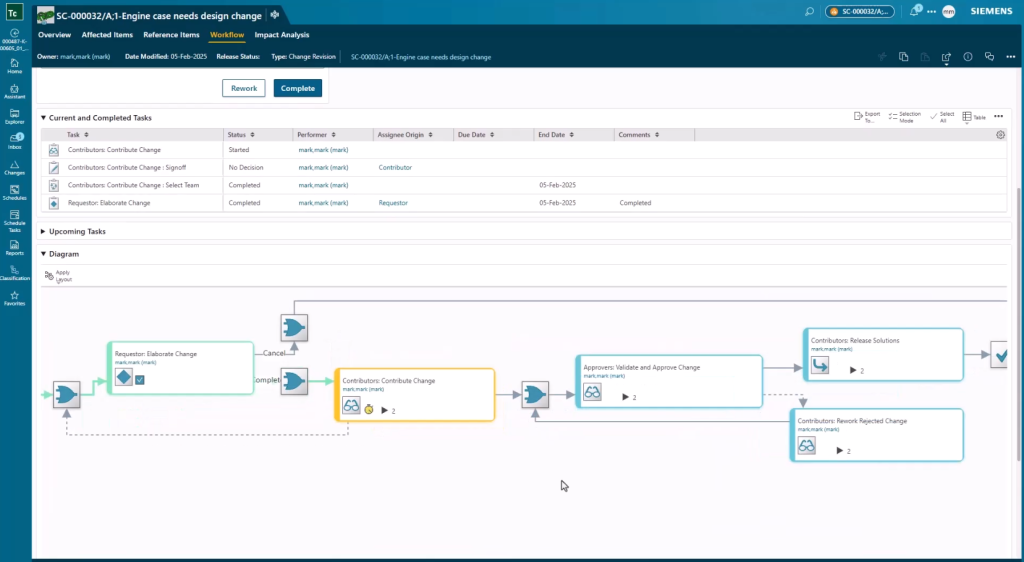
Following a consistent process improves accountability and helps organizations maintain compliance with established business procedures.
Releasing Modifications with Confidence
Once the modifications have been completed and approved, the change is ready for release.
Because the engineering change workflow has captured the associated designs, impacted items, supporting information, collaboration history, and approvals, stakeholders have complete visibility into the change before it is finalized.
The release process becomes more predictable because the information needed to support the decision already exists within the workflow.
Reducing the Time, Cost, and Risk of Change
Engineering changes are a normal part of product development, but uncontrolled changes can introduce delays, increase costs, and create risk.
Teamcenter X supports a standardized engineering change workflow with controlled impact analysis, consistent approvals, enhanced visibility, and end-to-end traceability. Teams can collaborate using the same information, follow established processes, and maintain a complete history of the change from proposal through release.
By standardizing engineering change workflows, organizations can improve product quality, accelerate release readiness, and reduce rework across engineering and manufacturing teams. The result is a more efficient engineering change workflow that helps organizations reduce the time, cost, and risk associated with product modifications.
About this series
Want to watch this video series from the beginning? 👉🏼👉🏼 Start here!
Save the YouTube playlist to get notified when new episodes drop.
Jump directly to other blogs in this playlist as the series develops:
- What is Teamcenter used for?
- Schedule planning
- Requirements management process
- PLM document management
- Simple change management
- ECAD and MCAD integrations
- Review and reporting
This series takes a practical look at some of the capabilities available in the preconfigured Teamcenter X Standard and Advanced tiers. Each video explores a common product development use case to show how connected SaaS PLM capabilities can work together in day-to-day execution.
This series is not an exhaustive look at every capability. Teamcenter X continues to evolve with new features and enhancements being added regularly. Instead, this series is designed to give an accessible, practical overview of how these capabilities come together to drive better outcomes.
FAQ
What is an engineering change workflow?
An engineering change workflow is a structured process used to evaluate, approve, implement, and release product modifications while maintaining visibility and traceability throughout the product lifecycle.
Why is an engineering change workflow important?
An engineering change workflow helps organizations manage modifications consistently, understand impacts, improve collaboration, maintain accountability, and reduce the risk of errors during product development.
How does Teamcenter X support an engineering change workflow?
Teamcenter X connects change requests, product data, impact analysis, approvals, supporting documentation, and release activities within a single engineering change workflow, helping teams manage changes with greater visibility and control.
🧠 Make smarter decisions with AI-powered PLM
🚀 Start fast and grow with Teamcenter X
🚗 Take the Teamcenter X 30-day test drive
🌟 Learn more about Teamcenter solutions