Requirements Management Process in Teamcenter X: Connect Requirements to Execution

Every successful project begins with requirements. They define what needs to be delivered, establish expectations, and provide the criteria used to measure success. When requirements are disconnected from project tasks and supporting information, teams can struggle to maintain alignment and track progress.
An effective requirements management process connects requirements, project activities, approvals, and supporting information in a single digital thread. Requirements management in Teamcenter X helps teams define requirements in context, maintain traceability and keep the entire requirements management process connected from planning through approval. This ensures the right information reaches the right people at the right time.
This is the third video in our series exploring Teamcenter X use cases, from project scheduling and requirements management to document management, change, integrations, and reporting. While requirements management in Teamcenter X supports a wide range of capabilities, this video focuses on one common use case: connecting requirements to project execution, approvals, and traceability.
In the video below, we showcase how the Standard and Advanced tiers of Teamcenter X help teams manage requirements in context, maintain clear ownership, and keep everyone aligned throughout the process.
Want to watch this video series from the beginning? 👉🏼👉🏼 Start here!
Save the YouTube playlist to get notified when new episodes drop.
Keeping the requirements connected to the project
As part of the requirements management process, requirement-related tasks are assigned to the appropriate team members through the project schedule.
In this example, a motor gearing requirement has already been created and attached to the task. The responsible team member can immediately access the requirement and the related information needed to complete the work.
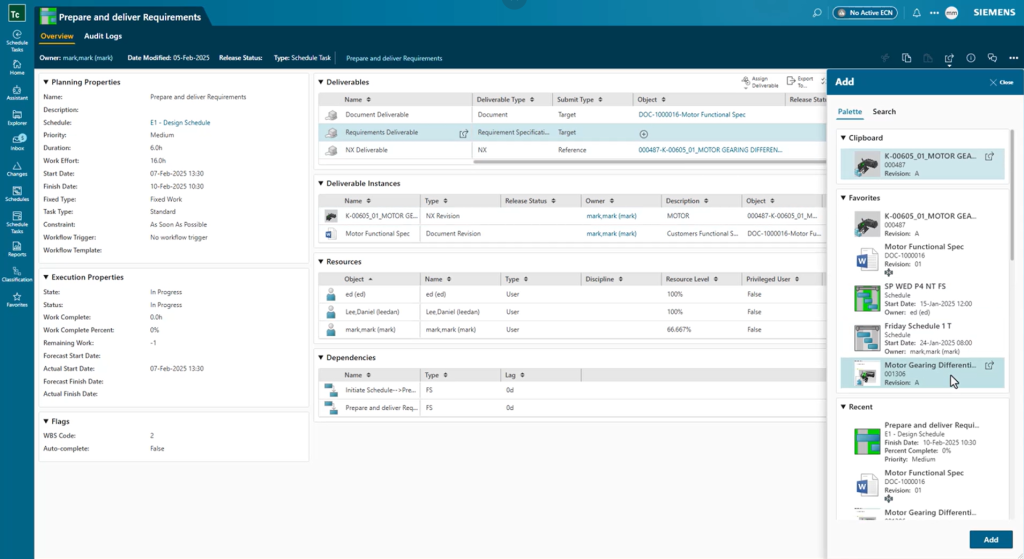
Because the requirement is connected to the project plan, teams can see how it relates to the overall program, who owns it, and where it fits within the broader scope of work. This connection strengthens requirements traceability and keeps critical information tied to the activities that depend on it.
Reviewing and approving in the requirements management process
During the requirements management process, the requirements manager can review the requirement details, examine associated specifications, and access relevant supporting documents from a single location.
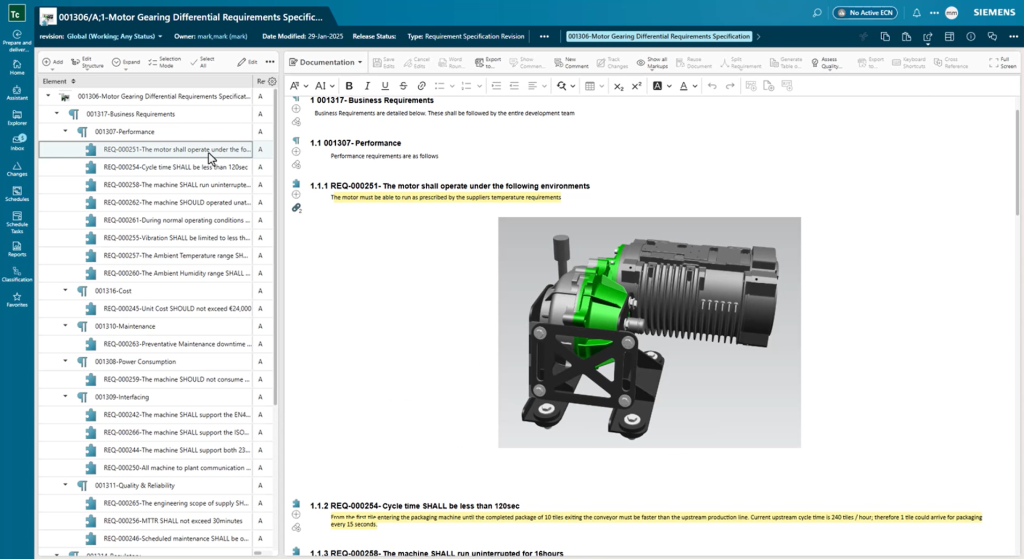
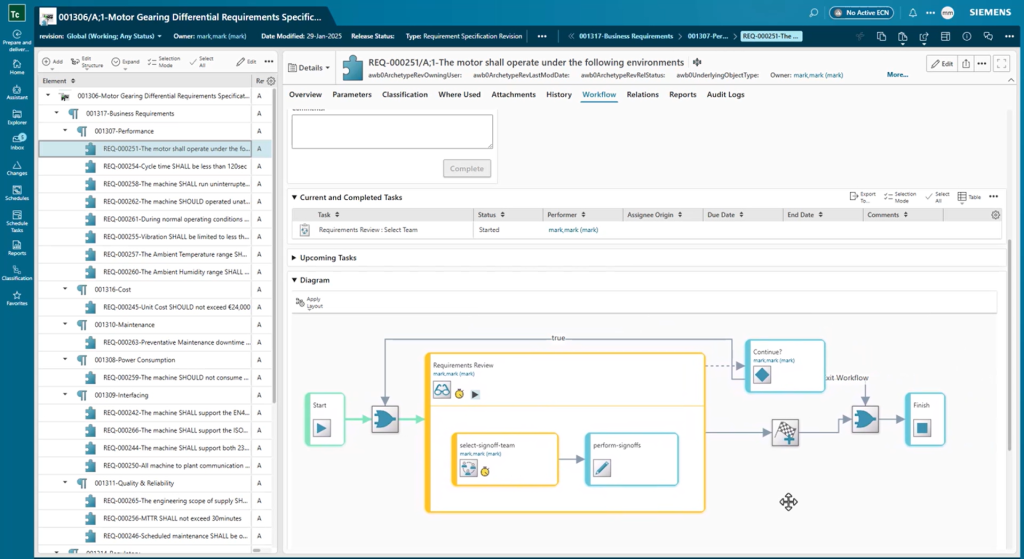
Once the requirement has been validated, the specification is submitted through an approval process.
Notifications are automatically routed to the appropriate stakeholders, ensuring reviews occur at the right time and that approvals are formally captured. This creates a clear record of decisions and provides confidence that established processes have been followed before requirements are released.
Visibility into every requirement
Understanding a requirement often means understanding everything connected to it.
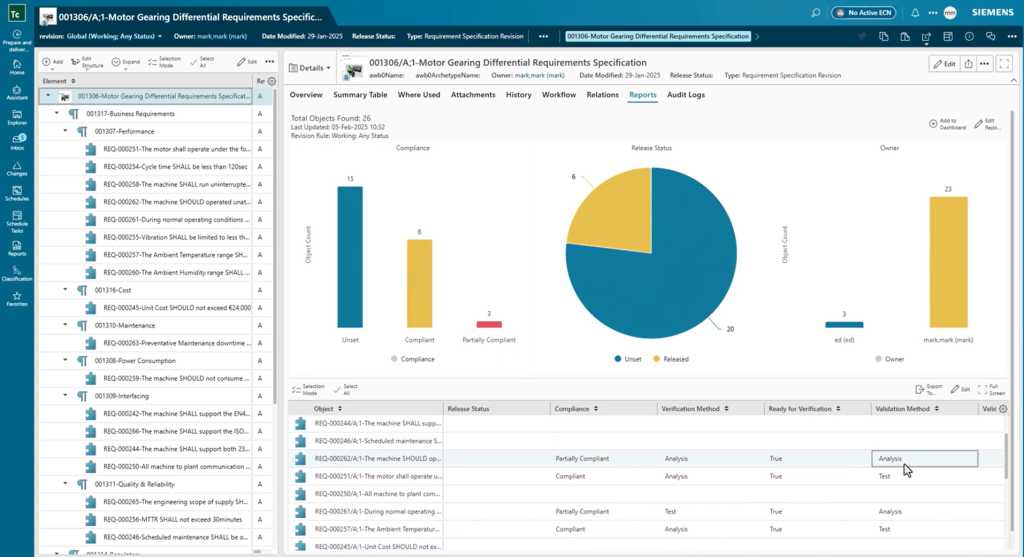
Teamcenter X provides reporting capabilities that give teams an up-to-date view of the requirements throughout the requirements management process. Stakeholders can quickly review requirement details and monitor progress without relying on disconnected spreadsheets or manual status updates.
Relationship views provide additional context by showing the documents, specifications, and connected information that contributed to the requirement definition. Having this information readily available makes it easier to understand decisions, answer questions, and maintain traceability throughout the lifecycle.
Turning requirements into achievable outcomes
A strong requirements management process creates alignment across teams and establishes a clear path toward project goals.
When requirements are connected to project schedules, supporting documentation, approvals, and downstream activities, teams can move forward with greater confidence. Everyone works from the same information, ownership is clearly defined, and decisions are easier to track.
That is the value of an integrated requirements management process in Teamcenter X. Requirements are not just documented. They are connected to the people, processes, and product information needed to bring projects to completion.
About this series
Want to watch this video series from the beginning? 👉🏼👉🏼 Start here!
Save the YouTube playlist to get notified when new episodes drop.
Jump directly to other blogs in this playlist as the series develops:
- What is Teamcenter used for?
- Schedule planning
- Requirements management process
- PLM document management
- Simple change management
- ECAD and MCAD integrations
- Review and reporting
This series takes a practical look at some of the capabilities available in the preconfigured Teamcenter X Standard and Advanced tiers. Each video explores a common product development use case to show how connected SaaS PLM capabilities can work together in day-to-day execution.
This series is not an exhaustive look at every capability. Teamcenter X continues to evolve with new features and enhancements being added regularly. Instead, this series is designed to give an accessible, practical overview of how these capabilities come together to drive better outcomes.
FAQ
What is a requirements management process?
A requirements management process helps organizations capture, review, approve, track and trace requirements throughout a project or product lifecycle.
Why is the requirements management process important?
A well-defined requirements management process improves traceability, increases accountability, reduces rework and helps ensure teams remain aligned on project objectives.
How does Teamcenter X support the requirements management process?
Teamcenter X supports the requirements management process by connecting requirements with project schedules, approvals, documents and reporting, helping teams maintain requirements traceability and manage requirements in context throughout the product lifecycle.