How advanced search capabilities enable efficient model re-use with Simcenter Client for Git

In our previous discussions, we’ve explored the collaborative creation, integrated deployment and automated validation of complex simulation models. Now, let’s delve into another cornerstone of efficient model-based design: model re-use.
Have you ever spent hours searching for a model, only to rebuild it from scratch?
This article explains how Simcenter Client for Git enables efficient model re-use through advanced search capabilities, maturity-based workflows, and PLM integration, reducing model discovery time and enabling organizations to maximize investment in simulation assets for engineering teams and AI training initiatives
Creating validated models that accurately represent physical systems, parameterizing them with real-world data, and refining them through testing is a time-consuming and resource-intensive process.
While these tasks are essential, their true value to engineering isn’t realized until these assets can be effectively re-used to inform future decisions and accelerate product development.
The challenge, however, often lies in finding and confidently re-using existing models. Have you ever downloaded a model from a shared drive only to find it difficult to understand, execute, or verify its validity? Was it validated? To what data? What was its original purpose? Without clear answers, it can sometimes feel easier to start from scratch, negating the very benefit of model creation.
This is where Simcenter Client for Git provides critical capabilities, transforming the way we discover, manage, and re-use our valuable simulation assets.
The model lifecycle: From creation to strategic asset
The model lifecycle isn’t complete until a model can be effectively utilized beyond its initial purpose. It progresses through stages:
- Build: Creating the foundational model based on physical understanding.
- Parameterize: Populating the model with relevant data from geometry and literature.
- Improve Predictability: Refining the model through calibration with test data.
- Use: The crucial stage where the model becomes a strategic asset for engineering decisions and future projects.
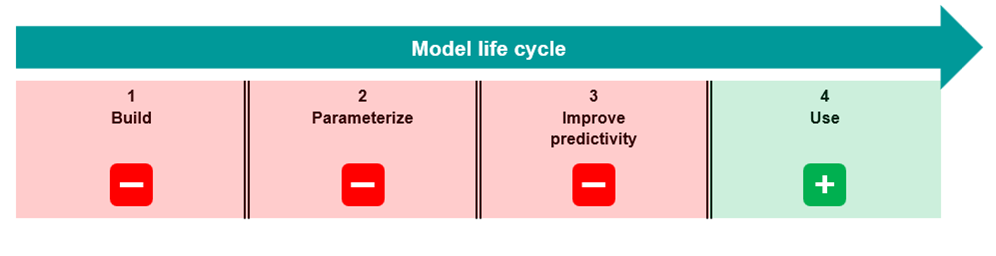
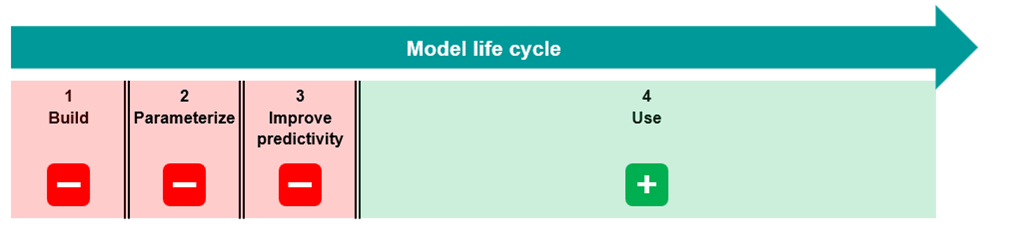
Finding models that are suitable for model re-use is important. These are the models that should be leveraged for extending AI capabilities, ensuring that organizational intellectual property is efficiently re-used in new projects.
Six search capabilities reduce model discovery time
Simcenter Client for Git provides a comprehensive set of search features designed to help users quickly track down and identify usable models, overcoming the common hurdles of model discovery:
- Collection Type: Refers to the modeling environment or platform used to create the model, narrow your search by specifying the modeling environment, such as Simcenter Amesim, Simulink, or other relevant platforms.
- Classification: Restrict your search and access rights based on predefined classifications, ensuring you find models relevant to your domain and security clearances.
- Maturity Status: Utilize a workflow-based approach that triggers review and approval processes. Models on the main branch, often associated with a higher maturity status, can be treated as readily re-usable, while models in development branches might require further validation.
- Branch / Main: Differentiate between models under active development (branches) and stable, validated models (main branch) that are suitable for model re-use.
- Attributes: Leverage custom attributes (e.g., “EV,” “Battery,” “Project X”) to tag and categorize models with specific metadata, enabling highly targeted searches.
- Version Comments: Review comments associated with different model versions to understand their history, purpose, and any critical modifications.
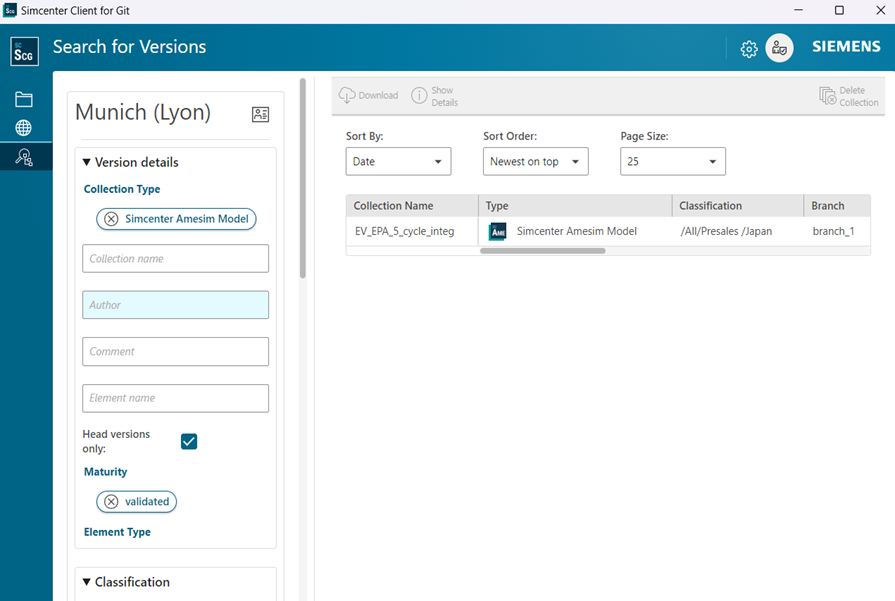
These features significantly reduce the time and effort needed to find and re-apply models. Furthermore, they help identify target models that are ideal for AI training, maximizing the return on investment in model development.
Version history and Diff tools enable confident model re-use
While powerful search capabilities are essential, Simcenter Client for Git goes further. It provides a comprehensive model history and allows direct comparisons using diff tools.
Diff tools (difference comparison tools) enable side-by-side comparison of model versions, highlighting exactly what changed between iterations—such as parameter values, component connections, or structural modifications.
This ensures that even when models are downloaded locally for review, their lineage, meaning the complete version history and origin for the model, and changes are transparently managed.
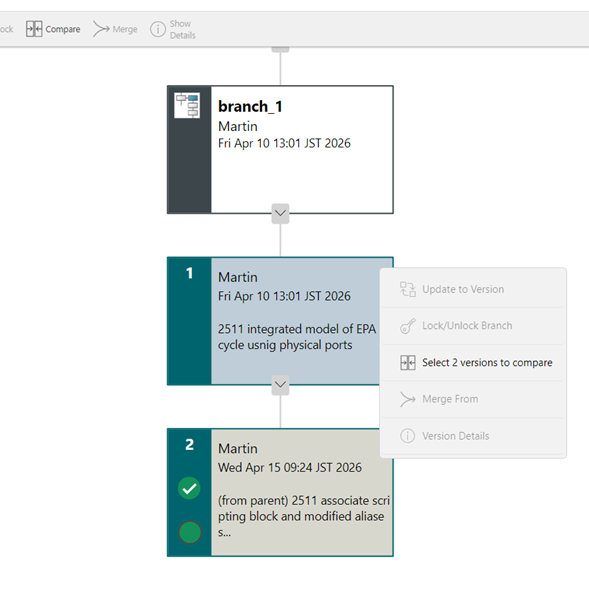
For organizations requiring even stricter control, Simcenter Client for Git can extend its maturity status concept to integrate with Product Lifecycle Management (PLM) systems like Teamcenter. This allows for “Gold Copy”, referring to the practice of maintaining a single, authoritative version of a validated model that serves as the official reference for critical applications, management of models, ensuring that only fully approved and validated versions are released for critical applications.
Conclusion: Model re-use transforms simulation assets into strategic organizational knowledge
Efficient model re-use addresses a critical inefficiency in simulation-driven development: the repeated investment in creating, parameterizing, and validating models that already exist within the organization. Advanced search capabilities, maturity-based workflows, and version control transform simulation models from project-specific artifacts into strategic, re-usable organizational assets.
Integration with PLM systems ensures governance and traceability, while comprehensive version history enables confident re-use based on transparent lineage tracking. This approach not only accelerates development but also creates high-quality datasets for AI training initiatives.
📌Key takeaways
- Model re-use reduces development time by 40-60% by eliminating redundant build, parameterization, and validation work
- Six search capabilities reduce model discovery time from hours to minutes through maturity-based filtering and custom attributes
- Version history and diff tools enable confident re-use through transparent lineage tracking and change visualization
- PLM integration supports “Gold Copy” management, ensuring only validated models are deployed in critical applications
As simulation complexity increases and organizations invest more heavily in model-based development, the ability to efficiently discover, validate, and re-use existing assets will increasingly differentiate high-performing engineering organizations from those that repeatedly rebuild institutional knowledge.
How does your organization currently manage simulation model libraries, and what percentage of models are successfully re-used across multiple projects?
In our next and final blog in the series, we will look at go beyond versioning and connect to the broader product development lifecycle with Polarion.
FAQ
Q: What is model re-use and why does it matter?
A: Model re-use is the practice of leveraging existing, validated simulation models for new projects instead of rebuilding from scratch. Organizations that effectively re-use models reduce development time, improve consistency across projects, and maximize return on investment in model creation, parameterization, and validation efforts.
Q: How does Simcenter Client for Git help engineers find re-usable models?
A: Simcenter Client for Git provides six search capabilities:
- Collection Type filtering by modeling environment (Simcenter Amesim, Simulink, etc.)
- Classification restricting access based on domain and security clearance
- Maturity Status identifying validated vs. in-development models
- Branch/Main differentiation between stable and experimental versions
- Custom Attributes enabling targeted searches (e.g., “EV,” “Battery,” “Thermal”)
- Version Comments providing context on model history and modifications
These features reduce model discovery time from hours to minutes.
Q: What is maturity status and how does it indicate model readiness?
A: Maturity status is a workflow-based classification that tracks a model’s validation state. Models on the main branch typically have higher maturity status, indicating they’ve passed review and approval processes and are ready for re-use. Models in development branches may require additional validation before deployment in new projects.
Q: Can Simcenter Client for Git integrate with existing PLM systems?
A: Yes. Simcenter Client for Git integrates with Product Lifecycle Management (PLM) systems like Teamcenter to enable “Gold Copy” management. This ensures only fully approved, validated model versions are released for critical applications, aligning simulation asset management with broader product lifecycle governance.
Q: How do custom attributes improve model discoverability?
A: Custom attributes are user-defined metadata tags (e.g., “EV,” “Battery,” “Project X,” “Validated-2024”) that categorize models beyond standard classifications. Engineers can create attribute-based search queries to find models matching specific technical domains, validation status, or project contexts, dramatically improving search precision.
Q: What happens when I find a model – how do I verify it’s suitable for my use case?
A: Simcenter Client for Git provides comprehensive model history and built-in diff tools for comparison. Engineers can:
- Review version comments to understand model purpose and modifications
- Compare different versions to see what changed
- Check maturity status and validation history
- Download models locally while maintaining transparent lineage tracking
This ensures confident re-use based on complete model context.
Q: How does model re-use support AI and machine learning initiatives?
A: Validated, well-documented models in Simcenter Client for Git serve as high-quality training data for AI systems. Search features help identify models suitable for AI training, ensuring organizational intellectual property is efficiently leveraged. Models with clear maturity status, version history, and validation data provide the structured datasets AI systems require.