Version control for simulation models: Tracking meaningful changes in collaborative development

In our journey through Electric Vehicle (EV) thermal management modeling, we’ve explored modular component creation and seamless integrated model deployment. Now, let’s tackle a common challenge in complex engineering projects: collaborative development and efficient model iteration.
This article explains how version control capabilities in Simcenter Client for Git enable collaborative model development by distinguishing meaningful changes from test runs, managing component dependencies, and maintaining a single source of truth for simulation engineers working on distributed EV thermal management projects
When multiple engineers are working on intricate simulation models, especially with tools like Simcenter Amesim, even minor modifications can lead to a completely new archive file.
For example, when models are compiled or executed in Simcenter Amesim, the tool generates a new archive file, a complete package containing the model, compiled code, and binary results.
This makes it difficult to discern genuine updates from mere test runs and can quickly clutter servers with redundant data, models with stored data can quickly exceed 2GB, obscuring the true evolution of the model.
So, how do we maintain clarity, track meaningful changes, and accelerate development in a collaborative environment? The answer lies in the robust capabilities of Simcenter Client for Git.
Integrated comparison tools identify model changes in seconds
Imagine you’ve been working on a model, and the next day, you’re unsure if a file’s timestamp reflects a significant change or just a test simulation you performed. Without proper tools, this can lead to confusion and wasted effort.
To address this, Simcenter Client for Git provides an integrated comparison tool that allows you to identify exactly which files have been modified. This isn’t just a superficial check; it enables you to dig into the details, much like any advanced file-based comparison tool.
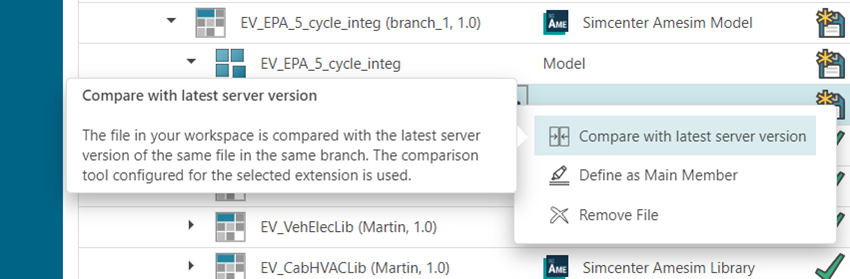
Beyond its built-in capabilities, Simcenter Client for Git offers the flexibility to integrate with custom comparison tools for various file and model formats, including text files and other specialized model types such as Simulink. Effective version control for simulation models ensures that regardless of the specific data or model format, you have the capability to track changes.
Quick turnaround: Distinguishing real changes from test runs
Consider a scenario where you’ve renamed aliases in your model to align with new test automation scripts, a necessary change for system specification compliance. With Simcenter Client for Git, you can quickly check these differences using the revamped Simcenter Amesim model comparison tool.
Once you’ve confirmed that the changes are intentional and necessary, you can take advantage of Simcenter Amesim’s purge feature to remove unnecessary binary results data and compiled code from the Simcenter Amesim model, this feature is on roadmap to be integrated into Simcenter Client for Git directly from version 2611.
This important step reduces file size, optimizes storage, and ensures that only relevant model updates are committed. Then, you can upload the new model, knowing that your libraries (if unchanged) will not be redundantly re-uploaded.
In addition, from the 2511 software release, Git Large File Size (LFS), an extension that manages large binary files separately from the main repository, is supported, allowing both model data and large binaries to be stored without overloading the version control system.
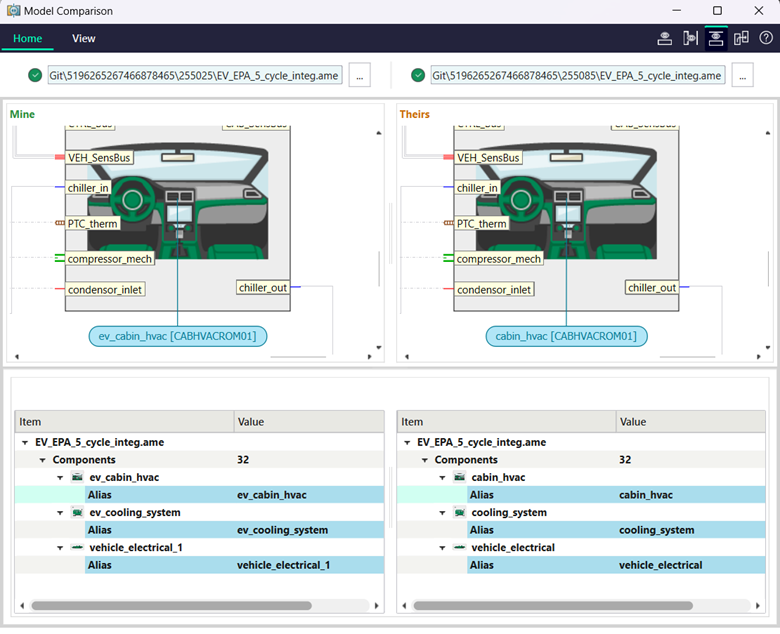
This streamlined process ensures that your version control system accurately reflects the meaningful evolution of your models, rather than being cluttered with transient test data.
The power of a single source of truth
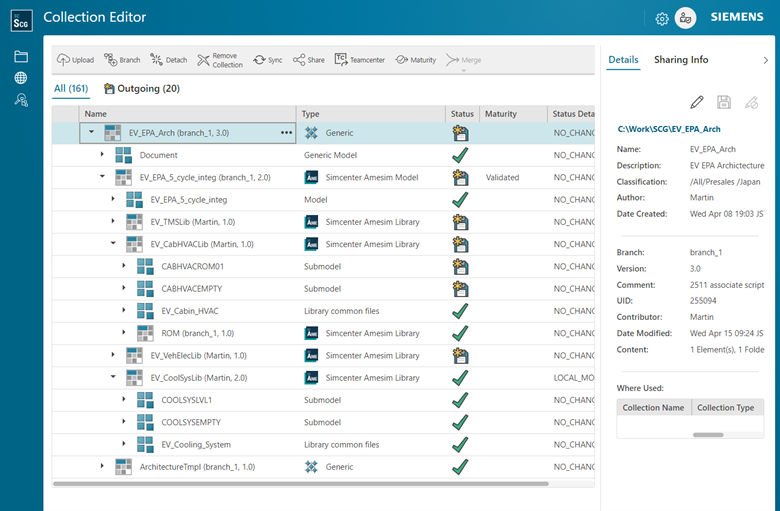
As we discussed in the previous post, Simcenter Client for Git establishes a single source of truth for your model definitions. This extends to collaborative development by providing a clear, version-controlled history of all changes.
Every modification, every decision, and every iteration is tracked, fostering transparency and accountability within the team.
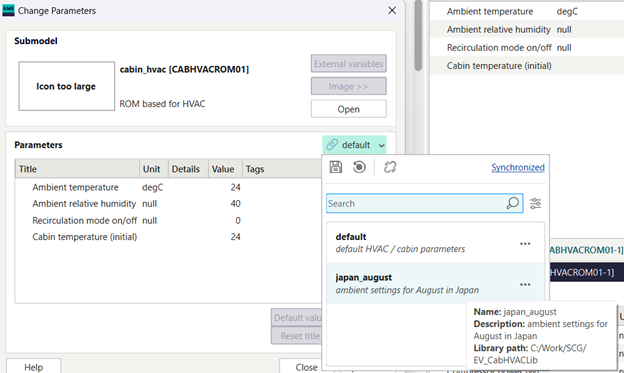
In addition, from Simcenter Amesim 2604, users can store groups of parameters as a Parameter Set, in a library. This enables the separation of model logic and parameter data further enhancing the re-use of template models and supporting efficient collaboration.
This centralized management prevents conflicts, simplifies merging, and allows team members to work concurrently on different aspects of the model with confidence, knowing that their contributions are integrated seamlessly.
Conclusion: Accelerating innovation through collaboration
In complex EV thermal management projects, distinguishing meaningful model changes from transient test runs is critical to maintaining development velocity. Version control systems designed for simulation models address this challenge by tracking substantive changes, managing component dependencies independently, and maintaining a single authoritative model definition.
📌Key takeaways
- Integrated comparison tools distinguish substantive model changes from transient test runs, reducing review time by up to 70%
- Purging binary data before committing reduces repository size by over 60% while preserving model integrity
- Version-controlled component libraries enable concurrent development without merge conflicts
- Git LFS support (version 2511 onwards) prevents repository bloat when managing large simulation datasets
As distributed engineering teams work concurrently on increasingly complex thermal systems—spanning battery cooling, HVAC integration, and power electronics—the ability to track meaningful changes precisely while preventing version conflicts will increasingly differentiate high-performing organizations.
How does your team currently manage version control for simulation models across distributed development environments?
In the next blog, we’ll explore how the free add-on to Simcenter Amesim can support an automated validation process.
FAQ
Q: What file types does Simcenter Client for Git support for version control?
A: Simcenter Client for Git natively interfaces with Simcenter Amesim models (.ame files) and associated libraries, through the Simcenter Amesim GUI directly. Any other file is supported through the Windows Explorer interface. It also integrates with custom comparison tools for text files, Simulink models, and other specialized formats. From version 2511 onward, Git Large File Storage (LFS) is supported for managing large binary files without overloading the version control system.
Q: How does Simcenter Client for Git handle models that are compiled or executed without meaningful changes?
A: The integrated comparison tool distinguishes between substantive model changes and transient modifications from compilation or test runs. Engineers can review differences before committing, and Simcenter Amesim’s purge functionality removes unnecessary binary results and compiled code, ensuring only meaningful updates are version controlled.
Q: What happens when a library component is updated while a system model is using it?
A: Simcenter Client for Git tracks library dependencies independently. When a library is updated, only system models using that specific library is flagged for review. Unchanged libraries are not re-uploaded, reducing redundancy and storage overhead.
Q: How does Git LFS integration improve model management?
A: Git LFS (Large File Storage) separates large binary files from the main repository, storing them externally while maintaining version control. This prevents repository bloat, speeds up cloning and fetching operations, and improves overall system performance when managing simulation models with large result datasets.