What’s new in Simcenter FLOEFD 2606? | CAD-embedded CFD simulation

The new Simcenter FLOEFD 2606 software release is now available in all its CAD-embedded CFD variants, and also the Simcenter 3D embedded variant. This release delivers focused improvements for electronics cooling analysis. This includes library enhancements for easy validated component re-use, efficient modeling of power sources on a die to identify hotspots for IC packages in system models, improvements to computationally efficient PCB thermal modeling, automation of EDA data import, and much more. Please read on below to explore each new feature organized by Simcenter pillars, or scan the topic list on the left to go straight to the highlighted sections that interest you most. For users wanting to update now, please navigate to the download section.

Model the complexity

Smart Die – modeling 1000’s of power sources
To identify localized hotspots when IC packages are incorporated in a system, it is advantageous to model power distribution on the package die. In Simcenter FLOEFD 2606 the Smart Die has been introduced for modeling 100’s or 1000’s of power sources on a packaged semiconductor die in a computationally efficient manner suitable for this level of analysis. This means engineers can account for complexity such as power distribution spatial influences, overlapping sources, transient time variations, and thermal dependencies. You can detect leakage-driven hotspots that uniform die modeling approaches are not able to represent.
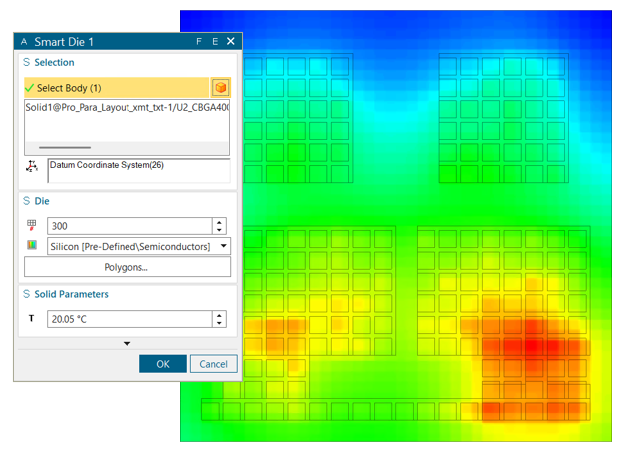
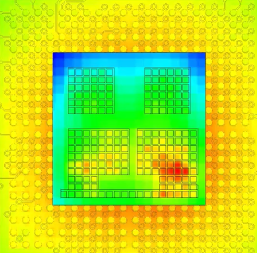
How are power sources defined using the Smart Die? The die is subdivided into multiple polygons with distinct power characteristics. Polygons are defined by an imported CSV file and assigned to a body specified as a die. You can import power floorplan with leakage models assigned. A voxelized mesh resolves the die. This means you can import hundreds of overlapping polygons with dynamic and leakage power assigned to represent a complex power distribution.
You can import polygon geometry from a CSV file using the polygons dialog. Several formats are supported, and the type is automatically then detected. Types include:
– Geometry definition table (name, nverts, vert1, vert2, …)
– Simcenter FLOEFD polygon table with full definition (Name, Polygons, Dynamic Power, Derating Factor, Leakage Model, Leakage Power at T0, Priority, Goal
– Discrete sources from Flotherm (name, X1, X2, Y1, Y2, P)
– Total Coverage Sources from Simcenter Flotherm (uniform grid with power values)
You can explore these types when you upgrade to the latest version. Below are 2 videos showing the use of the new Smart Die feature.
Video: Smart Die overview
Video: Importing data into Simcenter FLOEFD Smart Die from Simcenter Flotherm
This new Smart Die approach allows import of non-uniform disspation power sources from Simcenter Flotherm software into Simcenter FLOEFD 2606. (Simcenter Flotherm has enabled this CSV export since version 2604 from its Die Smartpart component)
Smart PCB: FEM mesh based thermal analysis
Enhancements to the computationally efficient and popular Smart PCB feature have been delivered in this release via the introduction of FEM mesh based thermal analysis and expanded results visualization options. The new FEM prism mesh based thermal modeling approach reduces memory usage and improves speed for modeling of high density, multi-layer boards with complex copper routing.
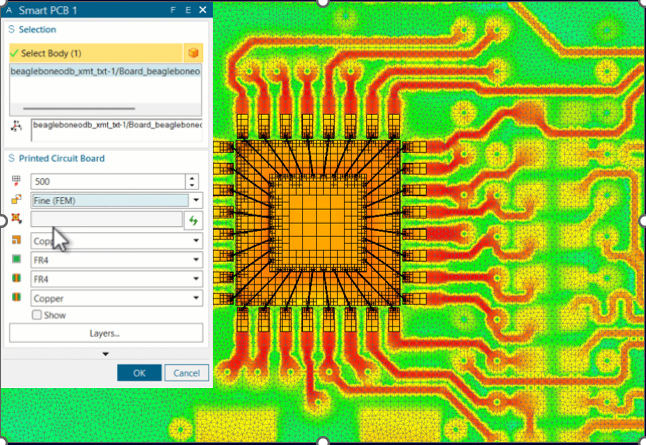
In post processing, results visualization using this new Smart PCB modeling approach, users can leverage clearer insights into board internal temperature variations and more easily visualize heat flux plots to locate thermal bottlenecks.
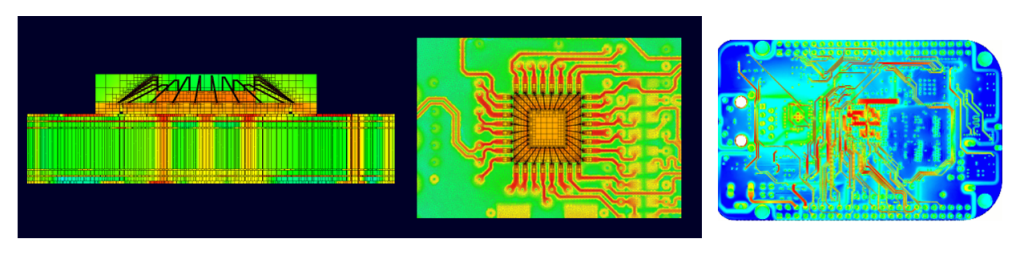
Video Demonstration: Smart PCB FEM mesh based thermal analysis
Watch this short < 2 minute video that shows the new settings you use for Smart PCB FEM mesh based thermal modeling and results visualization examples.
Library enhancements in Simcenter FLOEFD 2606
PCB thermal analysis workflow benefits from libraries of existing components due to the complexity of most board applications with 100’s, or thousands, of components mounted on them.
Library ecosystem and browser
You can now create custom component or model libraries and instantly reuse them across projects. . Libraries of of validated, reusable elements help you assemble and set up models much faster. As this also minimizes errors between models, for engineering teams this provides the opportunity to ensure consistent standards for groups of users using libraries.
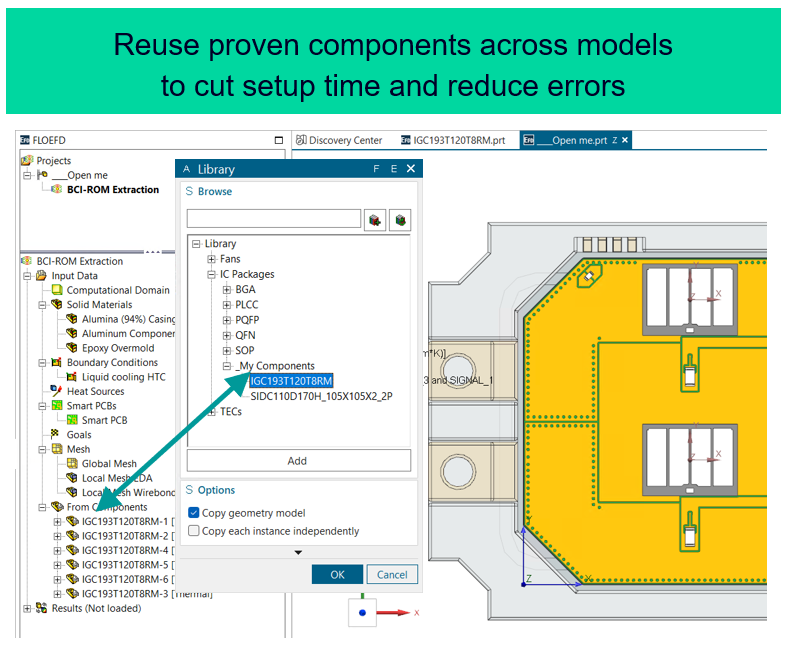
Library: edit parameter of features from component
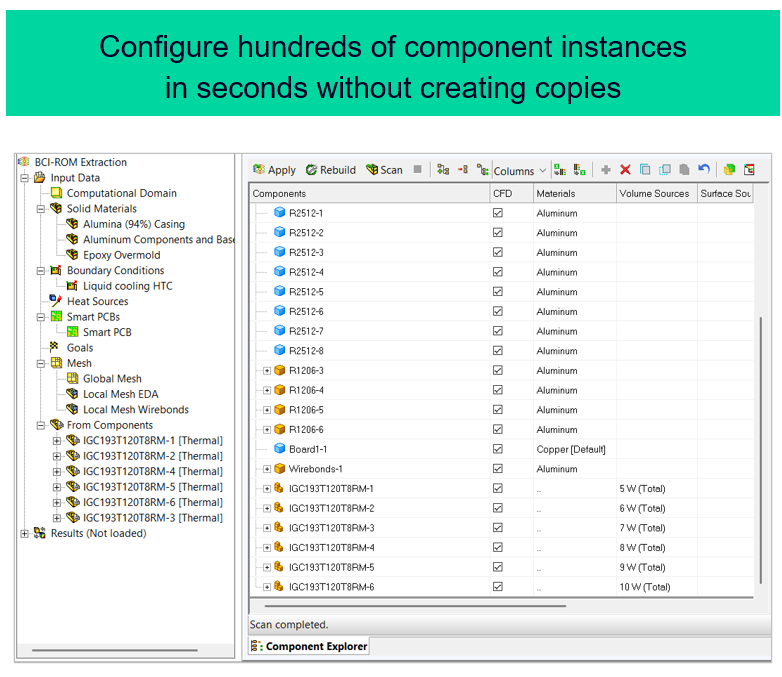
Parameters of features belonging to sub-components can now be edited directly from the top-level assembly. Each component instance can also be modified independently.
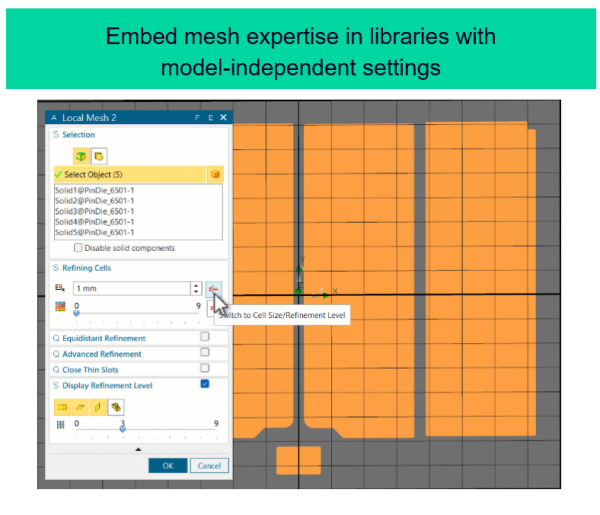
Library: Local mesh settings based on absolute cell size
Mesh refinement can now be defined using absolute cell size in library components. This enables local mesh settings for library items that are independent of top-level mesh settings for a project. This means a library author’s mesh decision transfer with library elements and there is no need for manual adjustment when re-using these.
Video demo: Library enhancements in Simcenter FLOEFD 2606
Component Explorer updates in Simcenter FLOEFD 2606
a) Component Explorer: Network Assembly and Smart PCB
New columns have been introduced to display power values assigned via Network Assembly and Smart PCB features. Users can review power at the individual component level or evaluate the total power budget.
b) Component Explorer: minimum temperature column
A new column shows the minimum temperature for each component, complementing the existing maximum and average values and enabling better analysis of temperature gradients.
The launch of the component explorer as your model becomes extremely complex and high component numbers has been sped up through a code refactoring. Even for very large models, you can now access component features immediately in table view.
Material Priority setting:
Material priority values can now be edited directly within the table, eliminating significant manual clicks and steps.

Explore the possibilities
EDA Bridge automation – headless operation
Automation of simulation tasks significantly increases throughput for thermal analysis projects for engineering teams. A step change has been delivered toward true headless automated import and processing of EDA data for PCB thermal analysis via enhancements to EDA Bridge used in conjunction Simcenter FLOEFD API capabilities. The ability to automate EDA Bridge operation enables teams to realize advanced cross-domain thermal optimization workflows linking simulation and ECAD-MCAD design flows.
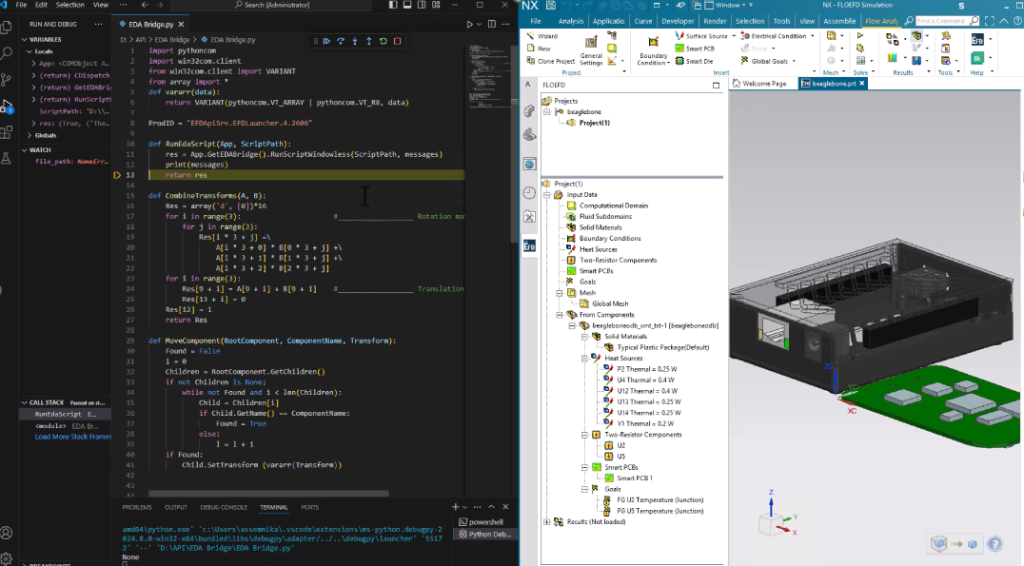
Video overview: EDA Bridge headless operation for automation
Automation: other API enhancements
Automation of simulation tasks continues to be a popular topic. EFDAPI, the new Simcenter FLOEFD API introduced back in version 2312, continues to be developed in each release based on user feedback.
Beyond EDA Bridge automation, more functionality been added in Simcenter FLOEFD 2606 including:
- An easier select coordinate system method
- Enable/disable absorption in default solid
- Add from components, to re-use from sub projects
- Set default outer radiation surface
Curious about PYTHON scripting? that was supported in EFDAPI as of version 2406
Go Faster
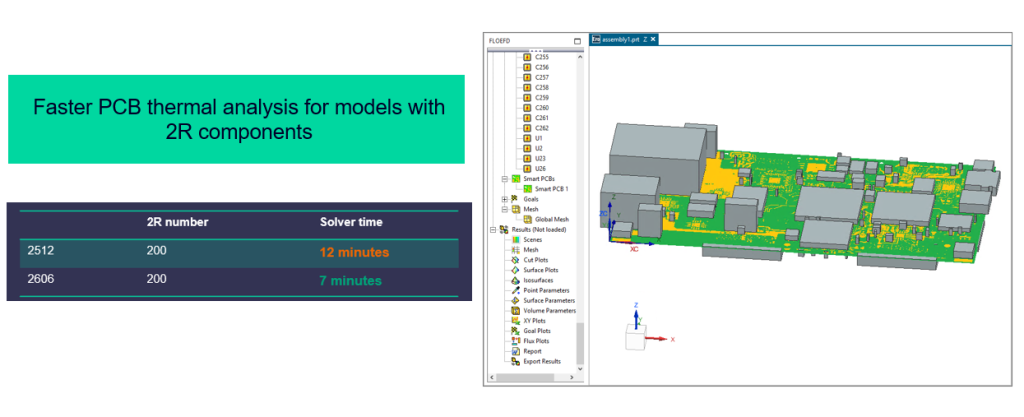
Speed-up: 100’s of 2R components contacting a Smart PCB
For PCB thermal analysis studies where high numbers (100’s) of components modeled as two-resistor (2R) type components are in contact with a board modeled as a Smart PCB, an improvement in computational efficiency has resulted in test models achieving performance of almost 2x faster solution. This was achieved through optimizing mesh contact handling for non-conformal meshes with high cell size ratios.

Stay Integrated
XTXML export enhances package model workflows
XTXML export now supports contact resistance and radiative surfaces at version 2606 to enhance IC package thermal model creation and adding to libraries.
XTXML export for component editing was introduced in the 2506 release allowing users to import models from Simcenter FLOEFD Package Creator utility, make adjustments to the models and then save the models in XTXML format to libraries. Manually created detailed models can also be exported in XTXML format. The previous Simcenter FLOEFD 2512 release enhancement introduced the option to export models of 2R and Network Assembly components.
Download Simcenter FLOEFD 2606 now
For current customers – please visit support center or click on one of the links below.
- Simcenter FLOEFD for NX 2606
- Simcenter FLOEFD for Solid Edge 2606
- Simcenter FLOEFD for CATIA V5 2606
- Simcenter FLOEFD for Creo 2606
- Simcenter FLOEFD Standalone 2606
- Simcenter FLOEFD SC 2606 (Simcenter FLOEFD for Simcenter 3D variant)
A new era for Simcenter
And it does not stop there. With the Simcenter June 2026 release we are bringing together Simcenter and Altair – two of the world’s most powerful simulation portfolios – in a defining moment for engineering.
Gain access to the broadest range of capabilities across modeling and visualization, mechanical, fluids, electromagnetics, systems, HPC, data science, and AI—helping accelerate innovation, simplify workflows, and drive smarter decisions with confidence.