What’s new in Simcenter Flotherm 2604?

Read about the latest enhancements in the Simcenter Flotherm 2604 electronics cooling simulation software release below, or click on a topic on the index on the left. Looking for download instructions? those are at the base of this blog.

Model the complexity

Enhancements to Simcenter Flotherm Pack Module
Simcenter Flotherm Pack Module, introduced in Simcenter Flotherm 2504, is a licensed utility for creating detailed mono-chip package thermal models using a template driven approach. It integrates within your Simcenter Flotherm workflow.. You can create detailed packages within this module and then you can also generate 2-resistor (2R) and DELPHI compact thermal models by leveraging enabled functionality in Simcenter Flotherm’s Command Center tool.
So what’s new in Simcenter Flotherm Pack Module in Simcenter Flotherm 2604:
a) a PCB Template has been added, under the “other objects” tab in the initial create new package window.
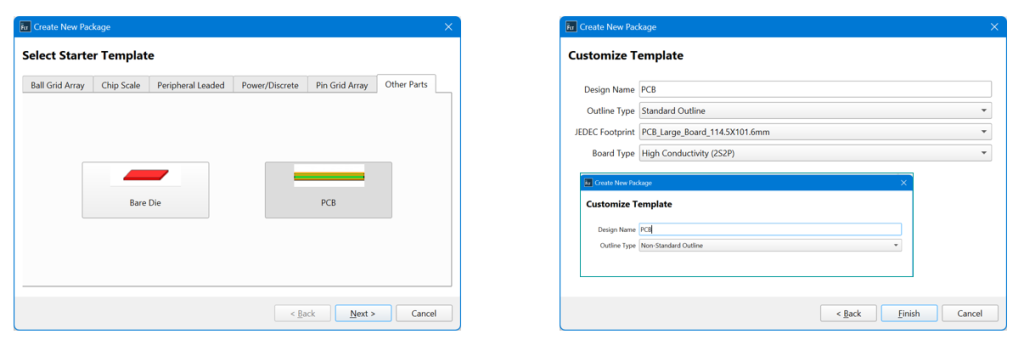
The wizard allows you to easily create the standard JEDEC boards – large and small with either four layers (high conductivity) or one layer (low conductivity) in the Simcenter Flotherm Pack Module utility.
b) users are able to customize DELPHI set up for advanced applications, including importing defined boundary conditions from a CSV file:
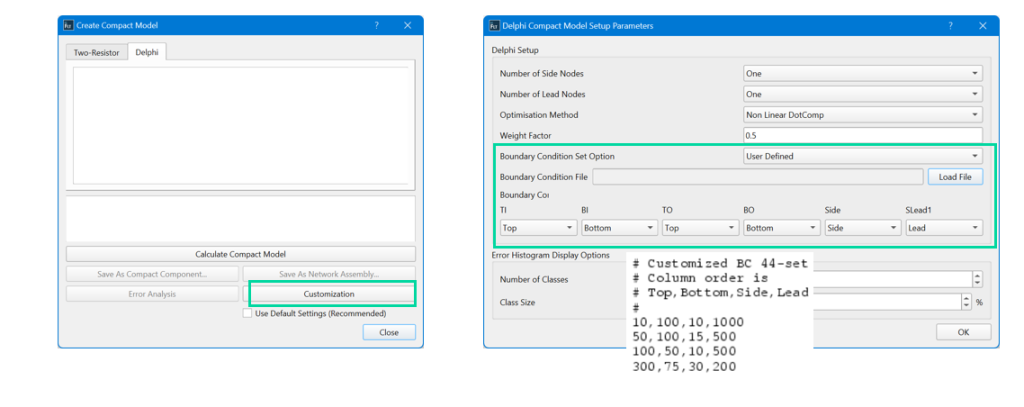
Initially, users select
– The number of side nodes (max two)
– For peripheral leaded packages only the number of lead nodes (choice is one, two or four)
– The optimization method and weighting factor where appropriate
Customization can include using a defined set of boundary conditions loaded from a file. The contents of the CSV file follows a specific format. You can add comment lines at the top of the file using the # character. The data comprises several rows, each representing one boundary condition scenario or single simulation. The data in each row is then made up of a number of heat transfer coefficient values (in W/m2K) separated by commas.
After upload and selection of a boundary condition set, you use progress to the Boundary Condition Mapping section to map columns in your file to the appropriate surface nodes of the compact model (or the surface node partitioning of the detailed model). The surface nodes have drop-down selections corresponding to the number of columns in your file.
c) There is now an error histogram available to judge accuracy of your created DELPHI model in Simcenter Flotherm workflow enabled by Simcenter Flotherm Pack Module.
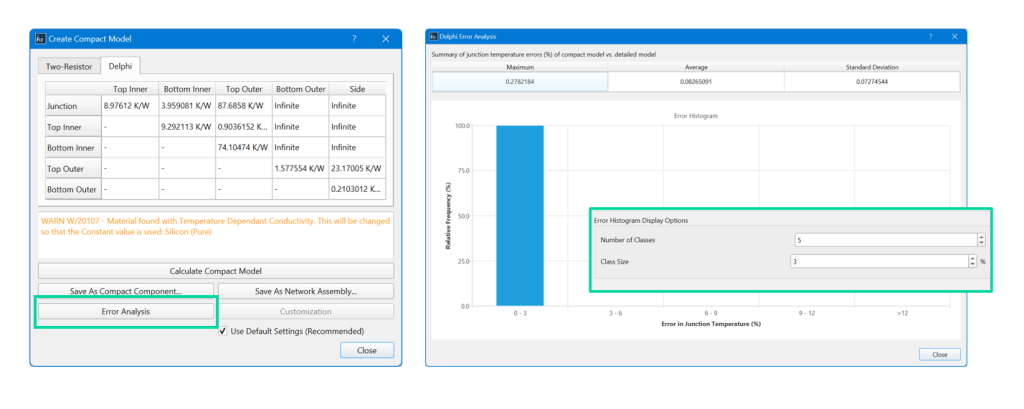
This histogram is available after completion of the scenarios and the DELPHI model is created. It shows the errors obtained from the backfit of the compact model. The histogram displays the fraction of the number of environments corresponding to each error range, or class.
Go Faster
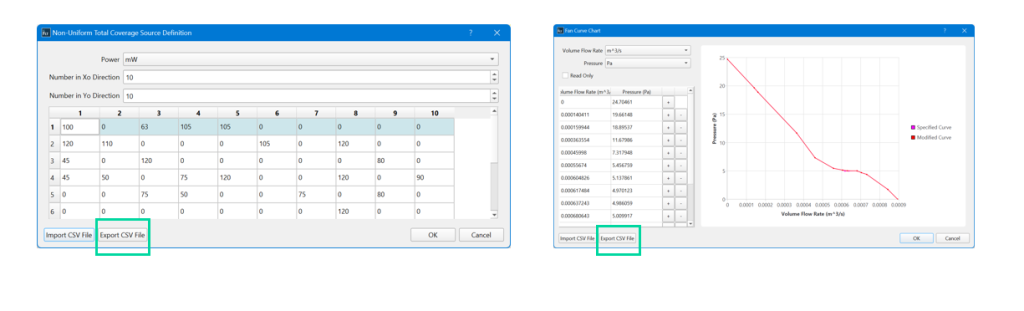
Export CSV data from Smartparts
Die and fan Smartparts are popular with users. To better support users in creating a starting point for changes an export function for CSV data has been added.
Enhancement to viewing model attributes
To enable quick inspection of a model, you can now use a right click option to the attribute name to “show attached”. This replicates functionality of the find operation. When selected, this highlights all the attached objects in the drawing board and the project manager.

Stay Integrated
Additional libraries of ROHM Semiconductor models as Embeddable BCI-ROMs
ROHM Semiconductor (Rohm Co. Ltd) have provided more components to the existing library of Embeddable BCI-ROM resistor shunt models initially added in version 2510. More models have been added to expand support to ROHM customers in the electronics supply chain who are integrating these components so they can perform thermal simulation tasks. These accurate, 3D CFD ready reduced order models were generated from detailed thermal models verified to actual measurement data. They are included with the Simcenter Flotherm 2604 install.
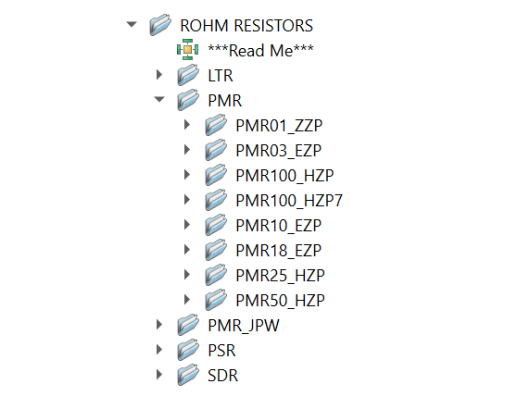
You can access and select to use these models in your Simcenter Flotherm board and system models. You can learn more about Embeddable BCI-ROM models for steady state and transient simulation in this blog. As a reminder, to use these models you do not need the additional BCI-ROM module, which is only required to create BCI-ROM models in each format
ECXML updates
Piecewise linear isotropic conductivity support has been added, an approach for modeling non-linear temperature dependent isotropic conductivity. Simcenter Flotherm continues to stay aligned with updates to ECXML schema.

‘Electronics Cooling eXtensible Markup Language’ (ECXML) is a neutral file format intended to facilitate the provision of thermal models from suppliers to end users of 3D electronics cooling simulation software, such as Simcenter Flotherm and Simcenter FLOEFD. ECXML is published by JEDEC as the JEP181 guideline. To find out more about ECXML and it’s origin, please read this blog by Robin Bornoff.
ECXML is very useful as a neutral file format and export option. However, it only supports a limited subset of wide variety of objects and Smartparts available to users of Simcenter Flotherm. To assist a user exporting models in this format, users can now view warnings for unsupported geometry.
Where to Download Simcenter Flotherm 2604
For Simcenter Flotherm customers, please visit support center to download Simcenter Flotherm 2604 now and to read the release highlights documentation.
You can also download the Simcenter Flotherm viewer from support center in it’s latest 2604 version to share with colleagues so they can view and navigate results from a file you send them.
A new era for Simcenter
And it does not stop there. With the Simcenter June 2026 release we are bringing together Simcenter and Altair – two of the world’s most powerful simulation portfolios – in a defining moment for engineering.
Gain access to the broadest range of capabilities across modeling and visualization, mechanical, fluids, electromagnetics, systems, HPC, data science, and AI—helping accelerate innovation, simplify workflows, and drive smarter decisions with confidence.