Automate DEM simulation and customize workflows with the Simcenter EDEM JSON format

Starting from 2026.1, Simcenter EDEM enables users to automate DEM simulation workflows using a new JSON format that lets users fully setup a Simcenter EDEM simulation from a JSON file or convert existing Simcenter EDEM simulations into JSON.
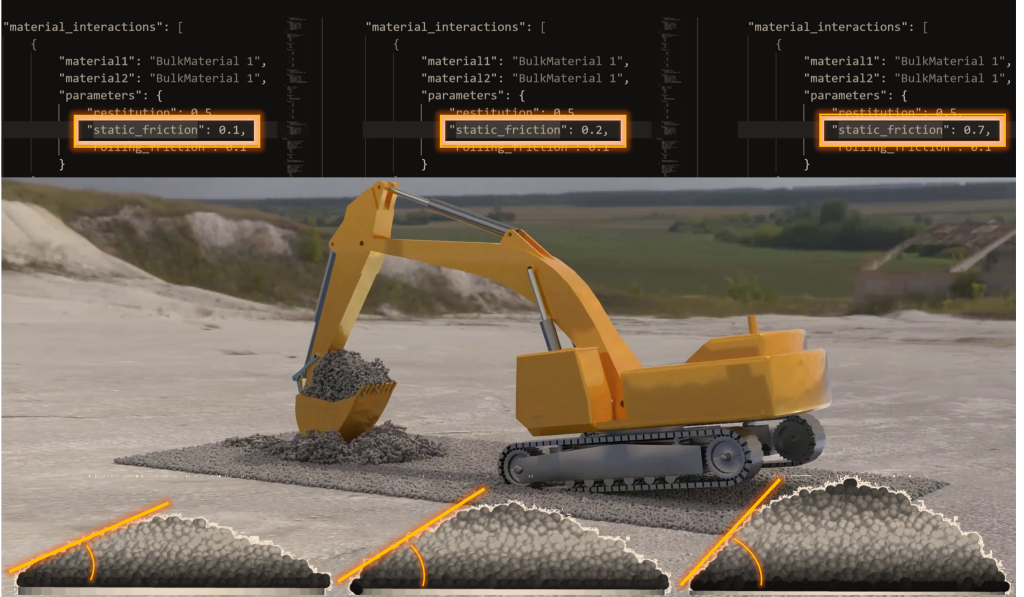
Hunting mouse miles
How many mouse miles did you track the other day, when setting up your simulation? How often did you click just to get a model up and running? How often did you feel like Sherlock Holmes searching for the tiny little difference between two simulations that might explain their tremendously different outcome? How often did you want to run a bunch of model variations but without an error-prone GUI based modify – save-as – rerun workflow?
Now, the solution seems obvious: what you need is scripting and automation! But automation comes with coding I hear you say, and I am not fond of learning yet another language. Even if LLMs are your friend, that does seem a bit of an overkill to automate my simulations.
Well, what if there was a nice way to automate, while being able to understand the underlying inputs to the automation without taking another programming course. This is what you can now do with Simcenter EDEM 2026.1.
A versatile alternative to the GUI for building a simulation
With the release of the Simcenter EDEM JSON format in version 2026.1, we are equipping you with a tool that complements and provides a versatile alternative to the classic GUI approach for building a simulation.
JSON (JavaScript Object Notation) is one of the most popular human-readable text formats for data interchange. It stores data in objects consisting of name–value pairs and arrays and supports data types such as strings, numbers, booleans, arrays, and objects, allowing for flexible data representation.
Opening an entire world of new possibilities
By supporting the JSON format to drive Simcenter EDEM setups, we are opening an entire world of possibilities. Before we take a look at a number of great things the Simcenter EDEM JSON format will let you do, let’s briefly explore what makes it so attractive to setup your Simcenter EDEM simulations through JSON over any other scripted approach.
Effortlessly write valid and consistent simulation files
A Simcenter EDEM simulation typically consists of many components: materials, particle shape and properties, equipment parts and their motion, factories (i.e. particle generation), material interactions, and more.
To create a valid simulation from a JSON file, every component, with its parameters, must be provided in a way that Simcenter EDEM can recognize. We leveraged the JSON Schema and built a Simcenter EDEM JSON Schema, a vocabulary that describes the structure of JSON data for a Simcenter EDEM simulation.
This Schema works for you as a user guide for writing a valid Simcenter EDEM JSON file without knowing all the syntax a priori, while Simcenter EDEM uses it to enforce consistency and validity of the input data before runtime.

Convert a Simcenter EDEM simulation into a JSON file in no time
Even with the guidance provided by the Simcenter EDEM JSON Schema, writing a full Simcenter EDEM configuration in JSON from scratch, and having to comply with all those rules for each parameter, can sometimes feel like climbing a mountain. Simcenter EDEM 2026.1 does provide a rich library of example JSON files, with good coverage of all simulation components and their parameters, which is a great starting point.
But what if you already have an existing simulation, with lots of components, and want to run your own optimization by creating hundreds of copies while changing only one or a few parameters? What if you are not exactly keen on writing an entire Simcenter EDEM model in a text editor from scratch? Well, we’ve got you covered! With Simcenter EDEM 2026.1 we not only provide you with a tool that converts a valid JSON file into a Simcenter EDEM simulation, we also enable the inverse operation: the Simcenter EDEM JSON Parser tool flips your Simcenter EDEM simulation to a valid JSON file and any valid JSON file to a Simcenter EDEM simulation, in no time! You can then create your base simulation from scratch in the GUI, as usual, then convert it to JSON, and you have a text-based equivalent that you can use as a template.
And since the Simcenter EDEM JSON Parser is provided with Simcenter EDEM 2026.1 as a Python package, users familiar with Python will find it easy to load a Simcenter EDEM configuration from JSON, add, remove or modify some components, and create one or more simulations, all through Python. It is even possible to completely bypass a JSON file and fully define a configuration as a Python dictionary, what really matters is that the structure and format defined by the Simcenter EDEM JSON Schema are respected.

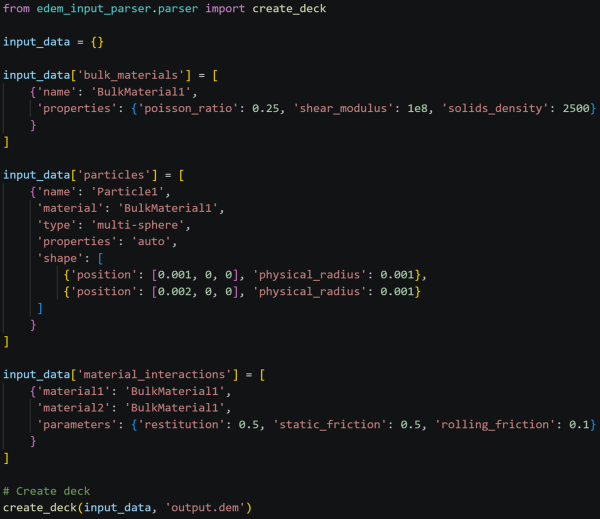
With the Simcenter EDEM JSON Schema and the Simcenter EDEM JSON Parser, we are providing two powerful tools to quickly, robustly and flexibly setup Simcenter EDEM simulations, ready for more efficient automated simulation workflows. All that said, it’s time to look at some…
Real-world examples of Simcenter EDEM JSON format in action
A quick, smart way of comparing two Simcenter EDEM configurations
Here is a common scenario that many will find familiar: you have a simulation with multiple particle shapes, complex geometries with tens or hundreds of parts, each with a different motion, and advanced physics models with calibrated parameters for each material interaction. You have shared this with a colleague, or perhaps you have made a copy for yourself. You run it again and realize the results do not match your old ones. Maybe you changed one small parameter by mistake, like the total mass generated by a factory, or the axis of rotation of a geometry’s motion. How do you find out what has changed between the two configurations? Manually checking each parameter one by one could take you hours, and the chance you would miss it is high. Not an effective use of your time! But what if you could just compare two text files? All popular IDEs have tools for text file comparison, so that would be an easy task.
By leveraging Simcenter EDEM JSON Parser’s ability to convert an existing Simcenter EDEM model into a JSON text file, all you have to do is run the command line tool on both simulations and then compare the two text files, and you will quickly spot that extra 0 in one parameter that changed everything.
Running a calibration or DOE made easy
While there are dedicated tools for these applications, sometimes you just want to do it yourself and create 10-20 simulations, to see how changing one parameter affects your results. It goes without saying that parameterizing a JSON file is much easier than doing the same with binary files. This means that, instead of opening each simulation in the GUI just to modify one parameter, you can simply edit a few text files (either manually or through a script) and generate a set of different simulations in a much more effective way.
Integration with AI agents
At this point, you may already be thinking: who is extremely good at interpreting text files, in particular looking at examples provided and generating new outputs following a set of instructions? AI agents, of course!
Try providing an agent with the binary files that make up a Simcenter EDEM simulation, and it will struggle to know what to do with them. But if you give it a text definition of a simulation you can fully leverage its power. Whether you build your own agents, leverage systems built on one of the provider’s platforms, or use agents embedded in your IDE, you will find in the JSON format an incredibly valuable tool for letting agents support you in your Simcenter EDEM workflows, e.g. by letting them modify simulations in batch, suggest parameter changes, help you conform to the Simcenter EDEM JSON Schema and validate your JSON input. You can even go further and build a full Simcenter EDEM workflow into an agent, from simulation setup to execution and post-processing.
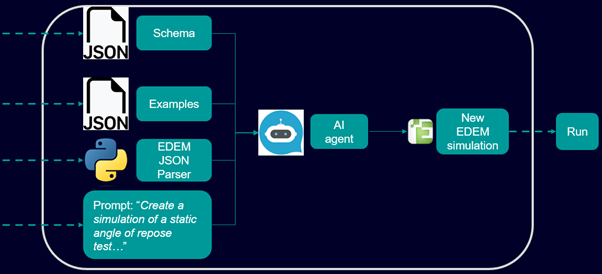
These are just a few examples. Once you embraced the power of Simcenter EDEM JSON input file, I am sure your creativity will be the only limit. To spark some ideas here are some more ways you can use Simcenter EDEM JSON schema to boost your productivity:
- Develop entire custom workflows
- Allow simulation setup in systems where the GUI is not available, such as on cloud
- Facilitate material calibration
- Easily create many simulations with minor changes by copy-pasting text files
- Enable integration of Simcenter EDEM with other Simcenter or 3rd party products
By leveraging the JSON format, engineers can automate DEM simulation workflows, improve consistency, and scale their simulation processes efficiently. Read Simcenter EDEM 2026.1 blog to know more.