NX Tips and Tricks | Documenting your surface treatments
In recent Tips & Tricks, we’ve shown you how to apply surface treatments to a part and access data about them. Now we’ll show you how to document coatings and other surface treatments with NX™ Product and Manufacturing Information (PMI) tools.
Thorough documentation for every aspect of your part, including surface treatments, is essential for downstream processes such as manufacturing once the design phase is complete.
NX PMI tools let you add that documentation to your model quickly and easily, contributing to the Model-Based Definition (MBD) and adding extra fidelity to the digital twin of your product.
Watch the video to see the step-by-step processes, or read on for more information. And if you’ve not already seen them, check out the previous two posts about surface treatments:
Automate PMI notes with Logic Editor rules
Logic Editor is an intuitive visual programming tool that anyone can use to automate a huge array of design and engineering processes within NX, including complex algorithmic modeling. It requires no traditional coding or programming skills and is a great way to reduce the time spent on repetitive tasks.
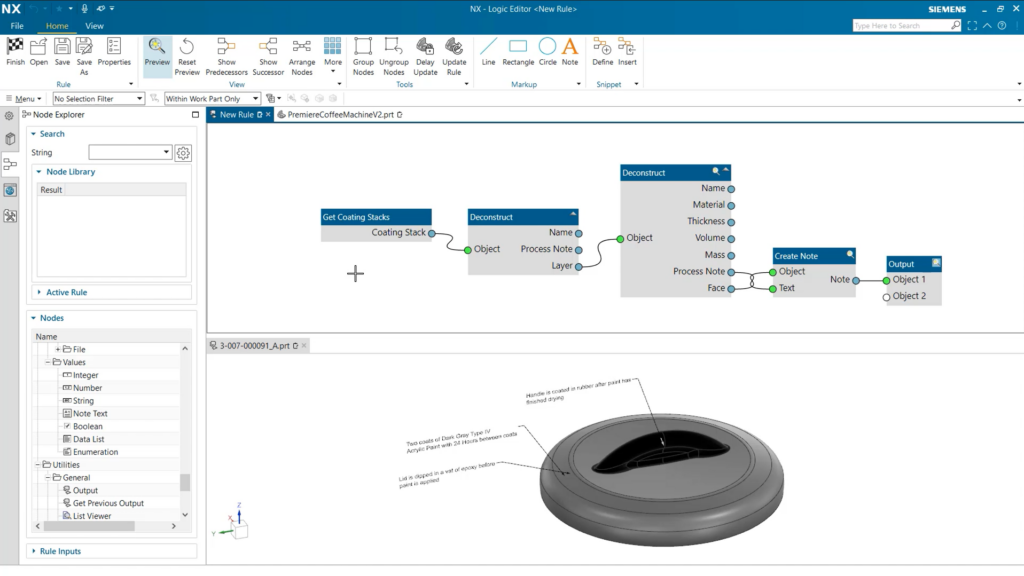
Here we see a simple rule that automatically creates PMI notes about coatings. It gathers information about all coatings applied to a part, including any specified manufacturing processes. It then creates notes for each coating based on this information, each pointing to the relevant areas of the model.
Once you’ve created a logic rule that replicates a certain task or workflow, you can save it for re-use again and again on different parts or assemblies.
Then it’s simply a case of applying and updating the rule with just a few clicks on each new part. For PMI notes, that’s a lot quicker than sourcing all the coatings information manually and writing each note out individually.
Adding surface treatment information to part drawings
With NX and the Xcelerator platform, you can take your designs from concept to manufacture with a continuous digital thread. But we do sometimes need to provide partners and manufacturers with traditional part drawings as well.
It’s easy to include information about coatings and surface treatments on these drawings too.
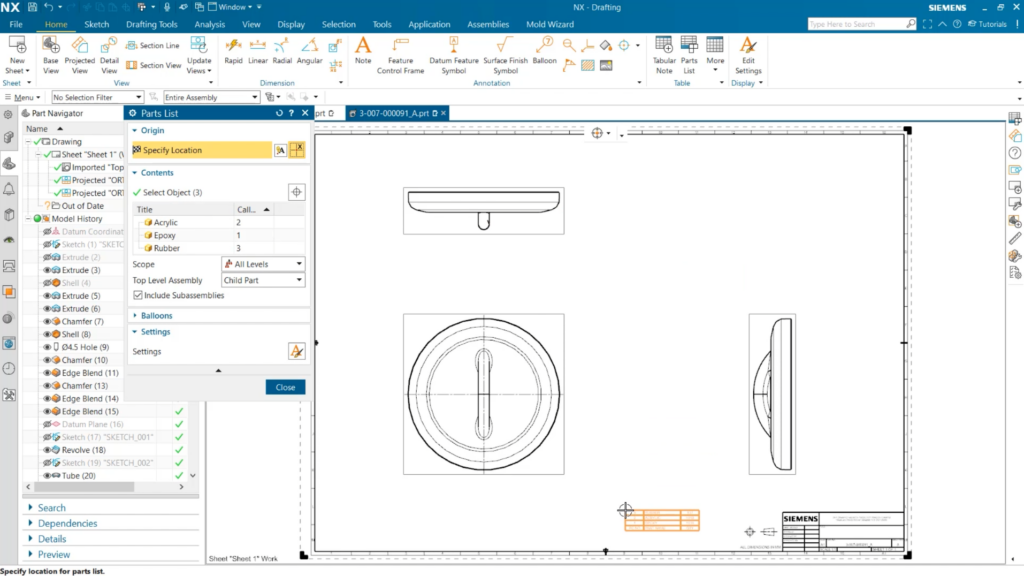
After you’ve assigned a coating to a part, the material and quantity required will automatically appear in the Part List along with the part’s other materials. Then you can simply drag and drop the table to the desired location on the drawing.
Watch the surface treatment documentation video
To really understand how quick and easy these processes are, you need to see them in action. Watch the video and learn how to add PMI documentation for coatings and surface treatments on your part.
The next NX Tips & Tricks entry will continue the surface treatments theme, covering the new Corrosion Analysis model that we added to NX in December 2023. So stay tuned for more!