The latest in Simcenter Mechanical and Modeling
Welcome to your new monthly engineering briefing.
A brand-new monthly series dedicated to the Simcenter Mechanical, Modeling, Visualization, and Manufacturing ecosystem.
Each month, we’re cutting through the noise to bring you the high-impact updates that actually matter to your workflow. Whether it’s a breakthrough in high-fidelity mechanical solvers, a streamlined approach to complex geometry modeling, next-generation visualization tools that turn data into insight, or the latest in digital manufacturing process optimization then we’ve got it covered.
Consider this your “signal in the noise”—a curated deep dive into the tools and techniques that help you engineer the impossible.
What to expect every month:
- Mechanical & Solvers: Deep dives into structural, thermal, and multidisciplinary analysis.
- Modeling & Pre-processing: Tips and new features to slash your geometry preparation time.
- Visualization: Exploring new ways to interrogate results and communicate complex data.
- Manufacturing: Bridging the gap between design and the factory floor with advanced process simulation.
August
Did you catch the release of Simcenter?
This year there have been two major events in the simcenter world. First, we acquired Atair and second we had the initial release of Simcenter X. With so many capabilities now available in Simcenter, engineers can simulate almost anything they can dream of but with so many tools now available they could spend as much time learning tools as getting their work done. Fortunately, the very purpose of Simcenter X is to provide greater integration of the tools in a single environment. The benefits of this will become more apparent and ultimately undeniable as more products are added to Simcenter X in the next few releases. The dev teams are working hard on this and have now aligned their processes so that releases are aligned. So then, it only makes sense that we have a web page that highlights what’s in the global Simcenter release
The end of Simcenter 3D: The latest and the start of something new
If you followed Simcenter 3D: The latest for the year it ran, you may have wondered what happened to it in the last few months. With a small product marketing team and a large number of products added to the Simcenter family after the Altair acquisition, having a monthly blog for each wasn’t possible, so we are scaling up. If you came here looking for a link that you had seen in an old version do not fret, you can get them all in the archives.
Generative AI in Simulation
Simcenter PhysicsAI is an AI-powered engineering solution that accelerates design and simulation by learning from historical data to provide real-time performance predictions on new and unseen designs. Frist released back in 2022, customers have adopted Simcenter PhysicsAI to improve their simulation workflows by quickly predicting results and allowing faster exploration of more design concepts.
In the latest release, Simcenter PhysicsAI Generate has been introduced. Rather than just evaluating designs, Simcenter PhysicsAI now helps create them. By supplying the tool with design requirements, novel design concepts can be created that meet these requirements. Read Nachiket’s blog to explore how this new technology allows you to take a leap from simulation acceleration to concept generation.

Simcenter Hypermesh
What’s new in Simcenter Hypermesh 2026.1

Discover how Simcenter HyperMesh 2026.1 continues to accelerate simulation-driven design with powerful new enhancements for model preparation, meshing productivity and engineering workflows. Whether you’re tackling larger, more complex assemblies or looking to streamline everyday preprocessing tasks, this release introduces capabilities designed to help you work faster, reduce manual effort and improve model quality. Read the full blog to explore the latest innovations and see how they can help you get more from your simulation process.
Post-processing and reporting
Post-processing in 2026.1 sees coordinated refinements across the workflows that engineers spend the most time on after a solver run completes. Hyperview Multicore can now be configured as the default Hyperview profile, simplifying adoption of multicore-enabled post-processing workflows while maintaining compatibility with existing session and template behavior. Chart Manager workflows see substantial responsiveness improvements: chart reopen operations are reduced by 75–90% in representative large-session plotting workflows. Hypermesh plotting workflows now support direct generation of line and complex charts from result data files, including multi-window layouts, cross-plotting, and session persistence — reducing the need to immediately transition into a separate plotting environment for routine review. HTML reporting now supports complex result export, including modal animations, complex result filters, layered result visualization, and synchronized dashboard views. Hypergraph adds support for the ISO/TS 18571:2024 curve-correlation standard with updated scoring metrics and expanded model-to-test validation workflows.


Simcenter 3D
What’s new
The Simcenter 2606 release cycle officially landed, delivering a powerhouse of new capabilities that push the boundaries of simulation. Leading the charge is the What’s new in Simcenter 3D 2606 blog, your essential roadmap to the latest breakthroughs in integrated workflows and expanded multidisciplinary engineering. This central piece explores how the new release empowers you to tackle more complex physics with greater efficiency than ever before. For those ready to drill down into specific technical advantages, we’ve curated a series of deep dives covering everything from high-performance solver advancements in Simcenter Nastran to precision-engineered updates in Rotor Dynamics and Electromagnetics.
- What’s new in Simcenter 3D 2606 Read the blog
- What’s new and exciting in Simcenter Nastran 2606 and Simcenter Optistruct 2026.1 releases Read the blog
- What’s new in Simcenter 3D Rotor Dynamics 2606 – Postprocess modes at critical speeds and efficiency updates Read the blog
- Accelerate your Simcenter 3D Rotor Dynamics analysis Read the blog
- Simcenter 3D 2606: Explore what’s new in low frequency electromagnetics Read the blog
- What’s new in Simcenter E-Machine Design 2606? Read the blog
- From Simulaiton results to data science: Meet the new Simcenter Data File (SCD5) Read the blog
The Latest expert blogs
At siemens we have many expert engineers, and when possible we try to encourage them to share there knowledge. The following blogs are those that have been created in the last month.
Evaluating set screw effectiveness through contact simulation

Are you sure your set screws will actually hold under load? In mechanical design, relying on “good enough” friction estimates can lead to unexpected slippage or costly over-engineering.
This technical deep dive into Evaluating Set Screw Effectiveness through Contact Simulation moves beyond basic assumptions. It explores how to leverage Simcenter 3D to model complex contact interactions, optimize mesh strategies for numerical stability, and use force-displacement curves to pinpoint exactly when a design transitions from “sticking” to “sliding.” Whether you’re troubleshooting a failure or refining a high-precision assembly, this blog provides the simulation roadmap needed to validate extraction limits with confidence.
Smart virtual sensing for EV battery durability testing
Physical sensors can only tell you so much, especially when they can’t survive the harsh internal environment of a battery pack. This blog explores how Simcenter Smart Virtual Sensing is revolutionizing EV battery durability testing by bridging the gap between physical testing and simulation. Learn how to “see” the invisible stresses and thermal loads that define battery life, allowing you to capture critical data from locations where physical sensors simply cannot go.

Virtual Integrated Aircraft: Designing cryogenic hydrogen storage through the digital thread
Cryogenic hydrogen storage is one of the most significant engineering hurdles to zero-emission aviation. Managing extreme thermal gradients while maintaining structural integrity requires more than just traditional design, it requires a Digital Thread. Discover how the Virtual Integrated Aircraft approach allows engineers to connect disparate design stages, ensuring that complex hydrogen storage systems are optimized for safety, weight, and performance long before a prototype is ever built.

From Apollo to Artemis: How the digital twin is accelerating lunar rover development

Designing a vehicle for the moon means engineering for an environment where failure is a catastrophe and “road tests” are impossible. This blog looks at the evolution of lunar exploration, showing how Digital Twin technology is the secret weapon for the Artemis missions. See how high-fidelity simulations are being used to predict rover performance on the lunar surface, helping engineers solve the unique challenges of low gravity and abrasive regolith to ensure mission success.
Case study blogs
Are you wondering why our customers choose us? We have numerous case studies that highlight exactly this and your sales contact will happily share them with you. But if you like things that are new a shiny then you will find the latest case studies we have released below.
How to win customers and inform designs with pre-bid intelligence: A case study with EMC FIME

Winning a contract often depends on the accuracy of your initial quote, but how do you guarantee performance before the design is even finalized? EMC FIME gained a significant competitive edge by using Simcenter to provide “pre-bid intelligence.” By simulating performance during the quotation phase, they moved beyond simple cost estimates to provide customers with validated design concepts upfront. This approach not only increased their win rate but also eliminated the risk of costly, late-stage design changes by ensuring feasibility from day one.
How Bosch Mobility accelerated design with Siemens’ Designcenter NX and Simcenter 3D
For a global leader like Bosch Mobility, the key to staying ahead is shrinking the gap between a concept and a finished product. By implementing a unified digital thread with Siemens’ Designcenter NX and Simcenter 3D, Bosch successfully dismantled the traditional silos between CAD and CAE. This integration allowed their engineers to iterate in a synchronized environment, drastically reducing development cycles and accelerating time-to-market. Discover how this seamless workflow enabled Bosch to maintain peak engineering precision while moving at the speed of the modern mobility market

.
Video
Automating Result Probes for Design Space Exploration in Simcenter 3D and HEEDS
Manual iteration is the enemy of innovation. This video demonstrates how to break the cycle of “trial and error” by integrating Simcenter 3D with HEEDS to automate design space exploration. Using a vehicle lower control arm as a case study, you’ll see exactly how to tag CAD expressions as variables and result probes as responses to drive an automated optimization loop. By leveraging the “Update for External Change” command, engineers can seamlessly minimize component mass while satisfying complex stress, displacement, and modal frequency constraints, turning simulation from a validation tool into a powerful design engine
The video feeds on youtube clearly need an update, and we will work on that this week. In the meantime, here are some links you may find interesting.
How To Use Imprint To Create A Congruent Shell Mesh Across Sheet Bodies, How To Run A Plastic Large Strain Analysis In Solution 401, How To Import Simulation Files Into Teamcenter, How To Update Expressions from Updated Result Probes, How To Calculate The Section Inertia Along A Beam, How To Create Automatic Selection Recipes, How To Use Groups & Selection Programs, How To Assign Properties To Meshes From Ship Basic Design, How To Create And Run Linear CGAP Elements, How To Move Objects, How To Request Output From Nastran In SCD5 Format, How To Create Root Sum Squared Results With Results Combination, How To Import A Table of Fields From A CSV File

Simcenter Nastran
What’s new and exciting in Simcenter Nastran 2606 and Simcenter Optistruct 2026.1 releases
The backbone of high-performance simulation just got stronger. This blog breaks down the latest advancements in the Simcenter Nastran 2606 and Simcenter Optistruct 2026.1 releases, focusing on the solver enhancements that drive faster, more accurate results. From significant performance gains in structural and vibro-acoustic analysis to new optimization workflows that help you find the ideal design balance sooner, this update is all about giving engineers more power at the solver level. Whether you’re managing massive model assemblies or pushing the limits of topology optimization, these updates ensure your simulation engine is running at peak efficiency


Simcenter Femap
The real threat to next‑generation aircraft programs isn’t weight

In aerospace, we’ve spent decades obsessing over every gram, but the biggest risk to modern aircraft programs isn’t a heavy component—it’s a lack of continuity. This provocative blog explores how the true “program killer” is the accumulation of risk in the handoffs between disconnected engineering teams. When assumptions from one model become the inputs for another without a unified digital thread, small changes can create catastrophic ripple effects that invalidate months of work. Discover why shifting your focus from weight management to coordination of knowledge is the only way to navigate the extreme complexity of next-gen aviation and ensure your program stays on track for certification.

Simcenter Inspire
What’s new in Simcenter Inspire 2026.1

Simcenter Inspire 2026.1 brings faster, smarter design exploration into a unified simulation-driven environment. With new AI-powered PhysicsAI workflows, expanded implicit modeling tools, and multi-profile support across structures, motion, fluids, and manufacturing, the release helps engineers evaluate design changes earlier, reduce workflow interruptions, and move from concept to production with greater confidence.

Simcenter Radioss
How AI-powered structural optimization could have saved the Empire’s AT-ST Walker

What if the Empire’s engineering team had access to modern simulation and AI? This entertaining Simcenter blog uses the Star Wars AT-ST Walker as a familiar case study to show how AI-powered structural optimization, topology optimization and crash simulation could reduce mass, improve structural performance and enhance pilot safety. It may not seem it at first, but you will discover that it is highlighting the same kinds of workflows used by today’s automotive and aerospace engineers.

Simcenter S-Frame
What’s new in Simcenter S-Frame v2026.1?

Simcenter S-Frame 2026.1 expands the everyday structural engineering toolkit with new design code support, stronger foundation review capabilities and broader material workflows. From ADM 2020 aluminum frame design and updated Canadian concrete and timber codes to barrette pile modeling, SRC section support and improved graphical foundation checks, this release helps civil and structural engineers design, validate and report with greater confidence across a wider range of projects.
This blog includes a number of demo videos to show you what’s in the latest release and how it is used.
Design Code Requirements
The Design code requirements for the latest release are now available to download. See what products in the Simcenter S-Frame collection support which design codes.

Simcenter Optistruct
What’s new and exciting in Simcenter Nastran 2606 and Simcenter Optistruct 2026.1 releases
See above for the latest info on the recent Simcenter optistruct and Simcenter Nastran release blogs
Star Wars – How AI-powered structural optimization could have saved the Empire’s AT-ST Walker
Along with Simcenter Radioss, Simcenter Optistruct was used to optimize the destruction of the empire, one imperial walker at a time. Jump to the Simcenter Radioss section to find out more

Simcenter Simsolid
What’s new in Simcenter Simsolid 2026.1

See how Simcenter Simsolid 2026.1 makes the power of simulation even more accessible with new capabilities that help engineers analyse complex designs faster and with greater confidence. From enhanced performance and expanded physics capabilities to workflow improvements that simplify everyday analysis, this release is designed to help you get answers more quickly without the burden of traditional meshing. Read the full blog to discover what’s new and how these enhancements can accelerate your engineering decisions.

Simcenter Simlab
Keep pace with today’s multi-physics challenges with Simcenter Simlab 2026.1

Explore how Simcenter Simlab 2026.1 helps engineers keep pace with increasingly complex multiphysics challenges through a more connected, streamlined simulation workflow. With enhancements designed to improve efficiency, simplify model preparation and strengthen integration across simulation disciplines, this release empowers teams to move from design to insight more quickly. Read the full blog to discover the latest updates and learn how Simcenter Simlab can help accelerate your multiphysics simulation processes.
Engineering a World Cup Goal: From sketch to stress results in minutes

What if you could take a concept from a simple sketch to validated engineering results in just minutes? This blog demonstrates how modern simulation tools are transforming the engineering process by making advanced structural analysis faster, more intuitive and accessible. Follow the journey from an initial World Cup goal design to actionable stress results, and discover how simulation can help engineers evaluate performance, explore alternatives and accelerate innovation with confidence.
Simcenter Software Trials
Many of our software products are now available for a free trial, and to make things easy for you, we have listed them all on one web page. Check out this web page to discover the features and functionalities of Simcenter products. Each product trial includes fully licensed software, complete with sample files and guided tutorials. Enjoy instant access anytime, anywhere, without the need for massive downloads or lengthy installations.
Siemens for Start-Ups

A new global initiative to work with founders that want to effectively collaborate with Siemens, refine their solutions, scale their business, and bring their innovations to market faster.
Student editions
We have a deadicated student edition allowing any student to use expert level simulation software. You can get a brief overview of the avaialble solutions here, or start learning to use it today, with the free deadicated training pathway. Learn more in the release blog, or dive right in and download now!

Training
There are many training options available that are provide by both siemens and our partners, here is a list of those that I found after a short search. If you don’t see a class that you are interested in here, take a look at our class finder
| Date and host | Course Title | Link |
| August | ||
| 17th Maya HTT | NX Customization and Programming using NX Open API | Link |
| September | ||
| 14th Maya HTT | Simcenter MAGNET Introductory | Link |
| 14th Maya HTT | Simcenter 3D Electronic Systems Cooling | Link |
| 14th Maya HTT | Simcenter 3D Space Systems Thermal | Link |
| 28th Maya HTT | Simcenter 3D Thermal Multiphysics | Link |
| October | ||
| 26th Maya HTT | Simcenter 3D Low-Frequency Electromagnetics for Rotating E-machines | Link |
| November | ||
| 2nd Maya HTT | NX Customization and Programming using NX Open API | Link |
| 9th Maya HTT | Simcenter 3D Electronic Systems Cooling | Link |
| 30th Maya HTT | Simcenter 3D Space Systems Thermal | Link |
| 30th Maya HTT | Fundamentals of Simcenter E-Machine Design | Link |
Blogs by tag
Blogs are the easiest way for us to get a message out and therefore you will find a wide range of content on Simcenter 3D and the other packages we work on, such as Simcenter Tire, Simcenter FEMAP, Simcenter E-Machine Design, and Simcenter Madymo, you can find all of our blogs here:
Blogs by product
If you want to stay focused on just one product then you can find content produced by various teams across Siemens that discuss individual products with the following links
Blogs by domain
Or you can focus on the domain you are most interested in.
Join the community
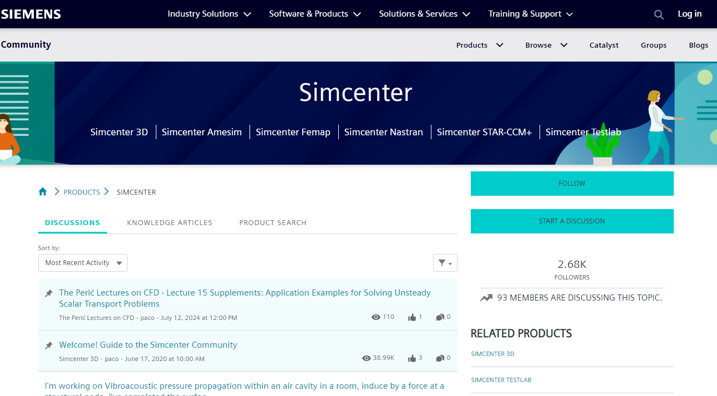
The Simcenter communities are the best place to find experts and a community of users to discuss and solve problems together. If you are tired of searching the web for answers or if you can’t find what you are looking for in the help documentation, then join the community.
Downloads and other assets
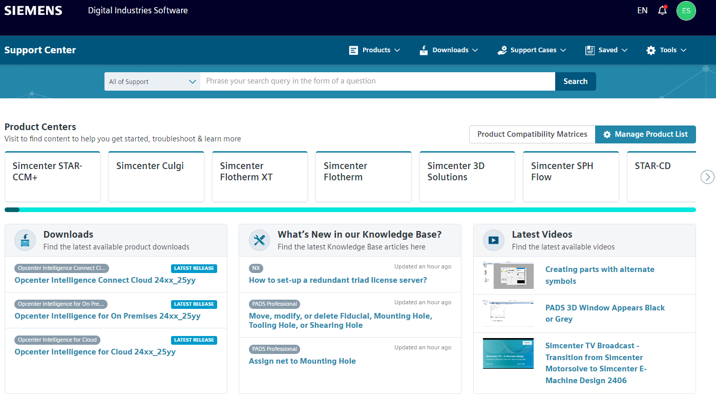
You likely saw the Support Center when you downloaded the software originally, but did you stay to look around? Now full of support documents, videos, and more. It is always worth checking to get the latest updates. It is also where you can create support tickets.