Streamline transfer path analysis with Simcenter Testlab Neo

Can you hear that rumble?
As electric vehicles quietly transform our roads, you’ve likely experienced this remarkable shift firsthand. Step into an EV, press the start button, and… silence. But that peaceful quiet suddenly unveils an unexpected acoustic world. Without the familiar rumble of combustion engines masking other sounds, we’re discovering a new acoustic landscape in our vehicles. Air conditioning whispers become conversations, auxiliary systems find their voice, and most importantly… the road beneath us tells its story.
Road noise did not appear with the EV, but it has emerged as a major new acoustic challenger in our electric future. This previously masked sound source now takes center stage in the EV driving experience, demanding innovative solutions and reshaping how we think about vehicle acoustics.
How do test engineers work to evaluate the impact and the physics at play behind it? And most important: how can you make this evaluation fast and efficient?
Get the right data!
NVH engineers need to evaluate and understand the road noise for different operational conditions. Depending on the road surface, the vehicle speed… and other parameters, the perceived noise and vibration in the vehicle will change. So it all starts with operational measurement. And good news, Simcenter Testlab provides the perfect tool for this: easy sensor definition, interactive data visualization, automatic data processing… No need to be a 15-years experienced test engineer to get the right data!
How do you obtain your operational measurements? How do you structure them? The traditional way is rather to get one run per condition (speed, road surface, etc.), start/stop the acquisition at each predefined location on the test track, then process, validate and analyze each run separately. It does the job! But isn’t there a more efficient and user-friendly way to measure and process?
Simcenter Testlab Neo introduces a fully automated way to validate and prepare your data for road noise analysis. The Process Designer capability in Simcenter Testlab Neo can automatically identify the different specific test track segments from one single long trace time. It can identify either smooth or rough road (Belgian blocks), speed (e.g. 30, 50 or 80 km/h), and identify a predefined test track area via GPS position. You can even define your own trigger condition. What this means to you is that you no longer need to manually start and stop your data acquisition at each point on the track, which can ultimately save you time.
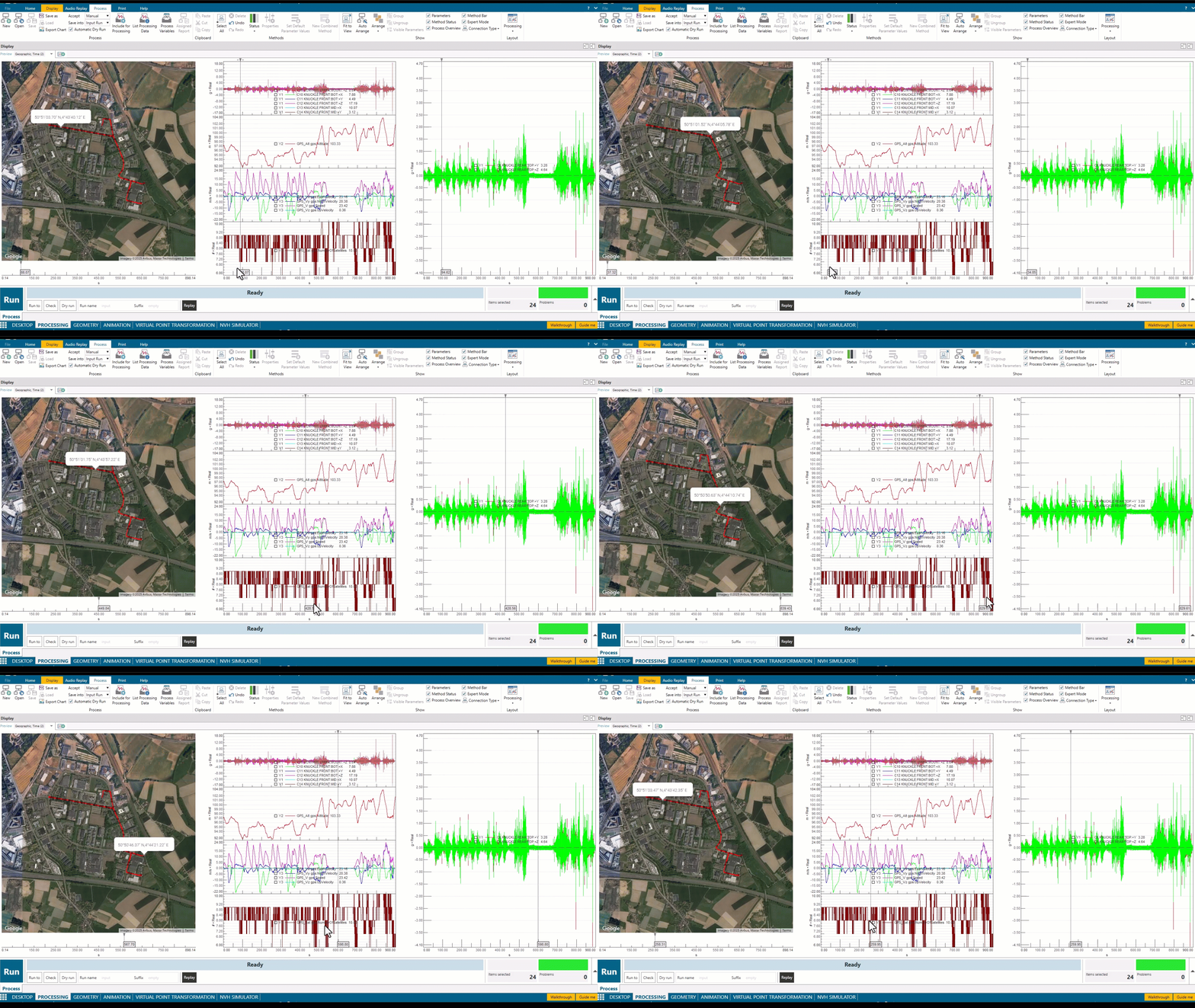
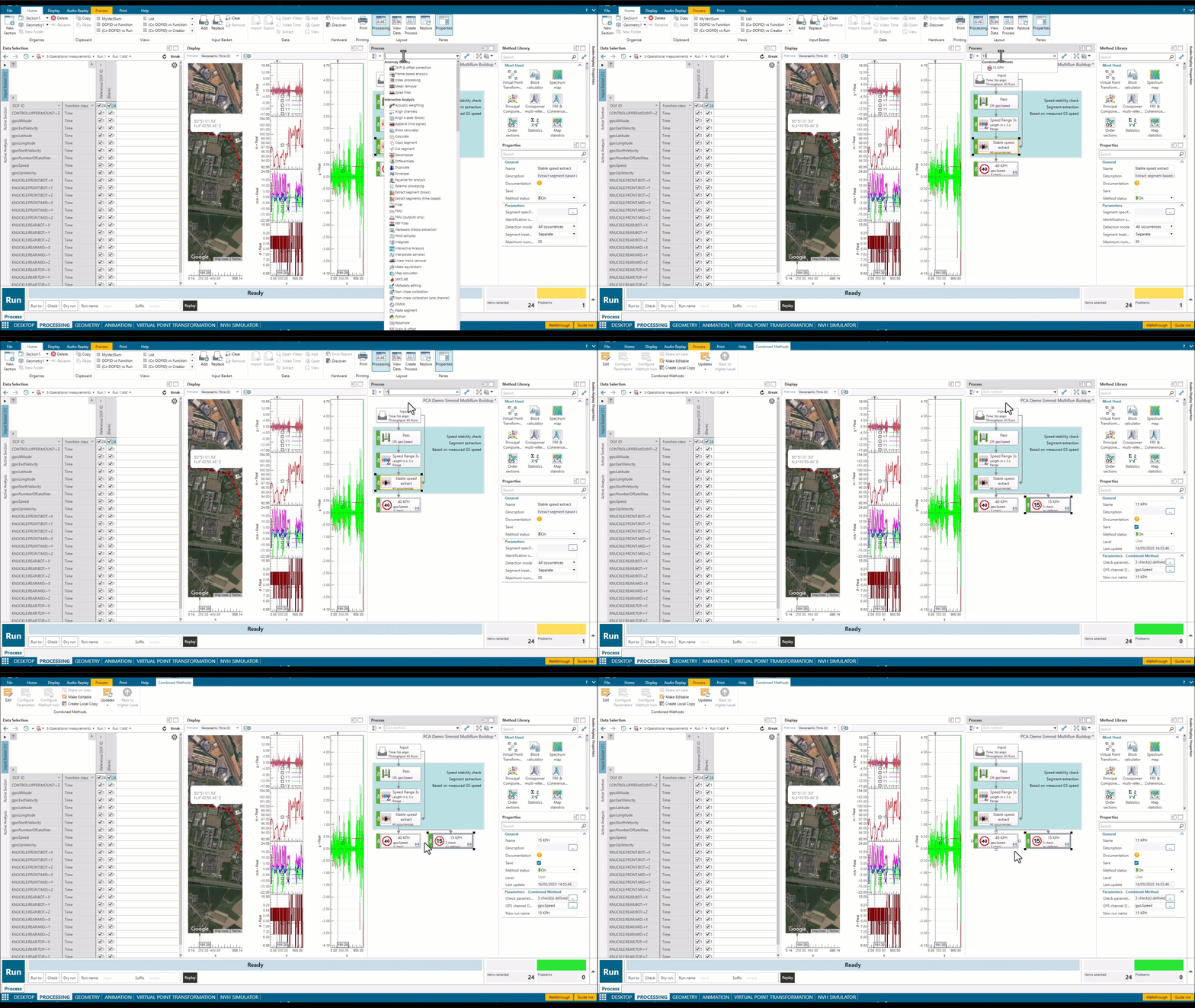
Bonus #1: Not only will Process Designer automatically cut the right time segment(s), but it can also validate the quality of the measured data by applying predefined data checks. This means you can quickly know if the data is good before the test technician leaves the track! See how we use this functionality for steering wheel testing.
Understand the source: How many wheels?
Let’s keep the focus on the main requirement: getting a deep understanding of the noise and vibration process from the wheels to the vehicle compartment. We know how to do such analysis, this is called Transfer Path Analysis (TPA).
Traditional TPA assumes that at any single frequency that is analyzed, there is only one source present. When multiple sources (example: 4 tires!) act at the same frequency, and are correlated, there are problems in the math. This typically results in an over estimation of the forces (the forces are higher than in real life) from inverse methods. Unless you are studying a unicycle, multi-reference analysis is required.

I first have two bits of news for you:
- This blog post won’t go in the deep technical explanations of multi-reference NVH analysis. Instead you can read about it this knowledge article!.
- The Simcenter Testlab Neo Process Designer can simply do the process for you automatically, within the same click as the segmenting and time data check! Multi-reference processing and Principal Component Analysis are brand new functionalities in the new 2506 release.
And here’s a more exciting one: by performing the data preparation in Simcenter Testlab Neo’s Process Designer, and thanks to this single intuitive workflow that ensures accuracy and robustness, this new process can save you up to 40% of the data preparation time compared to before.
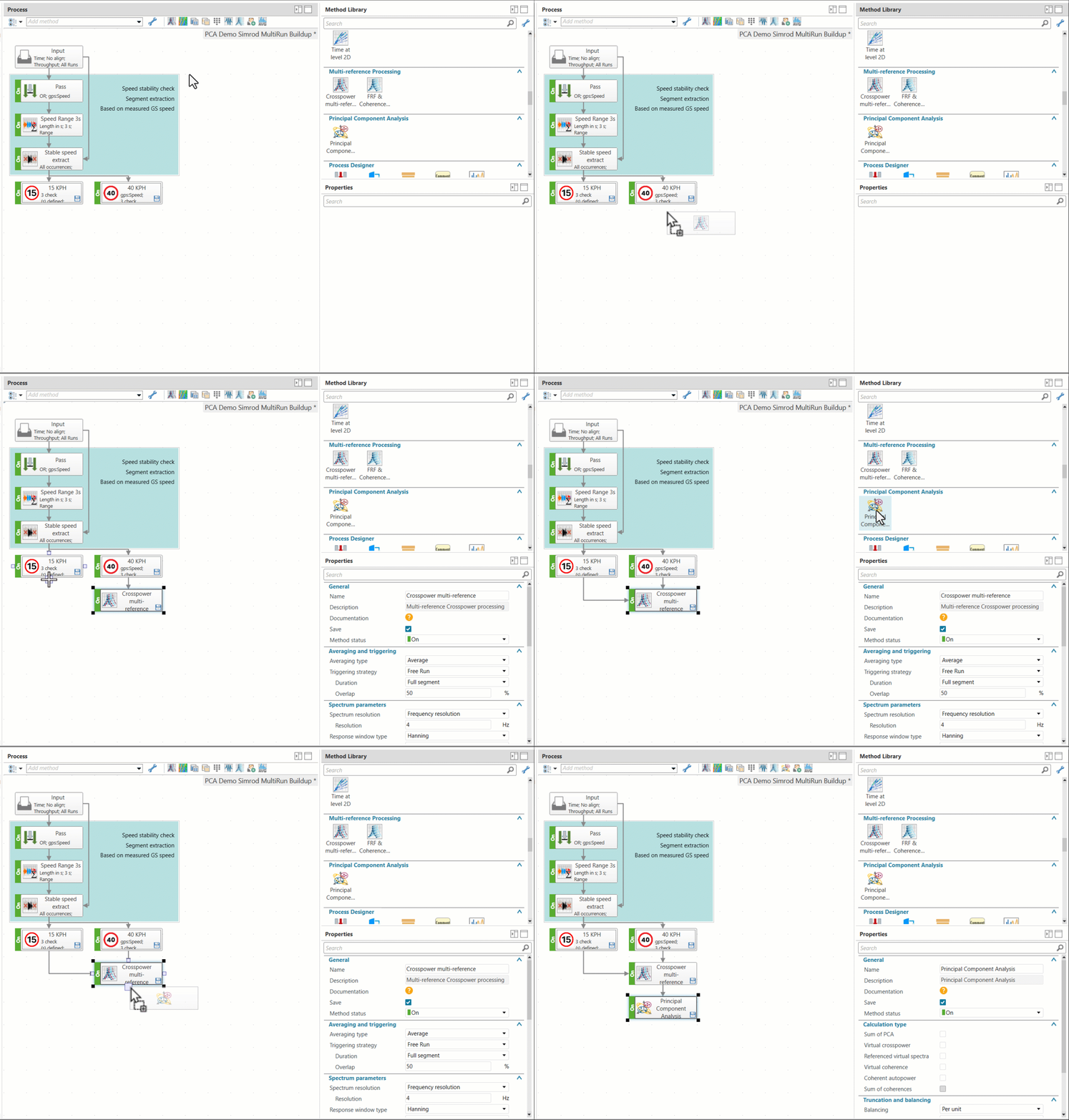
If you are familiar with road noise data processing, you might have your own way of working. Shall we start a debate? Do you prefer to use the source (typically vibration at the knuckle) or the target (noise and/or vibration in the vehicle) as a reference to your multi-reference post-processing? Whatever your preferred way of working, Simcenter Testlab Neo will adapt. Even better, the definition of references and responses offers an unmatched level of flexibility! When combined with Process Designer, you are literally one click away from multi-scenario analysis.
Watch the video below to see how Process Designer revolutionizes your analysis workflow with unprecedented adaptability! Instant channel adaptation, multiple parallel analysis strategies, and seamless workflow integration:
With just one click, you can move seamlessly from time data to PCA results, streamlining the process and reducing the need for multiple tasks or switching between sheets, while maintaining a clear overview of the workflow. Multiple scenarios can be tested in parallel, enhancing efficiency for troubleshooting, and the ability to identify references at the PCA level adds flexibility to how the process is defined.
Identify noise problems with transfer path analysis
With the correct operational dataset identified, sliced, and validated by Process Designer, you can move to the deep analysis phase using transfer path analysis to understand the NVH performance. The main objective of TPA is to break down the problem in paths, so it is possible to identify where potential issues are coming from. The basic math of TPA aims to multiply the operational loads by the transfer functions of each path to each target location.
If the operational loads, cannot be identified directly (which is often the case), there are indirect methods to identify these. The most common and widely used method is the Matrix inversion.
This process seems simple, but it can easily become complex. The good news is that as the multi-reference processing and principal components described above, Simcenter Testlab Neo 2506 introduces a new Transfer Path Analysis application that guides you to perform the deep dive analysis into the different contributions to the paths. Even more it brings flexibility to compare several different analyses to provide confidence to achieve the best possible results.
Road noise example
Taking the road noise example above, let’s see how it works:
Step 1: Define the TPA model
The first step is to define the TPA model and datasets that will be used. As expected, the datasets consist of FRFs and operational data. The video below demonstrates how Simcenter Testlab Neo helps you define these elements. They are created by using the data previously measured. Hence, by using the information already present in the data, the model is organized, helping an easier definition of the roles of each point (targets, paths, indicators). For the datasets, the pivot view automatically organizes the data and the preview display plots the select data, for review and quality checks.
Bonus #2: You are not tied to just one model, FRF dataset and operational dataset! You can create as many as you want. You will see how to combine them in the next step.
Step 2: Perform the analysis
After at least one of each element is defined, it is time go to the analysis task. Here you will be able to create as many analyses as needed. Each analysis is a combination of a model, datasets and its settings. Let’s see how it is done:
Per analysis is possible to select the method will be used, define the frequency range, the inversion truncation criteria (if needed), the selection of targets, paths and indicators, and what results should be stored. For example, you can duplicate an analysis and remove some singular values, reduce the number of indicators or even select a different FRF set. This gives you the flexibility to easily examine the impact of these settings in the final results. In one place, you can get an overview of the different settings used for the analyses.
Once the analysis or analyses are processed, it is time to investigate and compare the results.
As results it is possible to check the calculated loads, each contribution and its sum and some quality indicators as singular values and condition number.
In one interface, you can create one or several analyses, define the model and datasets to be used, and the its settings. Moreover, once processed, you can assess the quality it, plot the results and compare them. All these can reduce the comparison time by up to 30% compared to before.
Conclusion
Electric vehicles have made road noise a bigger focus for engineers, and understanding it is key to creating a quiet and comfortable ride. Simcenter Testlab 2506 makes this much easier. It helps NVH engineers quickly collect the right data, easily validate and process it, and run powerful analyses in just a few clicks, without needing advanced expertise.
With its new automated tools, flexible workflow, and clear visuals, Simcenter Testlab Neo cuts out manual steps and lets you compare different scenarios easily. No matter how you prefer to work or what your road noise challenges are, Simcenter Testlab Neo adapts to your needs.
In short: Simcenter Testlab Neo takes the hassle out of transfer path analysis and accelerates your end-to-end process by up to 40% so you can focus on solving real noise and vibration problems and deliver better EV experiences, faster.