Experience AI-assisted modal analysis with Simcenter Testlab 2506
After 50 years, modal testing and analysis is still going strong
Despite being an established process in industry for nearly 50 years, modal testing and analysis is far from retirement. Even in the digitalization era, it is still considered a crucial tool for the validation of numerical models and for understanding and verifying the dynamic behavior of products. But things have changed over the years. In the past, modal analysis was carried out by modal specialists. However, today noise and vibration generalists tend to perform modal testing and analysis. Since they are generalists, they are not performing modal analysis on daily basis. This means questions like “How should I interpret the stabilization diagram?”, “Which pole should I select?” and “How do I understand if it is a physical or numerical pole?” have become more relevant for a wider range of users. Moreover, any changes to the selected poles or analysis settings have so far required multiple iterations, making the process inefficient—even for expert users.
While Simcenter Testlab has had strong tools to perform modal analysis for decades, Siemens set out to challenge ourselves in trying to improve the process from the user’s perspective, targeting both novice and experienced users. The result? The new Modal Dashboard with AI-assisted modal analysis, available in Simcenter Testlab Neo 2506, that will speed up your modal analysis processes up to 5-7X faster than before.
From a task-centric to a dashboard-driven workflow
First, we wanted to reduce the number of clicks required to obtain a validated modal model – so not only selecting the poles but also iterating through the selection until you reach the desired quality. To achieve this, we moved from a task-centric approach, where specific Simcenter Testlab workbooks were carrying out specific tasks, to a dashboard solution, where the most relevant information you need is visible all on one page, allowing you to iterate within the same workbook.
This resulted in the new Modal Dashboard , that allows you to carry out modal analysis with just 2 steps:
Step 1) Data collection and analysis settings:
In the first step, you collect and review the data to be analyzed and specify the main analysis settings. This then computes the stabilization diagram.
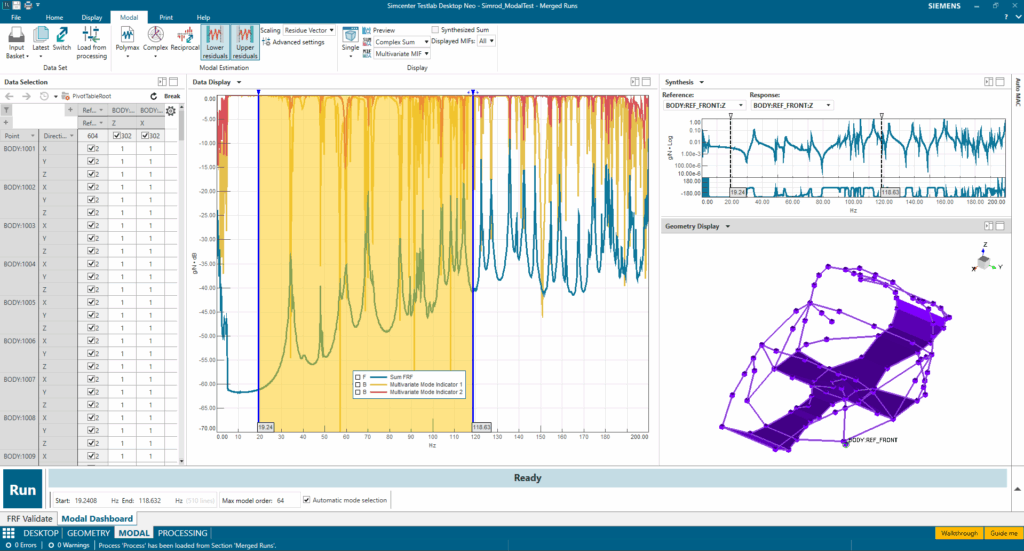
When opening the new Modal Dashboard, data are retrieved from the input basket and are visualized together with traditional mode indicator functions, such as the FRF Sum, CMIF, and etc. You then specify the frequency band for running the analysis and the maximum order to solve the model against. You can also specify the other parameters impacting the stabilization calculation (such as the solver or the tolerances) at this stage.
All other parameters which involve the modes calculation and the residuals can be adapted later on. This is also where you can choose to perform the analysis in full manual mode or rely on the new automatic mode selection tool, but we’ll get back to this in a second.
Step 2) Identifying the modal model:
The second step starts with the calculation of the stabilization diagram, and this is where most of the exciting action takes place. As you select the poles, Simcenter Testlab calculates the modes and can also animate them at the same time. The software will also asses FRF synthesis and populate the autoMAC matrix. These tools offer all information needed to validate the model at a glance and help you judge whether key modes are missing or if too many poles where selected.
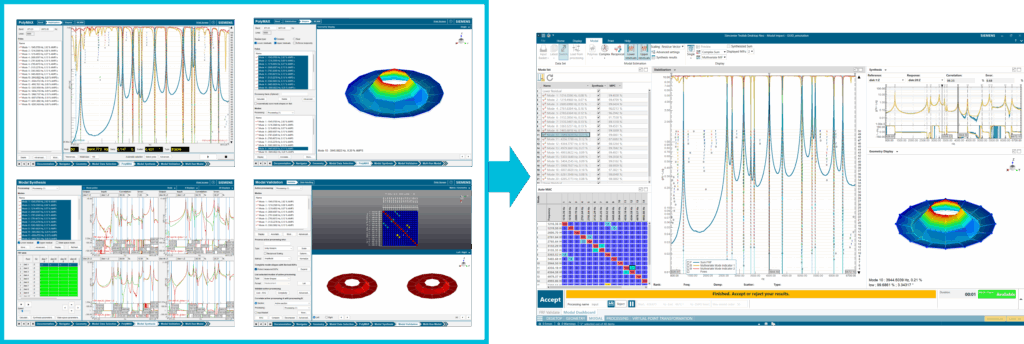
In the past, you would have had to jump across many different tasks until you obtained the desired results. Now, the new Modal Dashboard displays all information available immediately, making the whole process a lot more interactive. You can easily check the impact of computing modes with complex or real residues, visualize contribution of poles to the overall synthesis or detect numerical modes or spatial aliasing. You can also just save the modes once satisfied with the results, rather than having one mode set per each iteration.
AI-assisted modal analysis in one-click
The second target for this release was to accelerate the process and minimize the number of iterations required to achieve optimal results. Two main objectives were clear:
- Empower novice users to reach expert-level outcomes with minimal effort
- Provide expert users with a strong starting point that reduces repetitive adjustments.
By merging traditional machine learning with a rule-based system and embedding everything within the Modal Dashboard, Simcenter Testlab transforms modal analysis into an efficient and intuitive experience.
The result: a new AI-assisted automated modal analysis process that puts the full modal model in your hands instantly, not just the poles. With the new Modal Dashboard, you can validate results immediately and dive into fine-tuning with ease.
This hybrid-AI approach to automatic mode selection unfolds in three powerful steps:
- It clusters stable poles in the stabilization diagram and picks a standout representative for each cluster.
- It verifies that each representative pole truly reflects a unique feature.
- From these selected poles, the system computes modes and evaluates their contribution to the modal model, eliminating any numerical poles that don’t serve the analysis.
For a detailed breakdown, see this blog: Get modal analysis right on your very first day with AI assistance
But wait, there’s more to discover in Simcenter Testlab!
New stabilization diagram views
The latest release also elevates the stabilization diagram experience with brand-new visualization options, empowering you to interpret results more intuitively than ever before. The classic view remains—ranking poles by model order and categorizing them by stability. However, now you can switch to a dynamic frequency-damping plane where you’ll immediately spot how tightly grouped the high-confidence mode estimates are, their stability evident in consistent frequency and damping values across model orders.
You can also declutter your analysis by focusing solely on stable poles: simply toggle the “stable-only” view to display these as bold black dots, whether you prefer the traditional frequency-rank or the innovative frequency-damping representation. Pairing this “stable-only” visualization with automatic mode selection brings another advantage—color-coded clusters highlight the assignment of each pole, making it simple to assess the effectiveness of the algorithm and quickly pinpoint any areas where it may need adjustment.
Validate your results at a glance
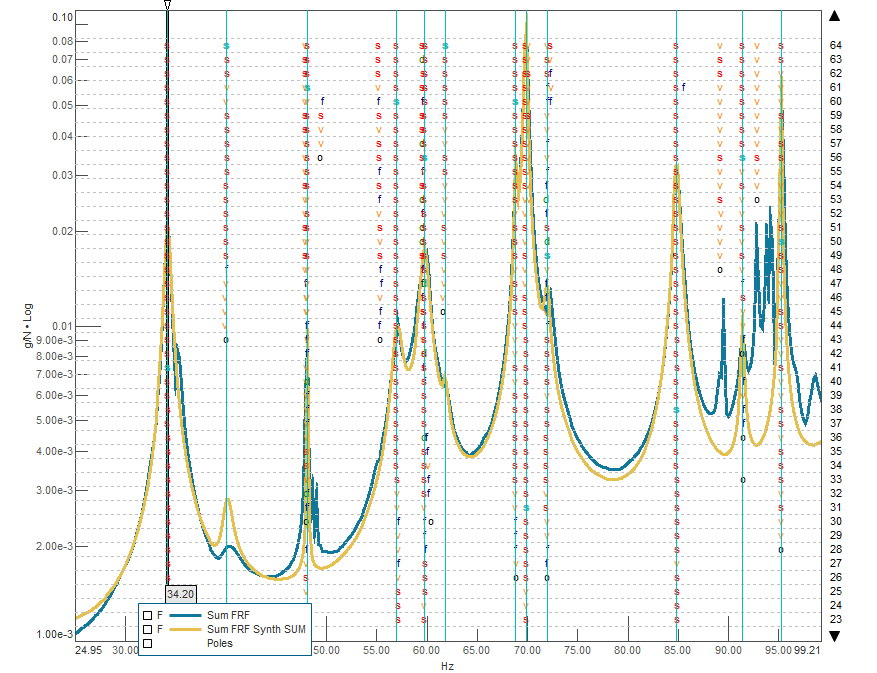
One of the most effective ways to validate the quality of a modal model is to recalculate the FRFs using the modal parameters—creating a synthesized FRF—and overlay them directly with the measured FRFs. When the synthesized curves closely match the measured ones, you can confidently rely on the accuracy of your results.
With the new modal dashboard, you gain even deeper insights. Now, you can compute the Synthesized FRF Sum and instantly compare it with the FRF Sum right within the stabilization diagram. This clear, overlaid comparison lets you quickly assess the overall quality of your modal model and immediately spot any areas where the model struggles to replicate the measured data.
Parallelized calculations
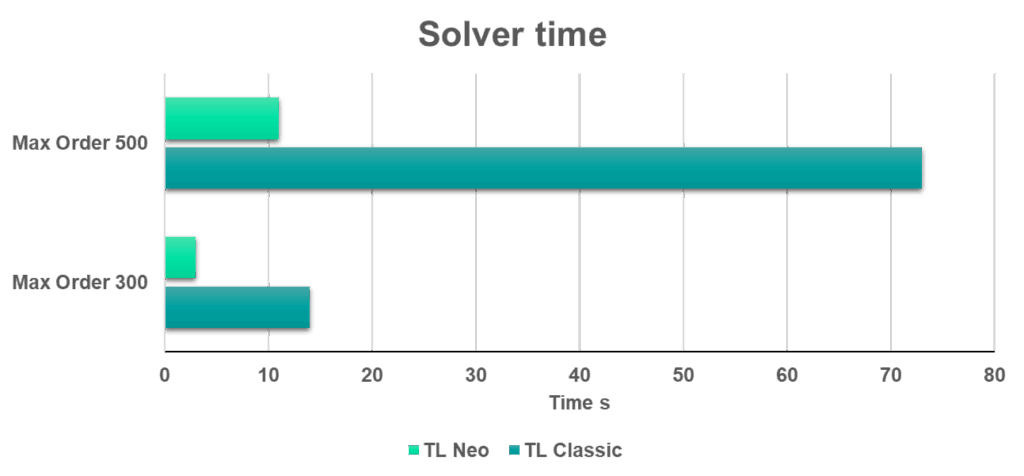
When you analyze complex structures with extensive FRF matrices, multiple references, and numerous modes within your frequency band of interest, you often need to solve the stabilization diagram to very high model orders. These large-scale computations can slow down your workflow. With Simcenter Testlab 2506, both Time MDOF and Polymax solvers harness the full power of your hardware through multi-threading, enabling you to tackle larger models at unprecedented speed.
Experience effortless modal analysis today
Experience effortless modal analysis—whether you’re a seasoned expert or exploring for the first time. Simcenter Testlab’s new AI-powered solution accelerates your path to optimal results, delivering precision in just a few clicks and saving you valuable time.
Get started with AI-assisted modal analysis today
After downloading Simcenter Testlab 2506, check out this Getting Started with Modal Analysis article on the Simcenter Physical Testing Community site. This article includes detailed, step-by-step instructions along with a video that explain how you can begin taking advantage of this new solution today!