PLM Document Management: Connected and Under Control

Documents are at the center of every product development project. Specifications, procedures, work instructions, reports, and technical documents help teams make decisions, complete tasks, and maintain consistency across the organization.
When documents exist in multiple locations or are shared through disconnected systems, teams can lose confidence in the information they are using. People spend time searching for files, determining which version is current, and tracking down approvals.
A connected approach to PLM document management helps solve these challenges by providing a single environment for creating, reviewing, approving, and managing product-related documentation. PLM document management is the process of creating, reviewing, approving, controlling, and maintaining product-related documents throughout the product lifecycle.
In the video below, we demonstrate how Teamcenter X helps organizations manage documents, understand document relationships, streamline approvals, and maintain a complete history of document activity.
Want to watch this video series from the beginning? 👉🏼👉🏼 Start here!
Save the YouTube playlist to get notified when new episodes drop.
This is the fourth video in our series exploring Teamcenter X use cases, from project scheduling and requirements management to document management, change, integrations, and reporting. While PLM document management in Teamcenter X supports many capabilities, this video focuses on one common use case: creating, reviewing, approving, and managing product documentation within a connected and controlled process.
Why PLM document management matters
Product development generates a significant amount of documentation. Requirements, specifications, procedures, quality records, and supporting documents all contribute to the final product.
Managing this information manually often leads to duplicate files, inconsistent data, approval delays, and limited visibility into document status.
PLM document management provides a structured way to manage documents throughout their lifecycle. As product complexity increases, effective PLM document management helps organizations maintain control and traceability across requirements, designs, changes, quality processes, and manufacturing activities.
Create documents with consistent information
Teamcenter X includes document templates and data mapping capabilities that reduce manual effort and improve consistency.
Information such as document IDs, titles, revisions, and other metadata can be managed once and reused wherever needed. This reduces duplicate data entry and helps prevent mistakes that occur when information must be maintained in multiple places. Standardized document data also supports audit readiness, compliance initiatives, and consistent reporting across programs.
Understand document relationships
Documents are often connected to requirements, changes, designs, and project activities.
Teamcenter X provides relationship views that allow users to see these connections directly. Teams can quickly identify associated requirements, change objects, design information, and supporting files.
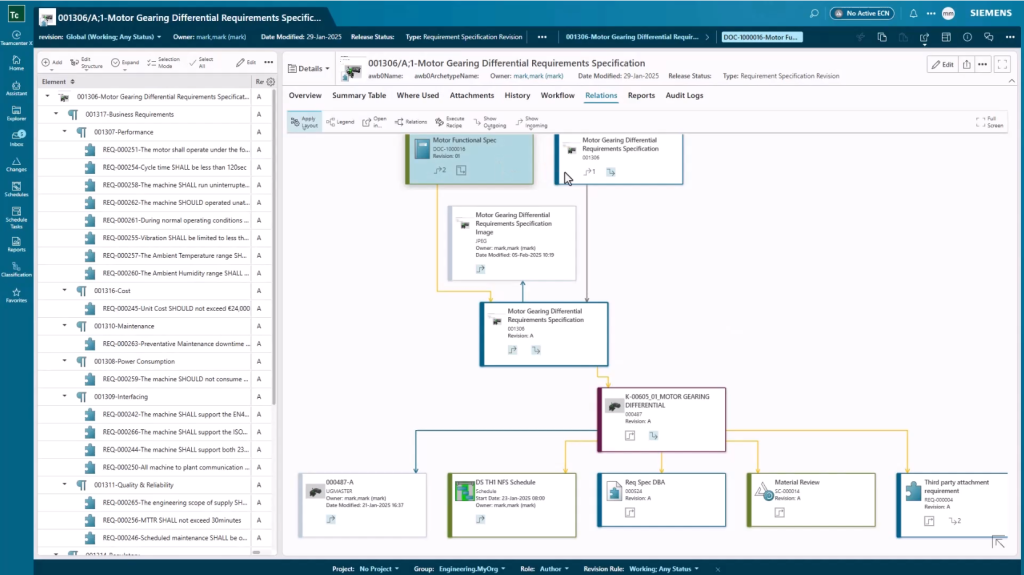
Having this context available makes it easier to understand why a document exists, what it supports, and how updates may affect related work. These connected relationships help create a digital thread that links documents to requirements, changes, product structures, and supporting engineering information.
Review documents and capture feedback
Document reviews frequently involve input from multiple contributors.
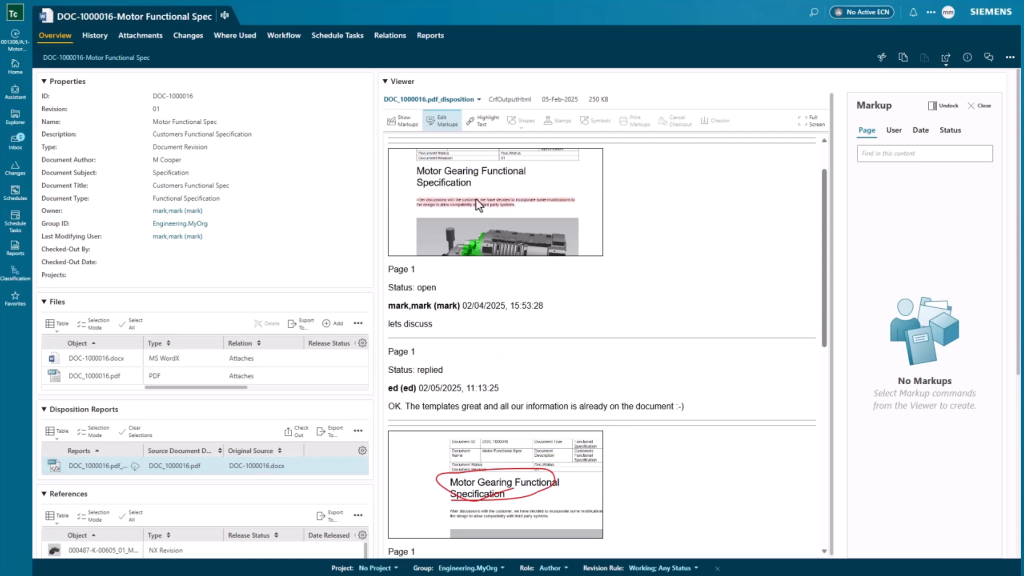
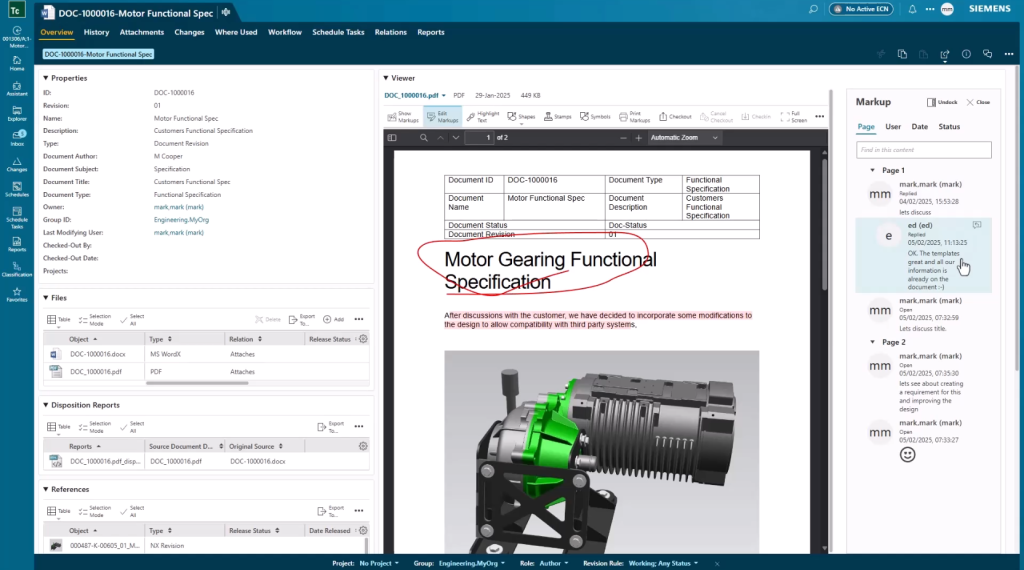
Within Teamcenter X, reviewers can add markups, hold discussions, and capture feedback as part of the review process. Conversations remain attached to the document, making it easier to understand decisions and track responses. This reduces review cycle times and helps teams resolve feedback more efficiently.
Disposition reports capture the review activity and preserve it as part of the document record.
Guide approvals through workflow
Documents often follow a defined review and approval process.
Teamcenter X workflows route activities to the appropriate people and provide visibility into the current status of the document. Team members can see where a document is in the process, review comments, and access a complete record of approvals and decisions. Automated workflows help ensure that approved documents follow consistent governance processes across teams and programs.
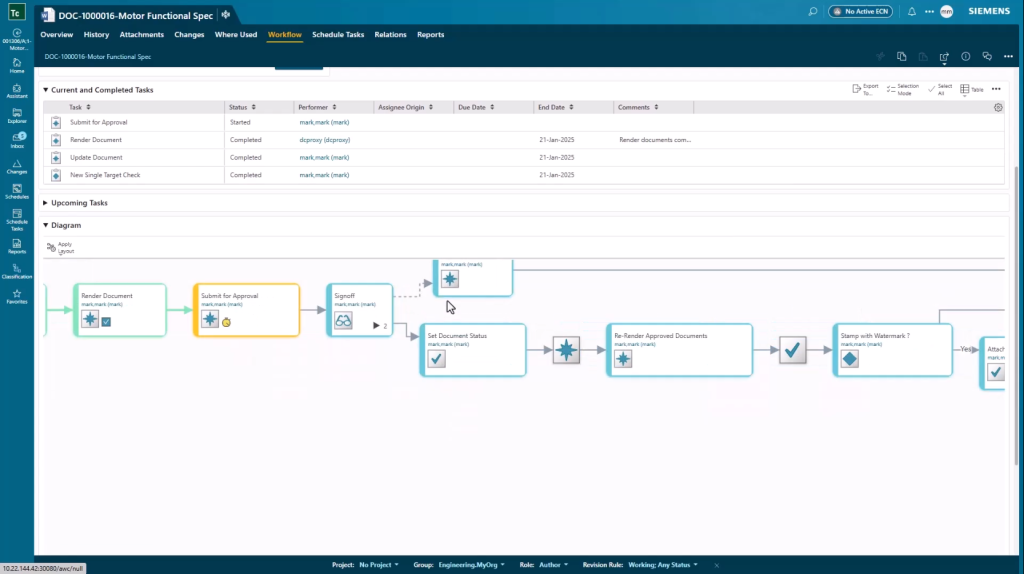
This creates a clear and auditable history throughout the document lifecycle.
Work directly from Microsoft Office
Many organizations create documentation in Microsoft Word, Excel, and PowerPoint.
Teamcenter X integrates directly with Microsoft Office, allowing users to open, edit, and save documents without leaving their normal authoring environment.
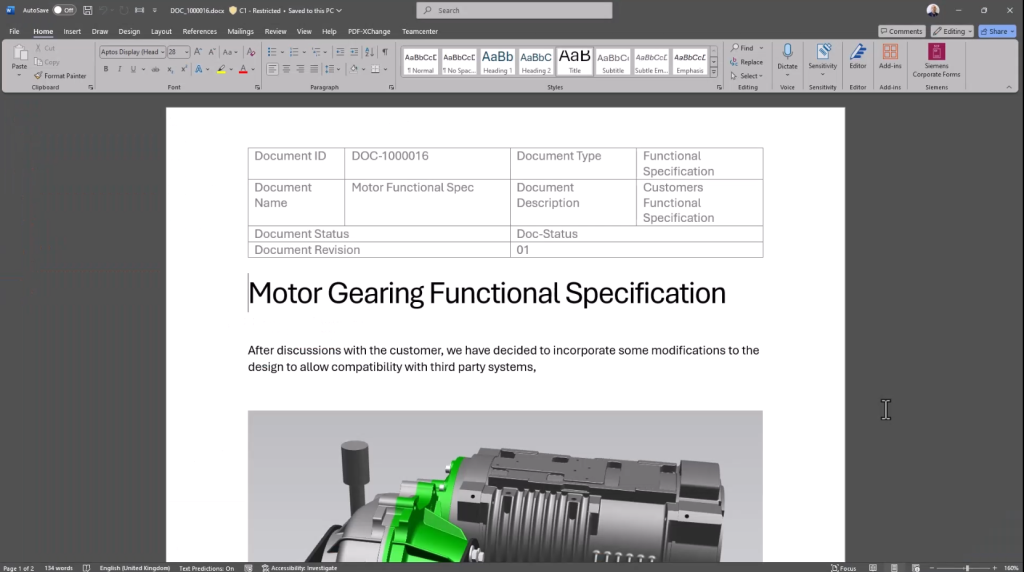
Document information managed in Teamcenter X, including document ID, title, and revision, can be automatically populated into Office templates. Users can continue working in familiar tools while maintaining PLM document management processes and controls. After updates are completed, documents can be saved back into Teamcenter X where revisions and related files are managed automatically.
This reduces manual data entry and helps maintain consistency across documents.
Maintain control of document revisions
As documents progress through reviews and approvals, Teamcenter X manages revisions and creates updated renderings, including PDF outputs when needed.
Teams always have access to the latest approved version while maintaining a history of previous revisions. This helps support compliance efforts and provides confidence that the correct information is being used. Revision history supports traceability by preserving approved records throughout the document lifecycle.
Eliminate version confusion
One of the primary goals of PLM document management is ensuring that everyone works from the same approved information.
By connecting documents to requirements, workflows, changes, and product data, Teamcenter X helps reduce duplicate files and version confusion while improving collaboration across teams.
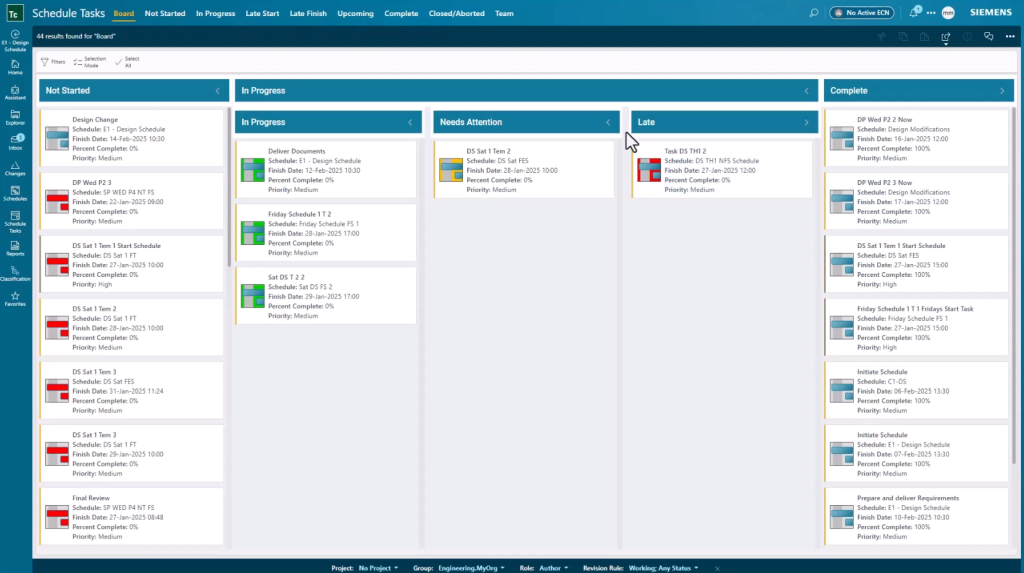
The result is better visibility, greater consistency, and fewer delays caused by document-related issues.
Keeping documents connected throughout the lifecycle
Effective PLM document management is not simply about storing files. It is about managing information within the broader context of product development.
With Teamcenter X, documents remain connected to the requirements, changes, workflows, and product data that give them meaning. Teams can create documents more efficiently, collaborate more effectively, and maintain control throughout the entire document lifecycle.
When everyone has access to the latest approved information, projects move forward with greater confidence and fewer interruptions.
Learn how Teamcenter X supports PLM document management by helping teams manage documents, workflows, revisions, and product relationships within a connected digital thread. Watch the full video and explore the remaining Teamcenter X use cases in the series.
About this series
Want to watch this video series from the beginning? 👉🏼👉🏼 Start here!
Save the YouTube playlist to get notified when new episodes drop.
Jump directly to other blogs in this playlist as the series develops:
- What is Teamcenter used for?
- Schedule planning
- Requirements management process
- PLM document management
- Simple change management
- ECAD and MCAD integrations
- Review and reporting
This series takes a practical look at some of the capabilities available in the preconfigured Teamcenter X Standard and Advanced tiers. Each video explores a common product development use case to show how connected SaaS PLM capabilities can work together in day-to-day execution.
This series is not an exhaustive look at every capability. Teamcenter X continues to evolve with new features and enhancements being added regularly. Instead, this series is designed to give an accessible, practical overview of how these capabilities come together to drive better outcomes.
FAQ
What is PLM document management?
PLM document management is the process of creating, reviewing, approving, controlling, and maintaining product-related documents within a product lifecycle management system.
Why is PLM document management important?
PLM document management helps organizations maintain document control, improve collaboration, reduce version confusion, and ensure teams use approved information.
How does Teamcenter X support PLM document management?
Teamcenter X supports PLM document management through document templates, Microsoft Office integration, workflows, review capabilities, relationship management, revision control, and document traceability.
🧠 Make smarter decisions with AI-powered PLM
🚀 Start fast and grow with Teamcenter X
🚗 Take the Teamcenter X 30-day test drive
🌟 Learn more about Teamcenter solution