Create digital work instructions, product catalogs and technical publications more efficiently

Technical publications teams are under increasing pressure to create accurate digital work instructions, product catalogs and service documentation while keeping pace with product complexity and frequent engineering changes. RapidAuthor for Teamcenter helps organizations create and manage technical publications more efficiently, with new enhancements for authoring DITA compliant digital work instruction, improved import of S1000D data, style sets for digital product catalogs and an expanded Easy Plan integration.
| In this recorded webinar, we’ll demonstrate these capabilities and show how they help technical publications teams work more efficiently. |
Who should attend?
This webinar is designed for professionals involved in creating and managing technical publications, including:
- Technical publications managers
- Technical writers and illustrators
- Digital work instruction authors
- Manufacturing documentation teams
- Service documentation teams
- DITA content authors
- S1000D specialists
- Teamcenter users responsible for technical content
What will you learn?
We’ll demonstrate how RapidAuthor helps technical publications teams:
- Create DITA-compliant digital work instructions
- Improve S1000D authoring and publishing workflows
- Generate job cards from Easy Plan process data
- Streamline technical content management in Teamcenter
- Improve productivity when creating digital product catalogs and illustrations
- Reduce manual effort through automation and validation capabilities
Create DITA-compliant digital work instructions more efficiently
We have added two new specification components for work instructions, so you can now create them according to the DITA standard. The previous specification component, RapidWorkInstruction, is still available in the new release, but it is recommended using the new specifications instead.
We continue to work on expanding the options for customizing the appearance and content of PDF publications. New features include the support for non-standard fonts, storage of PDF rules files in custom DITA OT plugin, and automatic cleanup of plugins used by rules.
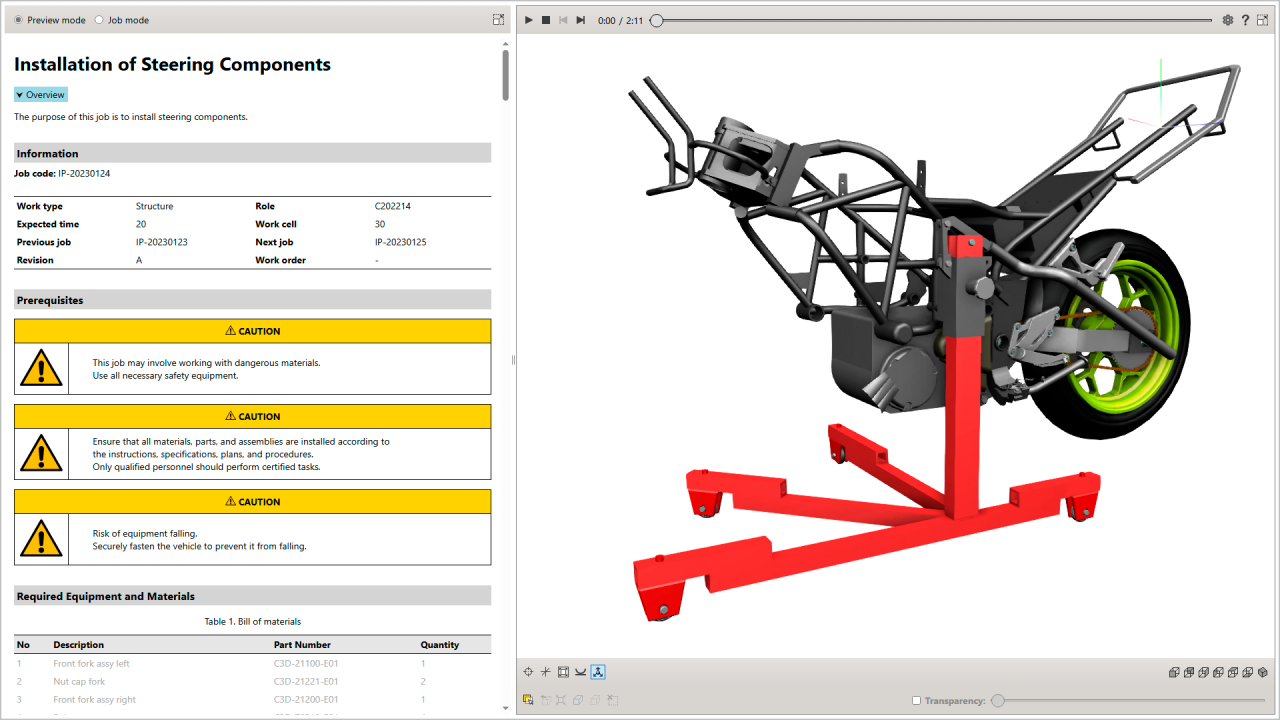
A new DITA-compliant work instruction
Explore the interactive demo to see how the new DITA specifications provide your end-users with highly-effective, interactive text, 2D and 3D content, in addition to traditional PDF and HTML.
Format fault reports in accordance with the S1000D standard
We have expanded support for Fault Isolation, an S1000D data module for managing troubleshooting procedures. New metadata allows you to generate properly formatted S1000D-compliant fault reports in PDF and HMTL formats. These enhancements help technical publications teams create more consistent S1000D-compliant documentation while reducing manual formatting effort.
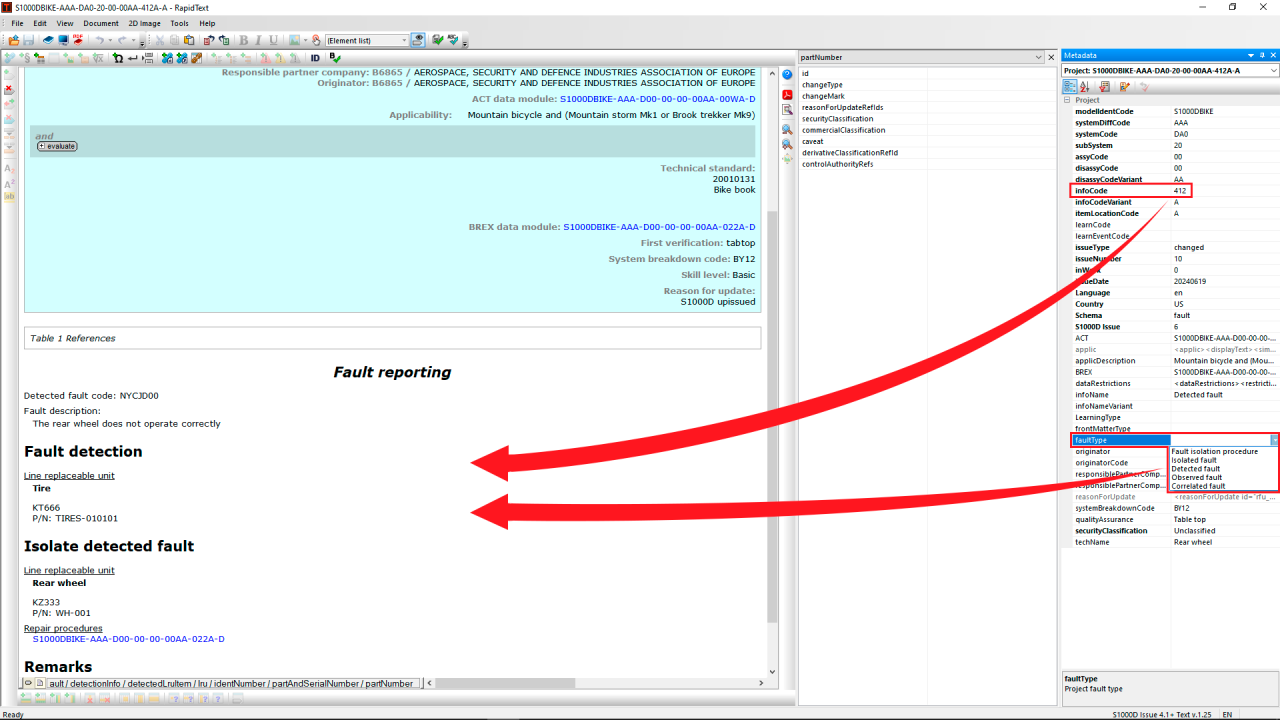
New metadata for creating formatted fault reports
Generating DITA-compliant job cards from Easy Plan data
The new release allows you to import process data from Easy Plan to generate DITA-compliant job cards. This helps organizations create digital work instructions directly from manufacturing planning information while maintaining consistency between planning and execution processes. You will need to use the new DITA Easy Plan import profile and the new specification component, DITA Job Card.
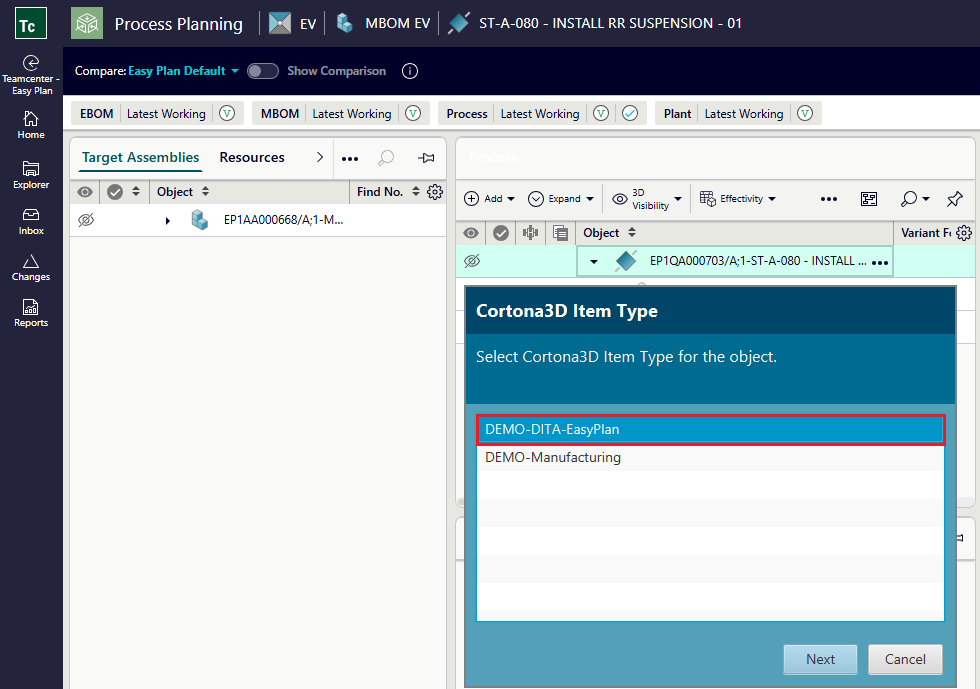
Importing process data from Easy Plan
Edit DITA content directly within RapidAuthor
You can now edit Content Management DITA content directly in RapidAuthor. You simply select the desired object and then choose the Open in RapidAuthor command.
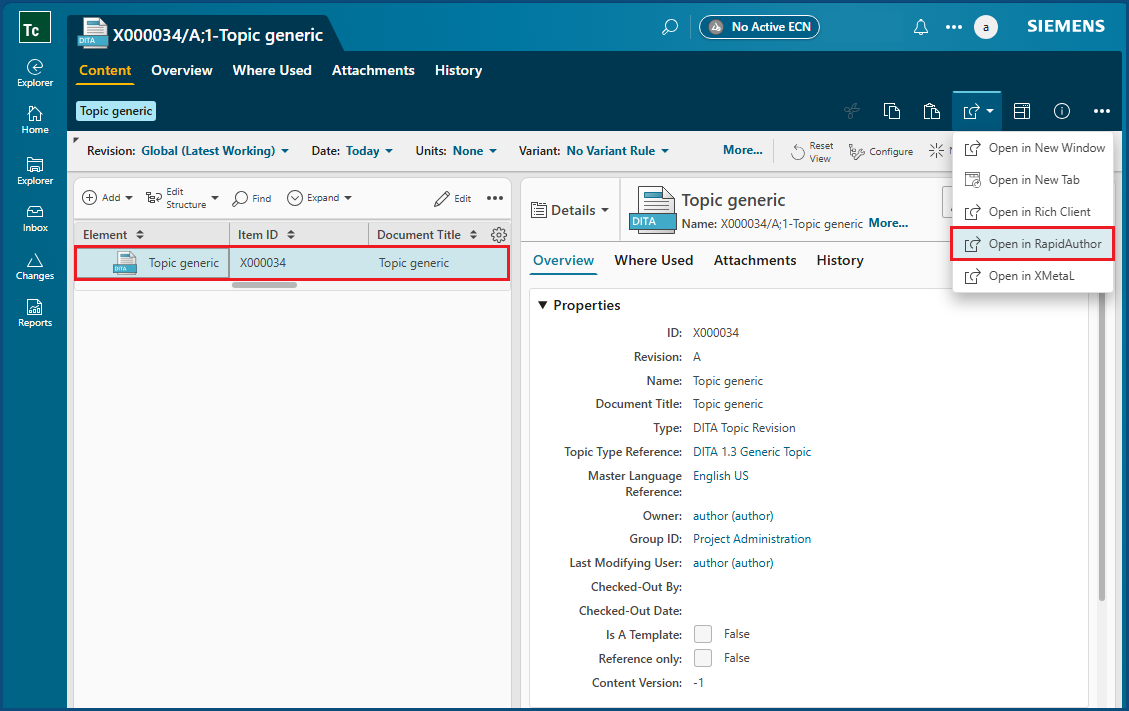
Opening of DITA content in RapidAuthor
Streamline S1000D import workflow with interactive validation, guided fixes, and automated object creation
The import process for S1000D items has been improved. The system checks whether S1000D items contain necessary info codes and cage codes, whether revisions are already available in Teamcenter, and other parameters. You can configure some automatic fixes to save time. These capabilities help technical publications teams onboard and validate S1000D content more quickly while reducing manual correction effort.
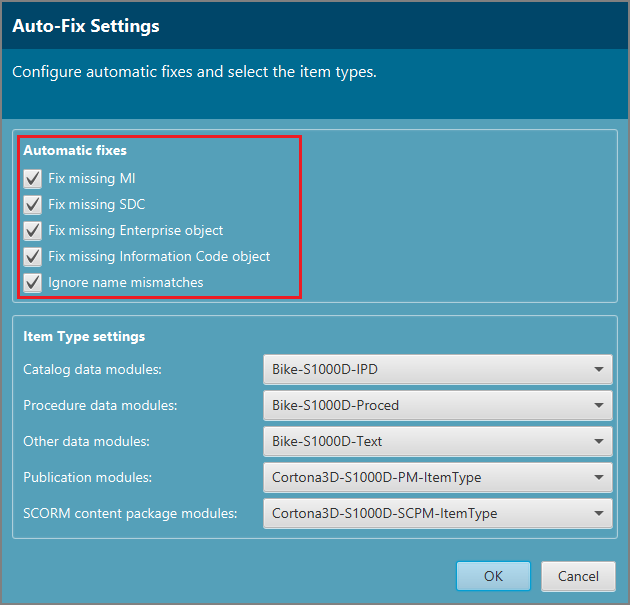
Automatic fixes for imported S1000D data
Additional enhancements for technical publications management
Other improvements in the integration of RapidAuthor with Teamcenter are as follows:
- Support for importing S1000D publication modules with automatic structure reconstruction in Teamcenter
- Automated generation and configuration of CIR repositories and CIR rules via RapidAuthor Administrator UI.
- Central management of RapidAuthor specifications in Teamcenter with version control and automatic updates.
- Enhanced logging and diagnostics with runtime debug control and structured logs.
- Unified PDF styling across RapidAuthor and Content Management using shared Cortona3D PDF Rules.
Improve authoring productivity for technical publications and product catalogs
When you select multiple items to apply a new action to them, you will be prompted to create a collection of these items for easier editing.
Reference lines in gallery objects, such as callouts, panels, and loupe, can now use different line widths and dash styles.
Context objects in the authoring tools can now be displayed in 3D view using different rendering modes, similar to those available in the published output.
Other improvements in general authoring:
- Support for images in Callout (XML) object within publications.
- New Panel (XML) object, similar to Callout (XML), but positioned using screen coordinates.
- Dash-dot style assigned to explode lines in 3D view.
- Setting an object as Context is now also allowed on the Base page, so the object will be context on all IPC pages.
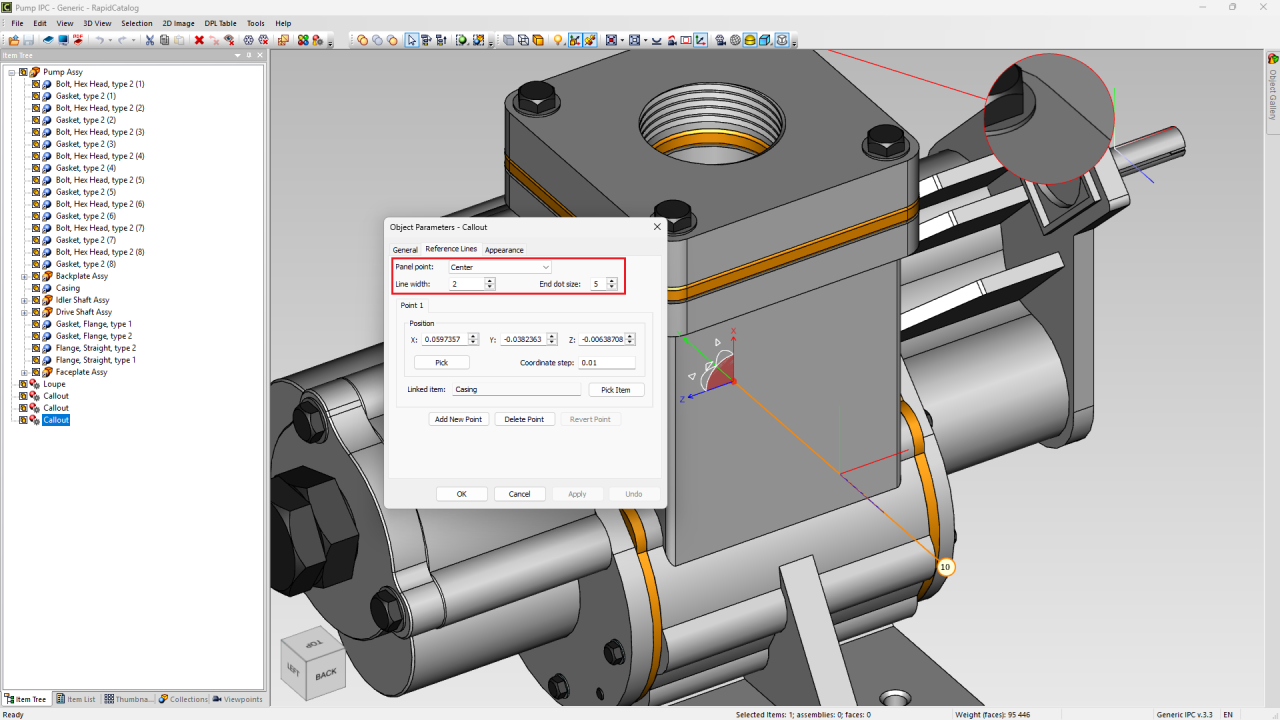
Editing the line width and dash style of a callout
Create and maintain digital product catalogs more efficiently
Creating and maintaining digital product catalogs often requires consistent illustration standards and efficient management of large numbers of visual assets. The new release introduces several enhancements that simplify 2D authoring and illustration management.
Easily share the style sets within your team to ensure that all authors use the same style. You can also use different style sets for different illustrations on the same computer, for example when you need to edit new and legacy images.
Layer handling has been improved to prevent creation of objects outside of layers, with the ability to name layers, pin the active working layer and an enhanced, customizable Layers window.
2D lines are now grouped by their source 3D object, making it easier to locate, manage, and edit all lines associated with a specific object.
Other improvements in 2D authoring:
- Ability to select points for all objects in a selected group using the “Pick Points” tool.
- Ability to paste tables from Microsoft Word, Excel, and other applications into illustrations.
- Ability to change group hover highlighting style, either as a bounding box or by highlighting all lines of objects in the group.
- Special text objects that automatically display various data like illustration title, file name, last saved date or time, various other illustration properties
- A new CGM Info dialog providing CGM element statistics and estimated output file size.
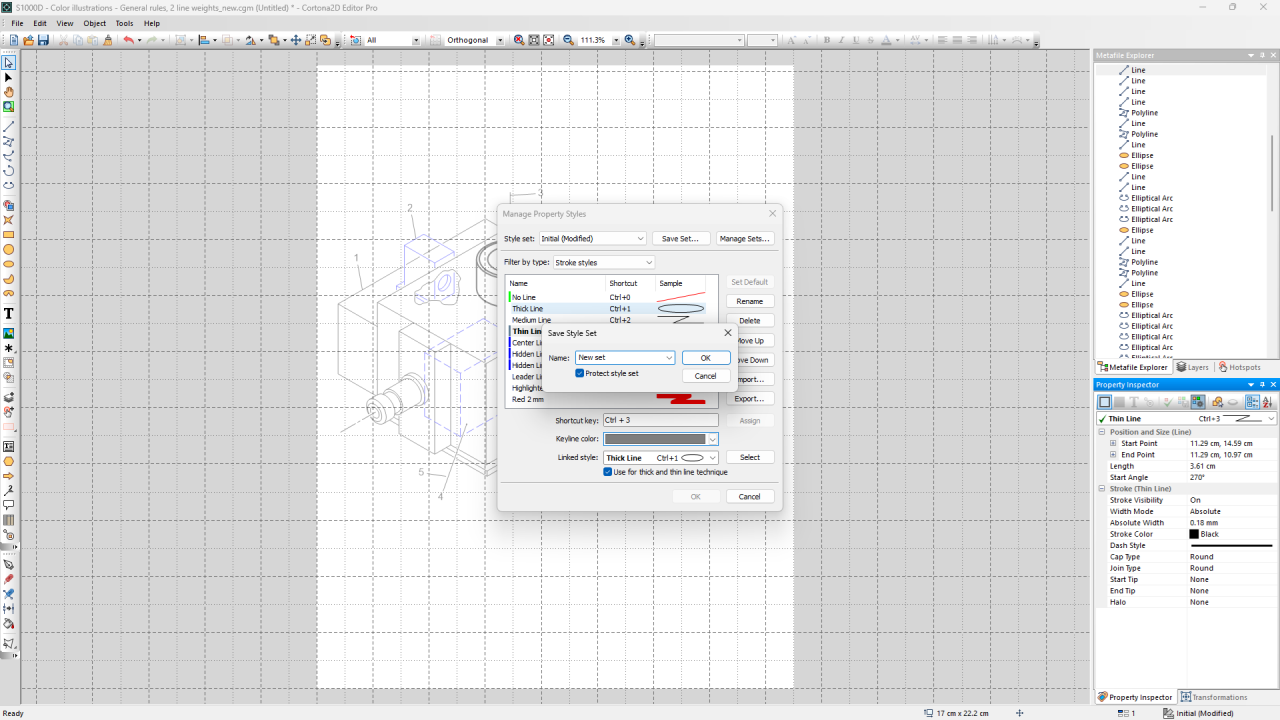
Managing style sets in 2D Editor Pro
Frequently asked questions
What is RapidAuthor?
RapidAuthor is a technical publications solution that helps organizations create, manage and publish digital work instructions, product catalogs, service documentation and other technical content. Learn more about RapidAuthor for Teamcenter.
What industries can benefit from RapidAuthor?
RapidAuthor is used by organizations that create technical publications, manufacturing documentation, service documentation and maintenance content. For example, Siemens Mobility uses Teamcenter to help optimize train performance and support complex engineering and operational processes.
Does RapidAuthor support DITA and S1000D?
Yes. RapidAuthor includes capabilities for DITA-compliant work instructions and S1000D authoring workflows, including enhancements introduced in the latest release.
What will be covered in the webinar?
The webinar will demonstrate new capabilities for digital work instructions, digital product catalogs, DITA authoring, S1000D workflows and Teamcenter integration.
See the new capabilities for digital work instructions and product catalogs in action
Watch the webinar recording to see how RapidAuthor for Teamcenter helps technical publications teams create digital work instructions, digital product catalogs and technical documentation more efficiently.
🧠 Make smarter decisions with AI-powered PLM
🚀 Start fast and grow with Teamcenter X
🚗 Take the Teamcenter X 30-day test drive
🌟 Learn more about Teamcenter solutions
Table of Contents