What’s new in Z-planner Enterprise 2510
What’s new in Z-planner Enterprise 2510
Z-planner Enterprise is a stackup design tool focused on managing and optimizing your PCB stackups. This is done by producing the most accurate simulation models possible, designed using real material characteristics, simulating real-world conditions and mimicking unavoidable variances in the manufacturing process, all within a straight-forward user interface.
The 2510 release of Z-planner Enterprise continues to refine the product by focusing on simulation accuracy, overall ease of use and collaboration.
Simulation accuracy
When designing with tight margins, significant changes in operating conditions should necessitate significantly different initial designs. Z-planner Enterprise 2510 now features temperature-aware loss modeling for realistic operating conditions.
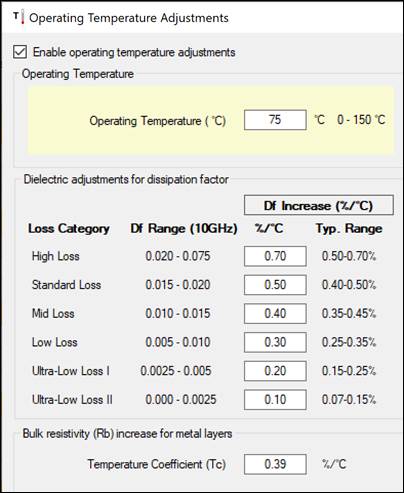
Temperature-aware loss modeling
Designs often operate at elevated temperatures, but PCB material properties like loss tangent or Dissipation Factor (Df) are typically characterized and simulated at a constant room temperature (23°C).
Z-Planner Enterprise 2510 introduces operating temperature adjustments, a feature that when toggled on, accounts for the changes within Df associated with temperature rise. Recommended values are set based on a material’s loss category and scale with the change in operating temperature. Operating temperature adjustments also account for the bulk resistivity (Rb) of copper layers, decreasing the conductivity relative to the temperature.
Overall ease of use
Z-planner Enterprise has been intentionally designed to appear familiar to even first time users, with a typical spreadsheet-style UX layout and ribbon-bar navigation. The 2510 release has streamlined this layout slightly, allowing users to accomplish common tasks quicker by grouping, re-arranging or restricting them. There has also been a continued improvement on visualizations within the software, color-coding intelligent dielectric selection recommendations, automatically labeling substacks within the stackup wizard, and making it easier to select and connect various reference planes.
In addition, Z-planner Enterprise 2510 now also provides support for multiple stripline scenarios to make it quicker to get to and perform the proper field solver calculations.
Stackup wizard flex and rigid-flex enhancements
The stackup wizard has seen adjustments in the handling of substacks and multi-board designs with several improvements which produce a more refined design straight from the wizard:
- Improved automation for identical rigid substacks
- Rigid/flex selections determine default substack names
- Improved layer ordering and labeling in the multiboard panel
- Improved flexibility and management of metric units for board thickness
AI advisor: intelligent dielectric selection
The new AI advisor is a feature within Z-planner Enterprise 2510’s stackup wizard which debuted in mid 2025. It has seen improvements in its reporting and implementation with this latest version. It is now easier to understand and select recommendations as it provides color-coded results based upon:
- Total layer count and target board thickness
- number and location of signal and power layers
- The location of cores and prepregs in the stackup
- Glass constructions available in the library for the specific material selected, as well as relative material costs
AI advisor helps optimize material selections for electrical performance and manufacturing cost, accelerating confident stackup decisions.
Expanded support for nonadjacent reference planes
Selecting reference planes in Z-planner Enterprise 2510 has become more intuitive. Previously, only copper layers designated as signal or mixed layers were selectable as references—limiting flexibility and clarity. The 2510 update removes this restriction, allowing you to select nonadjacent reference planes freely. This enhancement provides a more accurate representation of stackup intent and enables better modeling of complex layer structures.
Enhanced integration from Z-planner to Z-Solver
The integration between Z-planner Enterprise and its field solver, Z-Solver takes a leap forward with support for six new stripline scenarios, including configurations with dual striplines and nonadjacent reference planes.
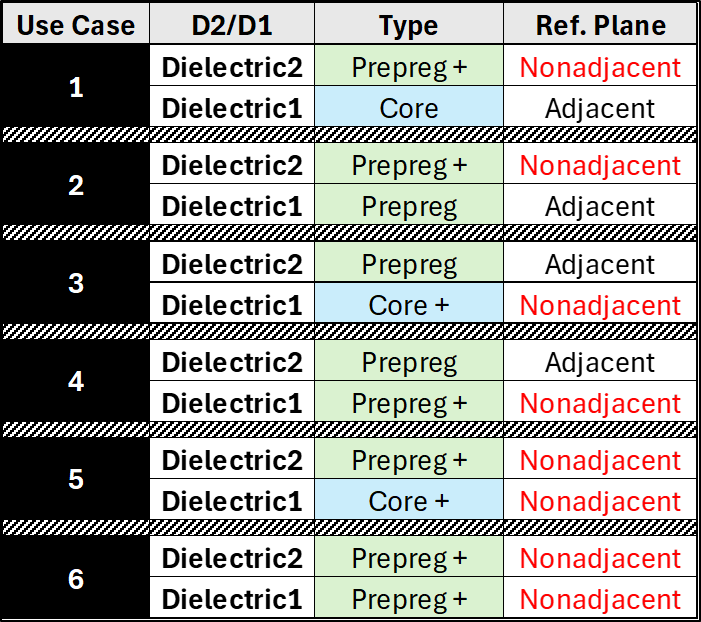
Figure 2: Six new use cases for stackup design are provided, including various core and pre-preg configurations as well as associated reference plane selections.
Z-Solver now calculates and combines the effective series values of stacked dielectric constants (Dk) and dissipation factors (Df), delivering more accurate impedance and loss predictions for intricate stackups.
Collaboration
Z-planner Enterprise 2510 is designed to be a completely stand-alone piece of software which interfaces into any workflow. The 2510 release has increased its handoff capabilities with Xpedition, Allegro and Ansys HFSS by adopting multiple output characteristics dynamically created for both ODB++ as well as IPC-2581.
Advanced OEM export capabilities
Collaboration between OEMs and flex PCB manufacturers becomes more seamless with new flex zone and substack import/export capabilities. Support for Cadence Allegro import using the IPC-2581 format now covers critical flex parameters such as conductive adhesives, EMI shielding, and stiffeners.
Additionally, excel-based export and import of “master” flex stackup projects facilitate efficient data exchange and version control during design and manufacturing handoffs.
Import export for Allegro and HFSS
Z-planner Enterprise 2510 now exports etch factor calculations in three different conventions based on the workflow involved. When working within HyperLynx and Xpedition, 2510 will export etch factor values as a result of outer to inner ratios. When working with Allegro, and exporting through IPC 2581, Z-planner Enterprise exports etch factor as a relative angle compared to the ‘top’ of the board. With Ansys HFSS, Z-planner Enterprise exports etch factor values as positive and negative values to denote positioning within the overall stackup.
Try Z-planner Enterprise 2510
Z-Planner Enterprise 2510 strengthens stackup simulation accuracy, while also simplifying overall creation and streamlining collaboration both inside and outside of a Siemens workflow. These new improvements focus on helping designers and fabricators to make, share and iterate stackups faster than ever before
These enhancements empower design and manufacturing teams to build stackups that not only meet electrical and mechanical specifications but also reflect realistic operating environments, helping your products achieve higher performance and reliability. Explore what Z-planner Enterprise 2510 can do for your next project and transform how you approach stackup planning and verification today.