PLM project management reports: Improve visibility with Teamcenter X

Product development projects rarely fail because teams lack plans. More often, they struggle because stakeholders lack visibility into progress, status, and outcomes.
Even when schedules are carefully built and tasks are assigned, project managers still need a clear way to monitor execution, identify risks, and communicate progress across the business. Without accurate, real-time reporting, decisions can be based on outdated information and project issues may go unnoticed until they become costly delays.
This is where reports for PLM project management become essential.
Reports for PLM project management in Teamcenter provide real-time visibility into schedules, milestones, resource utilization, and project performance. By using live project data instead of manually compiled status reports, organizations can make faster decisions, identify risks earlier, and improve project outcomes.
This is the final video in our Teamcenter X Standard and Advanced series. We’ve explored project scheduling, requirements management, document management, engineering change workflows, and integrations. Now, we close the series by looking at how reporting and analytics help organizations gain visibility into project performance and outcomes.
The video below focuses on one common example: using reports for PLM project management to provide real-time visibility into project status, track progress against plans, and improve decision-making across the organization.
Watch the video here:
Why reporting matters in PLM project management
Delivering a successful project requires more than completing tasks on time.
Project managers need to understand how work is progressing across multiple projects, identify potential bottlenecks, and communicate status to stakeholders. Executives need visibility into portfolio performance. Team members need confidence that priorities remain aligned.
When project information is scattered across spreadsheets, presentations, and disconnected tools, creating accurate status reports often becomes a manual process.
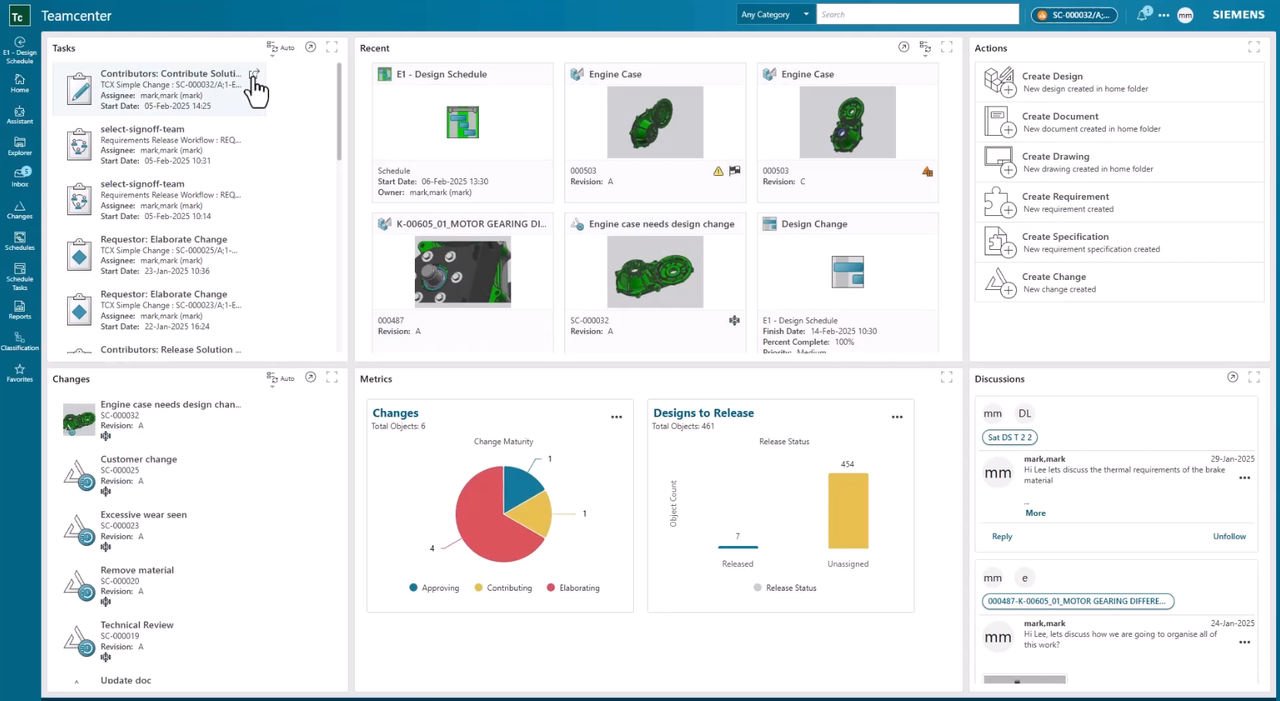
By centralizing project information within Teamcenter X, organizations can generate reports based on live project data, giving stakeholders immediate access to the information they need. This supports key PLM project management activities such as schedule tracking, milestone management, resource planning, and project performance reporting.
Monitor project progress in real time
As projects move through execution, schedules naturally evolve.
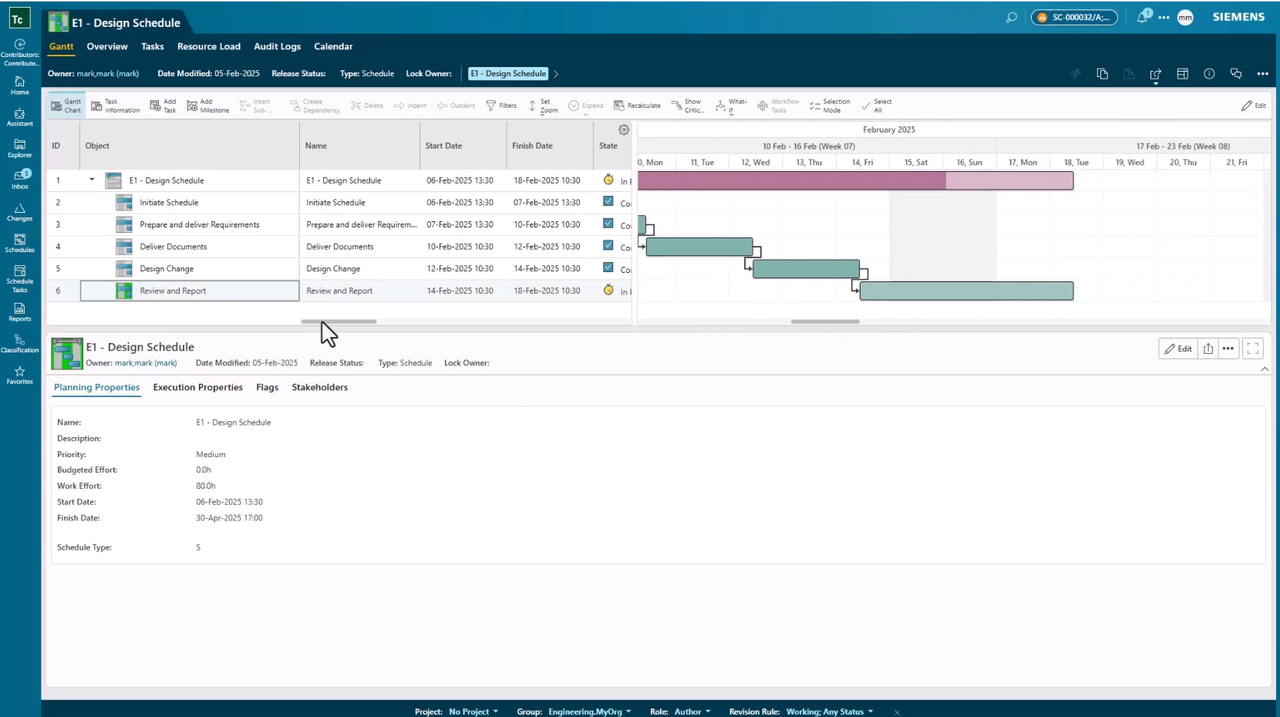
Tasks are completed, dependencies change, and milestones are achieved. Project managers need visibility into these changes without spending hours gathering information manually.
Teamcenter X provides schedule dashboards that deliver a real-time view of project status and progress. Dashboards can help stakeholders monitor project milestones, task completion, schedule performance, and overall project health from a single source of truth. Managers can quickly understand overall project performance and drill down into individual tasks when more detail is required.
Rather than relying on static reports created days or weeks earlier, teams can work from current project information that reflects actual project execution.
Give every stakeholder access to meaningful metrics
Different stakeholders often need different views of project performance.
A project manager may focus on task completion and schedule adherence, while leadership teams may want a broader view of project health across the organization.
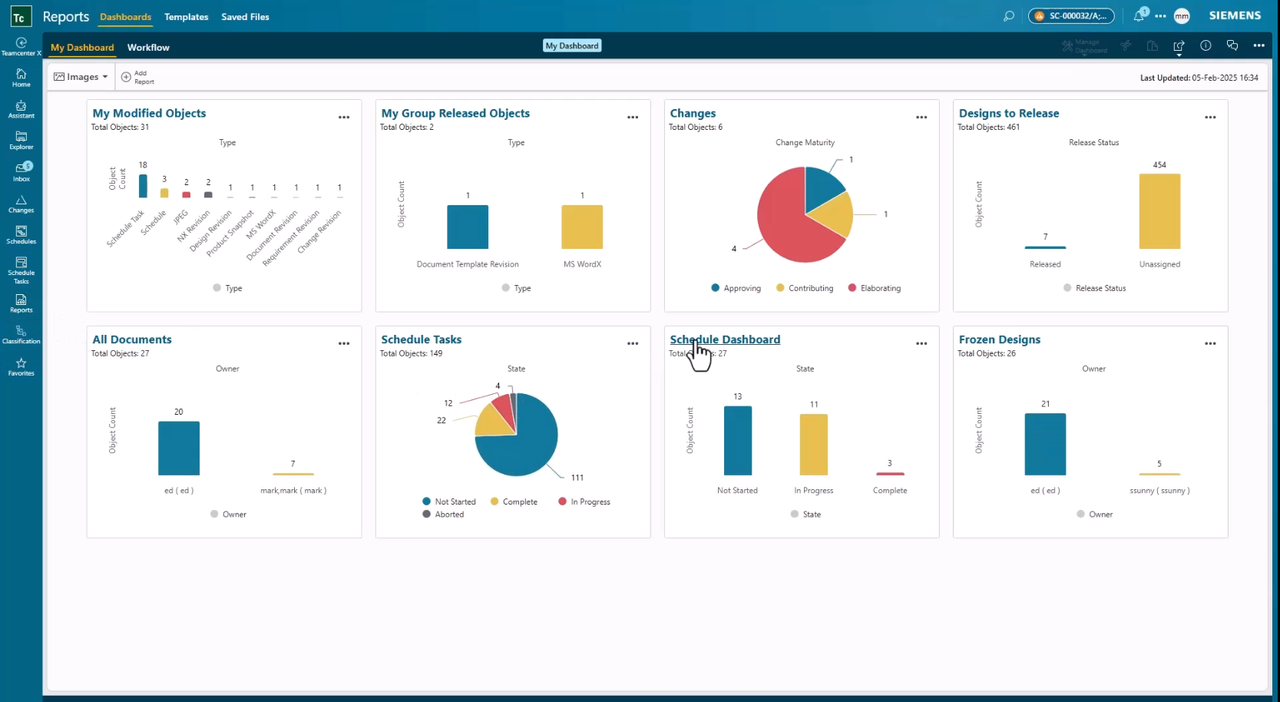
Teamcenter X dashboards provide users with relevant PLM project management metrics and reporting views that support their specific responsibilities. Examples may include schedule adherence, milestone completion rates, overdue tasks, resource allocation, and project status indicators. Because the information is generated from live project data, everyone works from a consistent and up-to-date picture of project performance.
This helps eliminate reporting discrepancies while improving alignment across teams and departments.
Create and share PLM project management reports across the business
Reporting requirements vary between organizations.
Some teams need standard project status reports while others require reports tailored to specific business processes, products, or stakeholder groups.
Teamcenter X supports both out-of-the-box reporting capabilities and custom reports for PLM project management. Reports can be shared with specific teams, roles, or individuals, helping ensure the right information reaches the right audience.
This flexibility allows organizations to standardize reporting where appropriate while maintaining the ability to support specialized business requirements.
Improve decision-making with transparent project data
Effective decisions depend on accurate information.
When project data remains current, accessible, and visible across the organization, stakeholders can identify issues earlier, understand project health more clearly, and respond more quickly when adjustments are needed.
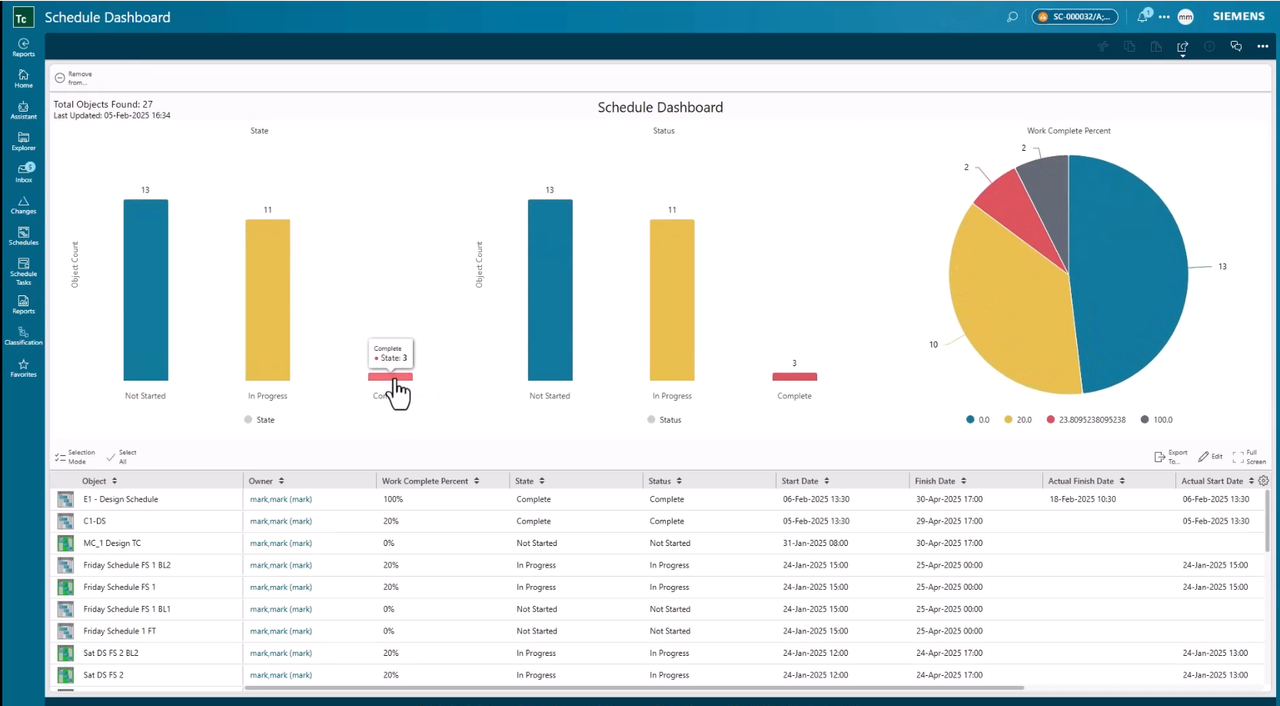
Organizations that use PLM project management reporting can identify schedule risks, resource constraints, and project bottlenecks before they impact delivery timelines. Instead of relying on assumptions, stakeholders can make decisions based on current project performance and measurable outcomes.
This visibility helps improve accountability while creating greater confidence in project execution and delivery.
Close projects with confidence
Successful project delivery is about more than reaching the final milestone.
Organizations also need the ability to review project outcomes, understand performance, and communicate results to stakeholders. Reporting and analytics provide the visibility required to evaluate completed work while supporting continuous improvement for future projects.
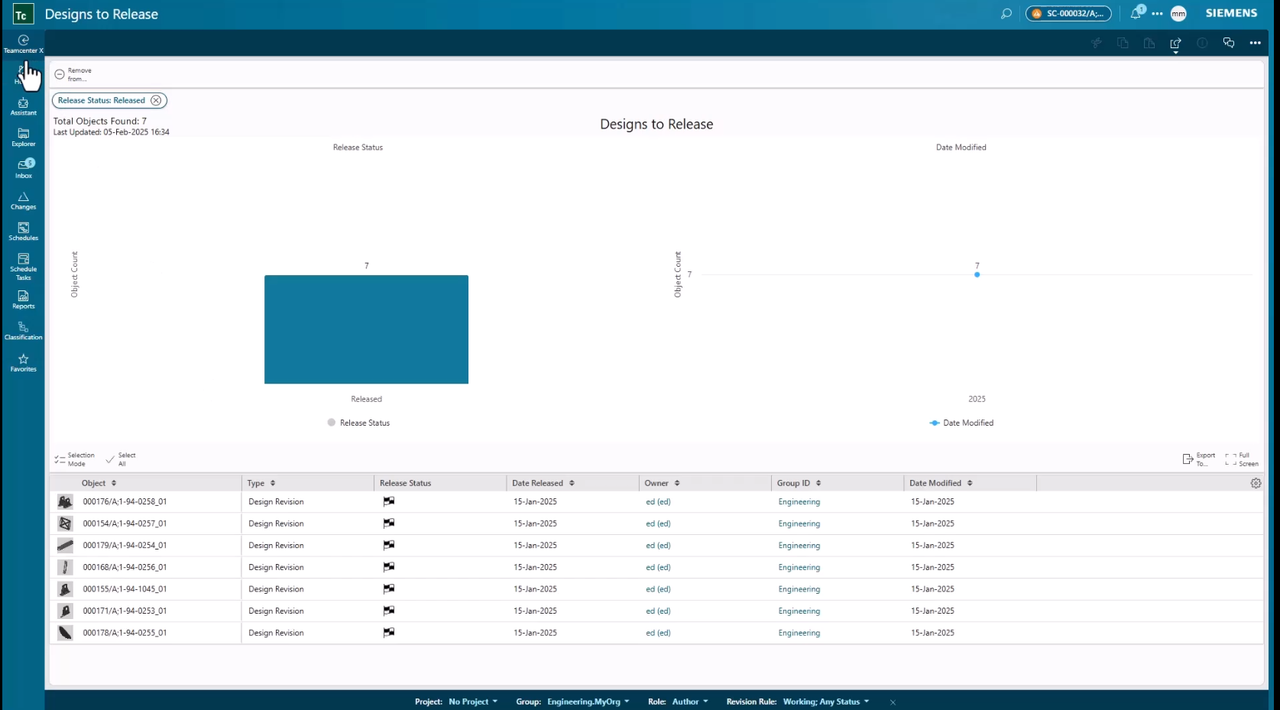
Teamcenter X helps organizations transform project information into actionable insight through real-time dashboards, project metrics, and flexible reporting capabilities. By bringing schedules, tasks, analytics, and reporting together in a connected PLM environment, Teamcenter X helps organizations improve PLM project management visibility, monitor performance, and deliver projects with confidence.
Frequently Asked Questions
What is PLM project management?
PLM project management is the process of planning, executing, monitoring, and reporting on product development projects within a product lifecycle management environment. It helps organizations align schedules, tasks, requirements, and deliverables across teams.
Why is reporting important for PLM project management?
Reporting provides visibility into project status, milestones, schedules, and performance metrics. Real-time reporting helps stakeholders identify risks, track progress, and make informed decisions throughout project execution.
How does Teamcenter X support PLM project management reporting?
Teamcenter X provides dashboards, project metrics, and reporting capabilities that use live project data to deliver visibility into project progress, schedule performance, and overall project health.
What metrics should organizations track in PLM project management?
Common metrics include milestone completion, schedule adherence, task completion, project status, resource allocation, and project performance indicators.
How do dashboards improve project visibility?
Dashboards provide a centralized view of project information, allowing stakeholders to monitor progress, identify issues earlier, and access up-to-date project data without relying on manually created reports.
About this series
Want to watch this video series from the beginning? 👉🏼👉🏼 Start here!
Save the YouTube playlist to get notified when new episodes drop.
Jump directly to other blogs in this playlist as the series develops:
- What is Teamcenter used for?
- Schedule planning
- Requirements management process
- PLM document management
- Simple change management
- ECAD and MCAD integrations
- Review and reporting
This series takes a practical look at some of the capabilities available in the preconfigured Teamcenter X Standard and Advanced tiers. Each video explores a common product development use case to show how connected SaaS PLM capabilities can work together in day-to-day execution.
This series is not an exhaustive look at every capability. Teamcenter X continues to evolve with new features and enhancements being added regularly. Instead, this series is designed to give an accessible, practical overview of how these capabilities come together to drive better outcomes.
Watch the video to see how Teamcenter X helps organizations improve PLM project management reporting, gain real-time visibility into project performance, and make more informed decisions throughout product development.
🧠 Make smarter decisions with AI-powered PLM
🚀 Start fast and grow with Teamcenter X
🚗 Take the Teamcenter X 30-day test drive
🌟 Learn more about Teamcenter solutions