Project Scheduling in Teamcenter X: Connect Planning to Execution

Many organizations are working to connect planning with execution, yet project scheduling often remains disconnected from product data and daily work. The opportunity is clear: make planning more connected, adaptable, and aligned to real-world execution.
That’s exactly what Teamcenter X delivers.
Project scheduling in Teamcenter X connects planning and execution, linking product data and workflows to help teams deliver changes faster with full visibility.
This is the second video in our series where we’re taking a closer look at use cases ranging from project scheduling, requirements, and document management to change, integrations, and reporting. If you missed the first video, watch it now! You’ll get a high-level tour of what’s possible today and the real-world challenges Teamcenter X preconfigured tiers are designed to help solve.
In the video below, we showcase how the Standard and Advanced tiers of Teamcenter X enable powerful scheduling capabilities, helping teams move from static plans to real-time, integrated execution.
Want to watch this video series from the beginning? 👉🏼👉🏼 Start here!
Save the YouTube playlist to get notified when new episodes drop.
Project scheduling driving progress
In Teamcenter X, project scheduling connects plans directly to the digital thread, linking tasks, milestones, and deliverables to real product data and cross-functional workflows. The result is improved visibility, stronger alignment, and more predictable execution.
From change request to project scheduling in context
The scenario starts with a common challenge: a product change to a motor, specifically a driveshaft update to enable electronic monitoring.
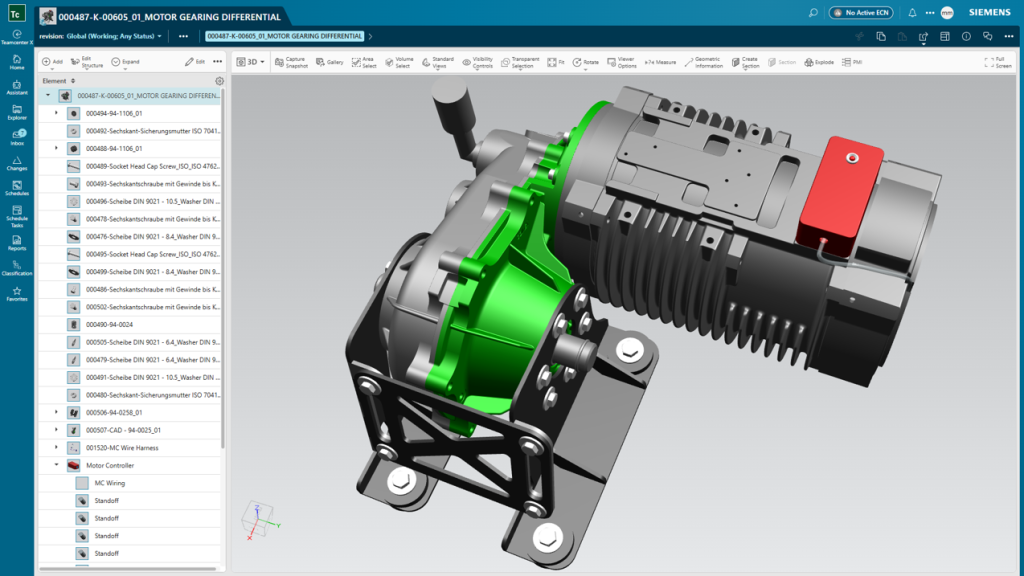
Instead of managing this through disconnected tools, Teamcenter X integrates project schedules directly into the change process:
- Capture requirements in context
- Align teams around the change
- Communicate updates across stakeholders
- Maintain a complete digital record of progress
By embedding project scheduling into change workflows, teams reduce misalignment, accelerate decisions, and maintain full control over execution.
Turning plans into actionable project schedules
Once the change is defined, execution depends on structured and scalable scheduling.
With Teamcenter X:
- Reusable templates accelerate schedule creation
- Tasks, deliverables, and dependencies are aligned from the start
- Schedules are easily tailored to fit specific programs
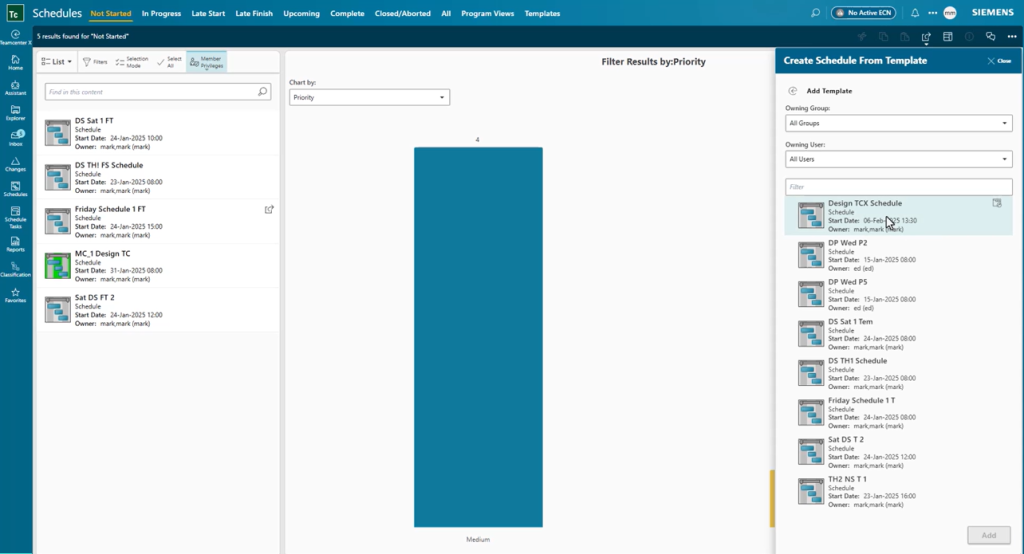
This approach ensures scheduling is consistent, repeatable, and aligned to business objectives—reducing rework and improving speed across the lifecycle.
Optimize your resources
Effective scheduling isn’t just about tasks, it’s about people.
Teamcenter X enables teams to:
- Assign resources based on real-time workload
- Adjust responsibilities dynamically
- Keep work progressing without delays
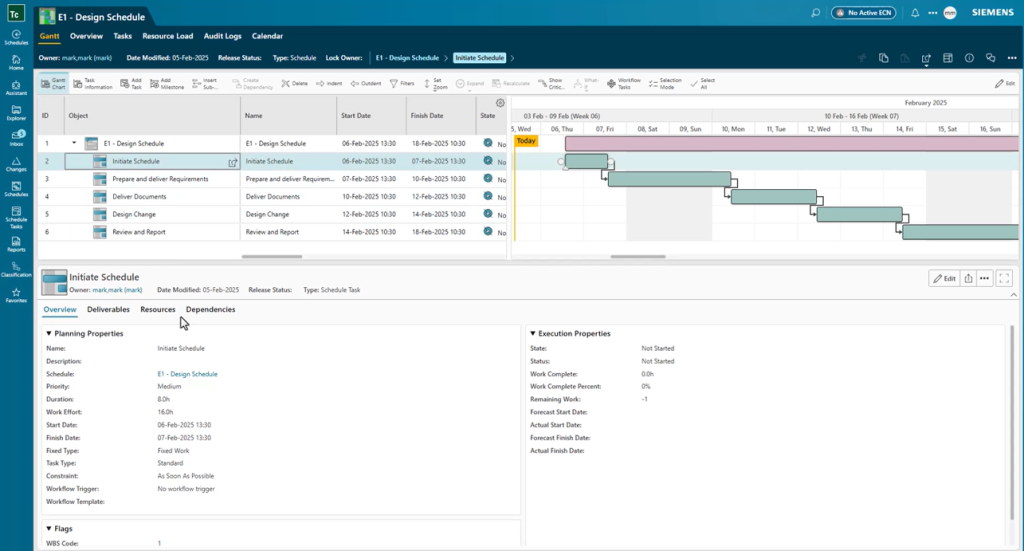
As project schedules evolve, the system automatically:
- Updates downstream activities
- Notifies the right stakeholders
- Triggers next steps
No manual coordination. No missed handoffs. Just continuous, optimized execution.
Schedule visibility and built-in accountability
A key challenge in project scheduling is maintaining visibility across teams and timelines.
Teamcenter X delivers:
- Real-time scheduling status tracking
- Role-based access to relevant information
- Transparent views of progress and outcomes
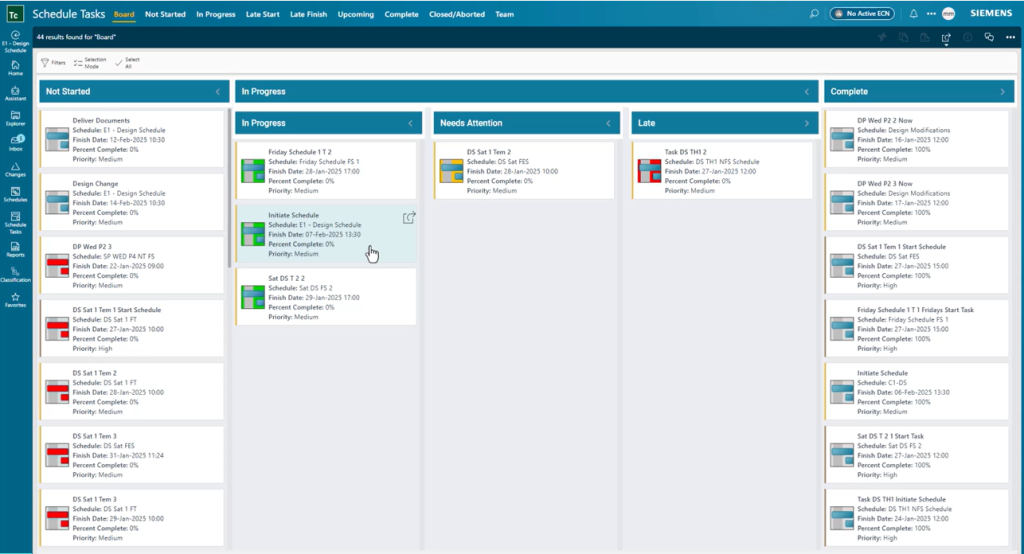
With accurate, up-to-date project scheduling insights, everyone stays aligned—from individual contributors to executive stakeholders.
Drive better outcomes
By connecting planning, project scheduling, and execution in a single environment, Teamcenter X helps teams:
- Make faster, data-driven decisions
- Optimize resources across multiple projects
- Deliver changes with greater speed and predictability
For organizations already using Teamcenter, this evolution brings a more connected, scalable approach to planning and execution, enabling a shift from disconnected planning to integrated, outcome-driven execution.
👉🏼 Explore Teamcenter X!
👉🏼 Learn more about Teamcenter!
About this series
Want to watch this video series from the beginning? 👉🏼👉🏼 Start here!
Save the YouTube playlist to get notified when new episodes drop.
Jump directly to other blogs in this playlist as the series develops:
- What is Teamcenter used for?
- Schedule planning
- Requirements management process
- PLM document management
- Simple change management
- ECAD and MCAD integrations
- Review and reporting
This series takes a practical look at some of the capabilities available in the preconfigured Teamcenter X Standard and Advanced tiers. Each video explores a common product development use case to show how connected SaaS PLM capabilities can work together in day-to-day execution.
This series is not an exhaustive look at every capability. Teamcenter X continues to evolve with new features and enhancements being added regularly. Instead, this series is designed to give an accessible, practical overview of how these capabilities come together to drive better outcomes.
🧠 Make smarter decisions with AI-powered PLM
🚀 Start fast and grow with Teamcenter X
🚗 Take the Teamcenter X 30-day test drive
🌟 Learn more about Teamcenter solutions