What’s new in Simcenter S-Frame v2026.1?

As part of the continuous work on looking to provide a robust, powerful suite of tools for the Everyday Needs for Civil and Structural engineers, the newest Simcenter S-Frame 2026.1 version comes with a series of expansions on the Supported Codes and improves the Result Reviewing tools for Foundation structures, along other featured tweaks which are explored in this post.
Aluminum frame design now supported according to the ADM 2020 design code
For this release, Simcenter S-Frame and Simcenter S-Frame Pad are now able to perform code check and design operations for aluminum frames and members, following the American Design Manual (ADM) 2020. With this implementation, it is now possible not only to check flexural or shear strengths, serviceability or combined flexural or axial actions, but run a design process and generate detailed reports of these members. The Built-in Standard Aluminum databases according to ADM 2020, are now also included.
Automatic load combination generation is now possible according to Korean Design Standard, KDS 2022.
Canadian CSA A23.3:24 Code and Steel-Reinforced Concrete (SRC) sections are now supported
Simcenter S-Frame Concrete now has support for section design according to the latest Canadian CSA A23.3:24 design code.
The Multistory Designer (MSD) received an update, supporting the recently implemented CSA A23.3:24 design code.
Another new feature includes the support for the creation of steel-reinforced concrete column sections (SRC), for the current supported codes. These are correctly identified once imported.

The steel sections can be imported from ETABS or defined within Simcenter S-Frame Concrete MSD.
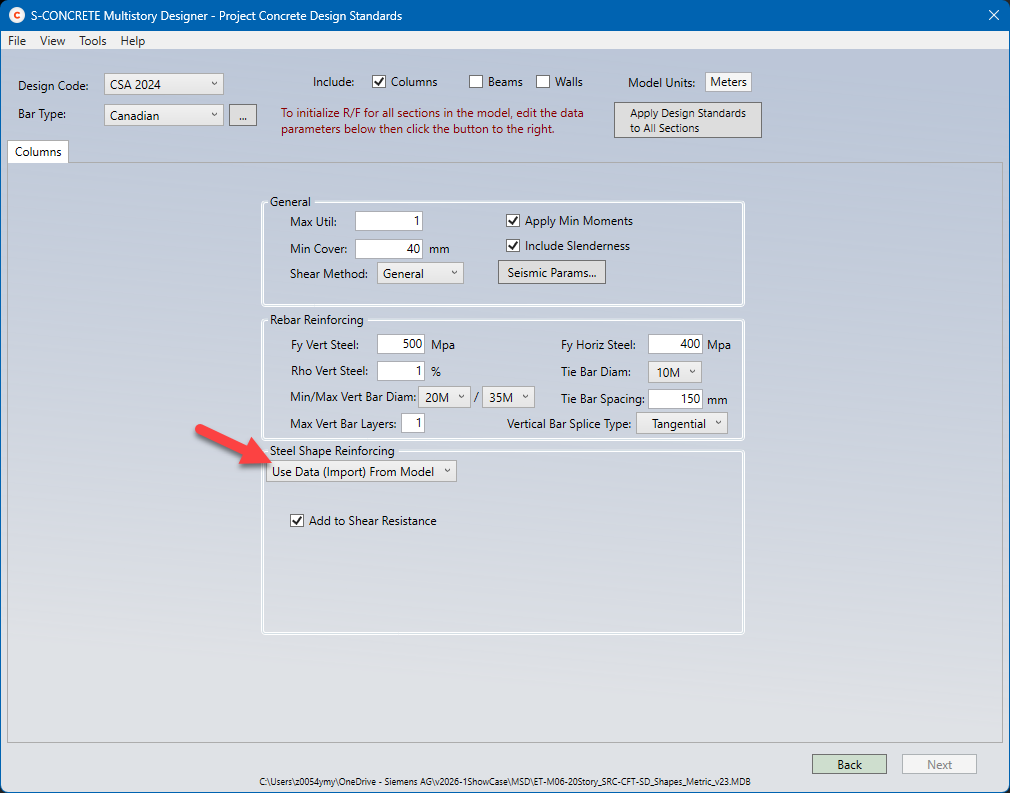
The MSD now supports ETABS v23 files, exported through MDB files.
Enhanced foundation modeling with barrette piles and improved foundation reviewing tools
Rectangular and square sections are now part of the pile section library, and can be used when designing the foundation, allowing users to model precast or cast-in-place barrette piles.
To improve design result review, the one-way shear, flexure and two-way shear (punching) critical section lines and perimeters are now displayed graphically on the pad/mat foundation. This applies to pedestals and piles for soil or pile-supported foundations.
Simcenter S-Frame Foundation can now combine punching shear capacity checks in scenarios where closely spaced pedestals have overlapping punching shear perimeters, enhancing the analysis capabilities for these cases.
NDS 2024 and CSA O86-24 Codes now available for timber analysis and design
The American National Design Specification (NDS) 2024 and the Canadian CSA O86-24 codes are now available and supported in Simcenter S-Frame Timber.
This version allows users to create ad hoc wall lines to extract panel forces, adjusting the location and angle, and reviewing them both graphically and numerically.
Support for Revit 2025 and 2026 to import and export model data was implemented.
Engineering Design Reports can now be generated for code checked timber members as per Eurocode (EC) 5.
Updated steel section databases
New American and Canadian rolled steel section databases were included: AISC v16.0 and CISC SST12.1
Frequently Asked Questions (FAQs) about this Release
Q1: What are the major new design codes supported in Simcenter S-Frame v2026.1?
A1: Simcenter S-Frame v2026.1 introduces several key updates to supported design codes, enhancing its capabilities for a wider range of projects. These include:
- Aluminum Frame Design: Now supported according to the American Design Manual (ADM) 2020.
- Concrete Design: Updated to include the latest Canadian CSA A23.3:24 code.
- Timber Analysis and Design: Supports the American National Design Specification (NDS) 2024 and the Canadian CSA O86-24 codes.
- Load Combinations: Automatic generation is now possible for the Korean Design Standard, KDS 2022.
Q2: Can I design aluminum structures with Simcenter S-Frame v2026.1?
A2: Yes. With Simcenter S-Frame v2026.1, you can now perform comprehensive code checks and design operations for aluminum frames and members. This includes checks for flexural and shear strengths, serviceability, load combinations, detailed design reports generation, all in accordance with the American Design Manual (ADM) 2020. The built-in standard aluminum databases are now included.
Q3: What improvements have been made to foundation modeling and review tools?
A3: Simcenter S-Frame v2026.1 brings significant enhancements to foundation modeling and reviewing:
- Barrette Piles: Rectangular and square sections are now available in the pile section library, allowing for the design of precast or cast-in-place barrette piles.
- Enhanced Review Graphics: Critical section lines and perimeters for one-way shear, flexure, and two-way shear (punching) are now graphically displayed on pad/mat foundations, pedestals, and piles, making design review much clearer.
- Overlapping Punching Shear: Simcenter S-Frame Foundation can now accurately combine punching shear capacity checks for closely spaced pedestals with overlapping punching shear perimeters.
Q4: How does the new version improve integration with other software?
A4: Simcenter S-Frame v2026.1 continues to improve interoperability:
- Revit Support: You can now import and export model data with Revit 2025 and 2026.
- ETABS Integration: The Multistory Designer (MSD) now supports ETABS v23 files via MDB exports.
Q5: Are there any updates to steel section databases?
A5: Yes, the steel section databases were updated to ensure the most current resources are available. The new version includes:
- American Rolled Steel Sections: AISC v16.0
- Canadian Rolled Steel Sections: CISC SST12.1
You can download or update to the newest version by following the next link: