Core Capabilities | What’s New in Designcenter NX | December 2025 release
Our first What’s New in Designcenter NX™ software for the December 2025 is a big one. We always follow a continuous release cycle strategy, implementing feedback we have gathered from you. In this blog, we’ll be taking a look at new core capabilities added in this latest release.
ICYMI
Before we take a look at this What’s New blog, be sure to take a look at the full article for this release. We shine the spotlight across the whole Designcenter NX product, focusing on new features that we know you will benefit from.
Read the Designcenter NX December 2025 release blog here
Copilot | AI Powered automation in Designcenter X NX
Recognizing the importance of artificial intelligence (AI) in transforming workflows to remain ahead of the competition is absolutely essential. After all, it’s the #1 technology investment area for manufacturers. Early adopters of AI technologies are reporting time saving on common tasks of more than 40%, which is why it is at the heart of our continuous release cycle strategy.
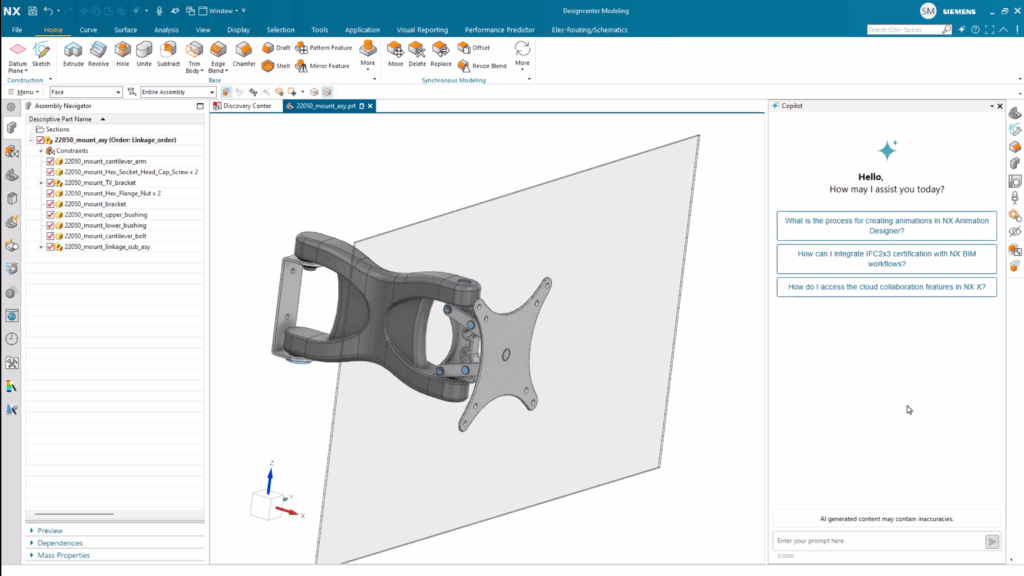
Designcenter X NX Copilot is our engineering-focused Generative AI assistant that brings innovation to life by turning natural language into action. It’s a conversational user interface that answers your questions by summarizing information from our documentation. It’s a tool that leverages industry best practices to guide you through complex tasks with experienced and informative responses.
Within Copilot, you can ask questions in plain language, where everything will be translated into domain-specific commands. It’s a tool to helping with everything from design best design approaches through to error resolution. Copilot is a truly revolutionary tool that streamlines workflows, making Designcenter X NX easier to use, especially for new users.
Highly engineered sketches with Mechanism Mode
Designcenter NX sets the standard for productivity and flexibility in product design and development. That’s why we’ve invested time in Mechanism Mode; a new sketch feature for industry specific workflows. By disabling relation finding, Mechanism Mode permits a free range of movement in a sketch without locking curves to an axis.
It is an incredibly useful tool for mechanism sketches where there is a need to move curves into different design positions to define or check a profile. Additionally, it can also be used when sketches need to be defined for multiple components for an assembly. These sketches are otherwise known as skeleton sketches.
Advanced Shape Design
Studio Surface
We’ve also added new capabilities when it comes to the Studio Surface command. Studio Surface can be used to create sheet bodies that are completely optimized for smoothness. The feature produces swept or lofted surfaces from a network of section strings, or a network of section strings with up to three guide strings.
The output will be split into multiple surfaces according to the input sections segments and guide curves. We’ve added this functionality so that you can create higher quality surface continuity results.
Algorithmic Modeling
The Logic Editor
We’re always looking at identifying ways in which we can make your workflows more efficient. With that in mind, we’ve focused on adding new capabilities to the Logic Editor. In this latest release, you can now specify the color of a node’s title bar to make it easier to interpret the rule, or group with other rules.
You can select any color, provide your own RGB / HSL values or use the dropper to inherit colors from a location on your screen. Changing the color will alter the title bar of your rules but the body will remain unaffected. Any new color is preserved in the collapsed state, and the title text auto-adjusts to a contrasting shade.

Selection Intent
Based on your feedback, we’ve worked on adding new features to Algorithmic Modeling to better support selection intent. Curve Selection and Select Point now support all selection intent rules, allowing you to preserve context of design intent when selecting entities for your Algorithmic Feature. All Algorithmic Features update as the input context changes; a move to maintain consistency with Designcenter NX’s overall user interface philosophy.
Lattices
Body Lattice Control and Analytical Patterning
Analytical Patterning is a great use case where Lattices involving an analytical unite cell, hybrid unit cell, or convergent unit cell where multiple faces need to stay persistent. Bearing this in mind, we’ve added new capabilities to the Body Lattice command in this latest release.
If the Convergent Patterning checkbox is toggled off from within the Body Lattice command, the Unit Cell body type will not be changed. What’s more, the Patterned Body faces are not merged, and the pattern will inherit the topology from its Unit Cell.
Live updates in Immersive Collaborator
If you’ve taken a look at our release blog, you’ll already be familiar with developments for Immersive Engineering. As a reminder, Immersive Engineering goes beyond traditional 2D practices by creating a fully integrated, user-centric virtual space that combines the real and digital worlds. It’s the next step into the future of design, built on precise 3D interaction, stunning visual fidelity and seamless virtual collaboration.
In this latest release of Designcenter NX, a meeting host can now perform live design updates to a model during an Immersive meeting. When a meeting host creates an Immersive meeting with Live Updates switched on, they can make changes in Designcenter X NX whilst the Immersive meeting remains active.
Every participant in the session can see these changes, whilst also being able to see any animations the host plays using Animation Designer and Mechatronics Concept Designer (MCD). It’s a real game-changer, adding real value when simulation and design changes are the main focus.
Continue your journey with Designcenter NX
Take me to the full Designcenter NX blog 📚