What’s new in Z-planner Enterprise 2604

This release focuses on delivering greater accuracy, improved efficiency, and expanded capabilities for engineers tackling today’s complex electronic designs.
Let’s dive into the exciting new developments in Z-planner Enterprise 2604:
Field solver speed enhancements
Overall optimization of the Z-planner Enterprise has led to significant speed increases within the embedded HyperLynx field solver. This results in noticeably quicker calculation times depending upon the complexity of the stackup itself. During speed testing we used a typical 14 layer stackup with 5 impedance groups and saw a 2.5x increase in calculation speed.
Library expansion
The Z-planner Enterprise material library is the largest and most accurate materials library available within a stackup tool. The library is constantly updated through a combination of new material releases and specific customer material requests.
This library release includes changes to copper roughness, increased documentation on 29 different dielectric measurement methods, and 7 different glass types. It has also expanded the material capabilities to support Dk anisotropy values and Df temperature values. In addition, the Z-planner Enterprise material library has also seen the addition of new materials from EMC and Ventec, as well as some updates, such as the removal of discontinued glass types, and the addition of expanded constructions within existing materials.
This brings the total number of materials available within the software to 322, each with multiple constructions and configurations available.
While this library expansion coincides with the 2604 release, it will be available as an automatic update to any Z-planner Enterprise users accessing this library through the cloud.
Viewer settings and customization
Z-planner Enterprise added additional viewer settings within the stackup viewer, which allows an OEM to tailor the generated PDF documents to reflect the requirements of their fabricator based on the individual complexity of the stackup generated. This makes the overall information transfer more manageable and streamlined. You can now selectively include or exclude all of the elements within the output file, including:
- Stackup table
- Stackup columns displaying layer data
- Copper properties
- Material properties
- Thickness tables
- Impedance and loss tables
This flexibility ensures that your documentation is concise, relevant, and easy to share and read. This is intended to significantly enhance and streamline the communication clarity between an OEM and their PCB fabricators by removing unnecessary information.
Modeling material anisotropy
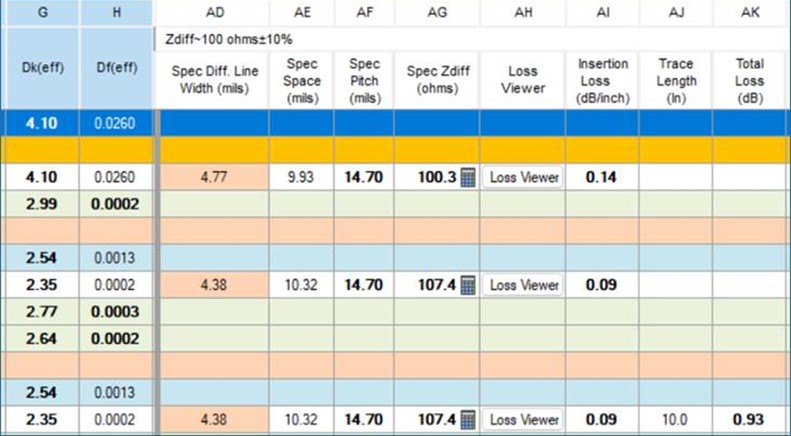
Z-planner Enterprise 2604 features an entirely new method for calculating Dk values based off of data taken from a material’s datasheet. This method significantly improves the accuracy of Dk values depending upon the plane of interest involved with individual calculations. This feature takes the typical Dk value, which is a measurement across the horizontal x-y axis of the PCB, and converts it to a vertical Dk value which transverses the z-axis. In addition to this, Z-planner Enterprise 2604 also calculates effective Dk values which compensate for prepreg resin loss and copper roughness variation.
This allows Z-planner Enterprise to account for a material’s anisotropy based on the calculation needed, leading to more precise impedance calculations. This feature provides effective Dk conversions (Dkeff) for three manufacturing factors:
- Dk(z) for impedance calculations.
- Option to calculate effective Dk(pp) and Df(pp) based on prepreg resin loss.
- Option to calculate effective Dk(Rz) including copper roughness.
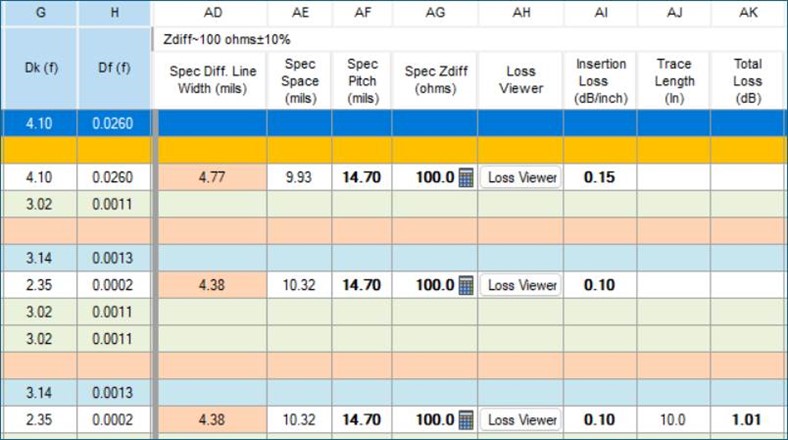
This advanced modeling can reveal significant differences in impedance, as demonstrated by a comparison showing Zdiff changing from 100 ohm without anisotropy calculations to 107.4 ohm with anisotropy calculations in place.
Exporting more accurate Dk values
You can export these effective Dk values to supported software tools, including HyperLynx SI/PI, Xpedition, IPC-2581, and other EDA software formats.
HyperLynx Advanced Solvers (HLAS), Z-planner exports:
- Dk(z) for impedance calculations
- Anisotropy, enabling HLAS to convert Dk(z) to Dk(xy) for via analysis
- Z-planner 201 and 301 now export frequency-based Dk and Df tables
Heat zone operating temperatures
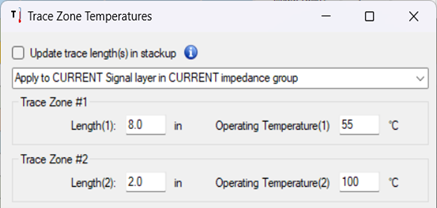
An extension of the existing Operating Temperature Adjustment, Z-planner 2604 introduces split operating temperatures. This feature allows you to perform multiple temperature calculations across a single board. You can now designate a part of a trace as being near an IC hot spot while the rest of the trace remains at the average board temperature. Z-planner will then convert these into a weighted average operating temperature and calculate Insertion Loss and Total Loss based on this more realistic temperature profile, leading to more accurate and reliable results.
Conclusion
Z-planner Enterprise 2604 is a testament to Siemens Digital Industries Software’s commitment to providing cutting-edge solutions for PCB design and analysis. With its focus on speed, accuracy, and advanced modeling, this release empowers engineers to tackle the most demanding design challenges with confidence. Upgrade to Z-planner Enterprise 2604 today and experience the future of PCB design!