What’s new in Valor 2610

The Valor NPI 2610 release represents a major product update which strengthens the products’ overall design for manufacturing (DFM) capabilities, increases the presence and use of component intelligence, adds DFM integration with external compliance organizations, while also significantly increasing overall DFM integration throughout your workflow, regardless of the layout tool in use.
The major updates within Valor NPI include:
- New User Experience (UX)
A unified, AI enabled, verification environment with customizable workspaces, easier command discovery, predictive commands and embedded product assistance.
- Xpedition Engineering data management (EDM) integration
Launch Valor NPI verification and manage analysis data and results within the Xpedition flow, with access control and traceability.
- Expanded DFx offering with embedded IPC standards compliance
Design for standards compliance (DFSC) capabilities added to Valor NPI that automatically incorporates the Global Electronics Association’s IPC standards into a larger DFM strategy
- Improved component intelligence
Valor Parts Library (VPL) additions make components easier to find, exchange and administer.
- New and improved DFM checks
As with every release, Valor NPI continues to add and refine DFM checks responding to new technologies and shifts in design and manufacturing trends.
New user experience (UX)
A major new AI enabled user experience: Valor NPI 2610 represents a unified verification environment with customizable workspaces, easier command discovery, predictive AI commands and embedded product assistance.
The new UX changes how users access and work with Valor NPI’s manufacturing verification capabilities. Its initial scope brings together core activities such as design preparation, VPL validation, netlist and DFM analysis, results review and CAM Compare. The emphasis is on the daily experience of navigating design information, configuring analysis and investigating findings.
Valor NPI introduces a unified, customizable environment with more accessible commands and assistance built into the workspace. The main additions include:
Home Page & Project Explorer
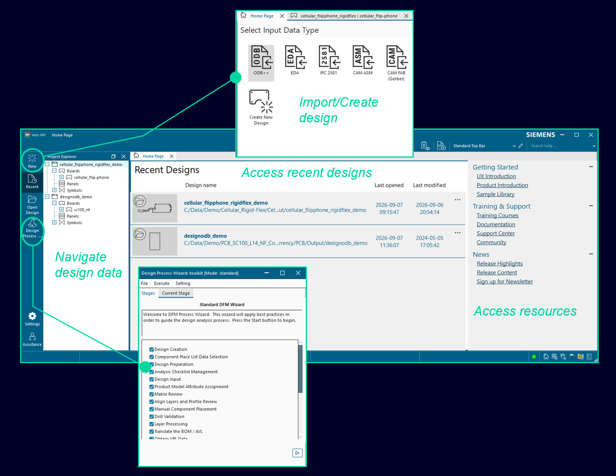
The Home Page provides access to the Design Process Wizard, existing projects, recent designs and learning resources. Project Explorer organizes design data and workspace navigation. Users can start or resume work from a common location and find guidance as they become familiar with the product.
Multiple workspaces in one environment
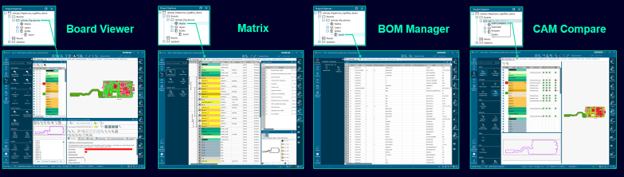
Board Viewer, Matrix, BOM Manager and CAM Compare support different aspects of a project within the same application. Each workspace can be customized independently, helping users move between verification activities while keeping the relevant project information available.
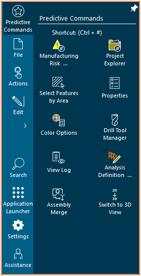
Natural language and predictive command search. Search recognizes common terminology, acronyms and product-specific language, so users can locate functionality without knowing its exact command name. This helps both new users learning Valor NPI and experienced users looking for an occasionally used capability.
Predictive Commands learn from command usage patterns and suggest relevant actions based on workflow context. Recommendations can reduce repeated menu navigation and help users reach the next operation more quickly. Users can manage predictive command behavior through the customization settings.
A dynamic, personalized workspace
The new UX adapts to the task at hand, presenting relevant commands as users move between workspaces. Customizable command layouts keep frequently used tools within easy reach, while integrated status and view controls help users track activity, monitor connections and adjust their view. Together, these changes reduce navigation and make it easier to stay focused on the design.
Mouse and keyboard navigation accommodate different working styles, while widescreen and 4K support with native Windows scaling maintain readability across display configurations. Searchable settings bring appearance, workspace preferences, scripts, libraries and administration into one place, making the environment easier to configure and manage. Users can also access privacy information and control their participation in Siemens product experience programs.
Product Support Copilot
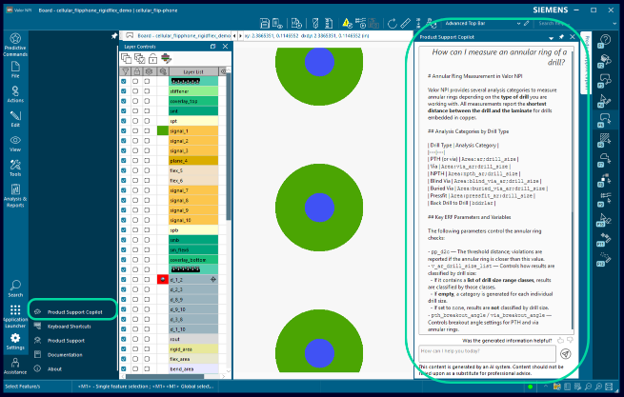
AI-powered assistance answers natural language questions using Valor NPI documentation and support content. Users can seek guidance directly within the application, reducing the effort of finding relevant product information while investigating a check or learning a workflow. Product documentation can open in an embedded workspace tab, keeping guidance available while users continue their verification work.
Adopt on your own timetable
Valor NPI 2610 provides access to both the unified experience and Classic Mode during the transition. Organizations can define the default experience, and users can switch as needed. Database Mode remains supported through Classic Mode in 2610, while broader modernization continues across subsequent releases.
Xpedition EDM integration
With the new 2610 release, Valor NPI has become part of a broader Xpedition engineering data management (EDM) verification suite, alongside several HyperLynx products, including design rule checking (DRC), schematic analysis, signal integrity and power integrity.
By bringing design revisions, verification results, reports, and related metadata together in a managed and traceable environment, EDM creates a richer foundation for AI-assisted analysis. AI capabilities can use this connected engineering context to help uncover patterns, summarize results, and identify opportunities to improve verification and manufacturing workflows.
Xpedition EDM now allows Valor users to launch manufacturing verification against a specific PCB revision while managing the resulting Valor NPI data through a check-in, check-out and approval processes. Synchronization with Xpedition Layout helps teams work from the latest design, while tying each verification to a specific design revision.
Valor 2610 organizes DFM results alongside broader board information and other verification checks, like DRC. Each check-in will capture the rules and factors used, pass/fail counts, failure details and feedback from multiple reviewers. MRA summaries will provide access to the verification history, including run dates, job size, ownership, approval and release status, and the corresponding PCB revision. This gives teams the context to understand findings and track how manufacturing readiness changes as the design develops.
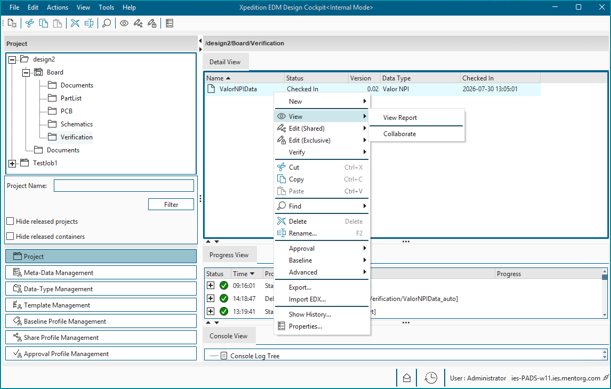
Teams can perform verification concurrently within a shared design or independently against the same revision, then rerun analysis using the updated PCB as needed. The workflow supports standalone access through EDM Cockpit, as well as direct access from Xpedition Layout through an integrated Xpedition DFM workflow.
This accumulated manufacturing knowledge supports AI analysis and deeper metadata mining. Connecting design properties, verification settings, results and reviewer feedback across revisions helps teams identify recurring issues and understand how design decisions affect manufacturing outcomes. These insights help teams refine DFM practices and improve manufacturability earlier in development.
Embedded IPC standards compliance
Valor NPI 2610 introduces design for standards compliance (DFSC) embedded within all versions Valor NPI and available at no cost. This version of the traditional IPC Class 1, Class 2 and Class 3 standards have been generated by the Global Electronics Association (GEA) and shared exclusively within Valor NPI.
Design for Standards Compliance (DFSC) checks PCB designs against applicable industry standards. DFSC supplements traditional DFM analysis, helping teams evaluate industry compliance alongside their existing manufacturing checks. The deployment includes nine advanced IPC profiles developed jointly by Siemens EDA and the Global Electronics Association (GEA), with planned updates happening twice yearly.
This strategic partnership brings together two complementary areas of expertise. GEA contributes its knowledge of IPC standards and global manufacturing capabilities, while Siemens provides the manufacturing verification technology to apply that knowledge directly to PCB designs. For users, this turns complex manufacturing requirements into repeatable checks within their existing design workflow.
The nine profiles cover every combination of IPC performance Class 1, 2 and 3 and producibility Level A, B and C. These describe two different aspects of a design: the performance expected of the finished product and the manufacturing capabilities needed to produce it.
Performance classes will already be familiar to many designers. Class 1 covers general electronic products where the primary requirement is that the finished product functions. Class 2 covers products requiring continued performance and extended service life, where uninterrupted operation is desirable but not critical. Class 3 covers products where continued performance or operation on demand is critical, downtime is unacceptable, and the product must function when required.
Producibility levels describe how widely the capabilities needed to manufacture a design are available across the global PCB supply chain:
| Producibility level | What it means for manufacturing |
| Level A — General, preferred | Uses broadly available manufacturing capabilities, giving teams the widest choice of potential suppliers. |
| Level B — Moderate, standard | Places greater demands on manufacturing processes, narrowing the pool of capable suppliers. |
| Level C — Least, reduced | Requires advanced manufacturing capabilities available from a limited number of specialized suppliers. |
Selecting a level helps teams understand how their design decisions affect manufacturing options. Moving toward Level C can accommodate more demanding technologies and geometries, but it also makes supplier capability more important. Performance class and producibility level remain separate choices: specifying a Class 3 product does not automatically mean it requires Level C manufacturing.
Each profile uses pass/fail criteria for the requirements it evaluates. These results indicate whether a design meets the selected profile’s thresholds; they are not severity rankings. Used alongside traditional DFM analysis, they give teams a consistent basis for reviewing standards compliance while continuing to address supplier-specific constraints and other manufacturing risks.
Developed for use with Valor NPI, the advanced profiles build on the basic profiles previously offered through PCBflow. They expand coverage to include HDI and microvias, flex and rigid-flex, RF, high layer counts, and heavy copper.
The profiles draw on the IPC-2220 and IPC-6010 series, IPC J-STD-001, IPC-4101, IPC-2152, IPC-2141, IPC-4562, IPC-7351, and IPC-4202, IPC-4203 and IPC-4204, along with related standards. GEA also researched global PCB suppliers to establish copper feature-size and clearance values that account for copper weight and thickness. This combines standards requirements with practical manufacturing capability data. The profiles are reviewed twice a year for updates and revisions.
The profiles provide an implementation of applicable IPC requirements for automated checking, while the underlying standards remain essential technical references. Although the check values are present in the profiles, the standards provide the fuller explanations, application guidance and engineering context needed to interpret them. Users can learn more about the advanced IPC profiles on GEA’s website and purchase the supporting IPC standards through the GEA store.
Improved component intelligence
The Valor Parts Library supplies component intelligence to Valor NPI and is the vital connection between BOM engineering data and manufacturing verification workflows. Its 2610 updates complement the Valor NPI application changes by improving how this component information is protected, located and made available to users.
Security, Reliability, Simplicity
Significant infrastructure changes have been made to the VPL to ensure more robust data integrity across the entire component exchange process, while simplifying authentication and access. Part data now has more robust encryption during system-to-system communication with each application.
Along with this, the VPL Content Server now supports LDAP-based authentication, allowing users to authenticate use using their existing enterprise credential. This connects each users VLM roles directly to their enterprise identity infrastructure.
Valor Parts Library 2610 includes automatic recovery capabilities, creating more stable deployment environment.
Simplifying Part Discovery with manufacturing part number (MPN) only search
By removing the vendor-name requirement from part searches, VPL makes component discovery more flexible and better aligned with how users often receive part information. This helps with whole-flow connectivity and improves matching when component data is incomplete or inconsistent.
New and improved DFM checks
Pass/fail constraints organized by manufacturing intent
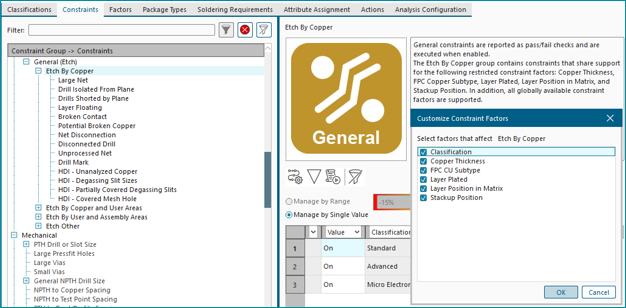
DFM profiles express the requirements used to evaluate a design. Pass/fail constraints determine whether particular conditions meet those requirements, while manufacturing factors help determine which constraints apply.
Valor NPI 2610 organizes pass/fail constraints into general groups based on shared constraint factors. General constraints are divided into relevant areas, including etch, mechanical, quality, solder, process setup and component placement.
Manufacturing requirements that adapt to board size
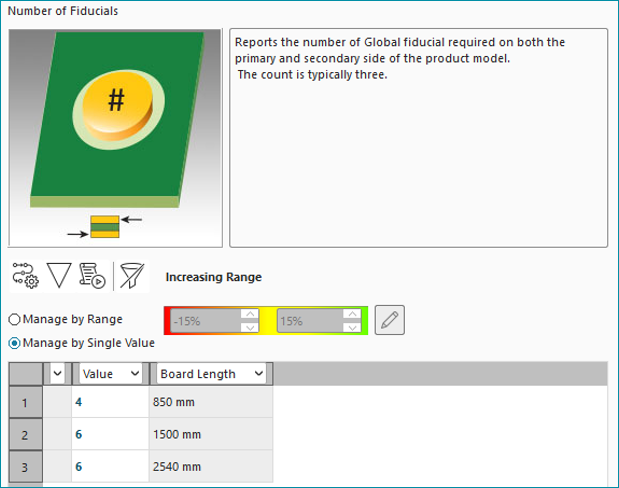
Valor NPI 2610 adds board dimensions to the list of factors within the ADM. Represented as two values; board width and board length, this allows analysis to automatically adapt to product size, allowing for more intelligent rule selection. Longer and wider boards are more susceptible to warping and as such, will need more fiducials, or increased fiducial spacing along the board dimensions to ensure consistent alignment for component placement. In addition, larger boards also require extra tooling holes to provide sufficient support and reduce board flex during assembly.
Expanded support for complex trench-via configurations
Valor NPI continues to extend it’s DFM coverage to support emerging PCB design techniques. One of the emerging manufacturing technologies increasingly entering HDI designs are trench vias.
Trench vias appear exclusively within rigid HDI PCBs and are created on blind or buried drill layers. Trenches are continuous laser-etched lines cut through the dielectric and then electroplated, forming uniform, elongated electrical connection between board layers.
Traditionally, via trenches we designated as simple point-to-point lines. Any overlapping paths were classified as illegal linear trenches. Valor NPI 2610 now supports multiple termination points from a single starting point, allowing for three and four termination microvia trench configurations.