From engineering change to BOM execution: How AI BOM agents transform PLM

The AI BOM agent in Teamcenter is a BOM-aware agentic experience that is embedded in PLM. It can understand bill of materials (BOM) structures, analyze impact, and execute changes within governed workflows.
Engineering change: Where BOM complexity becomes real
Engineering change is where BOM complexity becomes tangible. Teams must understand impact across products and variants, coordinate updates across domains, and ensure every decision is traceable. Yet in many environments, this work still depends on navigating structures, running separate analyses, and manually executing updates step by step.
That creates friction at the exact point where speed, accuracy, and confidence matter most. As product complexity grows, the challenge is no longer simply seeing the BOM clearly. It is acting on it quickly and correctly.
Teamcenter Copilot for BOM begins to change that equation by introducing AI BOM assistance directly into governed PLM workflows. Instead of stopping at analysis, it helps users move from insight to execution inside governed Teamcenter workflows, introducing a BOM-aware agentic experience that is built specifically for Teamcenter, so it uniquely understands your PLM environment. Your workflows shift from manual coordination to AI-assisted, BOM-aware execution.
Insight isn’t the bottleneck, execution is. And that’s exactly where an AI BOM agent changes the model.
Insight vs execution
Most organizations already have strong BOM capabilities. They can:
- Navigate complex product structures
- Apply configuration rules like revision, variant, and effectivity
- Perform impact and where-used analysis
But these capabilities are often disconnected from action.
Executing change still requires:
- Moving across tools and contexts
- Repeating analysis across structures
- Manually updating multiple occurrences
- Relying on individual expertise to ensure accuracy
As product complexity grows, the real challenge becomes closing the gap between understanding the BOM and acting on it.
Introducing the AI BOM agent: From analysis to action
Teamcenter Copilot for BOM introduces a different model for BOM execution; one where users don’t just analyze product structures, but interact with them in natural language and carry out approved actions directly within Teamcenter.
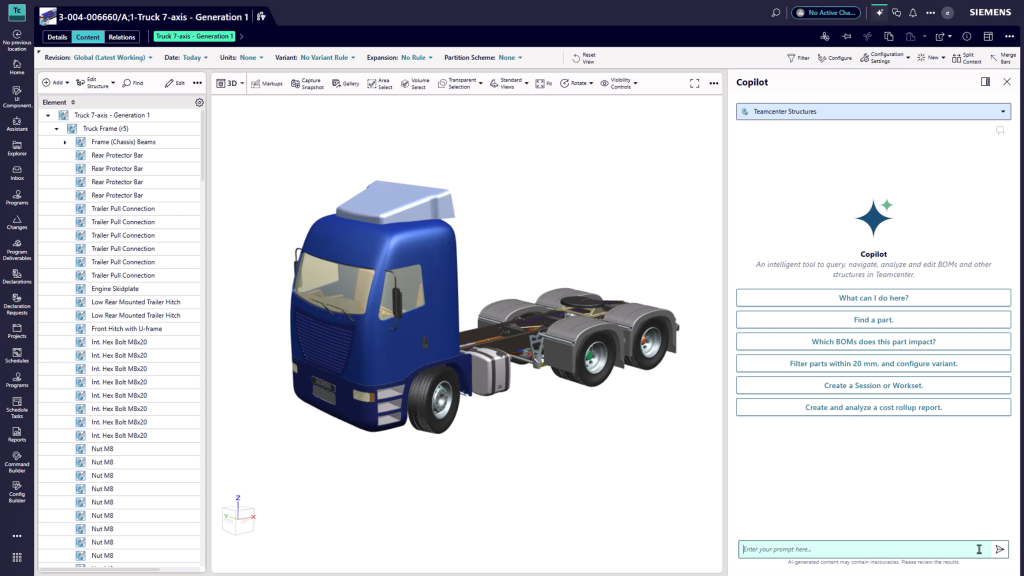
The Teamcenter AI BOM agent combines:
- Natural language interaction
- Awareness of BOM structures and rules
- Execution within governed workflows
The result is a single experience grounded in authoritative Teamcenter data, where users can move from a question to impact analysis to execution while staying in control. Actions happen within existing governance, access controls, and change processes, with human-in-the-loop confirmation for BOM updates.
Engineering change is the starting point, not the limit
Engineering change is a natural place to start because it brings together the most demanding aspects of BOM management: impact, coordination, context, and execution. But the value of a BOM agent extends well beyond a single workflow.
But the same capabilities extend across everyday work.
The Teamcenter AI BOM agent can:
- Navigate and configure BOM structures
- Analyze dependencies across products
- Execute updates and manage change workflows
- Surface relevant knowledge and specifications in context
- Save and reuse working contexts for repeatable tasks
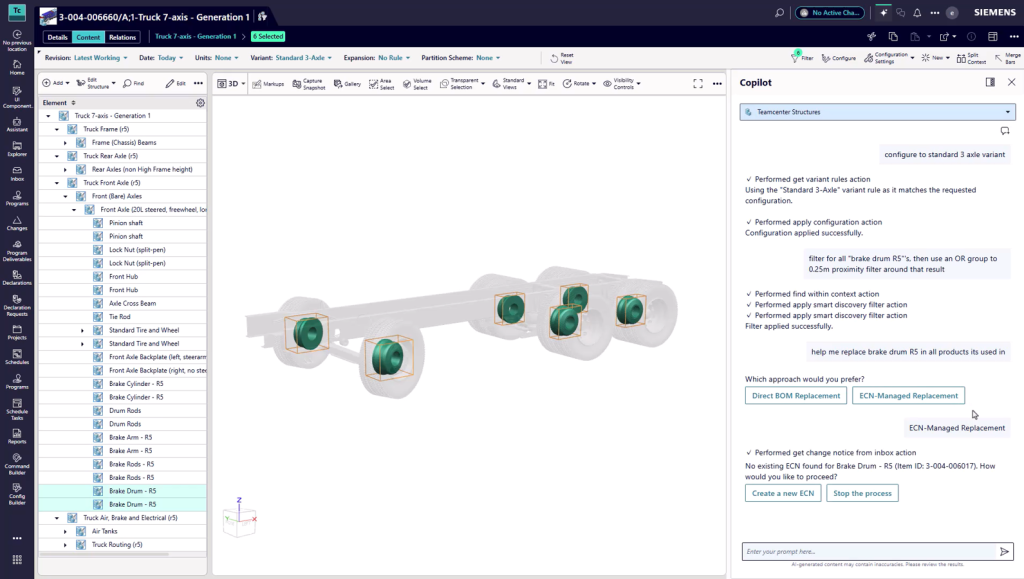
Engineering change is simply the clearest example of a broader shift from interacting with the BOM as a source of information to using it as a system of action.
AI-assisted BOM change: From configuration to redline
What makes the Teamcenter AI BOM agent different
It works in product context
The agent operates directly on governed BOM structures inside Teamcenter. Users can configure views, navigate hierarchies, and work in the correct product context using revision, variant, and effectivity rules.
It connects data across the digital thread
Because it is embedded in Teamcenter, the agent can reason across products, designs, configurations, and related objects in the digital thread, helping teams make decisions based on connected, governed data rather than disconnected lookups.
It executes work, not just analysis
In an AI BOM workflow, users can perform tasks such as component replacement, BOM configuration, or engineering change initiation using natural language. The agent helps identify impacted items, propose next steps, and carry out approved actions with full traceability.
For example: “Create an ECN to replace this part and show impacted assemblies”
Rather than acting as a black box, it supports controlled execution, surfacing impact, guiding the workflow, and keeping the engineer in control before changes are applied.
It brings knowledge into the workflow
The agent can also bring relevant standards, specifications, and product knowledge into the BOM workflow, reducing manual lookup and helping teams make faster, better-informed decisions in context.
Transforming engineering change with a guided flow
Traditionally, engineering change unfolds across multiple screens, handoffs, and manual steps. With an AI BOM agent, it becomes a more guided and connected flow:
With an AI BOM agent, it becomes a guided flow:
- Identify the component and initiate change
- Automatically determine impacted assemblies
- Evaluate alternatives
- Execute updates across occurrences
- Capture full traceability
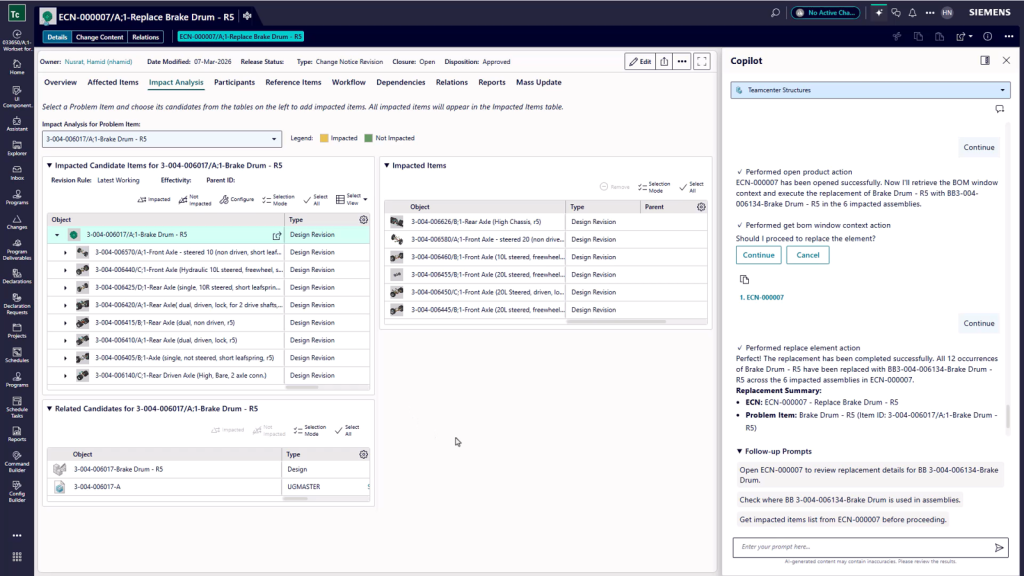
The result is a faster, more consistent change process that reduces manual effort, improves confidence in execution, and helps teams move from intent to outcome with far less friction.
Why this matters: Shifting from navigation to execution
As products become more complex, the BOM is increasingly serving as the operational backbone of the digital thread, connecting engineering, manufacturing, quality, and service decisions across the lifecycle.
At that scale, visibility alone is not enough. Organizations need to move from understanding product data to acting on it with speed, control, and traceability.
With Teamcenter Copilot for BOM, teams can move from navigating structures to interacting with them naturally, bringing AI BOM workflows into everyday product lifecycle work.
That’s what makes the AI BOM agent significant. It brings together product context, digital thread intelligence, and governed action to help organizations keep pace with growing complexity and turn BOM management into a more adaptive, productive, and scalable way of working.
🧠 Make smarter decisions with AI-powered PLM
🚀 Start fast and grow with Teamcenter X
🚗 Take the Teamcenter X 30-day test drive
🌟 Learn more about Teamcenter solutions
Table of Contents