Still Relying on Spreadsheets for Manufacturing Process Planning?
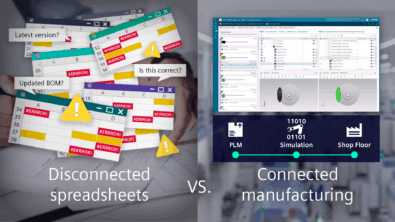
Imagine starting your day as a manufacturing planner, opening a dozen Excel files, each tracking parts, operations, machines, and work instructions. You cross-check process plans, update bill-of-process, check to see if work instructions are affected update manufacturing sequences, and reconcile the BOM again because someone changed a part revision yesterday. Every update is manual, every formula a potential mistake, and every new version adds to the tangle of email copies.
Sure, Excel feels fast, low-cost, and familiar, but the hidden costs quickly add up: hours wasted on updates, errors creeping into critical plans, and production delays mounting. You can’t simulate assembly feasibility, validate processes, or assign resources with confidence. Collaboration is painful, and traceability is nearly impossible.
Meanwhile, the factory floor is waiting, and the pressure to deliver accurate, efficient manufacturing process plans keeps growing.
The question is whether spreadsheet-based planning can still support growing complexity.
Spreadsheets cost hours of your day
Manufacturing process planning requires contextualized data sharing and close collaboration between engineering, manufacturing and execution teams. When one process falls out of sync, the impact often spreads across downstream activities and disrupts overall execution.
When plans are managed in spreadsheets, manufacturing planners spend valuable time on manual updates, version checks, and data rework instead of focusing on the plan itself. As complexity increases, even small timing errors become harder to detect and correct.
Real-world example: How an engineering change plays out
An engineering change typically starts with an update to the EBOM. That change must be compared with the Manufacturing Bill of Materials (MBOM), reflected in the bill of process, and then carried through to work instructions used during execution. In a spreadsheet-driven environment, each of these steps is handled separately, increasing the risk of missed updates, inconsistent data, and delays reaching execution.
With a task-based interface and built-in automation available in Teamcenter Easy Plan, comparing the EBOM and MBOM becomes a defined step within the engineering change process. Once the MBOM is updated, those changes automatically flow into the Bill of Process (BOP) and downstream Electronic Work Instructions (EWIs), keeping planning and execution aligned without manual rework.
That wasted time could be used far more effectively. Rather than maintaining files, planners could focus on validating process feasibility, assessing the impact of engineering changes, evaluating alternative scenarios, or improving line balance and throughput.
With a dedicated manufacturing planning solution, updates apply automatically, inconsistencies are flagged early, and planners regain time to focus on decisions that improve execution.
⏱ Time wasted: Manual updates, formula errors, and version tracking can consume hours of a planner’s productive time that could improve production.
Spreadsheets slow collaboration
Manufacturing process planning starts with MBOM creation from the EBOM, followed by EBOM–MBOM reconciliation and downstream process definition. These activities rely on multiple stakeholders working with the same data at the same time, often managed through shared spreadsheets.
The real challenge emerges when a design change is introduced. Updates must flow from the MBOM through operations and work instructions. In a spreadsheet-driven environment, those changes are captured in files, shared across stakeholders, and modified in parallel.
As multiple people make updates, version conflicts quickly appear. It becomes difficult to identify who changed what, which version is current, and how those changes impact downstream plans. Even when version history exists, tracking and restoring the correct data is time-consuming and error-prone.
📁 Version chaos:
Final.xlsx
Final_v2.xlsx
Final_REAL.xlsx
Without a shared system to manage changes, collaboration slows down, decisions are delayed, and the plan becomes unreliable.
What is the alternative for excel spreadsheets?
Manufacturers need better alternatives than Excel for manufacturing process planning. While spreadsheets may seem like a simple, low-cost solution, they carry hidden costs that quickly add up—time spent on manual updates, reconciling multiple versions, correcting errors, and coordinating changes across teams. These efforts not only slow down planning but also increase the risk of mistakes that can ripple through production.

As product structures become more complex, processes grow more interconnected, and design changes happen more frequently, the limitations of spreadsheets become harder to manage. Simple tasks like updating an operation sequence or reflecting a design change across the MBOM, process plan, and work instructions can take hours or even days.
✅ Smart alternative: Manufacturing planning software reduces manual work, ensures consistency, and enables real-time updates across teams.
Manufacturing process planning software addresses these challenges by providing a structured, connected environment designed specifically for complex products and processes. It enables real-time updates, automated validation, and seamless collaboration across teams, freeing planners from repetitive manual work and allowing them to focus on decisions that improve production efficiency and reliability.
To see the difference more clearly, here’s a side-by-side comparison of Excel spreadsheets and dedicated manufacturing process planning software:
Excel vs Manufacturing Process Planning Software
| Area | Excel Spreadsheets | Manufacturing Process Planning Software (Teamcenter Easy Plan) |
| Ownership | Built and maintained by individuals | Shared system used across manufacturing planning roles |
| Purpose | General-purpose data tracking | Dedicated manufacturing process planning platform |
| Process plans creation | Slow to create and update process plans | Faster process plan creation and updates |
| BOM & BOP management | Manual EBOM/MBOM handling | Native EBOM–MBOM-BOP management and change process that reduces discrepancies between design and manufacturing data |
| Electronic Work Instructions (EWI) to shopfloor | Not connected to the overall process and change process | 3D/2D work instructions auto-linked to process plans and EBOM/MBOM/BOP; interactive and always up-to-date |
| System Integration | Disconnected from CAD, CAM, PLM, ERP | Integrated with CAD, CAM, PLM, ERP, simulation and quality planning software and downstream systems |
| Data quality | Prone to manual data entry errors | Errors flagged automatically through validation |
| Change management | Manual updates across multiple files | Controlled, workflow-driven change tracking |
| Traceability | Limited version control and history | Full traceability with approvals and audit trails |
| Scalability | Breaks down as complexity grows | Built for complex ETO, BTO, MTO, and multi-site collaborative environments |
Manufacturing Process Planning with Teamcenter Easy Plan
Switching from spreadsheets to Teamcenter Easy Plan provides a structured, connected environment for manufacturing process planning. Teamcenter Easy Plan is a web-based, task-oriented solution that allows manufacturing planners to create and manage the Manufacturing Bill of Materials (MBOM), Bill of Process (BOP), and Bill of Equipment (BOE) in one integrated system.
Key capabilities include:
- MBOM management – Convert EBOMs into production-ready MBOMs, reconcile differences, organize parts and subassemblies by station and sequence, and maintain full traceability.
- Process validation – Define operations, resources, and materials, with change tracking to reduce errors and maintain consistency.
- Production optimization – Balance workloads, simulate cycle times, and identify bottlenecks.
- Work instructions – Generate task-oriented, visual instructions directly from process plans to align shopfloor operations.
- Centralized planning – Maintain a single source of truth, reducing manual updates, version conflicts, and spreadsheet reconciliation.
🎯 Key takeaway: Centralized MBOM management, process validation, and visual work instructions streamline planning from design to execution.
This allows manufacturing planners to focus on analyzing operations, assessing alternative scenarios, and making informed decisions rather than managing files, helping maintain accurate, actionable plans across design, planning, and execution.
As complexity grows, don’t just rely on spreadsheets for manufacturing process planning, consider a more connected way to plan using Teamcenter Easy Plan.