Stop starting from scratch: How AI projects improve everyday work
Most people do not have an AI problem. They have a context problem.
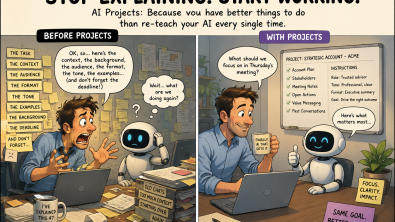
All new AI projects with the same routine.
Explain the task. Describe the audience. Upload the documents. Add the background. Remind the AI what good looks like.
Then, just as the AI begins to understand the work, the conversation ends and the process starts again somewhere else.
This is why AI projects in ChatGPT and Claude, alongside similar workspaces such as Microsoft Copilot Notebooks, matter.
At first glance, they look like a better way to organise conversations. That understates their potential.
A good prompt can improve one answer. Well-designed AI projects can improve an entire stream of work.
Why normal chat-based working fails
The first phase of workplace AI adoption has focused heavily on prompting.
Employees are encouraged to provide clearer instructions, assign the AI a role and experiment with different frameworks. This is useful, but it places too much responsibility on each individual interaction.
The quality of an AI response does not depend only on the prompt. It depends on the information surrounding it.
In most organisations, that information is fragmented across presentations, emails, reports, meeting notes, shared drives and the experience held by individual employees.
The result is predictable.
People repeatedly reconstruct the same background. Useful outputs disappear into old chats. Colleagues receive different answers because they are working from different information.
This is more than a productivity issue. It affects consistency, knowledge retention and the ability to turn individual expertise into repeatable execution.
What AI projects actually are
An AI project is a dedicated workspace built around an ongoing task, customer, program or area of responsibility.
Depending on the platform, it can bring together instructions, reference material, related conversations and previous outputs.
The important shift is persistence.
Instead of treating every prompt as a separate request, you create a working context that develops over time.
The AI begins with a clearer understanding of what you are trying to achieve, which information should guide the work and what a good result should look like.
This does not remove the need for human judgement. It gives that judgement a more consistent starting point.
How this applies across a business
The opportunity is not limited to technical teams or experienced AI users.
Finance could create a workspace for monthly forecast commentary, including reporting definitions, previous summaries and the expected executive format.
Marketing could build one around a regional campaign, containing audience profiles, approved messaging and examples of previous content.
Sales could create one for recurring account planning, combining customer priorities, stakeholder context, meeting notes, value messaging and agreed next steps.
Project management could use one to maintain decisions, risks, actions and stakeholder updates throughout a major initiative.
For customer-facing roles, the value becomes particularly visible.
Imagine preparing for the third meeting with a strategic customer in six weeks.
Without a dedicated workspace, you may need to upload the account plan again, explain what happened in the previous meetings and summarise the unresolved actions.
With one, the question can become:
Based on the previous meetings, open actions and the customer’s current priorities, what should we achieve in Thursday’s discussion?
The value does not come from a more complicated prompt. It comes from the AI already understanding the context surrounding the question.
Why this matters for employees
The obvious benefit is less repetition.
The more strategic benefit is consistency.
AI projects can help employees prepare from the same information, apply the same standards and build on previous work rather than recreating it.
They can also reduce dependency on knowledge held by one person.
Many business processes are less standardised than organisations assume. Two employees may perform the same task using different information, different assumptions and different definitions of what good looks like.
AI can reinforce that inconsistency or help reduce it.
The difference is how the context is designed.
AI projects should not replace CRM, document management or established systems of record. They can become the working layer between those systems and the employee who needs to interpret information, reach a decision or take action.
Practical ways teams can use them
The strongest use cases are rarely isolated tasks. They are recurring activities where context, quality and consistency matter.
Recurring business processes
Monthly reviews, executive summaries and planning cycles can be grounded in agreed inputs, terminology and output standards.
Customer and partner workspaces
Account preparation, opportunity planning, meeting follow-up and stakeholder analysis can sit within one consistent context.
Repeatable expert guidance
Subject matter experts can capture frameworks, evaluation criteria and strong examples so colleagues can apply their knowledge more consistently.
Major programmes and initiatives
Transformations, campaigns and product launches can maintain objectives, decisions, risks and working outputs in one dedicated environment.
The goal is not for AI to perform the entire process. It is for employees to spend less time reconstructing context and more time applying judgement.
Useful features people often overlook
The principle is similar across the major platforms, but each approaches persistent work differently.
ChatGPT: Separate the context, not just the conversations
Existing conversations can be moved into an AI project where they use its instructions and files. Project-only memory can also keep the working context contained within that specific AI project.
Claude: Build a focused knowledge base
Claude Projects provide self-contained workspaces with their own chat histories and knowledge bases. Artifacts offer a separate space for developing substantial content, tools and visual outputs.
Microsoft Copilot: Bring the workspace closer to Microsoft 365
Copilot Notebooks can use a curated set of Word documents, PowerPoint presentations, Excel files, pages and other references as the basis for its responses. Custom instructions can also guide the focus, format and tone of the output.
The most important principle applies across all three.
A customer account, recruitment process and marketing campaign should not share the same instructions or source material.
Context creates value because it is relevant, not because there is a lot of it.
A simple way to get started with AI projects
Choose one task you repeat every week.
Create a dedicated workspace and add only the approved information required to perform that task well.
Then use a simple CRIT structure to define how it should operate:
Context
This project supports [task, customer or initiative]. Use the information provided here as the primary context. Identify missing information rather than inventing it.
Role
Act as an experienced [role or area of expertise]. Apply practical business judgement and consider the needs of [audience or stakeholders].
Interview
Ask me up to five questions, one at a time, when additional context would materially improve the output.
Task
Help me produce [specific output]. Use [required format, tone and structure]. Clearly distinguish confirmed information, assumptions and areas requiring validation.
Use the workspace several times before judging it. Remove outdated material, identify missing context and refine the instructions based on real use.
The biggest mistake is uploading everything available and assuming more information will create a better result.
It usually will not.
The next phase of AI adoption will not be defined by employees learning increasingly complicated prompts.
It will be defined by organizations learning how to structure context, preserve knowledge and embed good judgment into repeatable ways of working.
That is the real opportunity behind AI projects.
Create AI projects around tasks you repeat every week and measure how much time you stop spending explaining yourself.
About the author
Benedict Russell is a Global Partner Development Executive responsible for scaling global GTM programs across all motions. He helps shape Siemens’ digital selling and AI strategy, embedding best practices that accelerate SaaS adoption and recurring revenue. Previously, he drove partner coverage and expansion, adding 300+ partners to the Siemens ecosystem. Read Benedict’s most recent blog here.