What’s New in Opcenter X 2607

Opcenter X for scalable digital transformation.
Summary
Siemens Digital Industries Software is pioneering modular MOM, enabling more manufacturers to take a stepwise approach to digital transformation. Built with cloud technologies and offered as software as a service (SaaS), using Opcenter™ X software, which is part of the Siemens Xcelerator business platform of software hardware and services, lowers the time and cost barriers for SMBs, enabling you to realize rapid return-on-investment (ROI) with modules that connect and adapt as your enterprise matures.
With Siemens as your MOM solution partner, you can be sure Opcenter X is built on a rich and deep knowledge base and the extensive capabilities of a leading software company. We listen to and learn from our customers, then innovate and capture best practices for every digital task. Then we apply best practices to accelerate time-to-value of our software.
Implementing Opcenter X can boost manufacturing productivity, product quality, time-to-market, and compliance by streamlining operations and decision-making. Siemens supports clients in their digital transformation journey, unlocking the full potential of manufacturing operations.
Capabilities
Track and Trace
- A new column, Type, has been added to the Work Order grid, enabling Work Orders to be viewed and sorted by type directly.
- It is now possible to set up the Tolerance Flexible mode for Work Orders. This is an additional option to the previously released Full Flexible mode. Refer to How to Create Work Orders in the User Manual.
New Operator Terminal
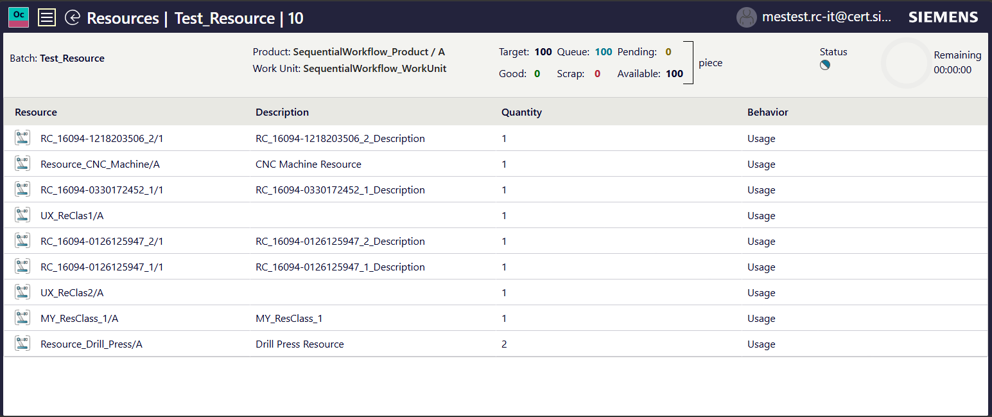
- Resource usage task and Resource table were implemented. It is now possible to declare resource usage and see the list of resources required for the current operation.
- The Assign Work Unit action is now available on the details page as well
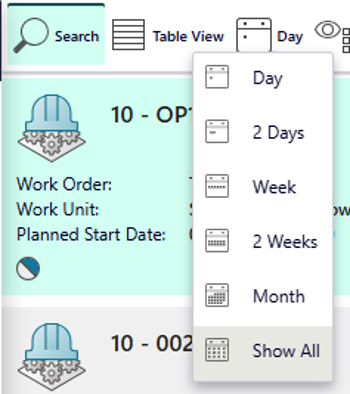
- Show All filter option is now available for the operation filtering
- NC tab now has a badge with open NC
- The next operation now opens automatically after the current one is completed.
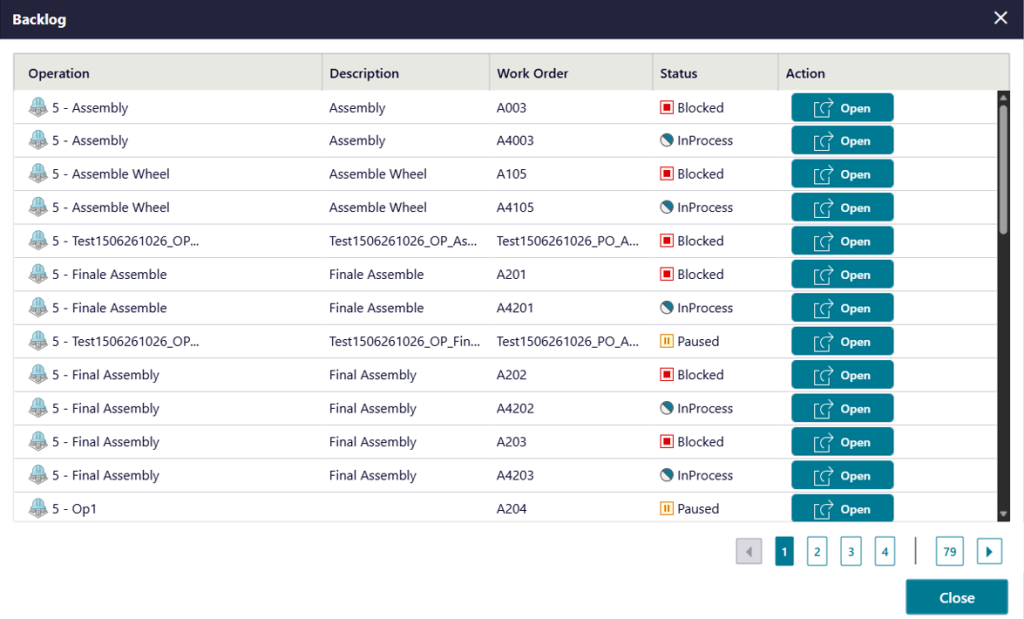
- The Backlog popup is introduced to enable quick selection of the operation from the list that was filtered on the first page
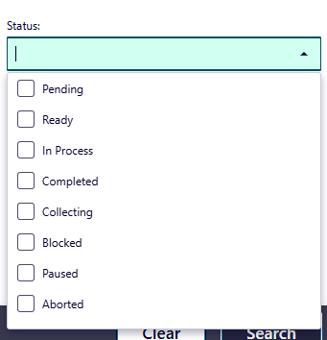
- Operation filter is now enhanced by introducing Status field. It is possible to select multiple statuses for the filtering.
- Material picking list now supports multiselect.
User Management
- When a user is deleted from the Admin Console it is automatically removed from the skill assignment and all the apps that manage its instances
Configurator
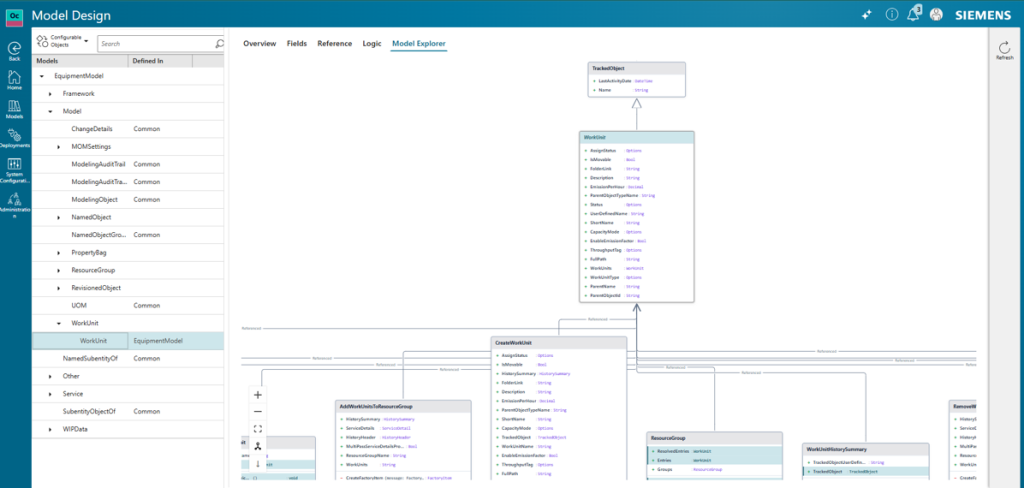
Model Explorer (UML Diagram)
- Enables users to visualize and navigate the system’s metamodel through interactive UML diagrams, providing clear understanding of object relationships, dependencies, and structural patterns within the platform architecture.
Promoting flow from QA to Production Environment
- Enables controlled promotion of tested and validated configurations from staging/quality environments to production, ensuring safe deployment through automated validation and approval workflow
Quality Management
Improved SPC inspection and evaluation
- Expanded SPC evaluation capabilities with additional evaluation types for variable characteristics. The user can select a preferred evaluation type, with control limits calculated according to recognized standards.
- Users can preassign subgroup sizes for variable characteristics and sample sizes for attributive and visual characteristics.
- Two new control charts are available — the median single control chart and the median control chart with median and range — suited for processes with occasional extreme readings or non-normal distributions.
- Users can edit and delete inspection orders and characteristics directly within quality order management, provided the necessary permissions are in place.
- Users can record usage decisions (e.g., scrap or rework) on inspection orders after acquisition. This can be set as mandatory before closing an order. Decisions are accessible from multiple apps. Related icons are hidden when not applicable.
Strengthened nonconformance management
- Enhanced graphical visualization in the nonconformance area, starting with visual inspections.
- New fields on the office and the shop floor pages are available. On the office page, quantity and responsible-team information are visible. On the shop floor page, an action status indicator has been added and updated in real time. Material information is available where it matters, including the material at the failure location and the material request action type.
- A fast-working view is designed for processing nonconformances and their related actions. Built around a work order and operation view, it features a dedicated filter panel and quick action creation.
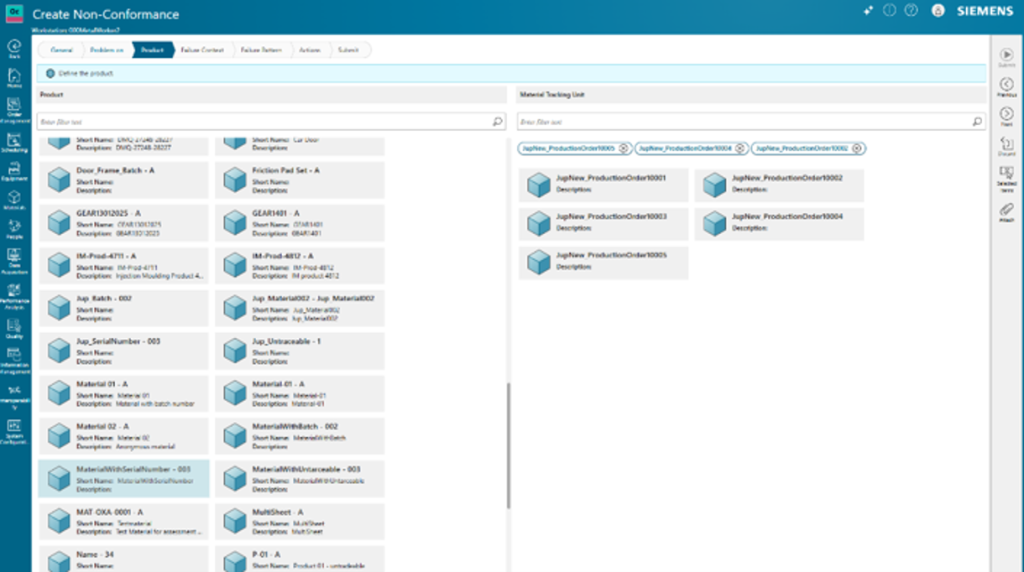
- Expanded the capabilities introduced previously with simultaneous creation of MTU-related nonconformances. Users can generate multiple nonconformances in a single step and link bulk-created nonconformances to one another and review them together in a bulk created tab.
Scheduling
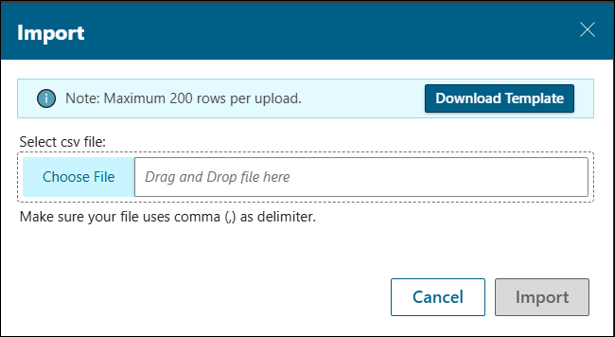
- Managing calendars got easier. You can create multiple resource calendar exceptions at once by uploading a CSV file instead of adding them individually. This is useful when a planned shutdown or schedule change affects several resources over different time periods.
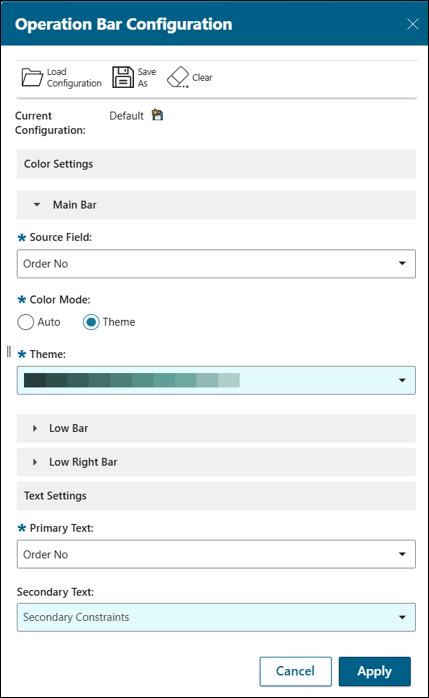
Introducing configurable operation bar visuals in the Gantt Chart. It is possible to personalize operation bar colors and labels based on orders, resources, resource groups, secondary constraints. Reusable visual themes and automatic color mapping make it easier to identify patterns, bottlenecks, and critical planning information immediately helping teams make faster, more informed scheduling decisions.
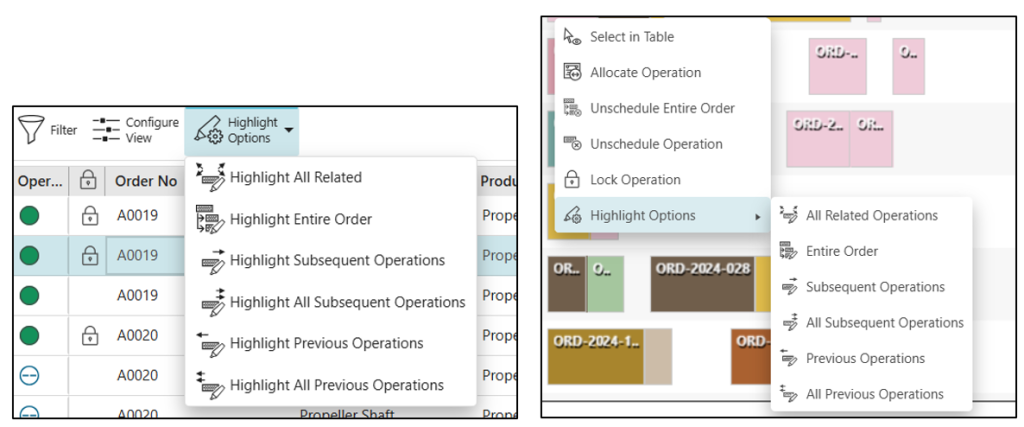
- Quickly visualize operation dependencies with more Highlight Options. Trace immediate or complete previous/subsequent operation chains or highlight all related operations including supply and demand links with just a click. This helps understand dependencies faster, make better scheduling decisions, and reduce the effort of manually tracing operation sequences.
- Sorting operation-level columns is now smarter and more intuitive. Orders are automatically ranked based on the earliest/latest operation value (depending on sort direction), while operations within each order are sorted consistently. This makes it easier to analyze schedules and locate the information needed.
Visual Information Navigator
Performance Optimization for High-Volume Event Processing Challenge
Manufacturing environments can generate large volumes of real-time events from Opcenter X. During peak activity periods, the system must process these events quickly and reliably to ensure information remains up to date and operational workflows continue without interruption.
Solution Description
Visual Information Navigator has been enhanced to process incoming NATS events more efficiently, significantly improving performance during high-load scenarios. The optimization reduces processing time, improves responsiveness, and enables the system to handle larger event volumes while maintaining stability and reliability.
Benefits
- Faster updates and response times for users working in real-time production environments
- Reliable performance during peak operations, even when event volumes increase significantly
- Improved scalability to support future growth and additional connected systems
- Reduced risk of delays, event queues, or missed updates, ensuring operational data remains current and accurate
- Smoother user experience with consistent system responsiveness under heavy workloads
UX Improvement for Visual Information Navigator
Solution / Description
The Visual Information Navigator header has been redesigned to deliver a more streamlined and engaging user experience while aligning with Opcenter X design standards.The new header introduces a consistent look and feel across the platform and prominently displays both the product name and the active site, giving users immediate context whenever they access the application.
Benefits
- More intuitive user experience with a modern, clean, and consistent interface
- Faster user orientation by clearly displaying the active site and product information
- Improved productivity through easier navigation and reduced user confusion
- Stronger Opcenter X integration with a unified and recognizable user experience
Interoperability
Map Designer
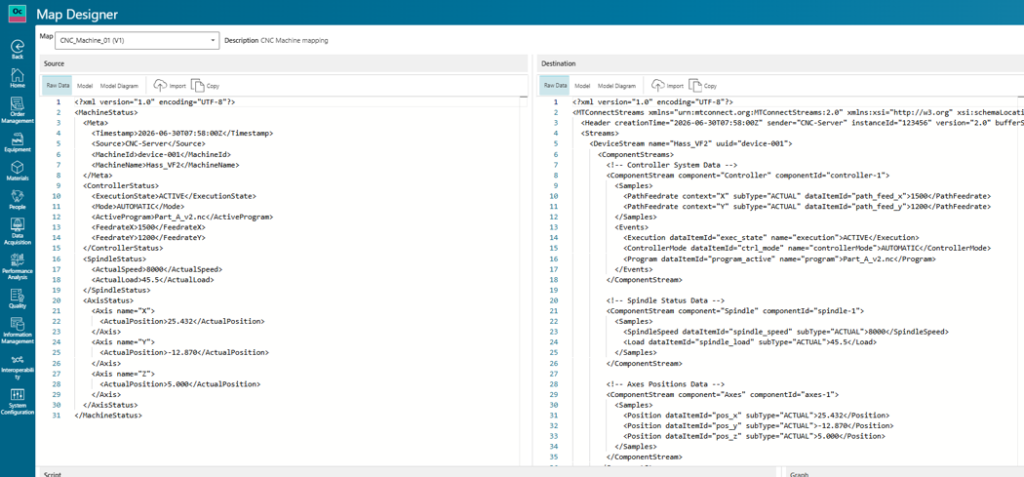
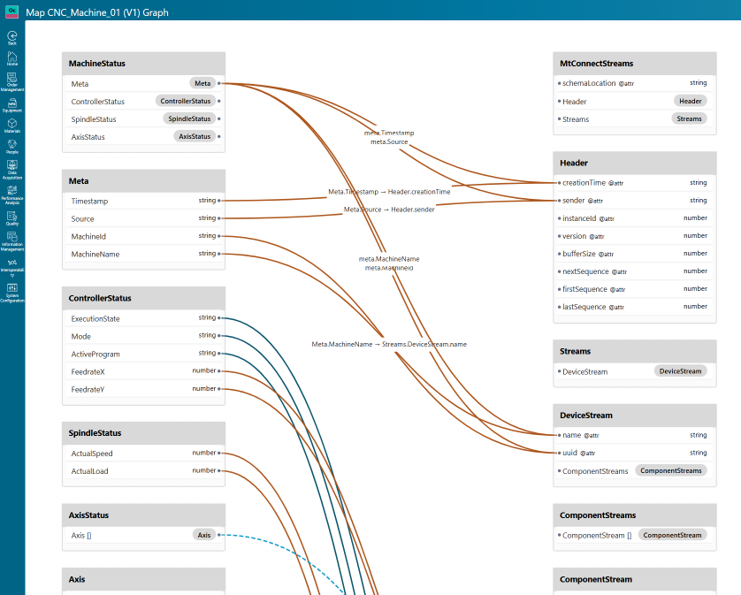
- A new Map Designer is available and can be accessed via a new tile under the Interoperability landing card. This enables the mapping of data between different formats. New examples of how to use maps in your Interop model extensions are also available.
Connector Enhancements
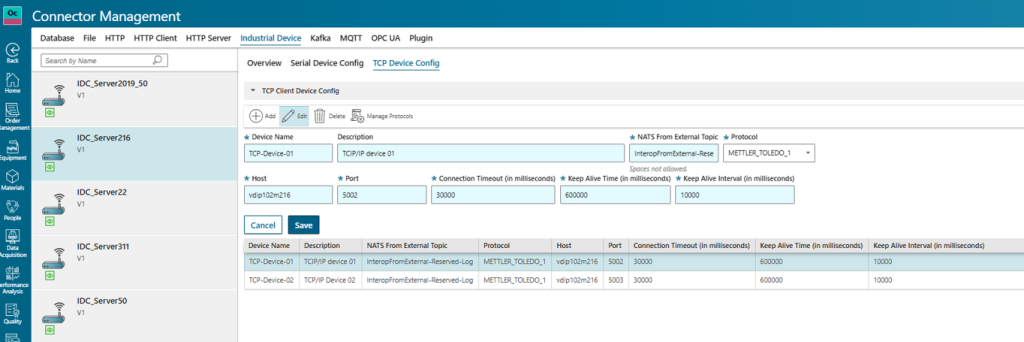
- The Industrial Device Connector now supports connection to TCP protocol based devices.
- The Http Connector and the Http Client Connector now support bearer token based authentication.
- The Kafka Connector now supports SaslSsl based authentication.
- The Remote Interop Connector (RIC) CLI installation tool now supports easier installation and upgrade of the NATS Leaf Node Server.
- The Remote Interop Connector (RIC) has been upgraded to .NET 10 framework. Note: you must install .NET 10 before upgrading RIC on Windows machines.
If you are a decision-maker and resonate with the challenges discussed, consider exploring Siemens’ new solution Opcenter X. It might just be the catalyst your company needs to leap into the future with confidence.
Try our product through our Trial page, or by requesting a demo.