What’s new in Opcenter X Quality 2607

Explore Opcenter X Quality 2607 and its new features designed to strengthen quality management on the shop floor.
Opcenter™ X Quality software is a cloud-based quality management system (QMS) that covers quality-relevant processes on the shop floor. Using Opcenter X Quality, manufacturers can execute quality controls based on detailed inspection plans, manage gages and characteristics, and rely on statistical process control (SPC) analysis to support consistent overall quality on the shop floor.
Opcenter X Quality version 2607 introduces features designed to strengthen quality management on the shop floor — boosting SPC capabilities, enhancing nonconformance management, and providing documentation guidance with the AI-powered assistant, Opcenter Copilot.
Expanded SPC inspection and evaluation in Opcenter X Quality 2607
Enhancements to SPC inspection and evaluation enable greater alignment with industry-recognized standards, while reducing manual effort and improving data accuracy.
Evaluation types for variable characteristics – This release expands SPC inspection and evaluation capabilities with additional evaluation types for variable characteristics. Users can select their preferred evaluation type, and control limits can be calculated according to several recognized standards.
Enhancements for SPC execution – Opcenter X Quality 2607 improves the day-to-day execution of SPC by letting users preassign key values rather than entering them by hand each time. Users can preassign the subgroup size for variable characteristics and the sample size for attributive and visual characteristics, both defaulting to five.
Introduction of new control charts – Opcenter X Quality 2607 introduces two control charts – the median single control chart and the median control chart with median and range. These charts are useful for processes with occasional extreme readings or non-normal distributions.
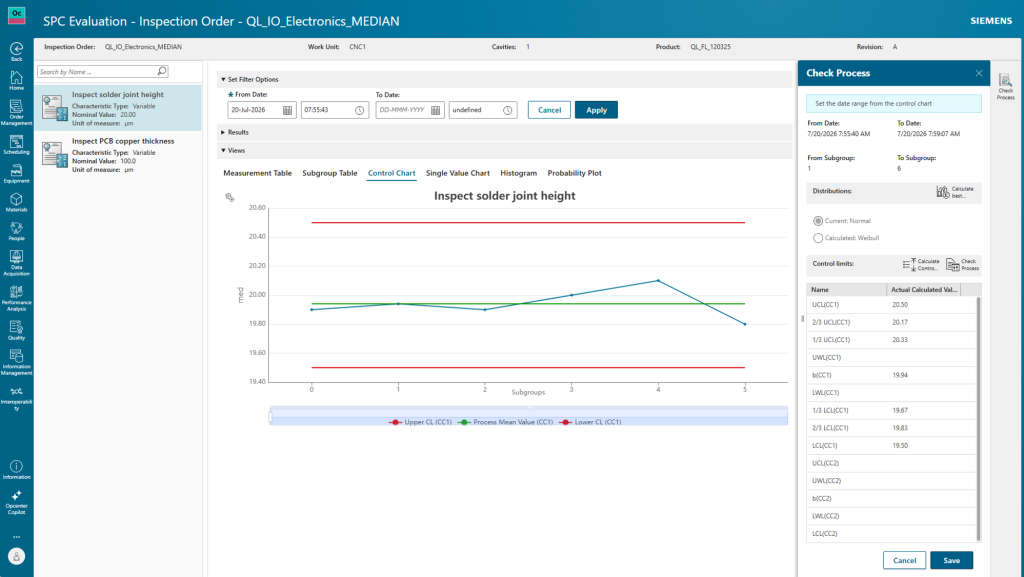
Enhancements in quality order management – Opcenter X Quality 2607 enables users with permission to edit and delete inspection orders and characteristics directly as part of quality order management. Access controls and user authentication ensure that only authorized users can view and modify the stored data.
Usage decision tracking and management – This release allows users to record a usage decision – such as scrap or rework – for the produced part or subgroup on an inspection order. Decisions can be entered from the order management app, the SPC inspection app, or the acquisition window.
MSA inspection data export – Building on the measurement system analysis (MSA) capabilities introduced in the previous version Opcenter X Quality 2601, users can now export MSA inspections from inspection order management.
Strengthened nonconformance management in Opcenter X Quality 2607
When quality issues arise, speed and clarity are everything. Opcenter X Quality 2607 delivers both with a suite of nonconformance management improvements.
Visual inspections and general enhancement for nonconformance management – Opcenter X Quality version 2607 enhances graphical visualization in the nonconformance area, starting with visual inspections. Additionally, new fields on the office and shop floor pages make everyday work more effective. On the office page, quantity and responsible-team information are visible at a glance. On the shop floor page, an action status indicator has been added and updates in real time.
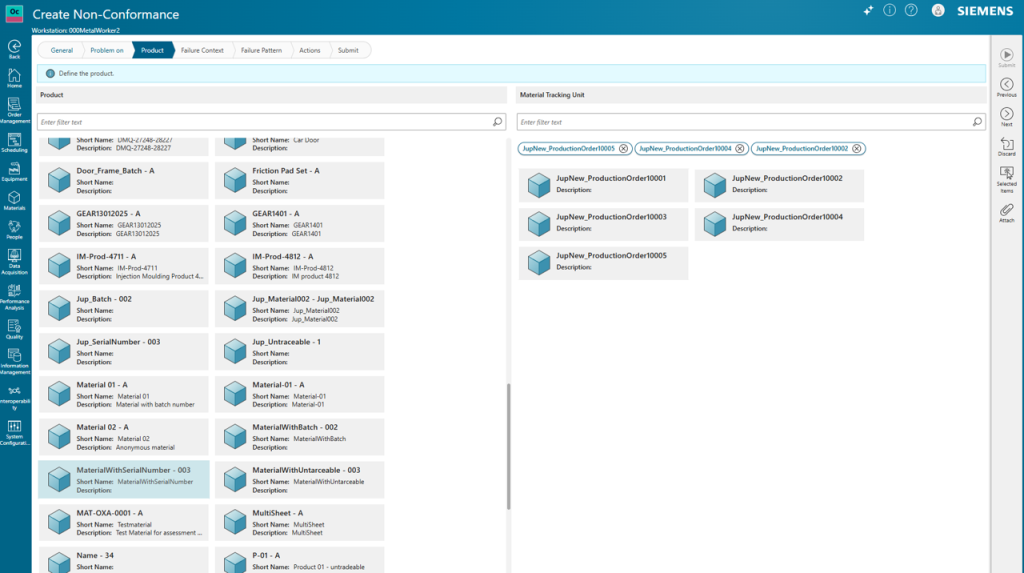
Simultaneous creation of MTU-related nonconformances – Opcenter X Quality version 2607 expands the material tracking unit (MTU) capabilities with simultaneous creation of MTU-related nonconformances. By selecting several material tracking units at once, users can generate multiple nonconformances in a single step. Users can automatically link bulk-created nonconformances to one another and review them together in a bulk created tab.
One view for all nonconformances and related actions – A fast-working view is designed specifically for processing nonconformances and their related actions. Built around a work order and operation view, it features a dedicated filter panel and quick action creation right where the user needs it. From here, users can create actions, update statuses and enter comments without leaving the view.
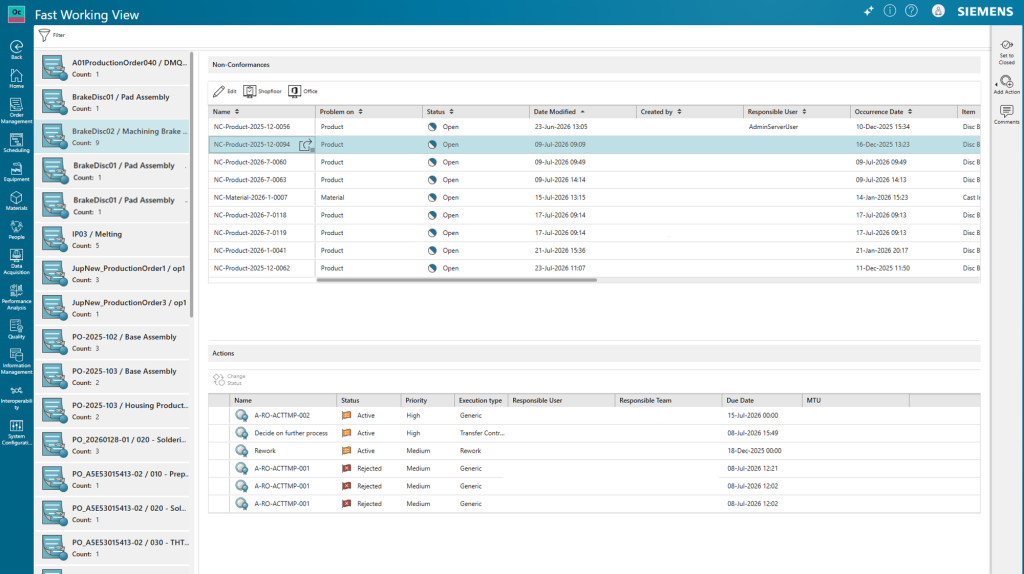
Streamlined action management
Action management in Opcenter X Quality version 2607 gains several usability and configuration improvements. A responsible team filter has been added, making it easier to focus on the actions that belong to a particular team. Users can assign workstations to an action template and reuse them later in the nonconformance.
AI-powered documentation assistant
Finding the right answer in product documentation shouldn’t slow you down. Opcenter Copilot is an intelligent assistant that reads and understands available product documentation, then responds to your prompts with context-aware answers through a simple chat interface.
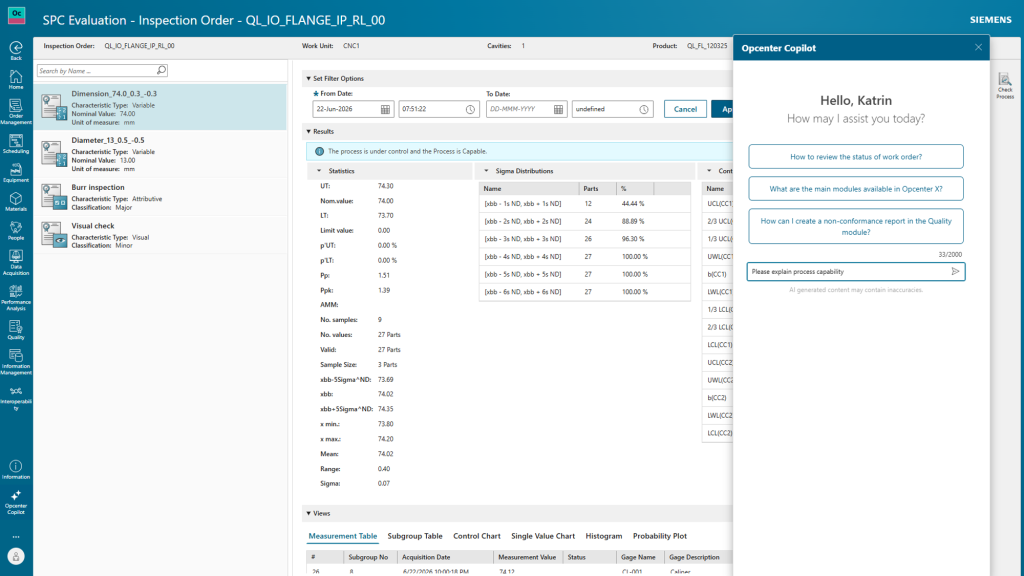
Need clarity on an SPC evaluation method? Wondering how to configure a specific quality workflow? Just ask. Opcenter Copilot delivers relevant, detailed answers drawn directly from the documentation — saving you time that’s better spent on analysis and action.
Closing the quality loop from planning to execution
Pairing Opcenter X Quality with Teamcenter® Quality software, both part of the Siemens Xcelerator portfolio, empowers quality professionals and production planners to optimize inspection planning and its execution.
With Opcenter X Quality 2607, this integration has been enhanced — characteristics and their associated images now carry over automatically when a quality engineer imports an inspection plan, preserving all relevant details. During execution, these characteristics and images are available in the defect location tab, enabling operators to identify the exact failure location without relying on text descriptions alone.
Discover all the benefits of Opcenter X Quality 2607
- Standards-aligned SPC evaluation across recognized industry methodologies
- Streamlined SPC execution with reduced manual effort and cleaner data
- Seamless inspection plan-to-shop floor consistency with Teamcenter integration
- Faster nonconformance resolution through bulk processing and real-time tracking
- Stronger quality accountability with skill-based controls
- Quickly find information and improve quality understanding with AI-powered assistant
Ready to explore Opcenter X Quality 2607 release?
Dive into the full Opcenter X Quality 2607 release notes to explore the complete list of capabilities, and discover how Opcenter™ X Quality software — part of the Siemens Xcelerator business platform — can help your organization achieve consistent, shop floor quality excellence.
Take advantage of Opcenter X Quality and explore the software release notes for a detailed list of capabilities and benefits.