What’s new in Opcenter X Quality 2601

Discover the latest release of Opcenter X Quality 2601, with features specifically designed to strengthen quality management on the shop floor.
Opcenter™ X Quality software is a cloud-based quality management system (QMS) software that supports quality-relevant processes on the shop floor, from product and process controls to defining corrective actions for nonconformities.
Built with cloud technologies and offered as software as a service (SaaS), Opcenter X Quality is part of the Siemens Xcelerator business platform of software, hardware and services. It enables manufacturers to execute quality controls based on detailed inspection plans, manage gages and characteristics, and utilize statistical process control (SPC) analysis for process monitoring, identifying potential nonconformances, and driving effective corrective actions.
Improved inspections and data acquisition
Opcenter X Quality 2601 introduces new features to support users in creating inspection definitions based on characteristics and additional information, which refers to executing the inspection. These features add value to both Opcenter X solutions for manufacturing execution system (MES) and quality management system (QMS).
- Part-specific inspection intervals. Users can define quantity-based inspection frequency directly in the process plan, complementing time-based options. The software tracks production quantities and alerts operators when the next inspection is due. Once completed, the counter resets and the next inspection threshold is displayed. This functionality integrates seamlessly with the MES parts counter.
- Improved visualization of images or drawings. Opcenter X Quality version 2601 enhances the user experience with improved visualization of attached images and drawings. Users can easily reference inspection procedures and graphically capture defect locations, streamlining the inspection process and improving overall usability.
Supporting measurement system analysis (MSA)
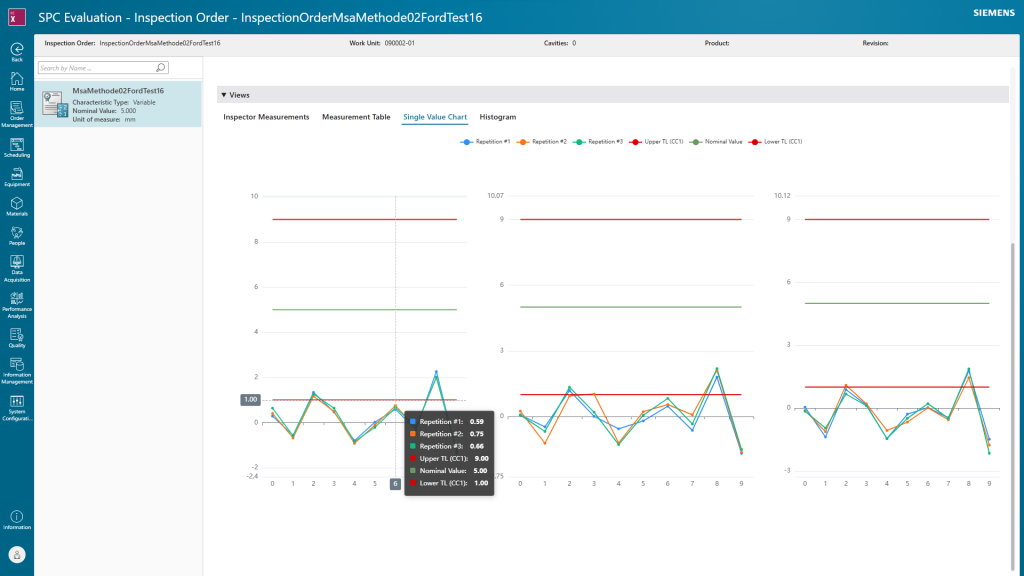
Opcenter X Quality version 2601 introduces the ability to perform measurement system analysis (MSA) and run capability studies.
In the main view of the SPC evaluation page, a user can select an inspection order with a specific MSA type, and the characteristics assigned to that inspection order are displayed. Users can refine their selection by specifying a time period (date and time range) for the evaluation. The filter defaults to the date of the first data acquisition. A green checkbox indicates the gage is capable for the selected MSA method, while a red checkbox indicates it is not capable.
- Determine the bias and linearity of a measurement system. An MSA Type 1 gage study can be selected to evaluate the capabilities of a measurement system by analyzing the accuracy and repeatability of a measuring instrument.
- Assess the repeatability and reproducibility. An MSA Type 2 study commonly referred to as a gage repeatability and reproducibility (GR&R) study, can be selected to assess the combined variation of repeatability and reproducibility of a measurement system.

Improvements in managing nonconformances
By leveraging Opcenter X Quality capabilities, line operators and quality engineers can record nonconformances in detail, providing valuable information for subsequent analyses. The user interface (UI) guides employees through a predefined process for quick data collection. By analyzing recorded data, they can identify defects and patterns and derive actionable insights to improve production quality.
Trend and Pareto analysis for nonconformances. Using Opcenter X Quality version 2601 empowers quality professionals with advanced graphical evaluation tools. Analyze failure types with interactive Pareto charts and monitor nonconformance trends across time periods. Both features support data-driven decision-making with customizable time-period filtering for deeper insights.

MTU handling during nonconformance creation. Several functions within the nonconformance process have been expanded to optimize and simplify the handling of material tracking units (MTUs), for example serial numbers or batches. This feature allows users to seamlessly and clearly assign an MTU to a product when creating a nonconformance.
- Automated nonconformance generation. When an inspection result is recorded for a specific MTU, and Opcenter X Quality detects a process violation, a separate nonconformance is generated for each defective MTU.
- Streamlined MTU selection from work orders. Operators ccan select the MTU directly on the product page, where only the MTUs included in the work order are displayed. The selected MTU automatically appears in the defined actions.
- Enhanced action assignment rules. An important feature for clear MTU handling is the action assignment rule: a unit can only be assigned either the scrap or rework action, not both simultaneously.
- Focused overview of open nonconformances. A special view provides a focused overview of open nonconformances for the selected MTU.
Additional improvements in Opcenter X Quality 2601
Opcenter X Quality 2601 delivers improved user experience with several enhancements. Here’s a list of the highlights:
- Quantity field for actions: When assigning actions to a nonconformance, if the action type is scrap (for example), the user is now required to enter the quantity.
- Improved search for defect assignment: Opcenter X Quality 2601 includes an improved pattern search function to boost efficiency during defect assignment. When activated, after selecting a defect type, the software displays all defect locations and highlights the most frequently used combinations.
- Expanded file upload support: The file upload functionality has been enhanced to distinguish between images and other file types, offering greater flexibility in managing quality documentation. Users can attach various evidence, such as reports or logs, directly to nonconformances, centralizing information.
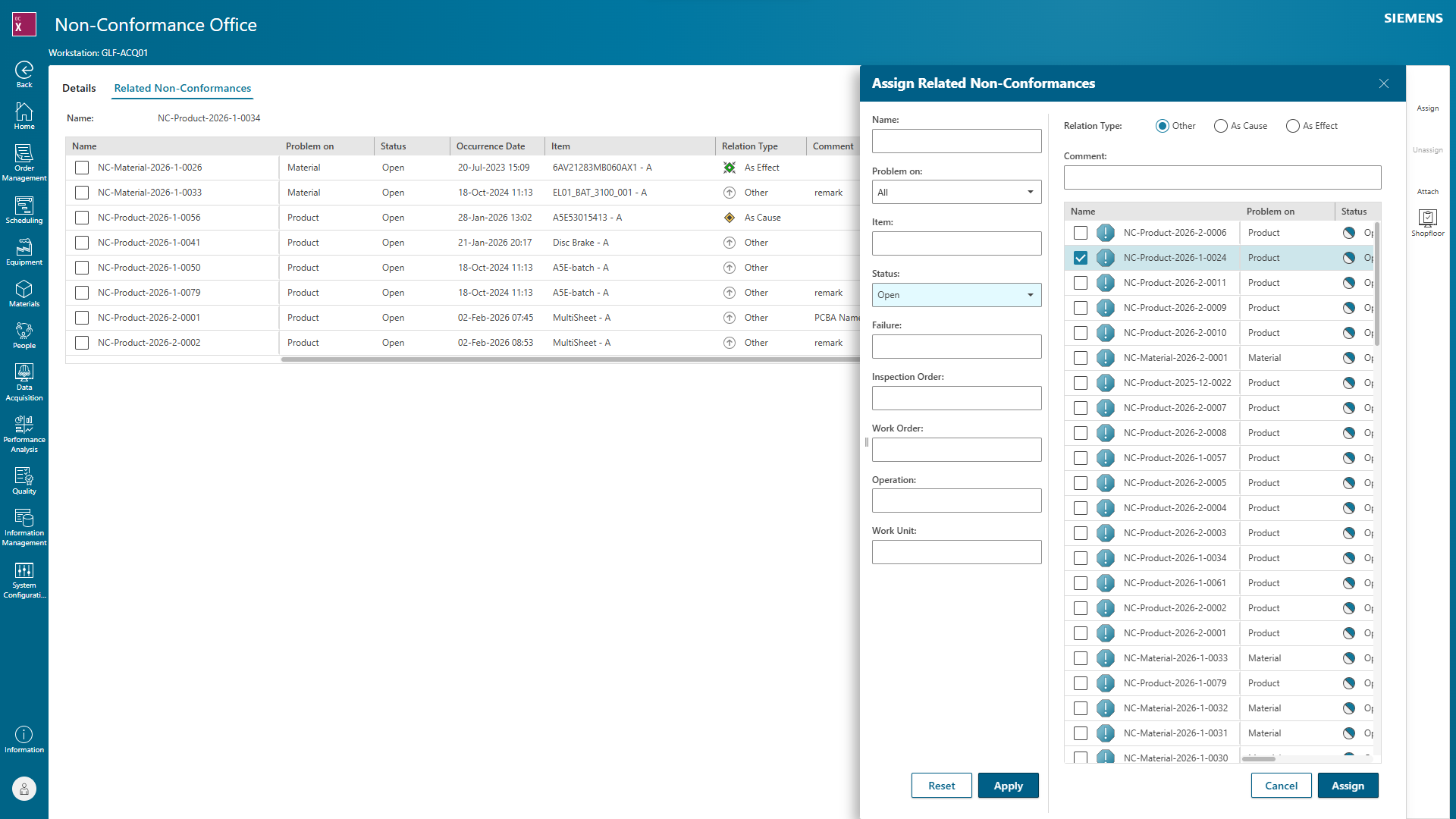
- Enhanced relationships: Users can search for nonconformances by inspection order, work order, or operation. Additionally, manual linking of nonconformances allows users to define relationships between them, aligning with the Failure Modes and Effects Analysis (FMEA) methodology for more comprehensive analysis.
Realize the closed-loop quality approach with Opcenter X Quality
Pairing Opcenter X Quality with Teamcenter® Quality software, both part of the Siemens Xcelerator portfolio, empowers quality professionals and production planners to optimize inspection planning and its execution. Users can access Teamcenter Quality inspection plans directly during quality task creation in the Opcenter X Process Designer app, eliminating the need to embed plans into inspection orders first. This capability also streamlines workflows for organizations leveraging Opcenter X as a combined manufacturing execution system (MES) and quality management system (QMS).
Pairing Opcenter X Quality with Opcenter X Intosite
The combination of Opcenter X Quality and Opcenter X Intosite™, both part of the Siemens Xcelerator portfolio, equips plant quality professionals with visual insights for proactive quality management. Here’s how these solutions streamline shopfloor processes:
- Enhanced quality monitoring. Opcenter X Intosite Visual Information Navigator module enables event-driven monitoring of product quality. This is achieved through the intuitive visualization of key metrics, such as the process capability index (CpK).
- Seamless visual nonconformance management. Opcenter X Intosite Visual Information Navigator integrates nonconformance management directly into the visual factory context. Nonconformances created at operator terminals automatically appear as linked visual placemarks on the relevant work units within the plant’s digital layout, providing immediate visual correlation.
Discover all the benefits of Opcenter X Quality
Ready to elevate your quality management processes in manufacturing? Opcenter X Quality 2601 delivers tangible advantages that empower your teams and elevate your production.
- Optimize shop floor quality control with streamlined part- and time-based inspections
- Enhance clarity for viewing attached images or drawings
- Boost the reliability of tools and procedures with MSA
- Provide clearer insights for nonconformance data to facilitate historical analysis
- Handle material tracking units (MTUs) information during nonconformance creation
- Enhance visual insights from shop floor inspection and evaluation
Take advantage of Opcenter X Quality and explore the software release notes for a detailed list of capabilities and benefits.