What’s new in Opcenter APS 2510

We are excited to announce that the new version of Opcenter APS 2510 has been released!
Opcenter™ software is part of the Siemens Xcelerator portfolio, the comprehensive and integrated portfolio of software, hardware and services. Opcenter APS is a family of production planning and scheduling products that help you synchronize your manufacturing processes.
This gives you greater visibility and control to increase resource utilization and on-time delivery while reducing inventory levels and waste. Opcenter APS is a highly customizable capacity planning and scheduling package that empowers manufacturers to respond quickly to changing shop floor conditions and make data-driven decisions.
Highlight features in this release
- Configurable Alerts Window
- Material Explorer Enhancements
- Secondary Constraint Event Type
- Support Endpoints with Different Subdomain to the Issuer for OpenID
- Integration with Opcenter IPL
- Integration with Opcenter X MES Essentials
Configurable alerts window
The new Configurable Alerts Window in Opcenter APS 2510 significantly improves how planners monitor shop floor activity by providing real-time visibility into shopfloor issues directly within APS.
This feature allows alerts to be displayed directly within APS and is no longer limited to EX DS or EXPR systems—it now supports any MES system, making it much more flexible for diverse manufacturing setups.
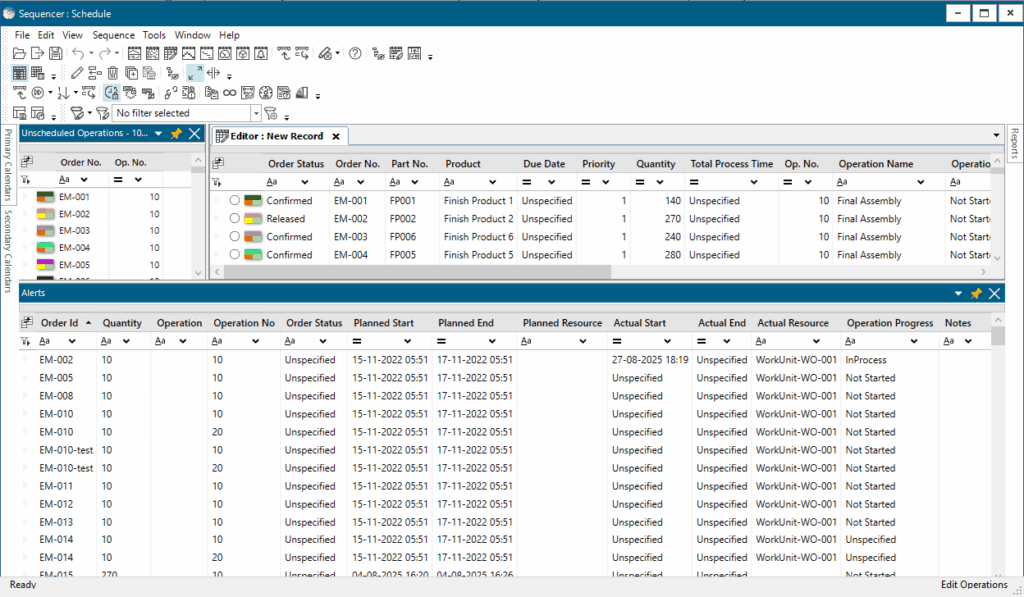
Key capabilities:
- Configuration is done via the USER ALERTS TABLE classification in the .prtdf file, allowing users to define how alerts are captured and displayed based on their MES configuration.
- Alerts auto-refresh using the Refresh Alerts PESP action, triggered by the On Alerts Window Update event.
- The refresh frequency is controlled via MES Integration Settings, so users can tailor how often updates occur.
This means planners and operators can now see real-time shop floor issues directly in APS, enabling faster responses and better decision-making. Ultimately, this feature enhances operational agility and helps reduce delays caused by unreported or late-reported issues.
Material explorer enhancements
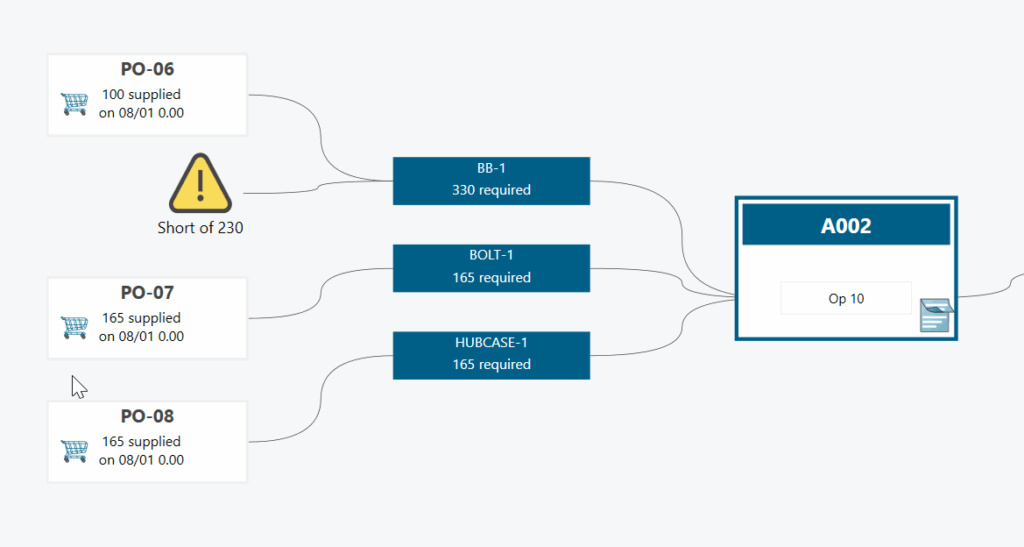
In Opcenter APS 2510, the Material Explorer has received several enhancements that make it easier and faster for planners to work with material data.
Key improvements include:
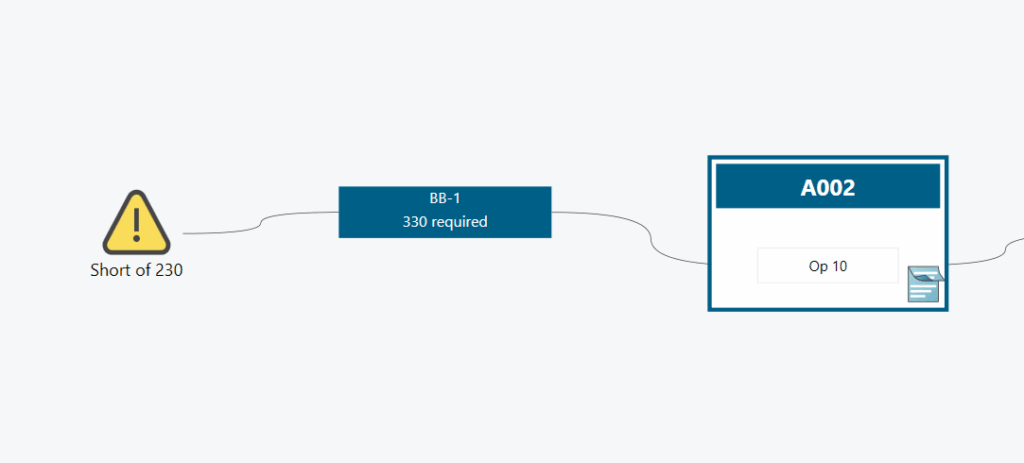
- Show Shortages Only view allows planners to quickly filter and focus on materials that are short, helping prioritize actions and reduce delays.
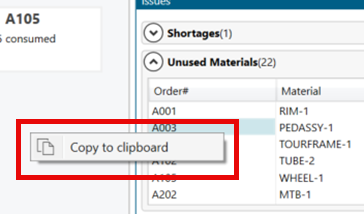
- Copy values directly from the Result table, which is especially useful for exporting data to reports or external tools for further analysis.
- Restore Focus feature ensures that when you return to a previous view, the last selected order is automatically highlighted—saving time and reducing navigation effort.
- Increased capacity to handle larger datasets with a Maximum Links or Operations Limit now at 50,000, which is a significant boost for users working with complex schedules.
- Performance improvement by up to 75% thanks to improved caching and backend optimizations, making data loading and navigation much faster.
These enhancements are designed to streamline the planning process, reduce manual effort, and improve overall system responsiveness.
Secondary constraint event type
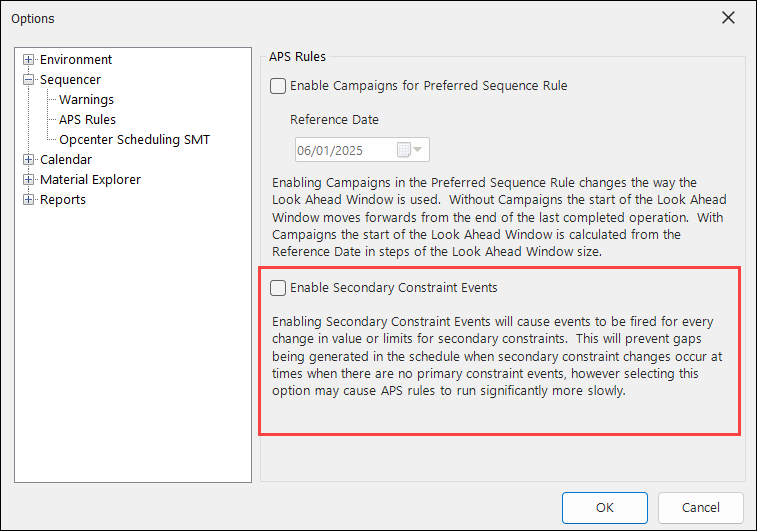
Opcenter APS 2510 introduces support for Secondary Constraint Events, which help avoid unnecessary schedule gaps caused by changes in secondary constraints when no primary constraint events occur.
In previous versions, changes in secondary constraints—like tooling or operator availability—could go unnoticed if no primary constraint (like machine availability) changed. This could lead to inefficient schedules or idle time.
What’s new:
- With this feature, APS can now fire events for every change in value or limits for secondary constraints, allowing the scheduler to respond more intelligently and optimize the plan.
- This is enabled through a new event type called SecResEvent, which is documented in the API guide.
Important notes:
- This feature is disabled by default to avoid performance issues or rule conflicts.
- It can be enabled via: Tools → Options → Sequencer → APS Rules.
- It’s recommended to use this feature only if your scheduling logic requires it, and ensure your APS rules are compatible.
Overall, this enhancement gives planners more control over complex scheduling scenarios and helps improve resource utilization.
Support endpoints with different subdomain to the issuer for OpenID
Opcenter APS 2510 has enhanced OpenID Connect support to allow integration with identity providers that use different subdomains than the issuer—such as Microsoft Entra ID. This update resolves a common issue where authentication fails due to mismatched endpoint authorities.
What’s new:
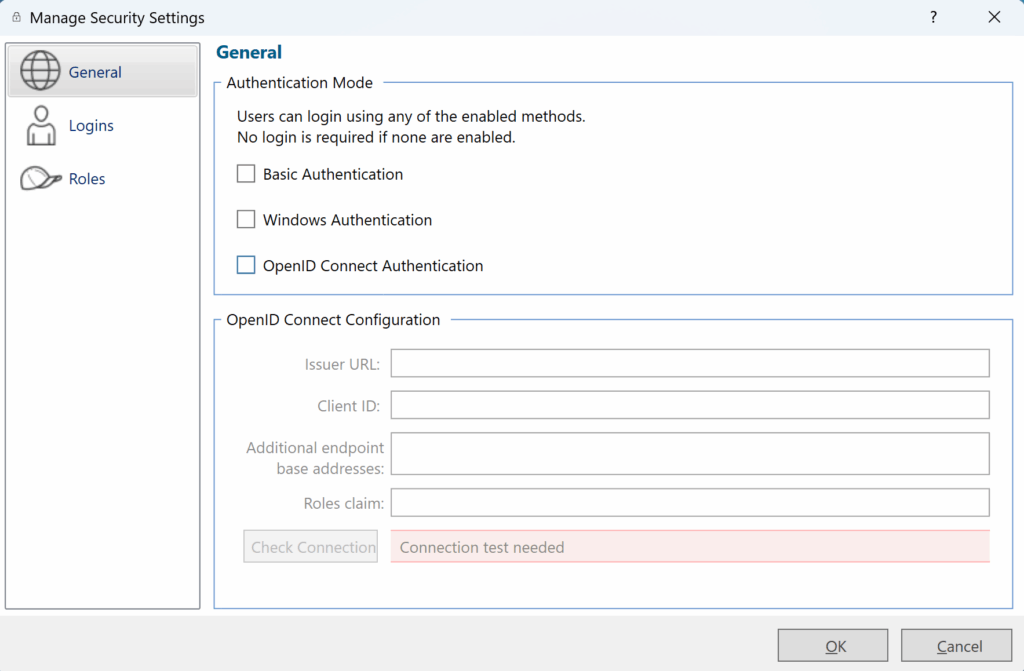
- Support for Additional Endpoint Base Addresses: This is an optional field that can be configured when you encounter the error: ‘Endpoint belongs to different authority’. You can now add multiple endpoint addresses to handle such cases.
- New field for Roles Claim: This can be customized based on your identity provider’s configuration.
These enhancements make APS more flexible and compatible with a wider range of enterprise identity systems, improving security and simplifying user authentication setup.
Integration with Opcenter IPL
Opcenter APS 2510 has added integration with Opcenter Intra Plant Logistics (IPL), which allows planners to import real-time material availability data directly into APS.
This integration helps create more accurate production schedules by reflecting actual shop floor inventory conditions.
How it works:
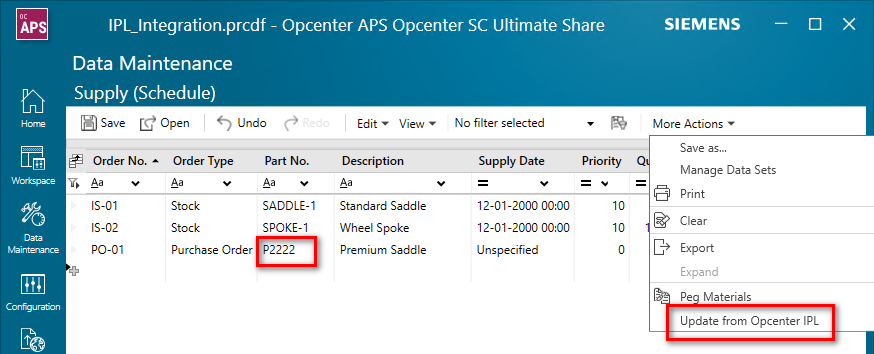
- The integration imports the latest material information based on Part Number from IPL.
- It is manually triggered from the Supply table in the APS Desktop by clicking ‘Update from Opcenter IPL‘ under the More Actions menu.
- This feature ensures that planners are working with the most current material data, reducing the risk of scheduling based on outdated or incorrect inventory levels.
Please note:
- An example configuration is available via a Support Centre Ticket.
- While this integration currently requires manual activation, it lays the foundation for more dynamic and responsive planning workflows.
Integration with Opcenter X MES Essentials
We’ve introduced integration with Opcenter X MES Essentials, which enhances the connection between planning and execution on the shop floor.
This integration enables:
- Improved time for production plan re-generation, enabling planners to see the changes before being applied.
- Improved communication between the planner and the shop floor.
Workflow:
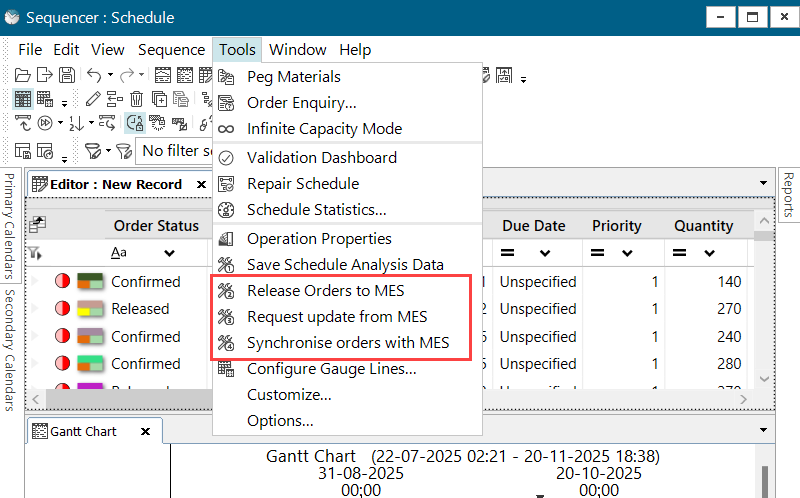
- APS creates and owns the work orders. Once a schedule is finalized, it can be released to the shop floor from the Sequencer.
- An interoperability adapter converts APS data into OCX work orders automatically—no manual intervention needed. The integration has been designed to be extendable via changes to the Interop Adaptor.
- After release, shop floor status updates are collected and displayed in the Common Alerts Window, giving planners real-time visibility into execution progress.
Assumptions and limitations:
- It assumes that process definitions and factory hierarchy between APS and OCX are already synchronized.
- Certain scenarios are not supported, such as Aborted or Split Orders and Aggregate records from OCX.
This workflow ensures that planners stay informed and can respond quickly to any issues, making production planning more dynamic and aligned with actual shop floor conditions.
Benefits of Opcenter APS 2510
- Configurable Alerts Window for real-time shop floor monitoring
- Material Explorer Enhancements with 75% performance improvement
- Secondary Constraint Event Type for optimized scheduling
- Enhanced OpenID Connect support for flexible authentication
- Integration with Opcenter IPL for accurate material data
- Integration with Opcenter X MES Essentials for improved planner-shop floor communication
Get Started with Opcenter APS 2510 today
Opcenter APS 2504 continues Siemens’ commitment to delivering powerful, flexible, and user-friendly planning and scheduling solutions. Whether you need advanced schedule validation, enhanced security, or streamlined data import, this release has you covered.
<< Start your free 30-day trial in minutes >>
Want to learn more? Opcenter APS products can be used for long-term strategic planning covering months and years, medium-term tactical planning with a few weeks planning horizon and for detailed sequencing and scheduling. Opcenter APS can be installed out of the box and can be customized and configured where necessary.
Additional Information
Want more info on Green Scheduling? Read our White Paper
Supply chain management planning – challenges and opportunities
Supply chain disruptions are incredibly stressful for manufacturers. Without visibility into all levels of the supply chain, production planning can be difficult and disjointed. There are so many complexities and dependencies that need to be balanced. That is where supply chain management planning becomes crucial, and an advanced planning and scheduling (APS) solution can help manufacturers stay in control.
- eBook “Supply chain management planning – challenges and opportunities” ->
- White Paper “Planning for a more resilient supply chain” ->
More Information on Opcenter solutions