What’s New in NX | June 2025 | Managed Mode
Welcome to the next edition of What’s New in NX™ software series! This series is tailored to your specific workflow, across multi-industries, highlighting to you how NX can deliver powerful and flexible tools that drive innovation all the way from initial idea to physical production.
With our continuous release of NX, we are driven to bring you new features, specifically designed to improve your productivity and time to market; the June 2025 release also brought just that. Looking at what’s new in managed modes, we’ll be highlighting how these latest enhancements are streamlining your workflows.
Let’s start!
Teamcenter inside of NX
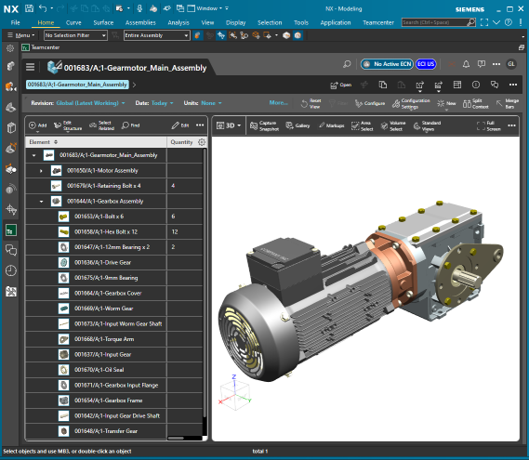
Ensuring you can use Teamcenter inside of NX is key. This allows all teams to have a place to collaborate on product designs and documents, without an authoring application and helps you utilise Active Workspace. We also know that NX user productivity increases with immediate access to content managed in digital threads and this is why we’ve made enhancements in the June 2025 release. Below are some of the improvements we’ve made in our continuous release cycle to benefit your Teamcenter and NX collaboration.
Show contents of an NX dataset
We understand the importance of aligning patterns used in Teamcenter with NX. Let’s say as an NX user, you want to verify the list of files that were saved to Teamcenter.
Here’s some improvements to help:
- BBOX is a Form (open and view form data)
- NX part file, preview, and true shape (TSO)]
- View all named references attached to an NX dataset
- Open the NX dataset and click on NX Properties
- First table shows the attached Forms
- Second table shows the attached Files
Cross-selection enhancements
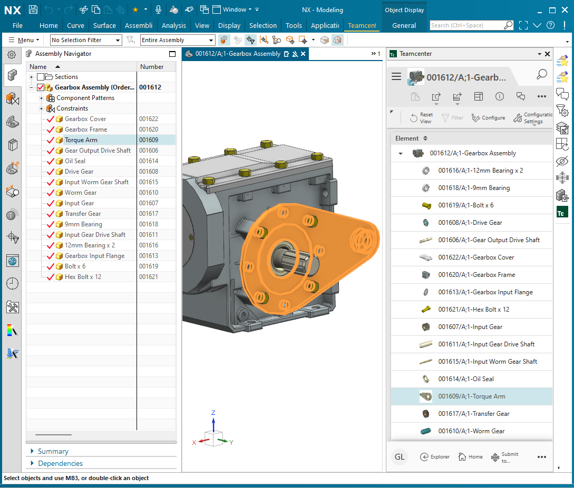
With the latest release you’re now able to define how you want to use cross-selection when Teamcenter is inside of NX. You will now be able to select the option to automatically expand the ANAV to selection.
Float as document tab
We understand the need for simple usability within tabs. You can now undock the resource bar tab and float your current one in a new documents window. This then allows your Teamcenter tab to float independently on a second monitor, separate from the main NX window. The NX document window then appears in the Windows taskbar grouped under the NX icon. This update will make switching between one and another more simplistic and reducing any confusion on designs.
Smart Discovery
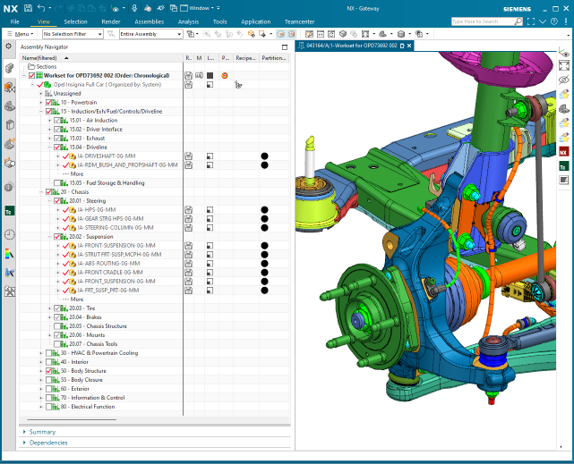
Updates to Smart Discovery allow advanced searching and filtering within large product structure, enabling engineers to focus and work on their areas of interest. This is particularly helpful within the automotive and aerospace industries, where we understand our customers are working with such large-scale models. Having a simple, structured way of filtering will result in saving valuable design time and getting products to market faster.
Smart Discovery is integrated into NX with a native NX experience giving access to four filter types to define filter recipe.
- Proximity (Spatial)
- Volume (Spatial)
- Partitions
- Attributes
Design Workset
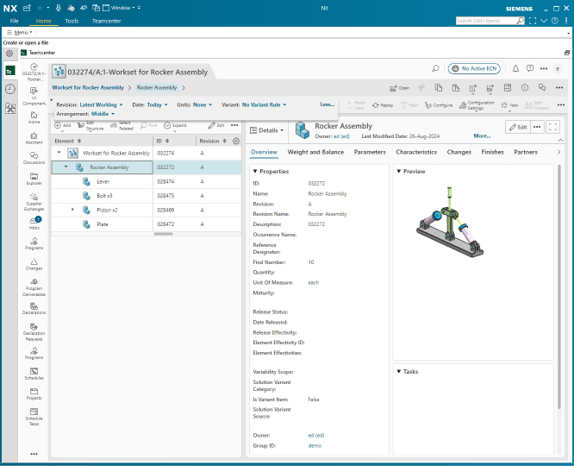
Design Workset allows you to insert a single or multiple filtered product assembly and locate them relative to one another. In relation to this, we have made some key updates particularly to Design Workset with multi-configuration; meaning the same product assembled into Workset. This is a useful enhancement which now allows you to view the same product revision with different variant rules or effectivity.
- Design Workset is the enabler
- Designate one inserted product as primary
- Other inserted products are secondary
- Position inserted products relative to one another
- User modifies the product marked as primary
Partitions
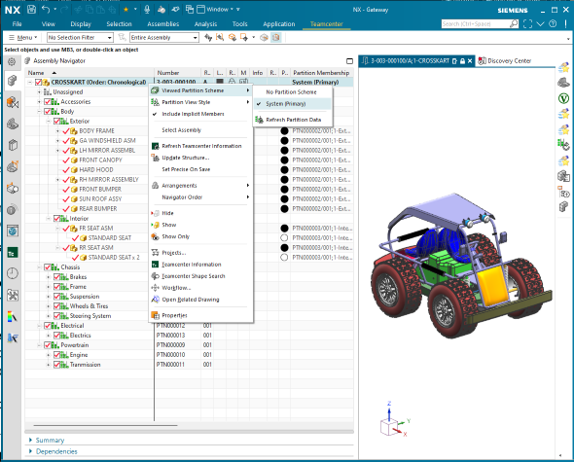
For every release of NX, we make our improvements based on feedback from our users, with the goal of constantly improving and streamlining your workflow, thus minimizing issues. This is why we’ve introduced improvements to Partitions. You’re now able to visualize alternative organizations of assembly structures through use of Partitions, regardless of BOM structure. NX is able to identify an auto-populate partition scheme and manages your user experience to minimize issues.
You’re able to apply these partition schemes to an inserted product assembly, a design workset or a design session.
Usability enhancements
Ensuring our users have a simplistic and straightforward experience within NX is fundamental to us. We want to make sure that with every release of NX, we’re improving your usability. Let’s take a look at some of the ways we’re continuing to support the best and most streamlined version of your workflow.
User messaging enhancements
We’ve listened when you’ve said that as a managed NX user opening an assembly, it would improve your workflow if NX reported the results as the end. The system will now report the information at the conclusion of open, meaning:
- NX will stop when the severity is high
- When the severity is not high, the open process continues, and the results are summarized at end
- The user has the responsibility to review the information and take corrective action when appropriate; Failure to comprehend that feedback could impact subsequent operations and save
Export assembly from Teamcenter
This enhancement will benefit your workflow for when you want to include the dependent PDF, CGM and JT content, when your NX data is exported from Teamcenter. Please note here though that NX will only export JT\Direct Model and PDF and CGM datasets attached to the NX dataset.
Change management
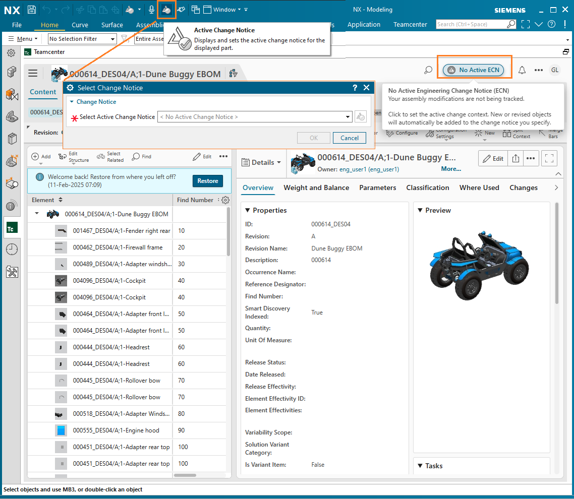
The Change Management feature package is deployed into your Teamcenter environment. In response to customer feedback, this improvement in the June 2025 release will benefit those who want to use Change Management inside NX where Change Management is not set as required. This useful enhancement has been made available on the quick access toolbar, and ensures that the icon is visible on the graphics tab. A few other points to note here are as follows:
- Click Active Change Notice to select ECN
- User can unset the ECN (choose “blank”)
- Save Management includes ECN column
Conclusion
And that draws our entry to a close! Hopefully you’ve enjoyed exploring some of the exciting new Managed Mode features in the June 2025 release of NX. We’ll continue to share more NX highlights and deeper dives into Managed Mode features later in the year, so be sure to bookmark the NX Design Blog and check back regularly!
If you’re looking for more in the meantime, then don’t miss our Tips & Tricks series to explore even more content and videos from the June 2025 Premiere.