Designcenter X NX Essentials | How to | Create drawings: part 2
Creating professional, precise drawings is essential for communicating design intent clearly and effectively. With Designcenter X NX™ Design Essentials Add-on software, teams can elevate their 2D documentation with advanced view creation tools, all within a lightweight, browser-based environment.
Designcenter X NX Essentials empowers users to design, annotate, and collaborate on technical drawings from any device, making it ideal for engineers and designers on the move. In this post, we’ll explore how the application helps users add detail and section views, along with annotations and title block customizations, to streamline documentation and accelerate communication.
Detail views for focused clarity
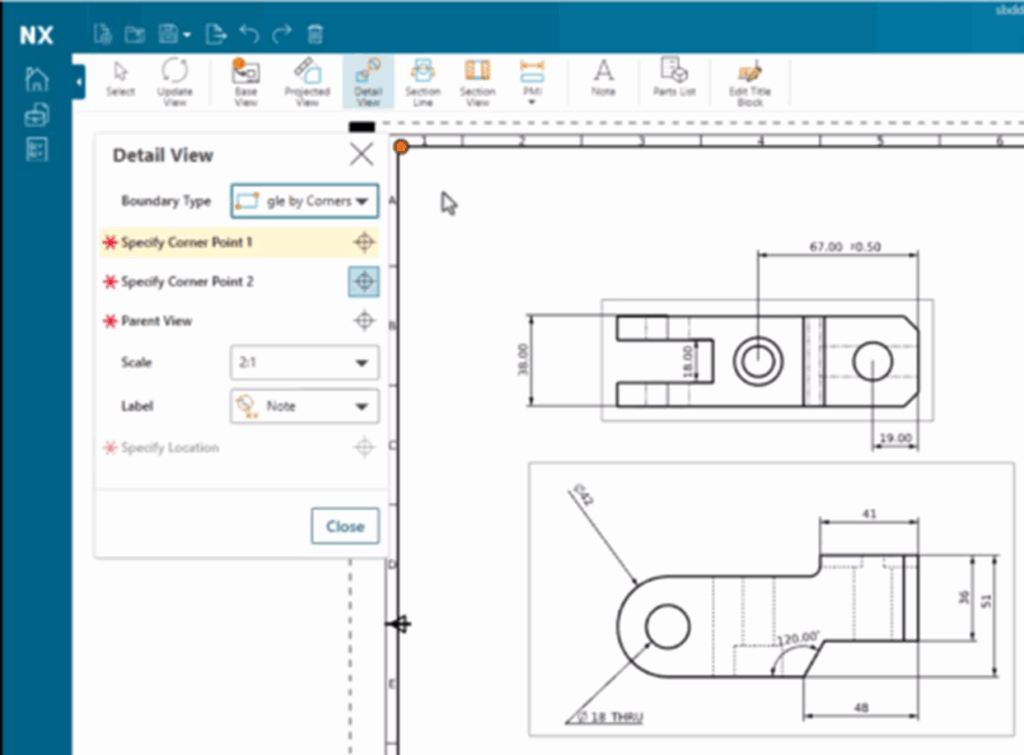
The software simplifies the process of adding detail views to your drawings. Users can easily define a boundary around any area of an existing drawing view by selecting key points, giving them full control over which portion of the model to highlight.
Just like base or projected views, detail views can be customized with different boundary shapes, scales, and labels. Annotations such as PMI (Product and Manufacturing Information) can also be added directly to the detail view, ensuring all critical design elements are visible and clearly documented.
Section views made simple
Section views in Designcenter X NX Essentials further enhance the ability to communicate complex geometry. With two sectioning methods and multiple placement options available, users can quickly cut through the model to reveal internal features.
Section views are not only easy to create, they’re intelligent too. If a section view already exists in the 3D model, the platform can automatically bring it into the drawing and add the appropriate section line. Selecting the parent and source view is all it takes.
As with all other drawing views, users can apply labels and add annotations to communicate additional design intent.
Notes and custom field that keep teams aligned
The software offers simple but effective tools for adding notes to any drawing view. Mini text customization options let teams communicate specific design details, manufacturing instructions, or revision history directly on the drawing.
The title block inside the platform is fully customizable. Any field, such as “Checked by” or “Part Name”—can be edited, added, or populated automatically using attributes from the part or assembly. This ensures consistency, reduces manual data entry, and speeds up documentation workflows.
Built for flexibility, speed, and productivity
Creating detailed, fully annotated drawings doesn’t require heavy desktop installations or long setup times. From CAD to CAM to CAE, this web-based platform delivers professional-grade capabilities through a streamlined, mobile-friendly interface.
Whether you’re in the office, on the shop floor, or working remotely, Designcenter X NX Essentials allows you to stay connected to your work—designing, documenting, and collaborating without limits.
Learn more about Designcenter
Deszigncenter X NX is the leading, next-generation mechanical engineering solution that delivers advanced 3D design capabilities to the Designcenter portfolio. Seamlessly integrating across disciplines, including electrical and electronic systems, to enable more iterations and utilize the latest manufacturing and simulation methods to ensure you build the richest, most comprehensive digital twin of your product and ultimately deliver the best designs to market faster.
Learn more about Designcenter X NX Essentials
Try Designcenter X NX Essentials today.
Explore the future of design with a flexible, browser-based solution that moves as fast as your ideas.