Advanced capabilities | What’s new in Designcenter NX | December 2025 release
We are continuing our journey through the What’s New in Designcenter™ NX™ software blog series with highlights from the December 2025 release—this time focusing on Advanced Capabilities.
This release introduces new tools that address real engineering challenges with practical, production-ready solutions. From performance improvements that cut assembly loading times in half, to sophisticated tools that bring CFD analysis directly into designers’ hands; this release is about removing barriers and accelerating innovation.
Assembly performance: Speed that scales with complexity
For engineers working with large, complex assemblies, speed directly impacts productivity. The December 2025 release delivers substantial performance enhancements that matter in daily work, particularly for teams managing assemblies with thousands of components across multiple configurations.
The most significant improvement comes when making a component the work part with minimally loaded data. Designcenter NX now loads approximately twice as fast by intelligently reducing unnecessary data loaded from parent levels. Reference set changes on minimally loaded components have also been optimized, retaining the minimal load state without elevating to partial load.
These performance improvements extend into Multi-Configuration Design Worksets, a capability that allows you to load multiple configurations of the same assembly into a single session. You can compare a current production design against a proposed revision, assess multiple design alternatives in context, or validate solution approaches across different product configurations. The worksets support minimal load, JT Multi-CAD data workflows, and synchronous assembly editing, making them practical for real-world product development scenarios.
DFM Advisor: Manufacturing intelligence in the design phase
Discovering manufacturing problems late in the design cycle is expensive. The latest DFM Advisor checkers address this by bringing manufacturing intelligence directly into the design phase, where problems are easiest and least expensive to fix.
DFM Advisor proactively identifies areas that may be costly, difficult, or impossible to manufacture using your intended processes. The application organizes capabilities around specific manufacturing methods, with customizable checkers for milling and assembly processes.
For milling operations, checkers identify conditions like inconsistent bottom radius, deep and narrow slots, inconvenient tool access, and non-uniform draft angles. Assembly checkers focus on downstream operations, catching issues like hole alignment problems, fastener access limitations, component interference, and insufficient fastener engagement.
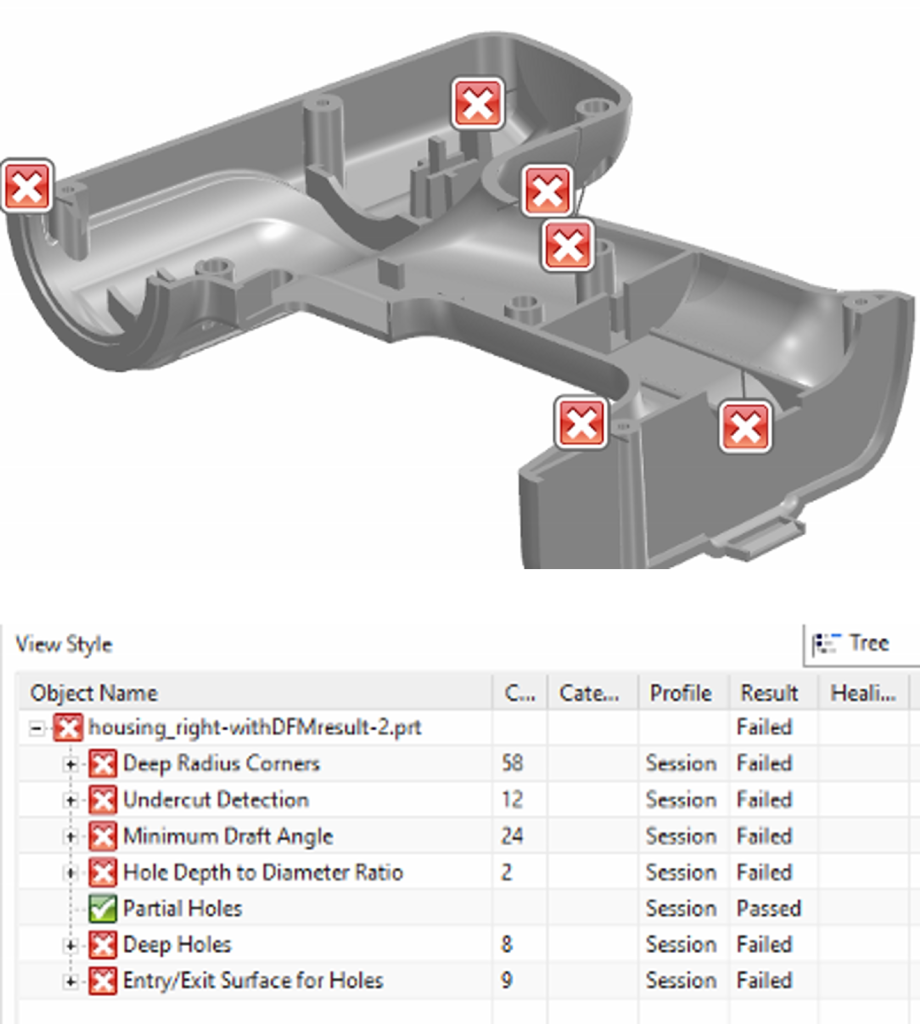
Integration with Teamcenter through Validation Manager means DFM Advisor fits naturally into existing workflows. Results display using HD3D, making it easy to visualize issues directly on your 3D model. The real value isn’t just catching individual problems—it’s the cultural shift toward designing for manufacturability from the start.
CFD Designer: Accessible flow and thermal simulation
Computational Fluid Dynamics has traditionally required specialists with deep expertise in meshing, solver settings, and turbulence models. NX CFD Designer changes this dynamic by putting flow and thermal simulation directly in designers’ hands, enabling a “shift-left” approach where simulation informs design decisions early and often.
Built on proven Simcenter FLOEFD technology, CFD Designer integrates natively into NX with no geometry transfer and no separate application to learn. Automatic fluid volume detection means minimal geometry simplification is required, enabling you to analyze your actual design. The solver handles internal and external steady-state fluid flow, liquids and gases, conjugate heat transfer, and porous media.
CFD Designer now come equipped with Study Plot, making it easier to compare design point results from multi-parameter studies. Dependency plots show how results vary with two design parameters on a single chart, helping you understand parameter interactions. The Solver Monitor with Preview functionality lets you create preview windows showing current solution values as cut plots, with adjustable display types and value ranges.
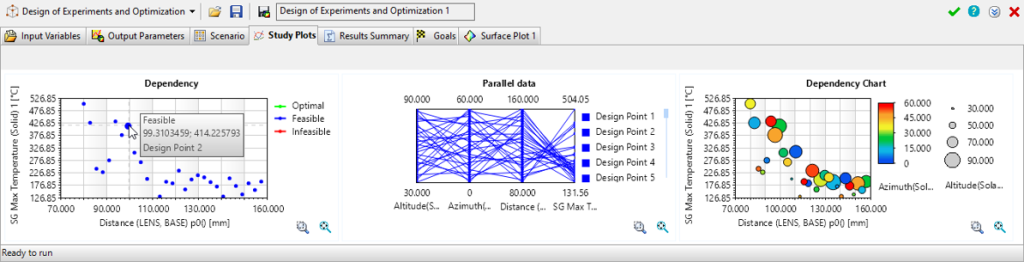
When simulation is accessible and fast, it becomes part of the design conversation rather than a separate validation step. Designers can test ideas quickly, understand why some approaches work better than others, and develop intuition about flow and thermal behavior.
The integration advantage
These capabilities work together within an integrated workflow that reflects how engineering teams actually work. You could leverage Multi-Configuration Worksets to compare different assembly variants, whilst benefiting from the performance improvements that keep complex assemblies responsive.
As you develop your design, you can apply CFD Designer to validate thermal performance directly on your assembly geometry. Before releasing the design, run DFM Advisor to catch potential manufacturing issues in both individual components and the assembly as a whole.
Meanwhile, Structure Designer with Frame3D lets you rapidly create structural frameworks that become part of your larger assembly, where they benefit from the same performance enhancements and can be validated with DFM Advisor for manufacturability. The Teamcenter integration ensures your work—whether it’s assembly configurations, analysis settings, validation results, or structural designs—is managed and accessible across entire teams.
Continue your journey with Designcenter NX
The December 2025 release represents a vision of engineering without artificial barriers—where performance scales with complexity, simulation informs design from the start, manufacturing considerations are integrated rather than afterthoughts, and specialized tasks are accessible and efficient.
Ready to explore these capabilities? Contact your Siemens representative to learn how Designcenter NX can accelerate your specific engineering workflows.
Take me to the full Designcenter NX blog 📚