Ask, don’t click: Agentic AI takes the pain out of simulation post-processing
Picture this. You have just finished a hydraulic drive-cycle simulation in Simcenter Amesim. The solver finished in four minutes. Excellent. Now you need a report for tomorrow’s design review: pump efficiency versus operating point, pressure transients at two critical nodes, and a comparison against last week’s baseline run. What follows is not four minutes of satisfaction – it is forty minutes of clicking through variable trees, adjusting axis limits, fighting with dual-axis scaling, and hunting for the baseline result file you are fairly sure is somewhere on the shared drive. The simulation was fast. The post-processing was not.
This is a story about how agentic AI can flip that ratio – by letting engineers describe the intent they want in plain language and get back something publication-ready.
The post-simulation slump
There is an uncomfortable mismatch at the heart of modern engineering simulation workflows. Solver performance has improved dramatically over the past decade: faster hardware, smarter algorithms, parallel computation. A transient systems simulation that once ran overnight now runs in minutes. Yet the time engineers spend after the solver finishes – extracting meaning from the results – has not kept pace.
This is sometimes called the insight gap: the distance between raw numerical output and a clear engineering conclusion. In systems simulation, where a model might produce thousands of signals spanning mechanical, hydraulic, thermal, and electrical domains simultaneously, that gap can be vast.
Post-processing tools have improved too, of course. But they still require the engineer to know what they are looking for before they look. You must navigate a variable browser, know the naming conventions used by whoever built the model, select the right variables, choose the right chart type, configure axes, add annotations. For an expert who built the model themselves, this is tedious. For a new team member inheriting someone else’s model, it can be genuinely bewildering.
The root problem? The burden of translation. The engineer has a question – “what is the pump efficiency doing during the pressure spike?” – but the tool demands that question be expressed as a series of GUI interactions. Agentic AI can dissolve that translation layer entirely.
Why is systems simulation data uniquely tricky to visualize?
Before looking at the solution, it is worth understanding why systems simulation plots present a particular challenge, even compared to other simulation domains.
A Computational Fluid Dynamics (CFD) result is fundamentally spatial: a 3D field over a geometry. Visualization tools for spatial data are mature and well understood – color maps, iso-surfaces, streamlines. A systems simulation result is fundamentally relational: signals that interact across physics domains and across time. The interesting story is almost never in a single variable in isolation; it lives in the relationship between variables.
Consider a cooling circuit for an electric vehicle battery pack. The temperatures matter. But the useful insight is why a temperature is rising – and that requires simultaneously examining flow rates, pump speeds, coolant properties, and the heat load from the cell model. A meaningful visualization cuts across all of these at once. Building such a plot manually – choosing the right variables, deciding what to overlay versus what to show in subplots, and selecting appropriate axis scaling- requires domain knowledge, aesthetic judgment, and familiarity with the model’s variable naming conventions.
Agentic AI with access to the variable metadata from the simulation, can handle all three of those requirements simultaneously. It knows what the variables mean, can reason which are causally related, and can generate the code to produce a well-structured figure.
Describing a plot you want, rather than building one
The core idea is straightforward: give the engineer a natural language interface for their simulation results. Instead of navigating menus, they type – or say – what they want.
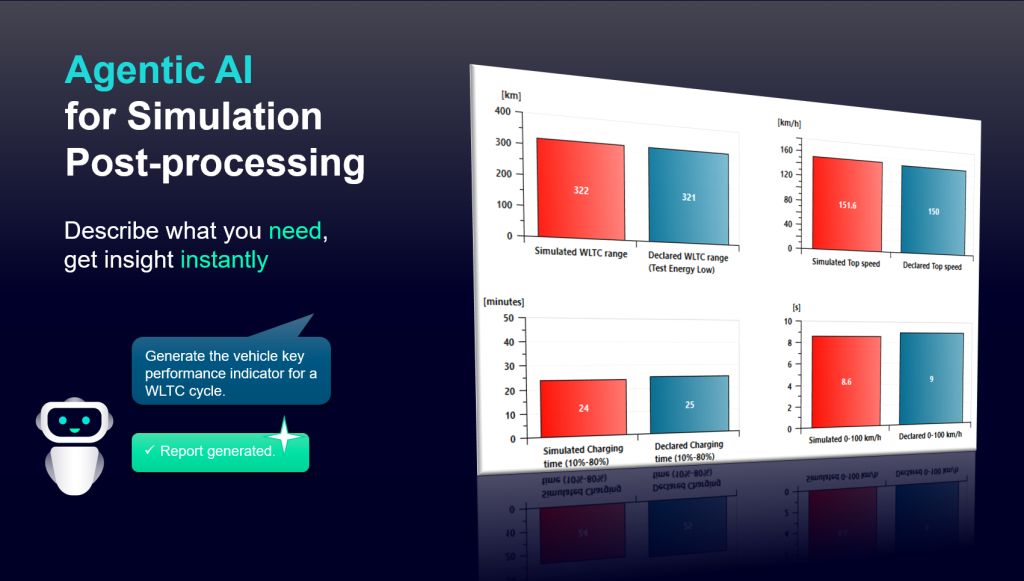
Some examples of the kinds of requests our prototype handles:
- “Plot pump flow rate and inlet pressure on a shared time axis for the first 5 seconds.“
- “Compare hydraulic efficiency from today’s run and the baseline – overlay them on the same axes with a shaded difference band.“
- “Show me the variables most correlated with the peak temperature event at t = 12 s.”
- “Generate a four-panel summary figure: speed, torque, power, and efficiency for the full drive cycle.”
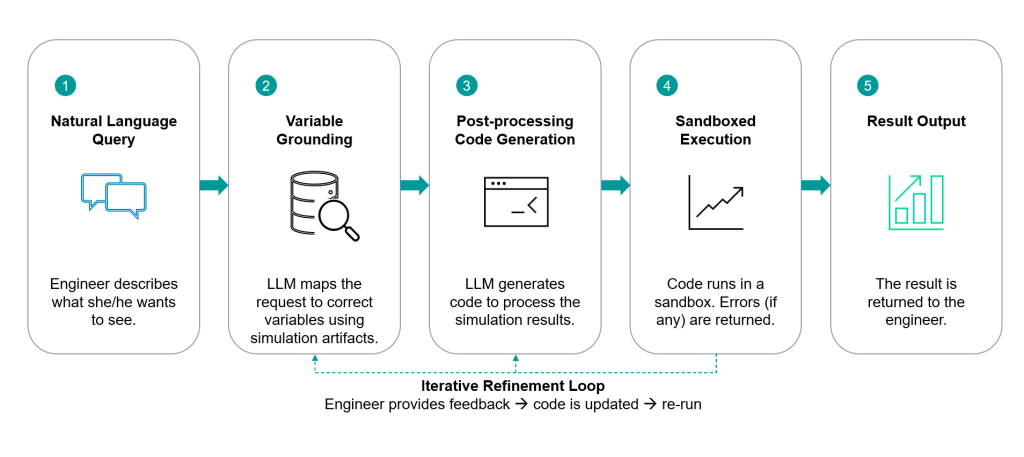
Behind each of these is an LLM that interprets the intent, maps it to variable names in the simulation output, selects an appropriate chart structure, and generates code that is then executed to produce the figure.
Crucially, the engineer can iterate in conversation. “Make the pressure axis logarithmic.”, “Add a red dashed line at the maximum rated value.”, “Export this as a 300 dpi PNG for the report.” Each refinement is a sentence, not a sequence of menu interactions.
Under the hood: how the agentic AI plot agent works
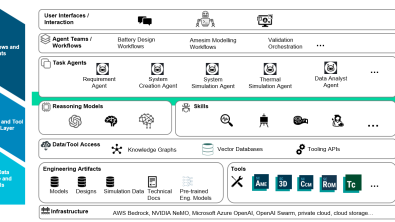
The agent sits between the engineer’s natural language intent and the simulation result files. Its architecture has three key components.
Variable grounding: Before any plotting logic runs, the agent indexes the simulation output – variable names, units, time ranges, and any metadata stored in the model (such as component descriptions or parameter annotations). This grounding step means the LLM can reason variable identity rather than just variable strings. When the engineer says “pump efficiency,” the agent finds the right signal even if it is stored as a binary artifact in the result file.
Post-processing code generation: Given a grounded understanding of what to show, the LLM generates executable code. Code generation (rather than, say, a fixed parameterized template library) gives the agent the full expressive range of a general-purpose plotting library. Unusual chart types, custom annotations, complex multi-axis layouts – all are within reach because the agent can write the code to produce them.
Iterative refinement loop: The generated code is executed in a sandboxed environment; any errors are returned to the LLM, which corrects and re-executes. This self-healing loop means the engineer rarely sees a failure – they see a figure, possibly imperfect, that they can then refine through further conversation.
As we explored in Imagine a world without toolbars or menus, removing the cognitive overhead of GUI navigation is itself a productivity multiplier – and that principle applies as powerfully to post-processing as it does to model setup.
From single plot to complete story
Individual plots are only part of the value. Systems simulation engineers often need to produce reports – structured documents that tell the full story of a design iteration. Today, report generation is almost entirely manual: copy a figure here, paste it there, update the caption, repeat for a dozen variants.
A plot agent that can access both the simulation data and a report template can automate a large portion of this. In our prototype, the engineer can request: “Fill in the performance section of the report template with figures for all batch run variants.” The agent iterates over the batch results, generates consistent figures for each variant, and populates the relevant placeholders in the document – all while maintaining consistent styling and numbering.
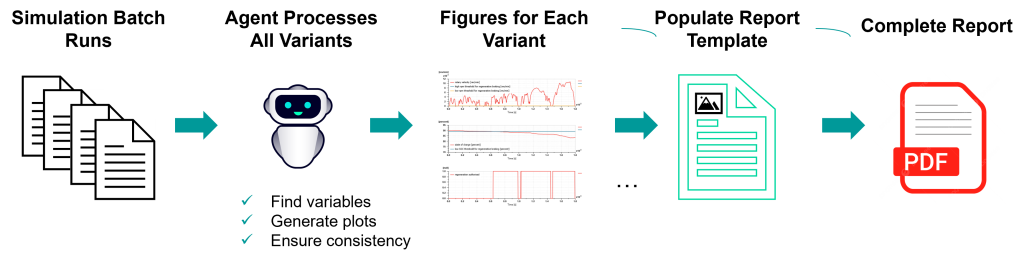
The same capability that makes conversational plot creation possible – understanding the intent behind a visualization request – also makes it possible to infer what belongs in a report section without the engineer having to specify every detail.
This connects naturally to the broader theme of simulation knowledge management. As discussed in A Simcenter personal consultant realized with Generative AI, LLMs can do more than retrieve and generate – they can synthesize, compare, and explain. A plot agent that can not only show you the efficiency curve but also explain what it means in the context of the design requirements is a qualitatively different tool from a conventional post-processor.
The role of agentic AI in simulation tool automation more broadly is explored in The role of Generative AI in simulation tool automation, where similar principles were applied to CFD workflows – a reminder that the underlying pattern transfers across simulation domains.
Conclusions and Outlook
Simulation solvers have gotten dramatically faster. It is time for post-processing to catch up.
Agentic AI offers a genuine path to closing the insight gap in systems simulation. By grounding an LLM in simulation variable metadata and giving it the ability to generate and execute plotting code, we can let engineers describe the visualization they want and receive it – iteratively, conversationally, and without fighting a GUI. The result is not just time saved; it is a lower barrier to asking the right questions of simulation data, which is where the real engineering value lies.
Important limitations remain honest to acknowledge. The current prototype works best with well-structured simulation outputs and clear variable metadata; models with cryptic internal naming conventions require more grounding effort. Code generation introduces the possibility of subtle errors in axis scaling or unit handling that the engineer must still review. And “publication-ready” is a high bar – aesthetics that pass muster in an internal review may need refinement before journal submission.
Looking forward, we see several exciting directions. Tighter integration with the Simcenter Amesim result browser and batch-run framework would allow the agent to operate directly on live simulation data. Extending variable grounding to include physical knowledge – understanding that a volumetric efficiency drop at low speed is a characteristic pump behavior, not an anomaly – would allow the agent to generate more insightful annotations automatically. And connecting plotting to the broader simulation workflow, so that a striking result in a figure can directly trigger a follow-up parameter study, begins to blur the line between exploration and discovery.
The model ran in four minutes. There is no reason the insight should take forty.
Acknowledgements
This work is part of the ongoing research program of the Simcenter Technology Innovation team. We thank our colleagues across the Simcenter systems simulation group for their collaboration and feedback on early prototypes.
FAQs
Q: How does Agentic AI compare to conventional CAE post-processing tools? A: Traditional post-processors are optimized for precise control and repeatability – essential for formal deliverables. The agent is optimized for exploratory analysis: quickly understanding what the data contains, identifying the interesting signals, and building intuition before committing to a formal analysis. We see the two as complementary: use the agent for exploration and early insight, then use the formal post-processor to finalize and validate the figures that matter most.
Q: What happens if an AI agent generates a plot with incorrect axis labels or wrong units? A: This is the most important quality concern in the current prototype. The agent grounds variables against metadata that includes unit information, which catches the most common cases. However, derived quantities (like efficiency, calculated from multiple signals) require the agent to reason about unit transformation – and this is where errors can creep in. When applying agentic AI for engineering analysis, we recommend engineers always review generated figures before including them in design reports, treating the agent as a skilled but fallible assistant rather than an authoritative source.
Disclaimer
This is a research exploration by the Simcenter Technology Innovation team. Our mission: to explore new technologies, to seek out new applications for simulation, and boldly demonstrate the art of the possible where no one has gone before. Therefore, this blog represents only potential product innovations and does not constitute a commitment for delivery. Questions? Contact us at Simcenter_ti.sisw@siemens.com.