Discover what’s new in Plant Simulation 2606
Tecnomatix Plant Simulation 2606 introduces enhancements designed to make digital manufacturing modeling more intuitive, realistic, and efficient, including updates in the Plant Simulation Copilot. As part of the Tecnomatix portfolio, Plant Simulation enables users to create virtual models of production systems, allowing early-stage optimization and performance analysis before physical implementation. This latest release focuses on improving 3D usability, simplifying complex modeling tasks, and enhancing realism in transport, robotics, and material flow, helping teams collaborate more effectively and make better-informed decisions throughout the manufacturing planning process.
You don’t have Tecnomatix software?
See the highlights from Tecnomatix Plant Simulation 2606,
From “functional in 3D” to “feels like my layout”
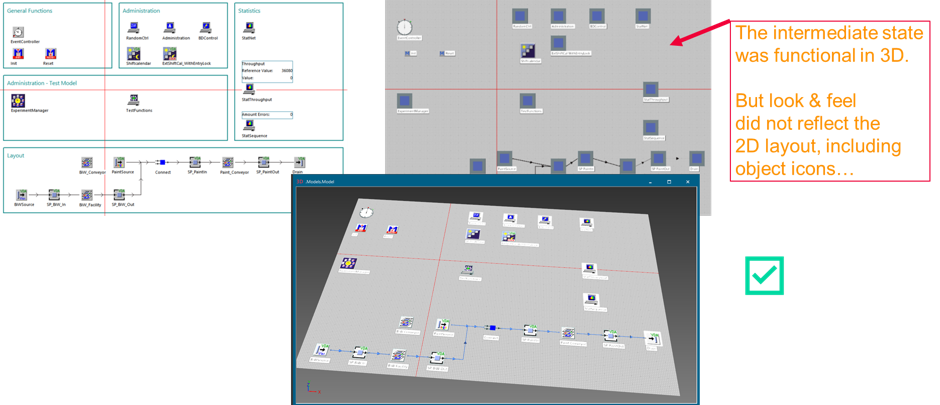
In earlier transitions, many users experienced something like this: the model runs, KPIs are correct, animation is technically available in 3D, yet the overall scene doesn’t reflect the clarity and structure you were used to in 2D layouts, including the icon-based readability that makes quick reviews so efficient. Plant Simulation 2606 addresses this gap by refining how models are represented and navigated in 3D, so teams spend less time “re-learning” their own layouts and more time improving them. The result is a smoother collaboration experience, especially when you use the model as a communication tool for planners, engineers, and stakeholders who don’t want to decode a scene before they can discuss improvements.
Multi-Workpiece-Carriers: less scripting, more real-world logic
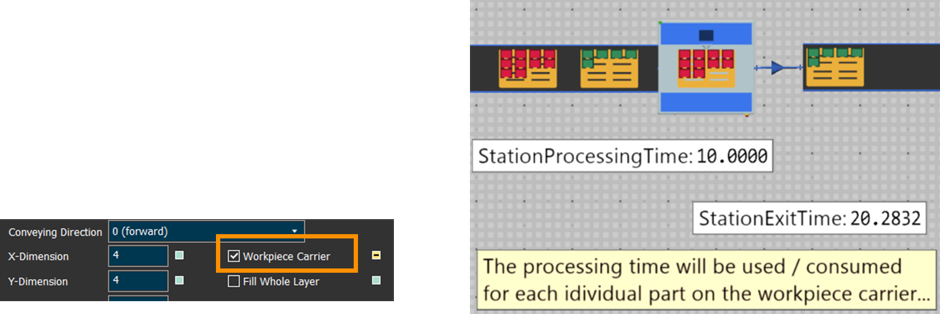
Workpiece carriers drive processing times, assembly logic, and station behavior based on what’s actually loaded. Plant Simulation 2606 improves this with two practical enhancements: it can automatically calculate overall processing time for multi-workpiece-carrier scenarios based on the number of loaded parts (reducing the need for custom SimTalk time adjustments), and it supports defined assembly patterns where the assembly list adapts to the part types on the carrier. Together, these updates make flexible assembly stations easier to configure and keep models simpler, more maintainable, and less dependent on scripting.
Transporters on tracks: automatic stopping where it matters
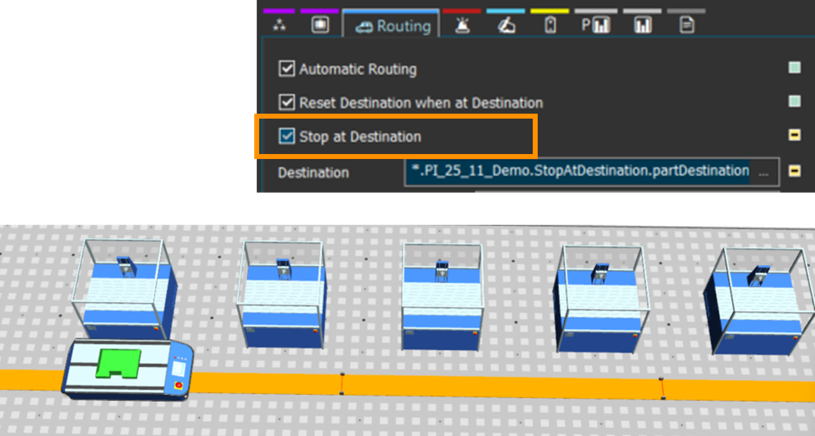
Transporters that move on tracks (including AGV-like behavior) often require fine control near destinations. In real systems, you don’t simply “arrive”; you decelerate, align, and stop precisely,especially when handoffs to stations, buffers, or conveyors must be synchronized.
Plant Simulation 2606 introduces automatic Stop-at-Destination behavior for transporters on tracks. This includes automatic calculation of deceleration in front of a driving destination,an area where many users previously relied on custom SimTalk controls to get realistic results. By moving this logic into the standard behavior, models become easier to configure and significantly more consistent across projects: you get predictable stopping without re-implementing the same deceleration calculation.
Plant Simulation Copilot: empowering engineers with AI
The Plant Simulation 2606 Copilot is an innovative, AI-powered tool designed to transform SimTalk coding for material flow and production control. This copilot aims to empower engineers, allowing them to focus on innovation and optimization by streamlining the coding process.
At its core, the Plant Simulation Copilot provides LLM-based SimTalk coding support, which means it can convert natural language descriptions directly into functional SimTalk control code. This capability addresses the challenge of writing complex material flow and production control code by leveraging the best-fitting built-in object features and functionality.
Key highlights include:
- SimTalk agents for complex controls: The copilot utilizes SimTalk agents that possess programming skills for even the most intricate controls. This allows engineers to delegate coding tasks and concentrate on higher-level design and problem-solving.
- Default Copilot (Siemens Hosted LLM):
- Provided and managed by Siemens
- Built on a robust architecture including:
- Python FastAPI
- Langgraph Agent
- LLM (Large Language Model)
- Embedding Model and Vector DB for Plant Simulation (for efficient search and retrieval of relevant information).
- Bring Your Own LLM Feature (Local Copilot): This powerful feature offers flexibility and control, allowing users to integrate their own Large Language Models.
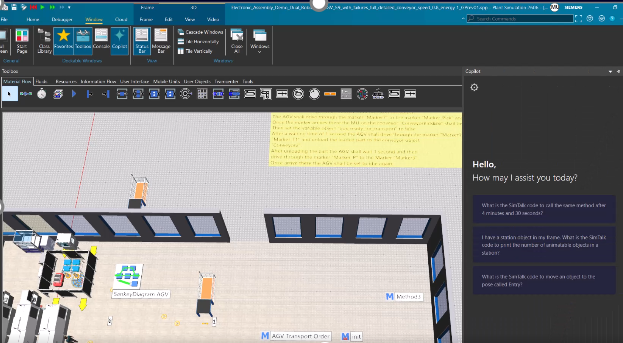
The Plant Simulation Copilot empowers users to:
- Get support in SimTalk control code coding: This is its primary function, simplifying the creation of complex control logic.
- Author custom controls for material flow and production control: It helps engineers develop tailored solutions for their specific simulation needs.
- Get to know and use all built-in functions and attributes of simulation objects: The copilot acts as an intelligent assistant, guiding users through the extensive functionalities available within Plant Simulation.
By providing intelligent coding assistance, the Plant Simulation 2606 Copilot enables engineers to significantly boost their productivity and focus on the innovative aspects of their work, ultimately leading to more efficient and optimized production processes. Interested in trying? Get access to the Plant Simulation Copilot in Plant Simulation version 2606.
More realistic motion: curve speed and smooth speed transitions
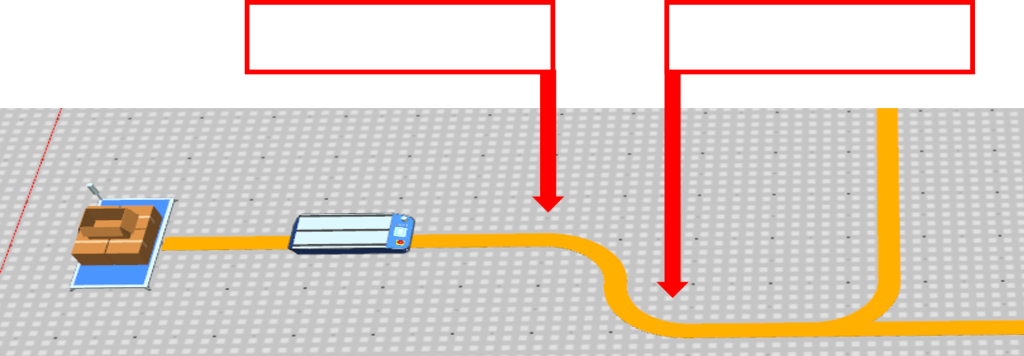
Track-based transport is rarely uniform-speed movement. Curves impose constraints, and vehicles typically slow down before entering a curve and accelerate again after leaving it. Plant Simulation 2606 adds curve speed behavior on tracks for transporters (AGVs), including automatic speed changes before and after curves. Importantly, this feature also supports acceleration and deceleration behavior, helping motion look and behave more like real AGVs.This is not only an animation improvement,it also supports better interpretation of results when travel time and congestion effects matter, because the movement behavior matches a more realistic dynamic profile.
Clearer analysis for AGVs: Sankey visualization for free-moving transport
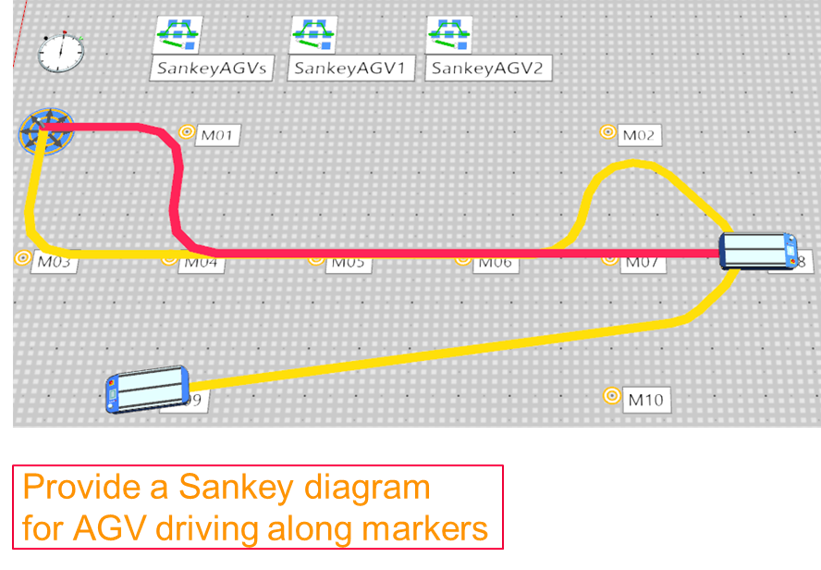
When AGVs move freely on the floor, understanding where traffic is flowing (and where it should be flowing) becomes a key part of optimization. Plant Simulation 2606 enables Sankey diagrams for free-moving AGVs and transporters, providing a visual summary of transport flows that is often much faster to interpret than tables. The update also supports marker-based routes and driving routes assigned via SimTalk, making it easier to combine visual analysis with routing strategies you already use in your models.
Conveyor and track modeling: faster layout building with smarter connections
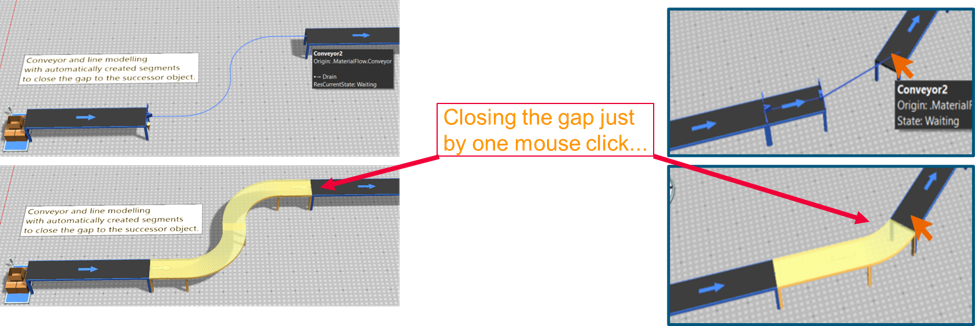
Layout creation is one of the most time-consuming parts of model building. Plant Simulation 2606 improves conveyor and track modeling with features aimed at reducing manual correction work. A wizard can suggest line-gap-closing shapes, helping you close small gaps without tedious geometry editing. In addition, additional connection patterns are supported to simplify conveyor line modeling,such as clearer flow direction visualization and more flexible physical connection patterns like end-to-end and start-to-start connections. The goal is straightforward: spend less time wrestling with geometry, and more time validating system behavior.
3D View Ribbon: better visibility controls, better connector performance
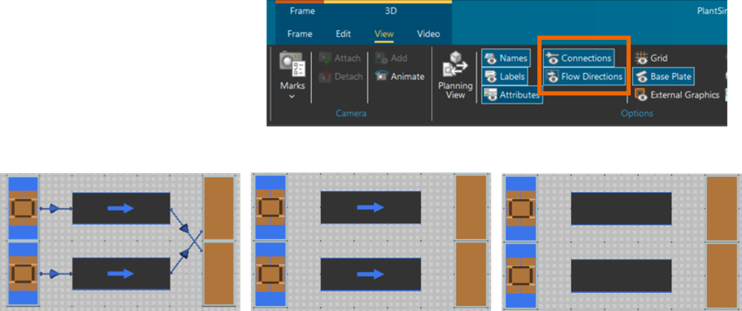
Visualization is only useful when you can control it quickly. In 2606, the 3D View Ribbon provides improved visualization controls for connectors and material flow directions, including independent show/hide buttons for connectors and material flow arrows on track and conveyor objects. This makes model reviews cleaner: you can highlight what matters for the discussion at hand without clutter from unrelated overlays.
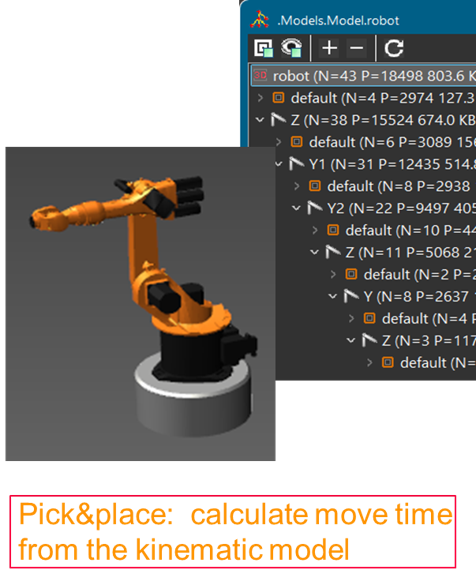
Pick-and-place robotics: moving time based on kinematics Robotics models are most valuable when movement time reflects the robot configuration rather than “hand-tuned” constants. Plant Simulation 2606 supports defining pick-and-place moving time using kinematic joint parameters. This allows the moving time to be calculated from the robot’s kinematic model using the joint speed settings for axis movement. The release also supports a widely used 6-axis configuration (Z, Y1, Y2, X, Y, X), which is considered a widely used practice for many 6-axis robot implementations. Achieve a physically consistent model and fewer manual adjustments when you reuse the robot across different layouts or tasks.
Any conveying direction for parts: flexibility for real layouts
Many real-world systems don’t keep part orientation perfectly aligned. Parts can rotate, shift orientation, and enter machines or buffers in different directions depending on upstream behavior. Plant Simulation 2606 supports all possible part orientations across conveyors, machines, buffers, and related objects. This gives you more flexibility to model realistic handling and reduces the need to constrain orientation just to satisfy limitations in representation artificially.
Graphics visibility: simpler internal/external control in 3D
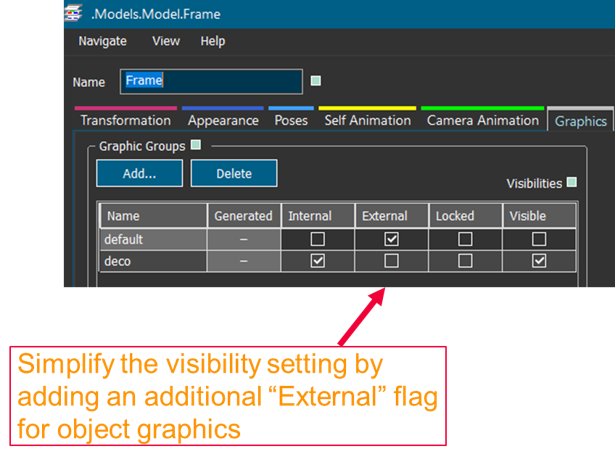
As 3D models become richer, visibility management becomes crucial,especially when you work with frame objects and want different graphics to appear inside versus outside a frame. Plant Simulation 2606 simplifies 3D object graphics visibility by providing complete setting possibilities for showing graphics internally and externally. This makes models easier to present and easier to debugso you can hide decorative elements during analysis, or show only the information that matters for a specific review.
Library Manager improvements: organize customer libraries
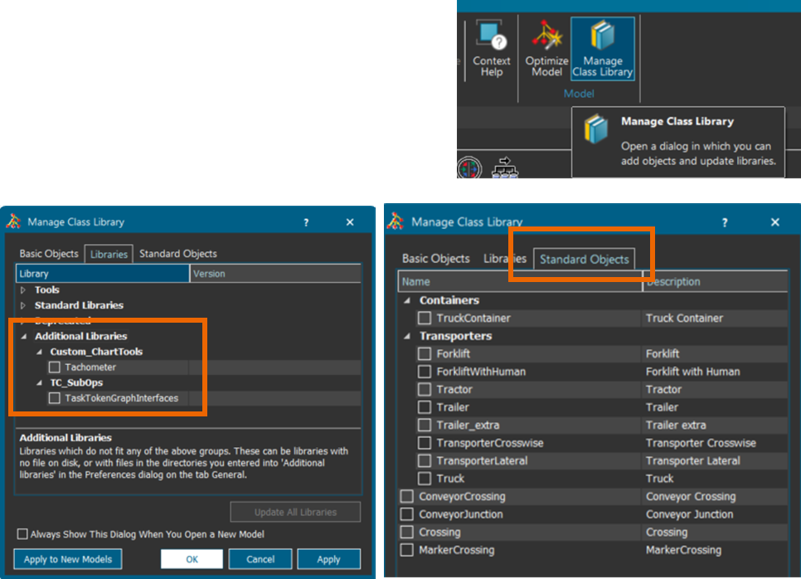
As organizations build reusable libraries, structure becomes essential. Plant Simulation 2606 improves the Library Manager with an Objects tab that supports better organization, including sub-folder support for custom library directories. Sub-folders are now shown directly in the Library Manager dialog, enabling logical grouping of libraries the way many teams requested. For example, group by domain, project, plant, or maturity level. The release also introduces a new UI for loading pre-defined objects delivered with the installation, making it easier to discover standard content and adopt consistent building blocks across teams.
These are just some highlights of the many user experience advancements delivered with the latest release. For complete details on the new features of Tecnomatix Plant Simulation 2606, please refer to the release notes offered with the software download.
And, as always, hop on over to the public community, corporate blog, and website for all things Tecnomatix.