What’s new in RapidAuthor for Teamcenter 2506

Create quicker, edit easier, publish smarter
Version 2506 introduces key improvements across S1000D and DITA authoring, publishing control, compiler automation and Service Planner integration. Whether you develop service manuals, training guides or digital maintenance content, this update helps you work faster and with more precision — directly inside Teamcenter.
S1000D authoring upgrades
Reorganized dialogs, faster ID creation and ISO entity support
The dialog for creating Cortona3D S1000D items in Teamcenter Active Workspace has been redesigned to minimize user errors and ensure consistent object naming and ID generation.

Figure 1. Improved dialog window for creating Cortona3D S1000D items in Active Workspace
Two frequently used actions are now faster: generating unique identifiers for data module elements and editing the forms containing references to a data module. A new Assign tag ID command generates unique IDs automatically, saving time and reducing manual entry errors.
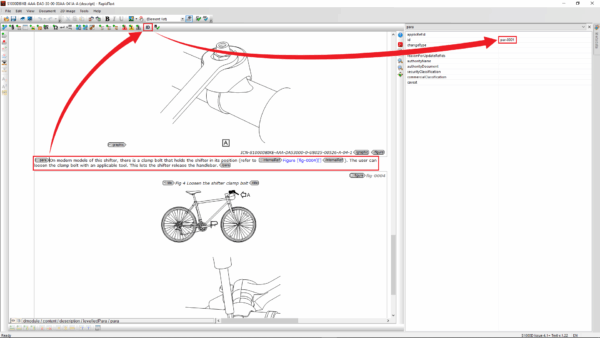
Figure 2. Assign tag ID command in Active Workspace
You can now reference or attach data modules containing ISO character entities (Greek, Cyrillic or mathematical symbols) to RapidAuthor projects. These were not supported in earlier versions.
DITA authoring enhancements
More control over layout and faster topic reuse
RapidAuthor 2506 adds new formatting capabilities for PDF output. You can define layout properties for multi-column pages, even and odd pages and control illustration alignment and scaling.
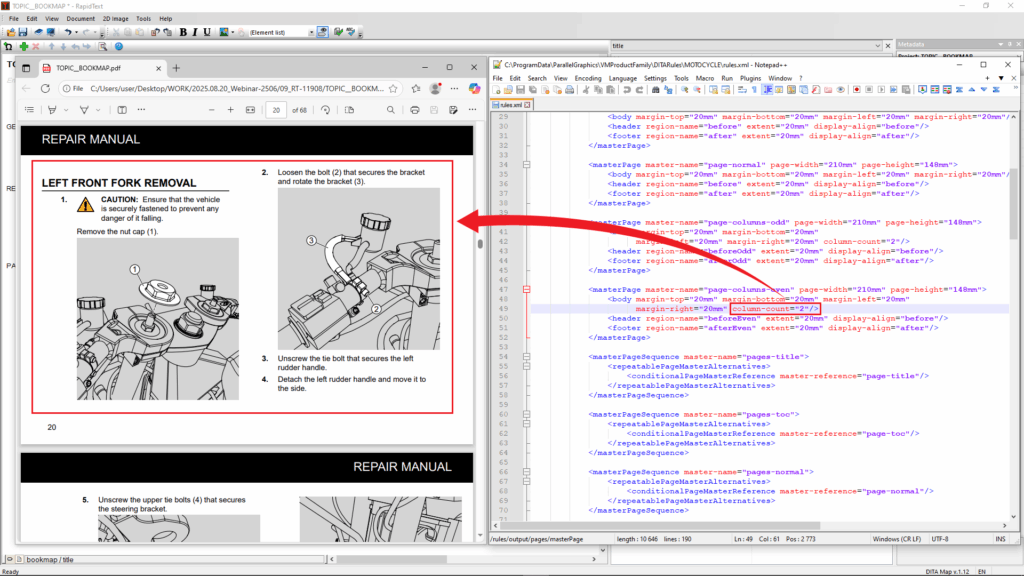
Figure 3. Sample two-column PDF layout customized using rules.xml
A new DITA PDF rules object type lets you manage publishing output through structured XML rules, which can be imported into RapidAuthor Administrator for flexible PDF control.

Figure 4. Importing XML-based PDF rules into RapidAuthor Administrator
You can also clone DITA and generic content directly in the Teamcenter RapidAuthor client, helping you create new topics quickly from existing content.
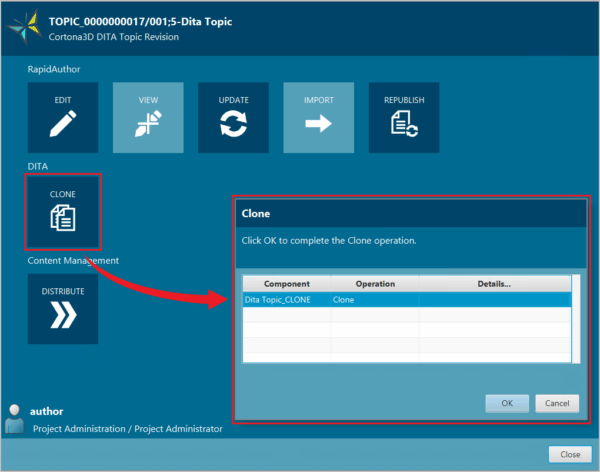
Figure 5. Cloning existing DITA content in Teamcenter RapidAuthor client
RapidCompiler automation
Schedule authoring tasks through Teamcenter workflows
You can now schedule RapidCompiler operations — such as import, update and distribute — using workflow tasks in Teamcenter. This reduces manual work and helps standardize content management processes.
Completed task notifications appear automatically in Active Workspace once the workflow finishes.
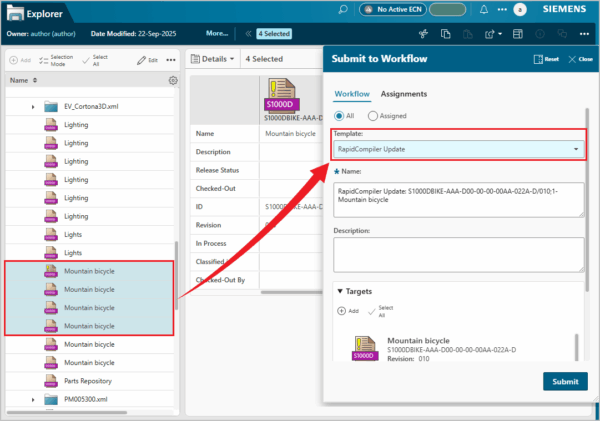
Figure 5. Scheduling RapidCompiler operations using workflow
Service Planner integration
Full alert type support and flexible configuration
RapidAuthor 2506 introduces full support for all alert types used in Service Planner. You can now create Warning, Caution or SendMessage actions in publications with custom text to match your service needs.
RapidConfiguration also shows a dynamic list of types depending on the loaded file, improving flexibility when working with varied data structures.

Figure 6. Dynamic alert type selection in RapidConfiguration
Smarter publishing control
Choose which illustrations appear in PDF
You can now select which illustrations to include in PDF publications and define their order across RapidCatalog, RapidIllustrator and the Generic Procedure specification in RapidManual. This means you can create visuals exclusive to PDF without displaying them in the interactive HTML version.

Figure 7. Selecting images for inclusion in PDF publications
Parts catalogs generated using the Generic IPC in RapidCatalog can now include individual tables for each illustration, making catalogs easier to navigate and understand.
2D authoring improvements
Simplified composite images and faster editing
Composite illustration creation has been redesigned. You can now combine images freely without predefined templates and update individual components more easily when designs change.
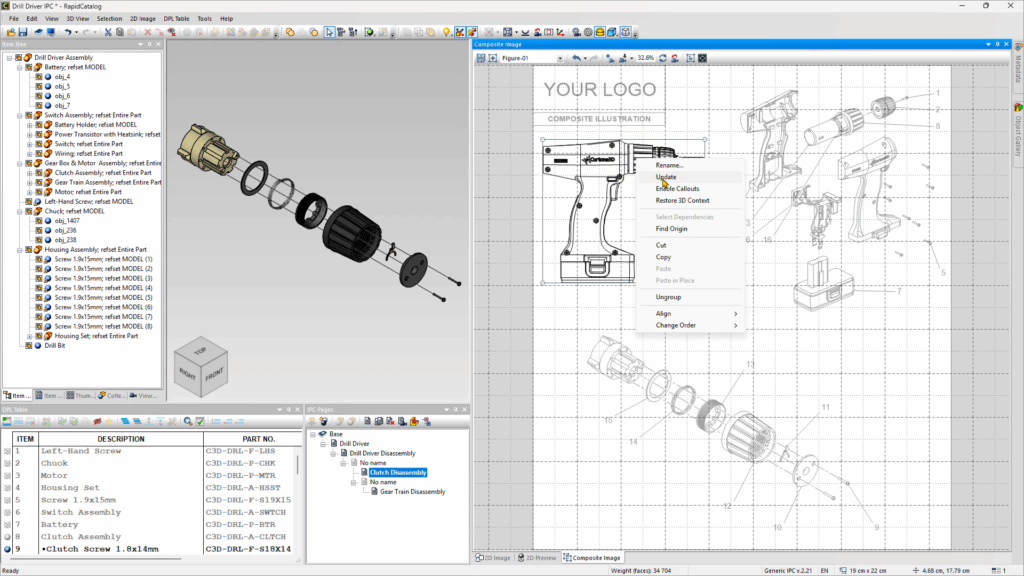
Figure 8. New composite image window for building illustrations
Additional 2D tools include:
- Multi-line text editing for raster images
- Brightness and contrast adjustment
- Polyline point reduction to minimize file size
🧠 Make smarter decisions with AI-powered PLM
🚀 Start fast and grow with Teamcenter X
🚗 Take the Teamcenter X 30-day test drive
🌟 Learn more about Teamcenter solutions
Table of Contents