Improving shop floor execution with clear, current Work Instructions

The shop floor is where the product gets built.
Before it reaches the shop floor, a lot of planning has already taken place. The product has been designed and the manufacturing process has been planned.
But on the shop floor, operators have to turn all that planning into a finished product.
That makes having the right information available at the right time critical. It also needs to be visual and easy to follow. Clear, accessible instructions can help operators understand what needs to be done and how to do it, reducing the risk of errors and helping them perform the job correctly.
Keeping those instructions accurate can be just as challenging. Products and processes change, and those changes need to be reflected in the work instructions used on the shop floor.
When updates are managed manually or across different systems, it can be difficult to make sure everyone is working with the latest information. The shop floor could end up working from yesterday’s instructions.
And that is a problem.
Give shop floor operators the clarity they need
A work instruction is a step-by-step guide that tells an operator what to do and how to do it correctly. If an instruction is difficult to follow, there is more room for misinterpretation, which can lead to mistakes and errors.
Imagine an instruction tells an operator to “install the bracket on the assembly.” Without a clear indication of its position or orientation, the operator could interpret the instruction differently and install the bracket incorrectly. Now the mistake may not be discovered until later in the assembly process, leading to rework and lost time.

This matters even more when an operation is new, has changed, or involves a complex part or assembly. In these situations, written steps alone may not always be enough.
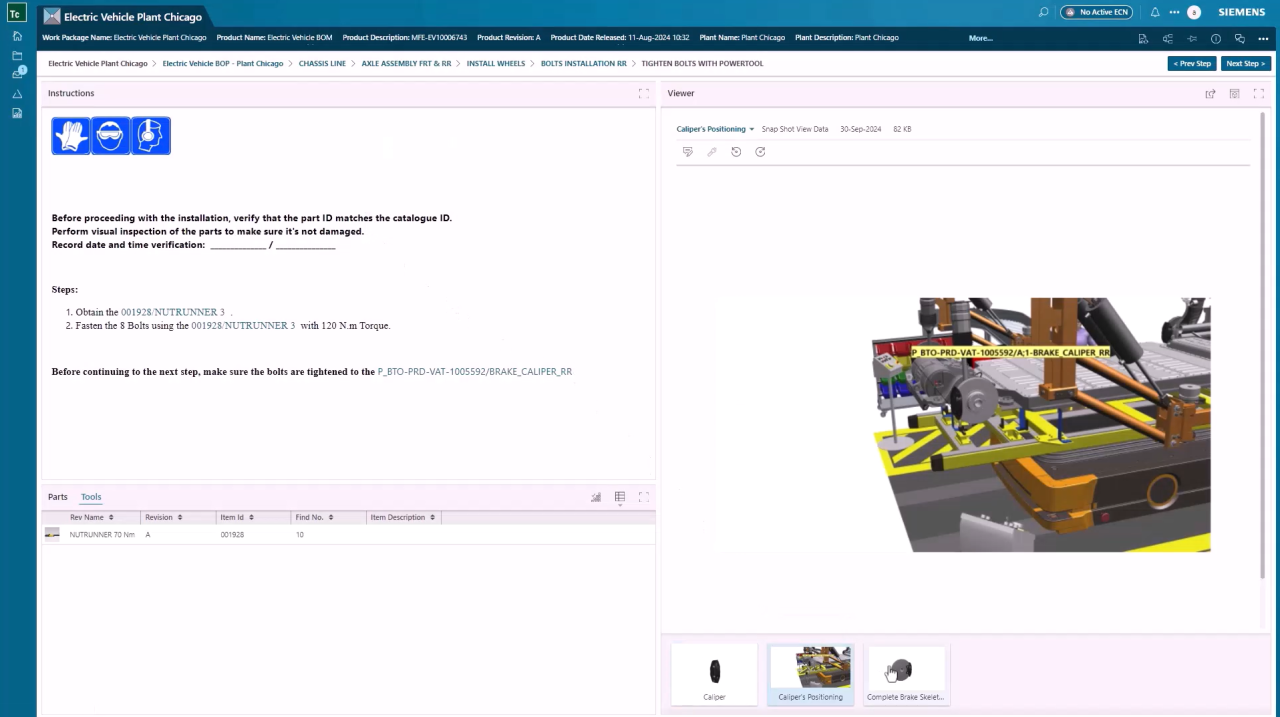
A picture can often explain something faster than a paragraph. 2D drawings and 3D views can show where a part goes, which components are involved, what needs to be done and what the finished result should look like.
For the operator, the benefit is simple: the instruction is easier to understand, easier to follow and less open to interpretation.
📋 Visual, easy-to-understand instructions can reduce the risk of errors.
When operators can quickly see and understand what needs to be done, there is less room for interpretation.
But clarity is only part of the equation. The instruction also needs to reflect the latest product and manufacturing changes. If it doesn’t, even a clear, well-designed instruction can still lead the operator in the wrong direction.
What happens when changes don’t reach the shop floor?
When a part changes, the manufacturing process and work instructions may need to change too. The challenge is making sure those updates happen.
Say a part has been redesigned and the manufacturing plan has been updated. The work instruction at the workstation still shows the previous version. The operator follows the instruction they have, but the instruction is no longer correct.
Everything looks fine until someone spots the difference.
For the manufacturing planning team, this can mean going back through the affected instructions, making updates and checking that the right version is available to the operator.
This becomes harder when work instructions are maintained separately from the manufacturing plan.
By the time the issue is found, it may mean rework, delays or having to check other parts that were built using the same instruction.
⚠️ The change is only part of the job. The work instruction needs to reflect it too.
Engineering can release the right change and manufacturing can update the plan. But if the work instruction at the workstation doesn’t reflect that change, the operator may still be working from outdated information.
Keep work instructions up to date
Good work instructions aren’t just about having the latest PDF at the workstation. They need to stay aligned with the manufacturing process and the work being planned.
When a change affects an operation, the related work instruction should be easy to find, update and release. Operators should have access to the current instruction for the job they’re performing, without having to wonder whether they’re looking at the right version.
For manufacturing planners and engineers, keeping instructions up to date shouldn’t mean chasing files, checking versions or manually working out which instructions need to change.
A good electronic work instruction approach should help teams:
- Keep instructions up to date: Align work instructions with changes to the product and manufacturing process.
- Give operators the right version: Provide a simple, read-only view of the current instruction on the shop floor, so operators can easily access and follow it.
- Make instructions easier to follow: Combine text with visuals, 2D drawings, 3D views and other content to clearly show what needs to be done.
- Reduce training needs: Help operators learn new or changed processes with clear, easy-to-follow work instructions.
Work Instructions management with Teamcenter Easy Plan
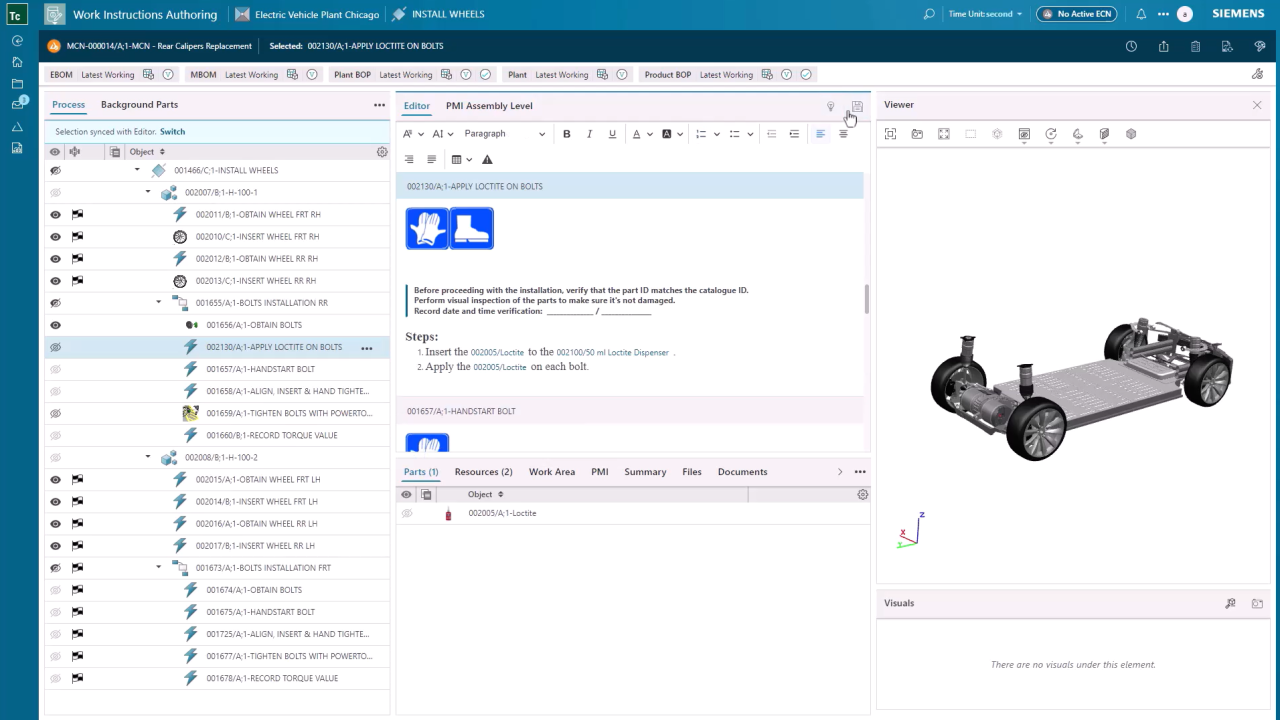
Teamcenter Easy Plan brings work instruction authoring and management into the manufacturing planning process. Manufacturing planning teams can create and manage work instructions alongside the processes they describe, rather than maintaining them as separate documents.
With Teamcenter Easy Plan, teams can author and publish work instructions to the shop floor using text, 2D drawings, 3D views and AR. Work instructions can also be translated into multiple languages, helping manufacturing teams provide clear instructions across different sites and support a multilingual workforce.
This makes it easier to keep work instructions aligned with the manufacturing plan and give operators the right instructions for the job.
🔄 Author and manage work instructions. Give operators the right view.
Manufacturing planners and engineers author and manage work instructions in Teamcenter Easy Plan.
Operators access those instructions through Electronic Work Instructions (EWI), a read-only view that presents the relevant instructions at the workstation.
See how Teamcenter Easy Plan helps manufacturing planning teams author, manage and deliver work instructions connected to their manufacturing processes. Download the factsheet to explore the capabilities in more detail.
With Teamcenter Easy Plan, manufacturing teams can:
- Author visual work instructions – Use text, images, 2D and 3D content to clearly communicate each operation.
- Build instructions from manufacturing planning data – Connect instructions to the operations, parts and resources involved.
- Deliver Electronic Work Instructions (EWI) – Give operators access to the information they need at the point of work.
- Work offline – Keep EWI available when network connectivity is limited, with updates synchronized when the connection is restored.
- Translate work instructions with AI – Make instructions available in multiple languages for a diverse workforce.