New in Designcenter Solid Edge 2026: Data Reuse and Migration
Table of Contents
With the launch of Designcenter Solid Edge 2026, we’re publishing a series of blogs to spotlight the release’s most exciting new features and enhancements. In this post, we’ll explore the latest updates to data reuse and migration.
Work confidently with precise data you can trust
Designcenter Solid Edge 2026 makes it easier to reuse, share and migrate design data — no matter where it comes from or where it’s going. Import architectural models from Autodesk Revit, export only the geometry you need to protect intellectual property and streamline steel fabrication with direct DSTV export. For teams transitioning from other CAD systems, new integration with Elysium CADfeature ensures high-fidelity data migration with built-in quality checks. Whether you’re collaborating across disciplines or moving decades of legacy data, Solid Edge gives you the tools to stay connected, accurate and in control.
DSTV export
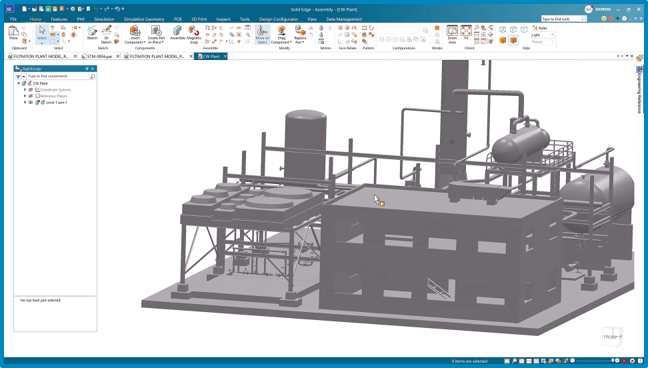
Designcenter Solid Edge now supports the DSTV format, enabling seamless CNC integration through a standardized method for describing steel structure parts. This ensures compatibility with post-processors such as saws, drills and flame-cutting machines, enhancing interoperability across engineering and fabrication software.
With direct DSTV export, structural steel and frame part models can be saved in the industry-standard format without workarounds or third-party tools. This streamlines downstream CNC workflows and ensures smooth compatibility with fabrication processes.
The feature supports a wide range of structural steel profiles — including I, U, L, M, RO, RU, B, C and T sections — commonly used in construction, architecture and mechanical engineering. Batch Macro is also included, allowing multiple parts to be exported at once for greater efficiency.
DSTV export is available via value-based licensing, making it a flexible and scalable add-on to meet diverse design and fabrication needs.
Autodesk Revit import
Solid Edge now supports Autodesk Revit (.rvt) file import, enabling seamless integration with Architecture, Engineering and Construction (AEC) applications. Files can be brought in as internal components with configurable options such as stitching surfaces, converting solids and creating precise geometry.
A new file filter in the Open File dialog makes importing Revit files simple and efficient, allowing architectural models to be easily integrated into your design process. This expands interoperability for teams working across multiple disciplines.
Autodesk Revit is fully compatible with CAD Direct, enabling users to work with third-party CAD data from applications such as SolidWorks, Inventor and Creo. With CAD Direct, you can use external CAD files directly without translation or import, ensuring faster collaboration and smoother workflows.
Import and export of context
You can now export only the geometry you need by selecting specific sections of your model for sharing. The section capability allows you to define the exact context of your model, ensuring only relevant geometry is included.
A simple checkbox in the Save As dialog streamlines the process, letting you quickly select visible geometry and trimmed parts. This is especially useful when working with very large assemblies, where exporting just a subset keeps files lighter and easier to manage.
By excluding surrounding geometry or sensitive details, this feature also helps protect intellectual property when sharing models with external vendors.
Elysium CADfeature
The new Elysium CADfeature integration in Solid Edge enables high-fidelity migration from other CAD systems with built-in quality verification. This powerful platform allows teams to transfer parts, assemblies, and drawings accurately while maintaining data integrity, providing detailed migration analysis and comprehensive quality reports to ensure a smooth, reliable transition across disciplines and legacy data.
The platform supports leading CAD applications such as SolidWorks, Inventor and Creo Parametric, making it a versatile solution across diverse design and engineering environments. By simplifying the migration process, CADFeature minimizes manual effort and reduces errors, helping users transition smoothly during system upgrades or software changes.
These and many other new features in Designcenter Solid Edge 2026 were unveiled during our live premiere on October 22.
For a deeper look at what’s new in Designcenter Solid Edge 2026, click here.
Join the conversation
There are a lot of ways to hear what others are saying about the upcoming release and to connect with other Solid Edge enthusiasts online.
Here are a few ways to join the conversation right now:
Join our online Solid Edge Community to connect with other Solid Edge users
Watch the Designcenter Solid Edge 2026 launch event, streamed live on October 22.