How AI is transforming aircraft wing structural design: From DOE to real-time simulation

What if your simulation data could do more than validate a design – what if it could predict the next one? This is how AI-augmented workflows using Simcenter Inspire and Simcenter PhysicsAI are reshaping conceptual wing structural design – turning DOE datasets into real-time design intelligence.
The reality of aircraft wing structural design
You’re in the window seat. The boarding rush has settled, the engines have spooled up, and somewhere between the safety demonstration and the first sip of coffee, you glance out the window.
The wing is right there.
Not in a schematic. Not on a screen. Right there – flexing gently against the sky, holding 80 tonnes of aircraft aloft with a quiet, almost casual confidence. You watch it bend slightly as you hit a patch of turbulence, then spring back. And if you’re the kind of person who thinks in stress contours and displacement fields, you can’t help it – your brain goes there.

How thick is that skin? What’s the span-to-chord ratio doing to the bending moment? How many design iterations did it take to land on that exact geometry?
Hundreds, probably. Maybe thousands. Each one a negotiation between stiffness and weight, between aerodynamic efficiency and structural margin, between what the physics demands and what manufacturing can actually build. Every millimetre of that wing is the answer to a question someone had to ask – and then simulate, evaluate, and ask again.
Remarkable, when you think about it. And, if you’re the engineer on the other side of that process, an exhausting one.
Why the modify–mesh–solve loop breaks down at scale
Back at your desk, the romance of 35,000 feet gives way to the reality of the design cycle.
You adjust a parameter. You re-mesh. You submit the job. Then you wait.
Twenty minutes. An hour. Sometimes more. When the results finally land, something’s off – stress is too high, displacement crept past the limit – so you go back to the geometry, make another change, and start the cycle again. By the time you’ve worked through a handful of variants, half the day is gone and your design space still feels largely unexplored.
If you’re an aerospace structural engineer working on wing design, this isn’t a hypothetical situation. It’s Tuesday.
The frustrating part isn’t the physics – it’s the loop. Modify. Mesh. Solve. Evaluate. Repeat. Each iteration is perfectly reasonable in isolation, but strung together across hundreds of design variants, they compound into a workflow that’s slow by nature, expensive by necessity, and almost guaranteed to leave promising configurations untested.
And the stakes are real. The decisions made at the conceptual design stage – which geometric configurations to pursue, which trade-offs to accept, shape everything downstream. Get them wrong, and no amount of detailed analysis later will fully recover the lost ground.
So, what if you could break the loop?
Not by skipping the physics. Not by guessing. But by running the right simulations – systematically, automatically, across the full design space – and then letting AI carry that hard-won knowledge forward, so every subsequent design decision benefits from everything already learned.
That’s exactly what this blog is about – and extending that workflow with Geometric Deep Learning is where it gets genuinely powerful.
The wing design challenge: Many variables, shrinking timelines
Aircraft wing structural design sits at a particularly difficult intersection. Wing geometry – span, skin thickness, profile curvature, internal reinforcement spacing – simultaneously drives both aerodynamic performance and structural integrity. Change one parameter and you’re not just shifting a stress contour; you’re potentially cascading effects across stiffness, weight, and fatigue life.

At the conceptual design stage, engineers rarely have the luxury of running hundreds of high-fidelity simulations. Yet the decisions made here – which geometric configurations to pursue, which to abandon – lock in most of the design’s eventual performance envelope.
The question, then: how do you systematically explore a multi-dimensional wing design space, identify what actually drives structural performance, and arrive at optimized configurations, without drowning in manual simulation overhead?
DOE-driven design space exploration with Simcenter Inspire
The answer starts with a parametric wing model built inside Simcenter Inspire, with multiple geometric design variables capturing the key structural dimensions: wing skin thickness, span length, airfoil profile radii, and internal reinforcement spacing.
Rather than relying on engineering intuition to pick configurations worth simulating, Latin Hypercube Sampling (LHS) stratifies each design variable’s range into equally probable intervals, selecting one sample from each interval. This ensures systematic coverage of the multidimensional design space while reducing sampling bias and avoiding unnecessary clustering.
Each DOE run triggers a fully automated workflow inside Simcenter Inspire’s Design Explorer – geometry modification, meshing, structural FEA, and response extraction – with no manual re-setup between runs and no copy-paste errors. Just clean, traceable simulation data across the entire design space.
What the simulations revealed
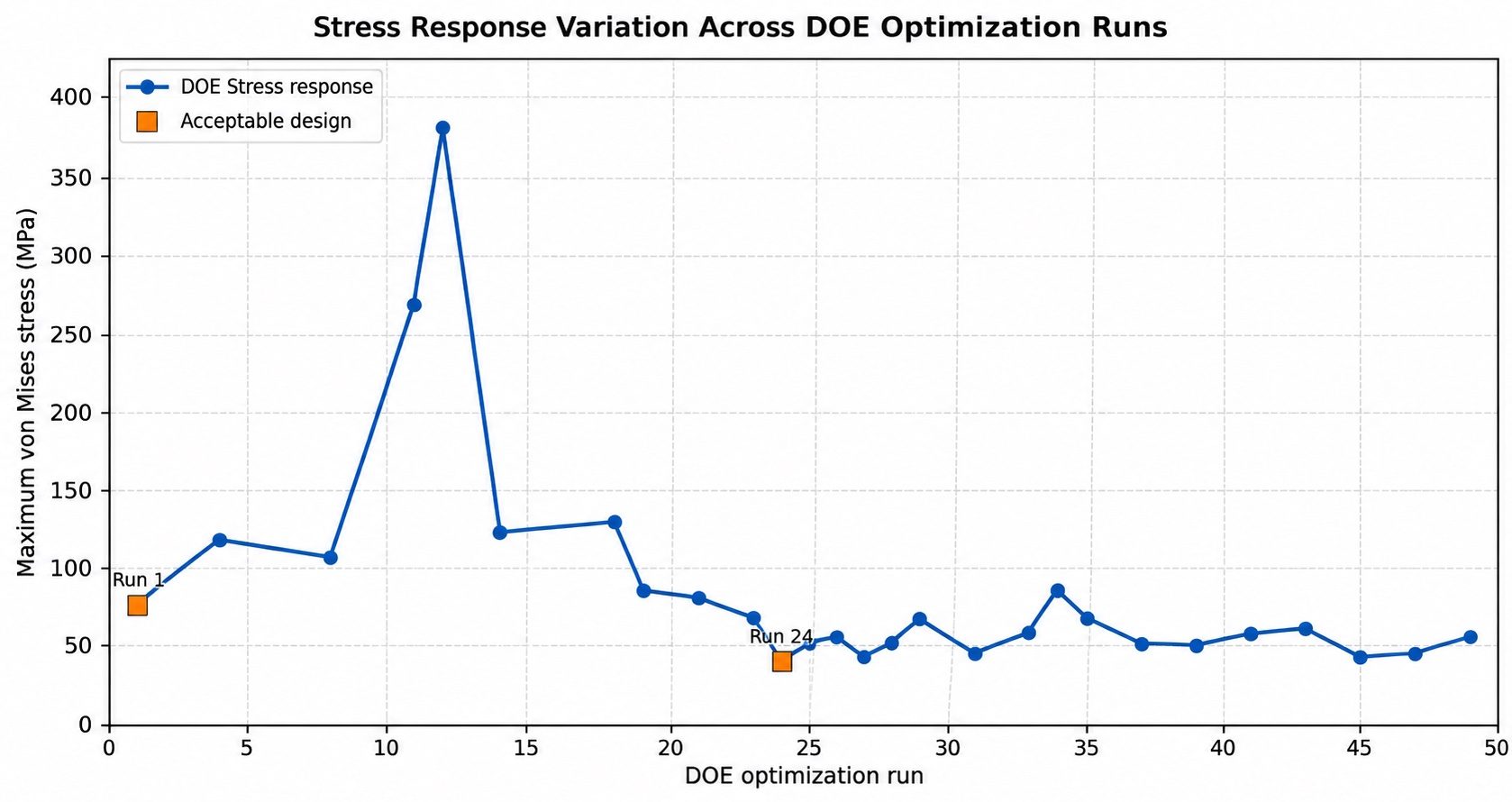
Two structural responses were tracked across every run: maximum displacement (the primary optimization objective) and peak Von Mises stress (the constraint). Simcenter Inspire’s Results Explorer color-coded every design candidate automatically – feasible, near-constraint, violated, or optimal – giving engineers an immediate visual read on the design landscape without wading through raw data.
The standout configuration was Run 24, which achieved the lowest Von Mises stress of 39.681 MPa among all acceptable designs – demonstrating, substantial improvement in structural efficiency and stress redistribution. That kind of result doesn’t emerge from intuition-driven iteration. It’s what a statistically rigorous DOE, sampling the full parameter space without bias, is built to surface.
Sensitivity analysis: Knowing where to focus
Beyond identifying the optimum, the DOE enabled a Pareto-based sensitivity analysis using Spearman rank correlation coefficients calculated between each design variable and both structural responses, to rank every parameter by its true influence on the wing’s structural performance.
The findings were clear. The number of ribs and front profile radius emerged as the dominant drivers, with combined sensitivity indices of 0.784 and 0.780 respectively – nearly equal in influence and clearly separated from the rest of the field. Large opening diameter (0.661) and upper profile segment length (0.642) follow as the next most influential parameters, forming a clear top-four cluster that governs the structural response more than any other combination.
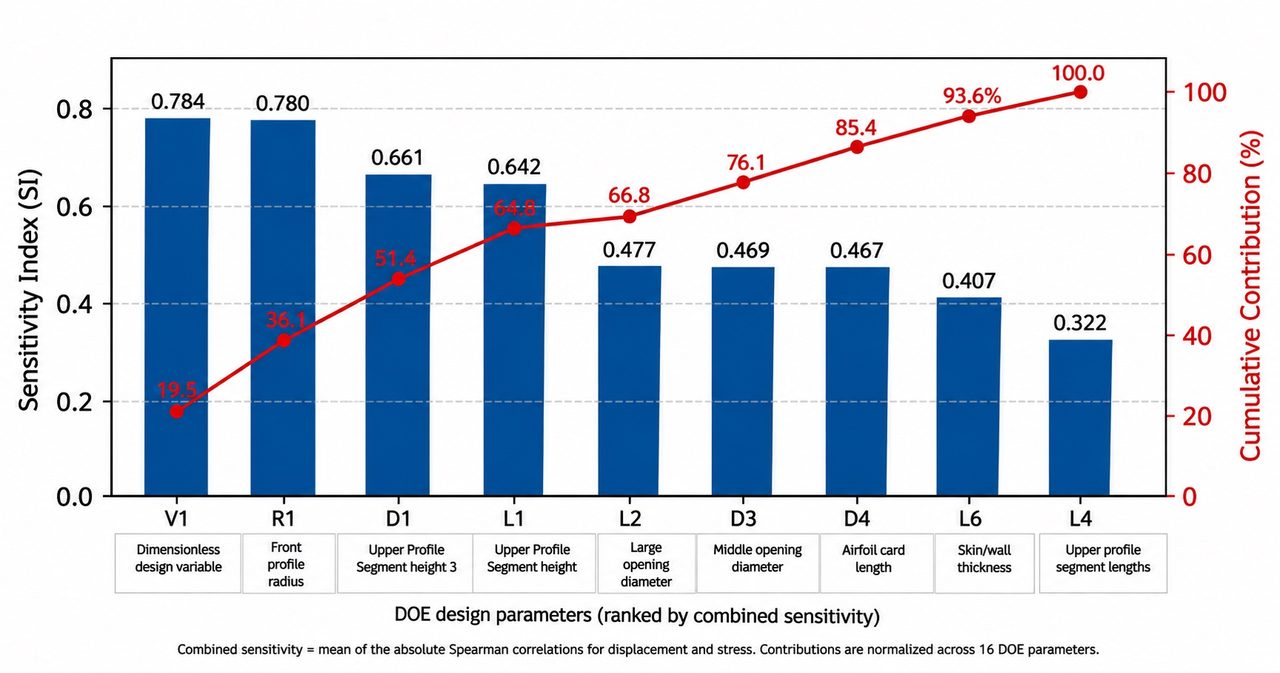
The top nine parameters together account for approximately 81.7% of the normalised cumulative sensitivity contribution – a textbook Pareto result that has direct consequences for how design effort should be allocated. You don’t need to treat all parameters equally. You mainly focus on the ones that move the needle – and now you have the data to defend that prioritisation in design reviews, with programme managers, and with certification authorities.
The DOE dataset has more to give
Run 24 was the standout. But here’s an uncomfortable truth about conceptual design: the moment you hand that result to a broader team, the geometry starts changing. Stakeholders want a longer span. Aerodynamics requests a different profile radius. Manufacturing flags a thickness constraint. Every one of those changes, under a traditional FEA workflow, means a new mesh, a new solve, and more hours of waiting.
What engineers actually need at this stage isn’t a single optimal answer – it’s the ability to interrogate the design space in real time, to ask “what if” and get an answer before the question goes cold. Not in an hour. Before the conversation moves on.
That’s when it becomes worth looking at what the DOE actually produced beyond Run 24: a rich, structured, physics-grounded dataset of geometry-performance pairs – dozens of wing configurations, each with known structural responses, sampled intelligently across the full design space.
Most workflows stop here. The simulations have served their purpose; the optimal configuration is identified; the dataset gets archived.
But that dataset is the foundation for something far more powerful. Treat it as training data, and it stops being a record of what was simulated, and becomes the basis for predicting what hasn’t been simulated yet, in seconds. That’s exactly what Simcenter PhysicsAI is built to do.
Real-time wing design evaluation with Simcenter PhysicsAI
Simcenter PhysicsAI delivers this through Geometric Deep Learning (GDL) – a class of neural network architectures that operate natively on mesh representations, without the need of manual feature extraction or simplification. Unlike conventional machine learning approaches that require engineers to first hand-craft scalar input features (such as aspect ratios or thickness-to-chord ratios), Simcenter PhysicsAI reads the solver result files directly. Each simulation run – a specific geometric configuration paired with its displacement and stress fields becomes a training sample.
The model learns the spatial relationships between structural elements and how they translate into physical responses. It produces an AI surrogate model that is capable of evaluating any new wing geometry in seconds – returning full-field predictions across the entire mesh, not just a scalar value at a single point.
What “real-time” actually means for a designer
Once the surrogate is trained, the speed of the design workflow changes entirely.
You adjust skin thickness from 3.2 mm to 2.8 mm. Simcenter PhysicsAI returns a predicted displacement contour and stress map – spatially distributed across the wing in real-time. You push span length up by 12%. Another prediction, another two seconds. You change the leading-edge profile radius, check the stress redistribution, and move on. Six geometric variants explored in the time it previously took to set up a single solver run.
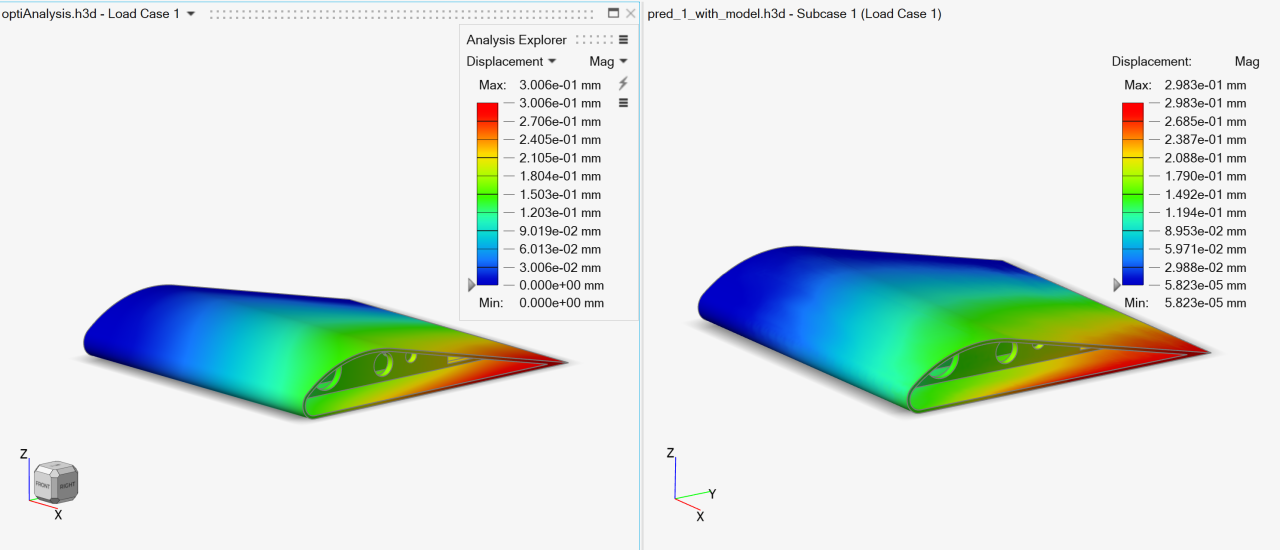
This isn’t approximation for the sake of speed. Surrogate predictions are validated against held-out solver runs from the DOE dataset, and the accuracy is quantified – not assumed. Critically, Simcenter PhysicsAI also calculates a geometric similarity metric for the prediction – an indicator that flags when a new design deviates significantly from the training distribution, empowering you to make informed decisions on when to rely on AI-predicted results and when to run full-fidelity simulations. That’s the difference between a fast tool and a trustworthy one.
The result: you can sweep dozens of design variants interactively, converge on promising regions of the design space with confidence, and reserve full-fidelity solver runs for the configurations that actually earn them.
A unified, AI-augmented workflow for aircraft wing structural design
Stepping back, what emerges from combining these capabilities is a coherent, end-to-end workflow for intelligent aerospace structural design – where each stage actively feeds the next.
The DOE isn’t just a path to an optimized design – it’s the data infrastructure for the AI capability that follows. Sensitivity analysis distils which parameters govern performance, sharpening engineering focus and making design rationale defensible to stakeholders and regulators. Simcenter PhysicsAI then makes the solver’s knowledge available at the speed of a design conversation – so every “what if” gets an answer before the moment passes.
The full physics solver never leaves the picture. It remains the ground truth. What changes is how efficiently its knowledge is accessed and reused across the design cycle – from the first DOE run through to the final configuration review.
This is what it means to move beyond the solver: not to replace physics-based simulation, but to make its knowledge instantly actionable at every point to accelerate the design process.
Why AI-augmented design workflow matters for Aerospace and Defence
The aerospace and defence sector operates under constraints that make this kind of workflow particularly valuable and increasingly necessary.
- Design cycle compression: The window between conceptual design and detailed design is shrinking. AI-augmented workflows let engineering teams explore in days what previously took weeks – not by cutting corners on physics, but by making physics-based knowledge instantly reusable across the design space.
- Confident design decisions: The DOE and sensitivity analysis combination gives teams a data-backed understanding of what drives structural performance – useful not just for finding the optimum, but for communicating design rationale to stakeholders, certification authorities, and manufacturing partners.
- Multidisciplinary scalability: The data infrastructure established here – parametric modelling, DOE, AI training – extends naturally as the design matures. The same framework supports adding aerodynamic loading, aeroelastic coupling, or thermal effects without rebuilding the workflow from scratch.
The wing flexing outside your window at 35,000 feet is the product of thousands of engineering decisions, made over months, by teams working at the limits of what their tools allowed.
The next generation of wings will be shaped by engineers who have more of those decisions available to them – faster, smarter, and informed by AI that learned from the physics, not around it. Engineers who can ask “what if” and get an answer before the conversation moves on. Who spend their solver budget on deepening understanding, not on waiting. That’s not a future workflow. It’s available now – built with Simcenter PhysicsAI into Simcenter Inspire.
Ready to explore what AI-augmented design can do for your engineering workflows? Learn more about Simcenter PhysicsAI and discover how your existing simulation data can become your most powerful design asset.