Polarion ALM 2606 – What’s New and Noteworthy
We’re pleased to introduce Polarion 2606. This update brings a focused set of enhancements designed to improve everyday work with Polarion, with improvements across AI-assisted workflows, user experience, multilingual collaboration, and platform quality.
As always, our commitment to continuous improvement remains at the center of everything we do. These enhancements build on that commitment with meaningful refinements that help teams work more efficiently, collaborate more effectively across regions, and benefit from a more secure and reliable experience.
Here is a preview of some of the key highlights:
- A new API for extending
 Polarion Copilot
 - User experience updates for a more familiar and vibrant interface.
- Multilingual user interface support for international teams
Let’s take a closer look at the new capabilities and the latest improvements in usability, security, performance, and quality included in this update.
Extended AI integration with the new Polarion Copilot API
With Polarion 2606, we added a new Polarion Copilot API, providing organizations with a secure, supported way to integrate AI into their own Polarion customizations. Reports, scripts, widgets, plugins, and other custom content can now call a large language model connected to Polarion, enabling teams to build AI-assisted workflows directly where users already work.
This opens the door for customer-specific use cases like content analysis, data summarization, workflow checks, decision support, and process automation while keeping the interaction aligned with Polarion’s security and deployment model.
Custom LLM Connector for on-premises deployments
For on-premises 2606 deployments, we also added support for creating custom LLM connectors that let you connect Polarion to any suitable LLM API (hosted or local) and apply your own enterprise AI strategy without being locked into a single model provider.
The Copilot API and custom connector feature let you extend Polarion’s AI capabilities to tailor them to your processes, infrastructure, and compliance needs, using your preferred AI models.
A more vibrant and familiar UX
User experience has always been an important part of Polarion. With this update, we refined the interface to better align with Siemens product portfolio, creating a more unified and familiar experience across solutions while preserving the flexibility and capabilities users value today.
Building on the existing in-line editing capabilities in the work item table, this update additionally introduces also a more vibrant visual design that enhances readability and usability. The work item table continues to build on the Excel-like experience many users already appreciate, with clearer row and cell distinction that makes information easier to scan and interact with. At the same time, the experience remains fully customizable, so teams can adapt it to the way they work best.
The refresh makes Polarion’s UX more consistent, intuitive, and a bit more colorful!
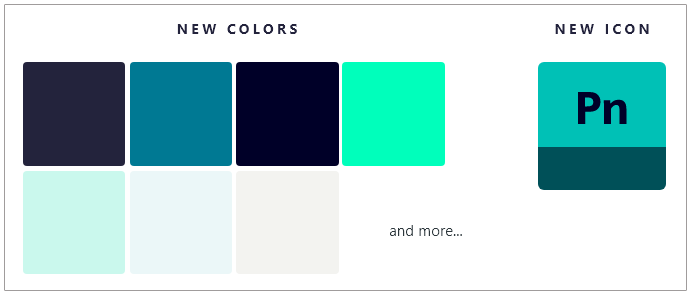
New Icon and Brand Colors
The updated colors reflect Siemens’ refined branding, with darker, sleeker tones, giving Polarion a fresh appearance that harmonizes with other Siemens solutions.
The new Polarion icon aligns with Siemens’ unified product design: each product has a unique acronym and a distinct bottom color, maintaining a unified visual logic while ensuring individual distinction.
We’ve also refreshed our Industry Solutions Templates, which support specific compliance and engineering needs across industries (such as Automotive, Medical Devices, Cybersecurity, V-Model Development, and more).
While we were at it, we refined specific UI areas and controls to deliver a fresher appearance and a more polished look and feel. Notable improvements include:
- Enhanced selection colors for improved visibility.
- Updated Command bars from dull grey to warm sand tones.
- Restyled popup notification panels now feature better text contrast.
- Made Filter tags in the Visual Query Builder more distinct and compelling.
- Revamped the Loading wheel indicator to match the fresh new look.


Colored Cells in Tables
We added color highlights to table cells to make navigation easier and the table more visually engaging.
The Excel-like cell coloring improves readability and helps you find the information you need at a glance.
These configurable cell colors are available for the Work Items table, Test Runs, Plans, Live Reports, and Work Item picker dialogs.


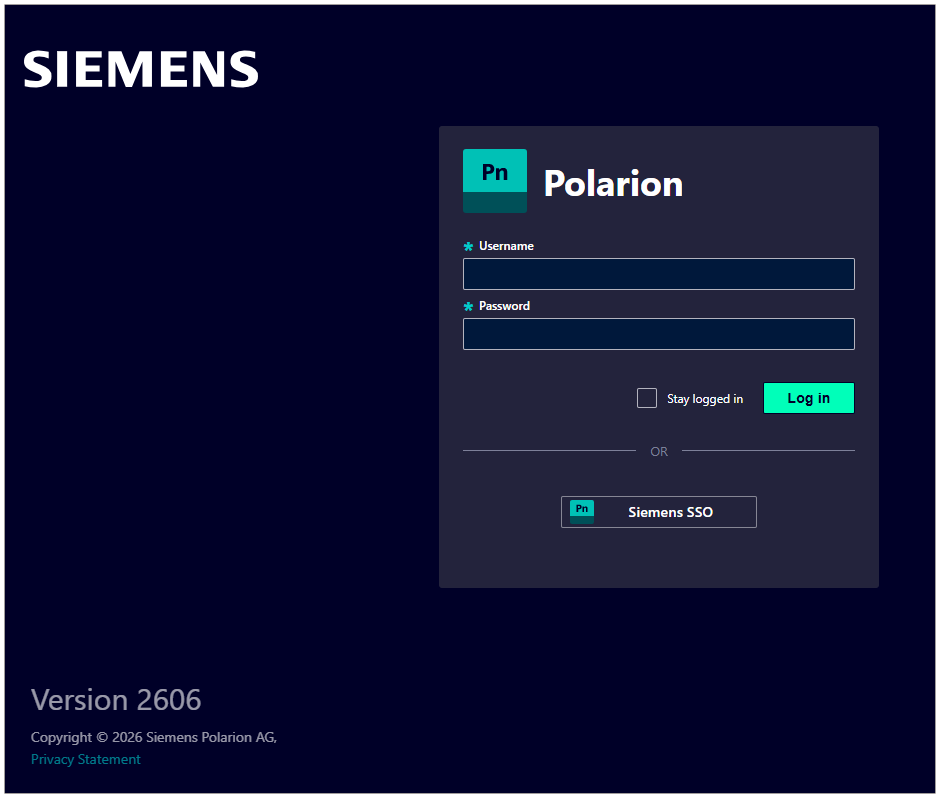
Updated the Login Screen
We also updated the login screen, making it more minimalistic, fresh, and aligned with Polarion’s new colors. It reflects both brand evolution and enhanced user experience: simplified, functional, and visually clean.
In addition to the visual refresh, administrators can now reuse branded success, warning, error, and general info messages on the login screen, ensuring key information is communicated in a unified visual.
Administration UI Refresh
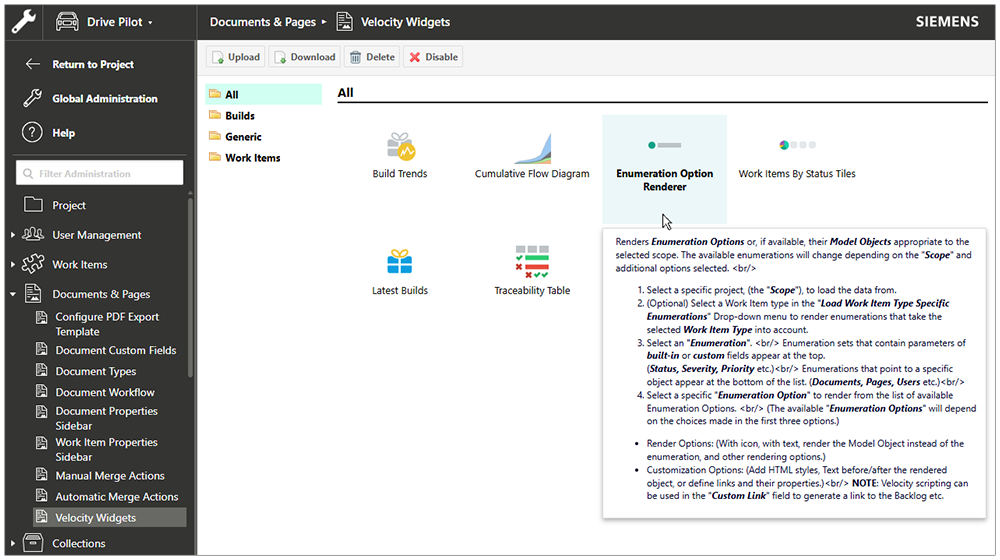
We also made several color updates to Administration Navigation and its content to match the new brand colors, but ensured that the default User Navigation remains visually distinct.
In addition, we aligned the layout and usability of the Velocity Widgets configuration and aligned it with the Project Templates page.
Improved Test Management for Execution and Collections
In Polarion 2606, we further improved test management, making defect linking during test execution more flexible.
- You are no longer limited to a single existing defect to be linked to a failed test case during the test execution.
- Users can now link multiple existing defects, and more generally, multiple existing Work Items of the configured type, to a single Test Record.
This improves traceability in your testing process when multiple issues are found during a test case execution.
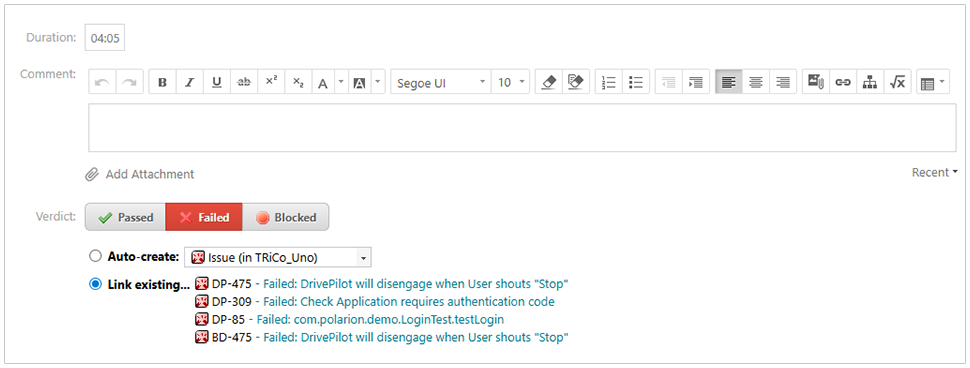
This is reflected not only in the execution workflow itself, but also across the tool. Multiple linked defects are now consistently displayed in relevant places throughout Polarion, helping teams keep visibility from execution to reporting and analysis. At the same time, the feature was implemented with backward compatibility in mind, so existing integrations and established usage patterns continue to work as expected.
We also improved the user experience of the Test Runs in Collections feature, introduced in Polarion 2512. To make the relationship more visible,  Test Runs that belong to a
  Collection now display an informational banner directly on the page. The Collection Consistency Checker has been extended to also report Test Runs based on
  Documents that are not part of the same Collection, making Collection-based testing easier to understand and maintain.

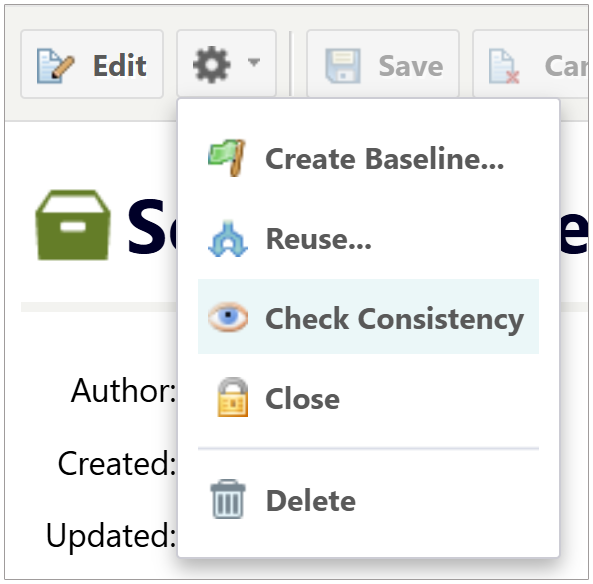
Future-proofed Variant Management with Polarion Variant Configurator
We strengthened the long-term foundation of product Variant Management in Polarion. Polarion Variant Configurator is replacing Polarion VARIANTS, giving customers a sustainable path forward while preserving the familiar end-user experience they rely on today.
Existing variant data, configurations, feature selections, restrictions, Variant Matrix views, Variant Reports, and generated Variant Documents continue to work as before, so teams can continue to manage 150% master specifications and generate focused 100% variant-specific documentation without changing their established processes.
Behind the scenes, Polarion Variant Configurator moves its variant resolution to a Siemens-owned solution, reducing dependency on proprietary third-party solver technology and giving Polarion a vendor-neutral, transparent, and maintainable logic evaluation engine for validating feature selections, evaluating restriction expressions, comparing variants, and resolving complex product configurations. For customers, the value is simple: the same Variant Management capabilities, but on a more future-proof technical foundation designed for reliable operation at enterprise scale.

Usability improvements
In the Elevated Experience stream, we delivered 11 functional enhancements requested by our customers, closing more than 30 customer Enhancement Requests (ERs). We always value our conversations with customers, and your insights continue to play an important role in improving the Polarion experience.
With this release, we focused on enhancements that support productivity and collaboration in everyday work. Among them, we closed a gap many international teams had highlighted by making it possible for users to select their preferred Polarion UI language directly in the interface. Together, these improvements are designed to make working in Polarion more effective, intuitive, and user-friendly.
Polarion speaks your language
Polarion 2606 introduces a more flexible and user-friendly approach to language selection. Users can now select their preferred Polarion UI language directly in the interface, with changes applied immediately and no administrator involvement required.
This new user-level setting makes it much easier for international teams to work in the same environment while using the language that suits them best. As a reminder, Polarion supports 13 languages out of the box, and these language packs are now included directly in Polarion, with no separate installation required. This makes it even easier for global teams to get started in their preferred language.
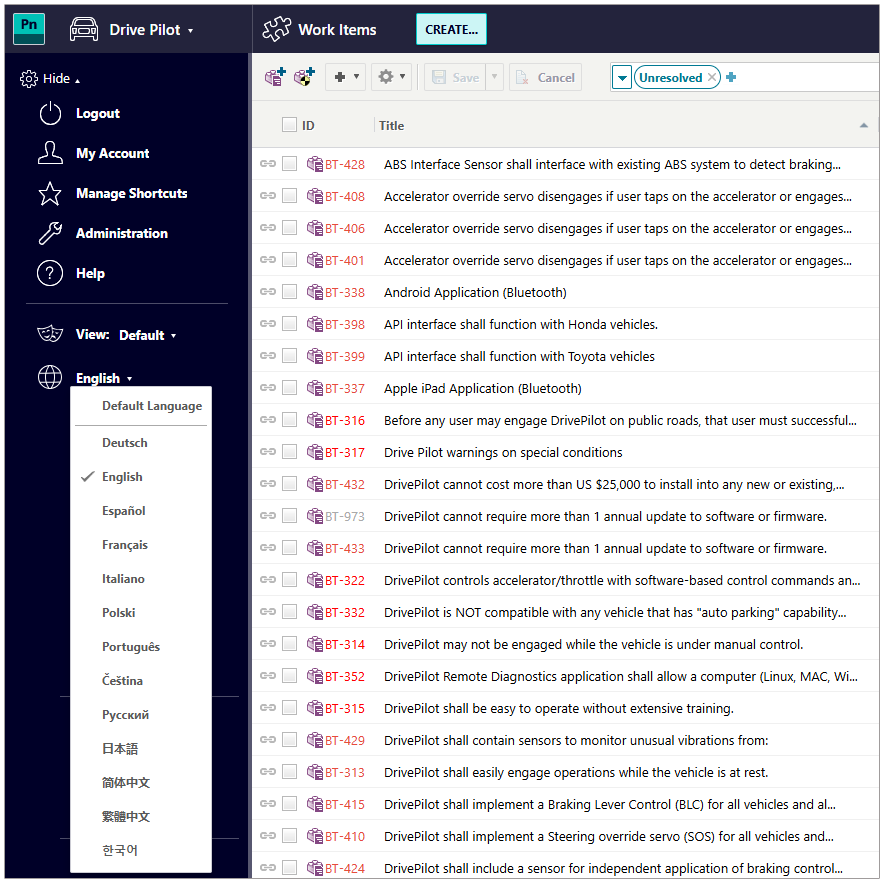
Administrators can also set the Default Language in the new language-select option.
New support for right-to-left languages
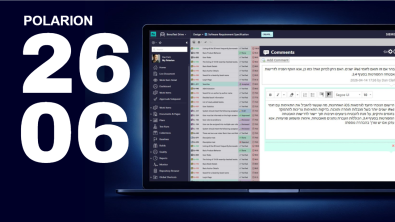
Continuing our focus on international teams and language support, Polarion 2606 introduces native right-to-left language support. Teams working in languages such as Hebrew and Arabic can now work more naturally across Polarion, with consistent alignment, rendering, and layout behavior.
Users can create and edit content in Live Documents and Work Items, including mixed right-to-left and left-to-right content in the same context. You can easily change text direction in the editor, and RTL formatting is preserved across lists, tables, search, and exports to Word and PDF. Integrations and round-trip scenarios also consistently maintain text direction.
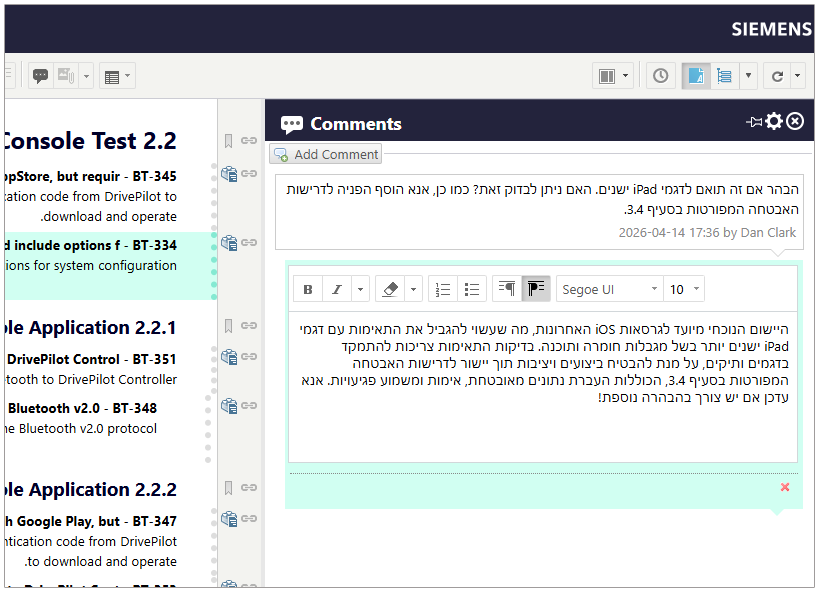
Can now disable Velocity Widgets
Velocity Widgets now offer a helpful new option for administrators: widgets can be disabled before they are deleted. This makes it easier to phase out a widget when you are no longer planning to use it, but still want to check whether it appears on any existing  Pages.
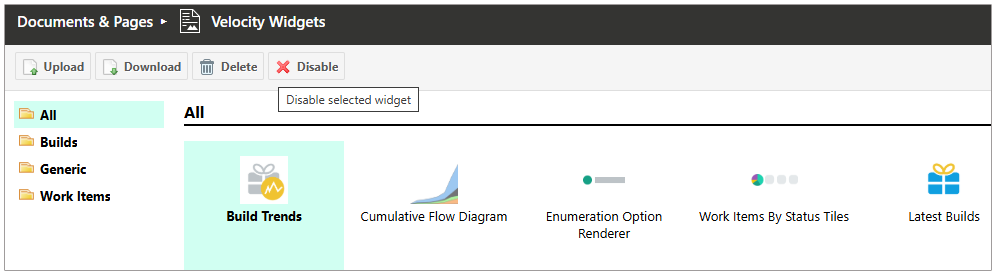
Once disabled, a widget is no longer available in the widget sidebar when users edit Pages. If the widget is still in use on an existing Page, it is replaced with a warning message.

This allows administrators to review the affected Page and decide on the next step. They can either update the Page to remove or replace the widget or re-enable the Velocity Widget without needing to upload and configure it from scratch.
Enhanced our integration capabilities
REST API improvements
Polarion 2026 brings another major expansion of our REST API capabilities.
The API documentation now follows the OpenAPI standard, making it much easier to integrate Polarion with external tools, generate client SDKs, and work with modern API tooling.
Documents APIs
We have significantly expanded support for Documents and Document Parts, allowing you to manage document structures much more comprehensively via REST APIs:
- Create all Document Part types, including Headings and Work Items.
- Delete all Document Part types, with Work Items being moved to the Document recycle bin when the corresponding Work Item Document Part is deleted.
- Enhanced capabilities to move multiple Work Items into a Document in a single operation.
- Improved support for managing the hierarchy and structure of a Document.
- Introduced support for overwriting Referenced Work Item Document Parts
These enhancements can now be automated via the REST API instead of being done manually.
(See the Document Parts section of the REST API User Guide for details.)
Word import via REST APIs
Polarion now supports importing Word documents via the REST API using existing Work Import Templates, making it easier to bring in content and automate document creation while keeping a consistent template-driven structure.
Richer field metadata via REST APIs
We have expanded our metadata support to include read-only resources for all fields within non-prototype resources. These are now accessible at the  Global and
  Project levels, as well as for individual instances such as Work Items, Test Runs, etc. This update encompasses all built-in, custom, and inherited fields.
Enhanced Enumeration management
Native support for Document and Page object enumerations is now available. This update also allows for the retrieval and modification of Link Role attribute enumeration options via REST APIs.
User License management
We added a new administrative capability: the ability to unassign licenses from users directly via the REST API.
Overall, this release continues our investment in automation, integrations, and API completeness across Polarion.
Polarion Connector for Matlab Simulink update
The Polarion for Simulink Connector has been further enhanced and tested against the latest version of Simulink 2026a and includes the following new capabilities.
Choose Spaces to work with
It is now possible to select specific Spaces in the Settings dialog to improve performance when working with a large number of documents in a Project. You can now choose which Spaces you wish to see visible in the Simulink connector context picker. Alternatively, you can always navigate directly to your desired Polarion location (such as a Live Document) using the embedded browser inside of Simulink.
Enable linking to lines of code in the Direct Linking mode
To ensure Direct Linking mode is aligned to Requirements mode, you can now link lines of code inside Simulink directly to new and existing Work Items. Backlink processing is also supported in this workflow.
Add System Composer Component I/O ports to the Surrogate Properties table
During backlink processing and surrogate creation, we now display input and output System Composer Component port information in the Properties table.
Control visibility of the Toggle Mode button on the Simulink Connector pane
It’s finally possible to control the visibility of the Toggle Mode button on the Simulink Connector pane with the configuration HideToggleModeButton (true/false) property.
The new version of the Polarion Connector for Simulink will be made available on our extension portal.
Continuous Improvement on Security
For this release, we delivered several important improvements that strengthen Polarion’s security foundation and make it easier to operate in controlled environments.
One major addition is Security Events logging. Security-relevant actions and events, such as changes to user roles or configuration, are now logged in a more structured, traceable manner.
We also introduced a Secrets Manager to provide built-in, secure storage for sensitive data like passwords, API keys, and user account vault entries.
We have also made important updates to key libraries and frameworks as part of our ongoing platform modernization.
Two changes especially worth highlighting:
- Polarion now runs on Apache Tomcat 11. Customers and partners with custom extensions based on Java Servlets or related web APIs should review them for compatibility, because the APIs have moved from
javax.*tojakarta.*. We published a blog post explaining the impact and recommended solutions. - Groovy was removed from Polarion, and installation and update scripts were rewritten in Java. This simplifies the product footprint and reduces dependency-related risk. Customers who rely on existing Groovy-based solutions, such as workflow scripts, still have a documented option to restore Groovy support if needed.
(See$POLARION_HOME$/polarion/sdk/examples/com.siemens.polarion.example.groovy)
Our documentation was also updated regarding secure configuration verification, backup, and restore.
(See the Security Guide in the Deployment and Maintenance Guide for details.)
These improvements also help align Polarion with evolving cybersecurity frameworks, including the EU Cyber Resilience Act.
Traceable Security Events
With Polarion 2606, security‑relevant actions and events are recorded in a structured, traceable manner.
Events are categorized and identified by explicit event codes, and each type is documented in detail in the Deployment and Maintenance Guide.
The system logs activities across several areas, for example:
- Authentication events, such as successful or failed logins. (
AUTH-0001,AUTH-0002) - User and access management changes, such as role assignments. (
ACCESS-0004) - Configuration events such as application start or shutdown. (
CONF-0005,CONF-0006) - Input validation issues, such as file format mismatches. (
INPUT-0004) - Data access events, such as attachment downloads. (
DATAXFER-0001)
Each event is recorded with a standardized structure that includes a timestamp, a component, an event code, and a descriptive message.
2026-02-03 12:45:46,514 INFO (SECURITY) ... - [AUTH-0001] - User 'admin' authenticated. Source: portal.
This structured logging provides a consistent record of system activity that can be used for incident analysis, user action review, and audit purposes.
For a complete list of event types, configuration options, and detailed descriptions, see the Security Event Logging section in the Deployment and Maintenance Guide.
Built-in Secret management
Polarion now includes a default Secrets Manager, delivering an important security enhancement right out of the box. Customers no longer need to rely on third-party solutions to securely manage sensitive information.
You can use the Secrets Manager to store data such as API keys, passwords, and sensitive entries in the properties file. It also now backs the User Account Vault, making it the central store for information that must be protected from exposure.
The Secrets Manager introduces a secure syntax for referencing property values in the properties file. This helps replace plain-text storage of sensitive values, reducing a significant security risk and making secure configuration much easier to manage.
Performance and scalability
Performance remains a key focus for Polarion, with ongoing efforts to ensure stability, predictability, and scalability in enterprise environments. In this release, the focus is on targeted optimizations, strengthening the underlying platform foundations, and improving guidance for performance validation and testing.
Performance improvements
Polarion 2606 adds a few focused performance optimizations in specific high-impact workflows:
- Major acceleration in repository and persistence operations, significantly improving performance for permission-heavy and backend synchronization workflows.
- A much faster Tracker search and query execution, delivering quicker Work Item retrieval and improved responsiveness across UI and REST API.
- Faster processing of ReqIF imports and big Document operations, improving efficiency in integration-heavy and large specification scenarios.
- Updated sizing and scalability recommendations in our Deployment and Maintenance Guide.
We also introduced a guide on how to execute load and performance testing with Apache JMeter in the Deployment and Maintenance Guide. This enables teams to simulate real-world usage patterns, validate system behavior under load, and analyze metrics such as response time and throughput using standardized approaches.
Location Index (early adoption)
Polarion 2606 improves the early adoption release of the new Location Index, a foundational update to the underlying data layer, and the long-term replacement for legacy Object Maps.
Built on a PostgreSQL-backed design, Location Index enhances robustness and system resilience. In this advanced phase, it supports the vast majority of indexing scenarios and historical object resolution across typical operations such as moves and renames. Certain non-standard (not achievable in the Polarion UI) or complex scenarios – especially those related to multiple project manipulation – are still being finalized and will be completed in future releases.
The database-driven design also helps alleviate several pain points in large deployments, including memory consumption in In-memory Object Maps and the shutdown overhead associated with the legacy Object Maps.
Detailed documentation for this early adoption feature is available on Support Center, and we strongly encourage customers to evaluate the Location Index in their test environments – ideally using production-like data.
Early feedback is essential: Reindex logs, usability observations, performance impressions, and reports of any workflows that do not behave as expected will help us refine the feature ahead of its full rollout.
Technology updates
The new version also brings a number of changes to the supported operating systems and platforms:
- Bundled Apache HTTP Server was updated to 2.4.67 in the Windows distribution.
- Bundled PostgreSQL was updated to 18.3 in the Windows distribution.
- Debian 13 is supported, and support for Debian 11 has been dropped.
- RHEL 10 is supported, and RHEL 8 support has been dropped.
- SLES 15 SP7 is the only service pack supported for SLES 15.
- SLES 12 support has been dropped.
- The minimum supported version of Subversion has been changed to 1.14.x
Notable issue fixes and enhancements
At Polarion, we remain committed to delivering the best possible experience for our users. With every release, we continue to resolve issues, improve overall performance, and refine the user experience to make everyday work smoother and more productive. Whether you run Polarion on your own infrastructure or use Polarion X in the cloud, our goal is the same: to provide a reliable, efficient, and high-quality experience across the platform.
We are aware of some localization-related issues and are working on fixes in upcoming patches. These include incomplete rendering of the language picker at lower resolutions, occasional line wrapping issues in the side panel for longer words, and several areas where content is not yet translated, such as the My Polarion Page, Project/Repo/Space Home, and Report template text.
During cluster startup, you may occasionally see a transient ui-data-log error in the log4j-errors-*.log file while user language preferences are still being loaded. This is a timing-related message and does not affect product operation or the user experience. This will be resolved in patch 2606.2607.
We are also planning to address a regression in 3.26.6 where the Create Account link is not shown on the login page when enableCreateAccountForm=true, in patch 2606.2607.
Explore the list of bug fixes, performance improvements, and enhancements delivered with Polarion 2606.
Deprecations
In our commitment to keeping Polarion current, we periodically evaluate and remove outdated features while embracing new technologies. See our Deprecation and Removal Plan for details.
Update information
Polarion 2606 is an update of Polarion ALM, available to all customers with a current maintenance subscription. This update is your gateway to the latest enhancements and security fixes. Staying up to date with our latest release ensures you benefit from new features, enhanced security, improved usability, and better performance.
To download the update distribution package, please visit this link.
For comprehensive details on the update process, read the bundled 2_How_to_update_Polarion.txt file in the update package or the online versions for Single Instance and Clustered or Multi-instance deployments in our Deployment and Maintenance Guide.
Conclusion
As we wrap up, we want to reaffirm our commitment to continuously improving the Polarion experience. With Polarion 2606, we are delivering new capabilities and enhancements designed to support more efficient processes, strengthen security, improve collaboration across international teams through multilingual support, and help Polarion fit even more seamlessly into your existing environment.
Your feedback remains an essential part of that journey. It helps us shape every release and continue evolving Polarion as a leading solution for collaborative software development, orchestration, and project management.
If you have questions or would like to share feedback, please reach out through the blog comments, the Polarion Community Portal, or your regular Polarion support contact.
Thank you for being part of the Polarion journey. We hope you enjoy the new features and improvements in Polarion 2606, and we’re excited to continue delivering more innovations in future releases.