What’s new in Opcenter X 2604

Opcenter X for scalable digital transformation
Summary
Siemens Digital Industries Software is pioneering modular MOM, enabling more manufacturers to take a stepwise approach to digital transformation. Built with cloud technologies and offered as software as a service (SaaS), using Opcenter™ X software, which is part of the Siemens Xcelerator business platform of software hardware and services, lowers the time and cost barriers for SMBs, enabling you to realize rapid return-on-investment (ROI) with modules that connect and adapt as your enterprise matures.
With Siemens as your MOM solution partner, you can be sure Opcenter X is built on a rich and deep knowledge base and the extensive capabilities of a leading software company. We listen to and learn from our customers, then innovate and capture best practices for every digital task. Then we apply best practices to accelerate time-to-value of our software.
Implementing Opcenter X can boost manufacturing productivity, product quality, time-to-market, and compliance by streamlining operations and decision-making. Siemens supports clients in their digital transformation journey, unlocking the full potential of manufacturing operations.
Capabilities
Track and Trace
- Fully Flexible Work Order
- It’s now possible to define a Work Order if the quantities of total work order quantity or the material requirements are fixed or flexible.
- In 2604 we support the full flexible mode, so everything is considered fully flexible and the produced quantity can be higher or lower than the target quantity without any constraints. Also, the Material Requirements have the same flexibility, so, a Material can be consumed or under-consumed without any constraints.
- The flexible mode is driven either from the Create Work Order or from the Import B2MML (so via Production Order).
- Multi Start and Final Operations in Parallel Workflow
- From the Create Work Order rest API is now possible to define more than one first and/or final operations
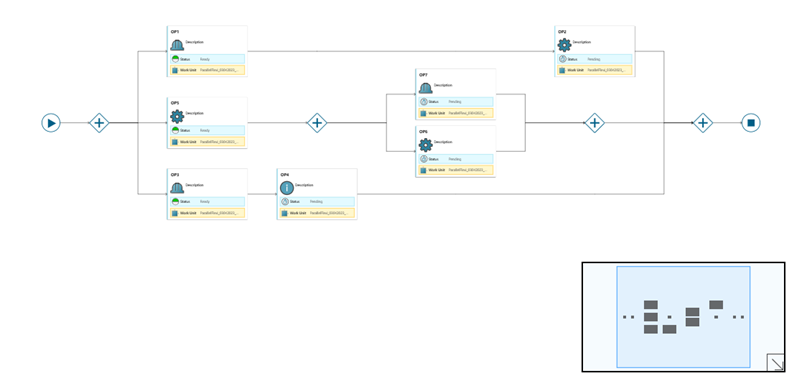
- Work Order Workflow Graphical Representation
- It’s now possible to render the Work Order with Parallel Gateways
New Operator Terminal
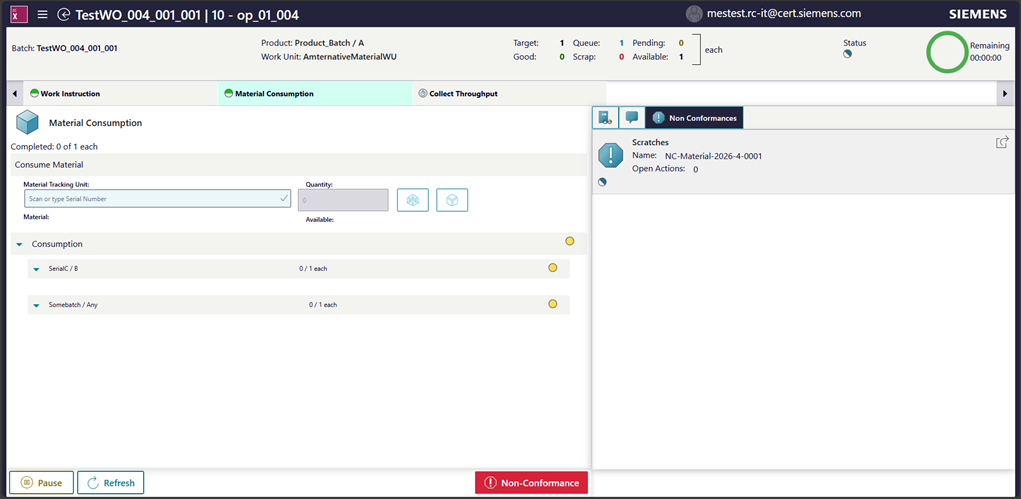
- Integration with Quality Applications.
- It is now possible to open Non-Conformance from the New Operator terminal
- Quality Inspection task is now supported.
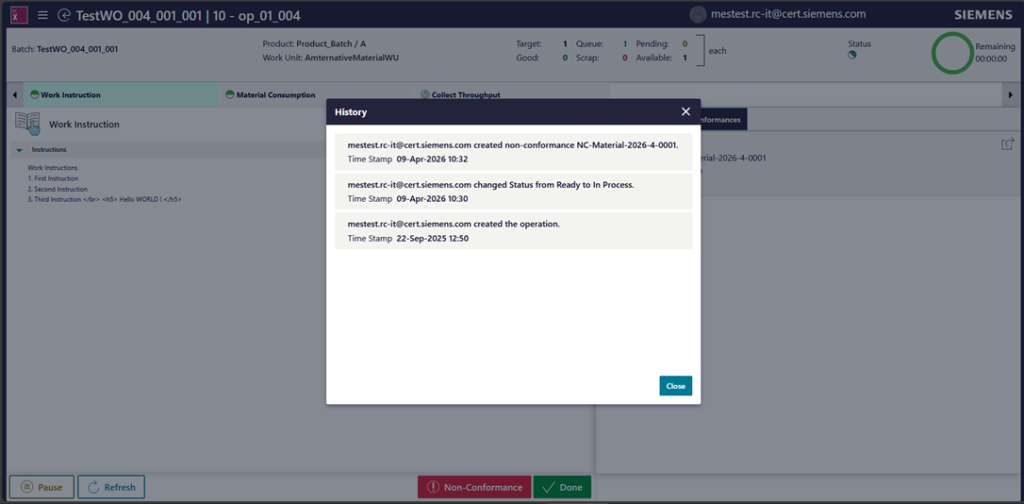
- The following functionality was introduced:
- Refresh command
- History view
- Improved logout functionality
- Manual operation complete action was added to support flexible type of work order
- Localization is now supported
- Customization flow now supports SaaS deployment. Upload Solution action allows to upload customized solution.
Skill Management
A new Skill Management capability was introduced. It allows to manage skill library and define skill requirements for an operation to be enforced during execution step.
- Skill library functionality:
- Create, update, release, revise, and obsolete skills
- Assign users to a skill defining their level of such skill
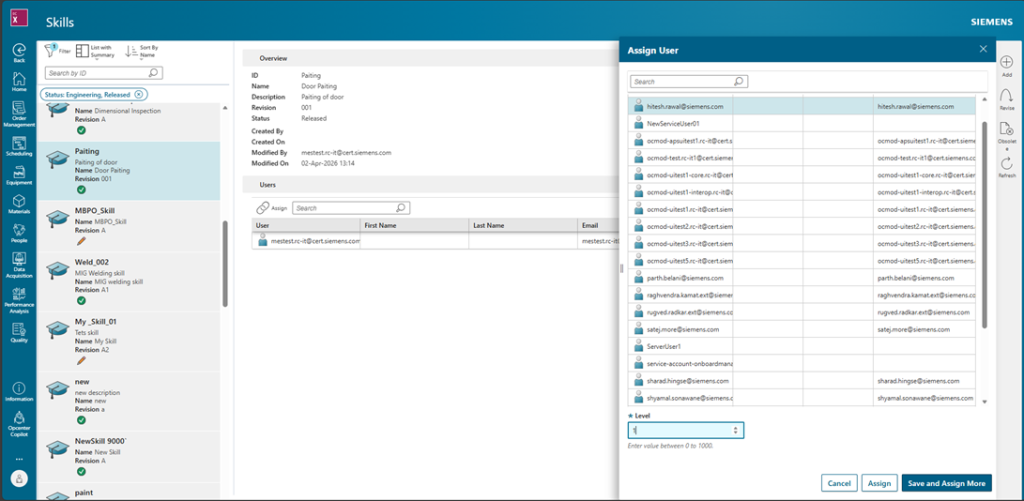
- Ability to assign one or multiple skills with a minimum required level to a process operation
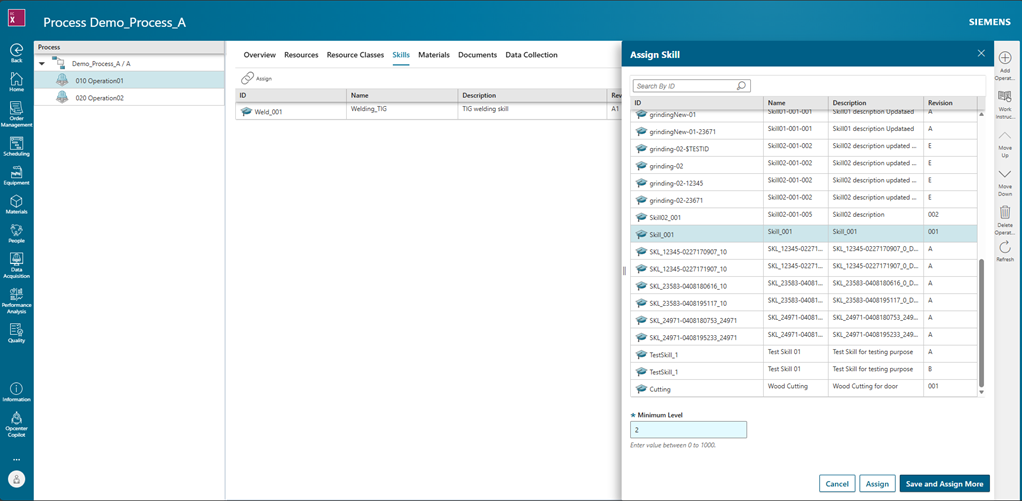
- During operation execution, the system checks if a logged in user satisfies the requirements for skill possession and either allows them to execute operation or blocks the operation from execution. If operation is not allowed to be executed, the operator terminal displayed a corresponding message that contains the reason.
Configurator
Configurator Agent – MCP Server
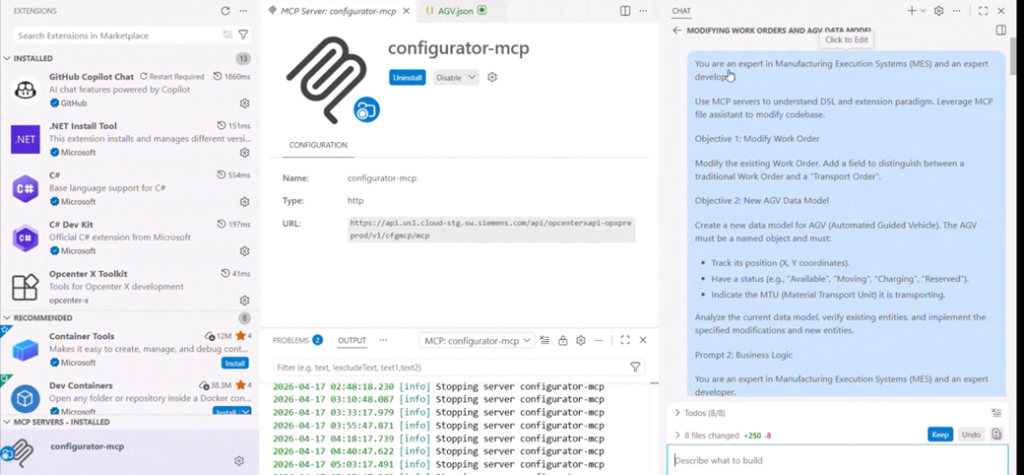
- Our integration with GitHub Copilot, providing an AI-powered assistant designed to support configurators directly within their workflow. This functionality is hosted on a new MCP (Multi-Cloud Platform) server.
- Configurator copilot enhances the capabilities of GitHub copilot in agent mode, with OpcenterX specific knowledge and tools. This enables GitHub copilot to generate code that conforms to Modular MOM Metadata (DSL).
Release Downgrade
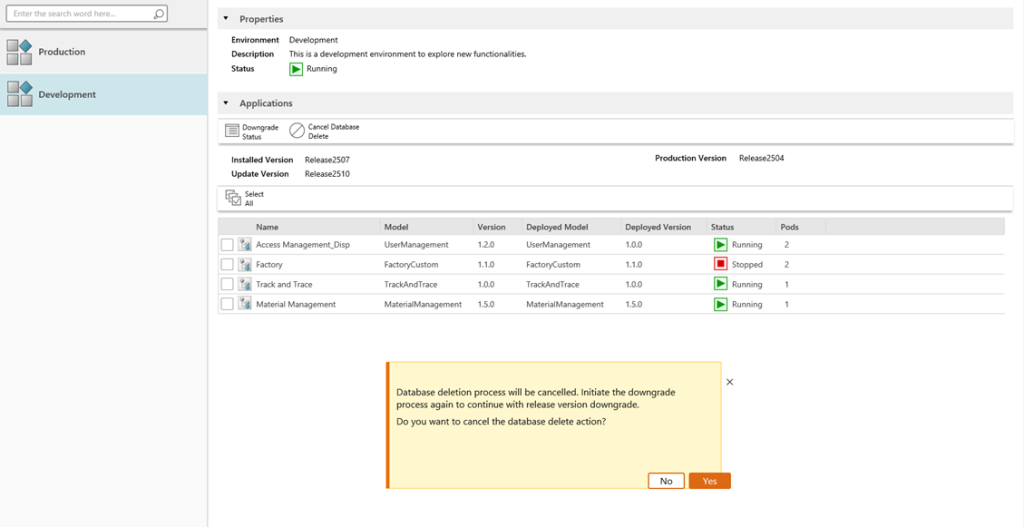
The Release Downgrade feature empowers users with the ability to revert to a previously deployed product version. This is particularly useful for thoroughly testing new releases within a development environment. Should a new version not meet expectations, or if any unforeseen issues occur, users can quickly and efficiently downgrade, ensuring a stable development workflow.
Important Considerations:
- This functionality is restricted to the development environment only.
- A database cleanup will be performed as part of the downgrade operation.
Third Environment Support
To meet the stringent requirements of regulated industries, our Third Environment Support feature enables the management of a dedicated QA Assurance environment. This capability is exclusively available for LPC and VPC installations, providing an essential layer for quality assurance and compliance. Please note that the setup of this third environment is performed solely during the initial provisioning process.
Interoperability
- Template Store allows you to select preconfigured connectors.
- Database Connector now allows you to connect to Oracle Database sources.
- Delivery Buffer allows the management of reliable message delivery.
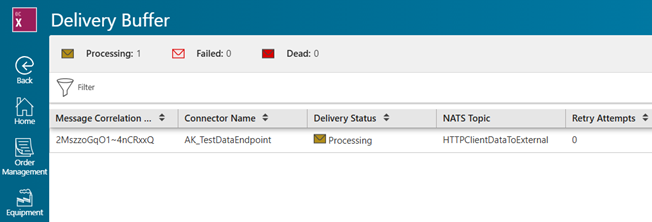
- Http Client Connector now supports reliable delivery using the new Delivery Buffer.
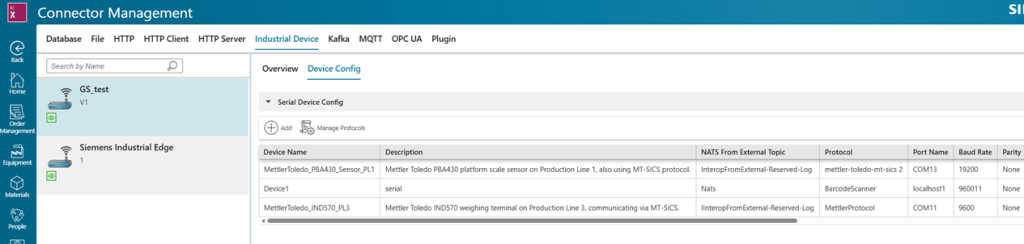
- Industrial Device Connector allows you to connect to serial devices such as weighing scales, barcode scanners and measurement devices.
Quality Management
This release strengthens Siemens Quality Management by enabling:
- Higher operational efficiency
- Improved shopfloor quality execution
- End-to-end integration across systems
- Faster and more transparent issue resolution
More Flexible & Efficient Quality Processes
- Ability to modify or delete inspection steps directly in inspection plans and orders
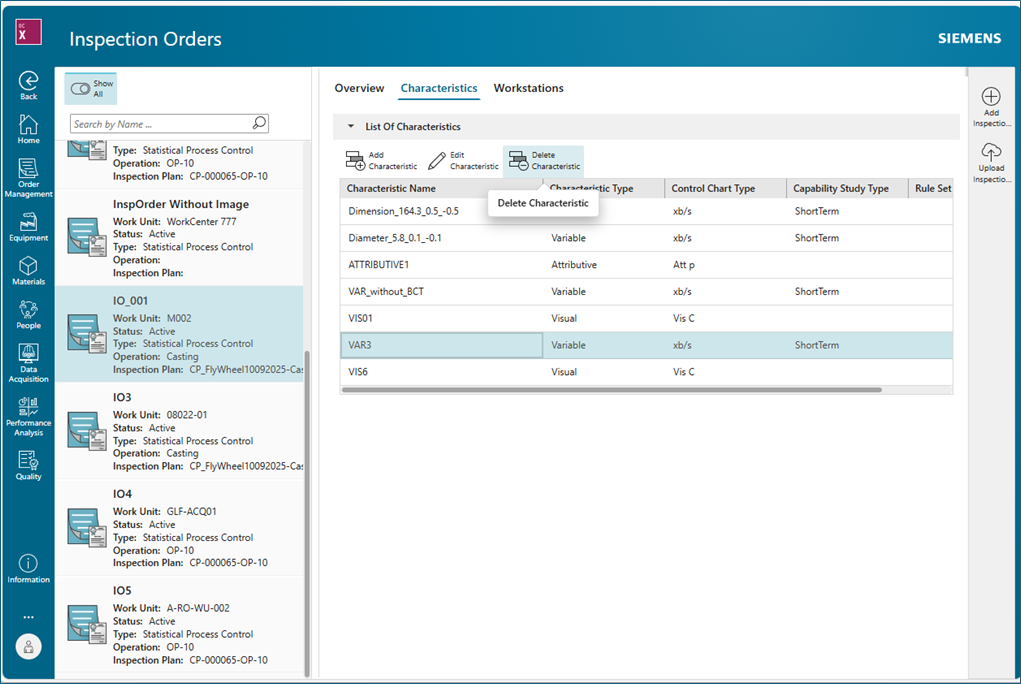
Enables faster adjustments to quality processes and reduces effort for planners and operators—leading to higher productivity and improved process agility.
Improved Inspection & Shopfloor Usability
- Graphical inspection instructions (including images) are now directly visible during SPC inspections
- Support for median control charts and simplified MSA (single-part scenario)
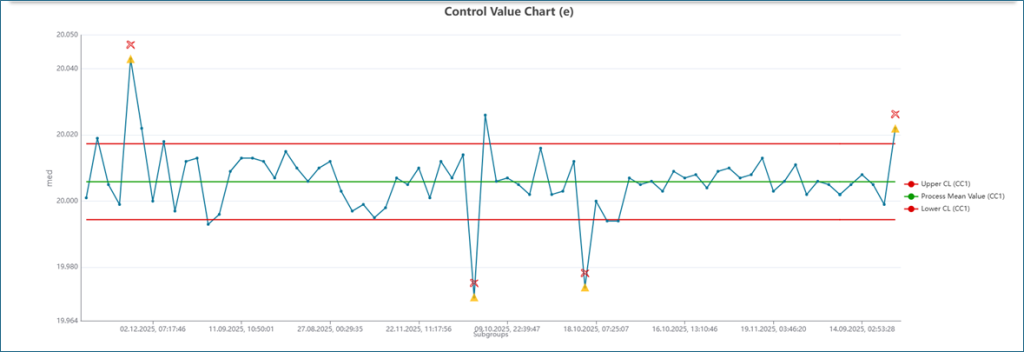
Improves operator guidance and decision-making on the shopfloor, resulting in higher inspection accuracy, reduced errors, and improved product quality.
3. Open Integration via APIs
- Enhanced public APIs for:
- Inspection (IES) – import inspection steps incl. attachments
- Non-Conformance Management
Enables seamless integration into enterprise landscapes (e.g., MES, PLM), supporting a true connected digital thread and automation of quality processes.
Advanced Non-Conformance Management
- Bulk creation of non-conformances for multiple units
- New action types such as part replacement and material requests
- Enhanced traceability with MTU handling
- Real-time status updates in shopfloor UI
- Improved analytics filters (Pareto & trend analysis)
Accelerates issue handling and improves traceability, enabling faster root cause resolution and reduced operational disruptions.
Improved Analytics & Decision Support
- Extended filtering capabilities for trend and Pareto analysis
- Better visibility into failure types, status, and affected items
Supports data-driven quality management, helping organizations identify trends faster and continuously improve processes.
Scheduling
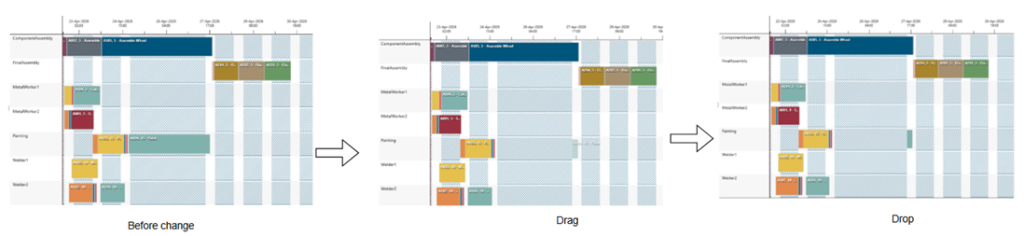
Interactive Operation Movement on Gantt Chart – Drag and Drop
Drag-and-drop rescheduling is now available on the Gantt chart, with built-in validations—making it easier for planners to easily adjust operations, reallocate resources, and fine-tuning schedules.
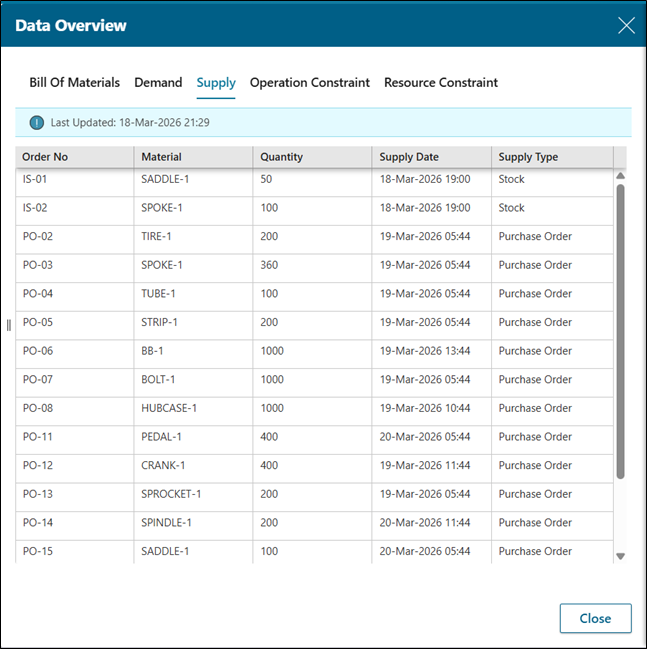
Read-Only Data Overview Pane
A unified, read-only data overview panel that consolidates key scheduling inputs—Bill of Materials, Demand, Supply, and Constraints—helping users quickly identify issues and improve decision-making.
Emission Factor Support for Calendar States
Introduced Emission Factor support for Calendar States, allowing resource energy consumption to vary based on operating conditions. This enables more accurate emission modeling across different machine states such as runtime, maintenance, and reduced efficiency modes.
Shopfloor Status Filter
Added Shopfloor Status as a filter option in the Orders table, alongside existing criteria, enabling users to control the visibility of operations based on their current state (In Progress, Pending, Completed, Aborted). This helps provide a more focused and clutter-free scheduling view.
Resource-Level Filtering in Utilization Chart
Introduced a Select Resources option in the Resource Utilization chart, allowing users to filter and analyze utilization for specific resources, improving visibility and monitoring of targeted workloads.
Multi-Assign Secondary Calendar Exceptions
Enhanced secondary Calendars to support assigning existing calendar exceptions to multiple secondary constraints in a single action. This streamlines configuration and reduces the risk of manual errors.
Visual Information Navigator
Delete placemark upon inspection order closure
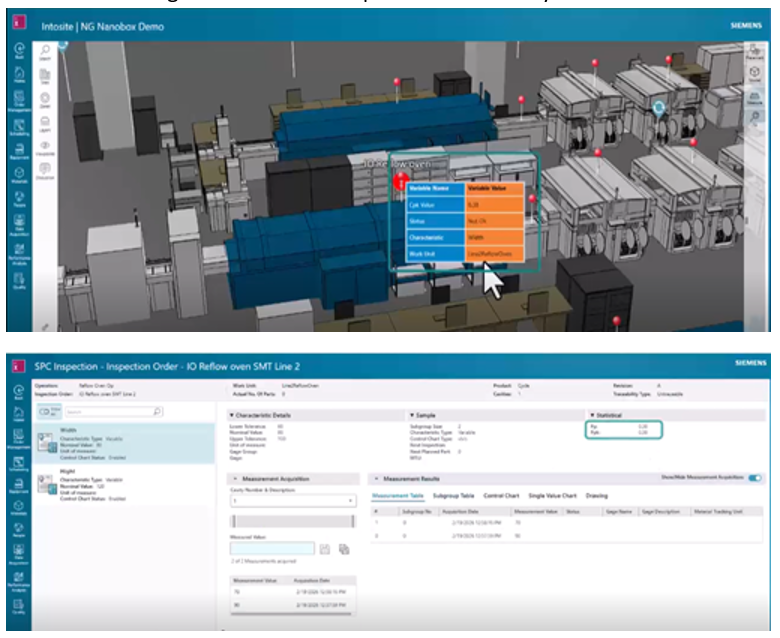
With Intosite, the Visual Information Navigator module, Visual CpK Monitoring has been enhanced to improve real-time quality visibility within the factory visual context.
CpK results for active inspection orders are displayed directly in the factory environment using visual placemarks. With this enhancement, when an Inspection Order is marked as Completed or Closed in Opcenter X, the related placemark is automatically deleted, ensuring the factory visual context always reflects the current production and quality status.
Business Value
- Real-time visual feedback on process quality
- Up-to-date and accurate factory status view
- Clear distinction between active and completed inspections
- Cleaner visualization with no outdated placemarks
- Better alignment with the inspection order lifecycle
Enhancing Andon Board with Inspection Order Information
With Intosite, the Visual Information Navigator module, the Andon Board has been enhanced to improve real-time visibility of quality issues within the factory visual context.
The Andon Board now displays the number of active Inspection Orders with Not OK CpK across the production site. Inspection Orders are added to the count when CpK moves out of control limits and are automatically removed when the process returns within limits or when the inspection order is completed.
Business Value
- Immediate, site-wide visibility of inspection orders with Not OK CpK
- Faster detection and response to quality issues on the shop floor
- Better alignment between quality and production teams
- Increased confidence in real-time factory status
- Improved operational decision-making through live quality indicators
If you are a decision-maker in an SMB in discrete industries and resonate with the challenges discussed, consider exploring Siemens’ new solution Opcenter X. It might just be the catalyst your company needs to leap into the future with confidence.
Try our product through our Trial page, or by requesting a demo.