What’s new in Opcenter Execution Electronics 2604
Artificial intelligence and pre-configured Battery solution
Summary
Opcenter™ Execution Electronics (OC EX EL) software is a complete digital manufacturing solution for the electronics and battery industry. It is built on an industry-leading manufacturing execution system (MES) platform for the electronics, battery, medical device and semiconductor industries. Opcenter Execution Electronics is used in the electronics value chain for printed circuit boards (PCBs), mechanical, box-building and battery processes.
The solution includes best-in-class manufacturing operations management (MOM) capabilities such as manufacturing execution, quality management, material management, planning and scheduling and manufacturing intelligence. This facilitates directly connecting to machines and production lines.
Electronics manufacturers can quickly execute new product introductions (NPIs) and reduce time-to-market, which increases their competitive advantage in a rapidly changing, consumer-driven marketplace.
Using Opcenter Execution Electronics 2604 in conjunction with Mendix™ Low-code platform, which are part of the Siemens Xcelerator business platform of software, hardware and services, helps deliver new enhancements to improve the application’s capabilities and security. The Mendix Low-code development framework and community of prebuilt marketplace components make it easy to create and deliver powerful, optimized and role-based apps.
Opcenter Execution Electronics 2604 provide AI based features, improved shopfloor experience and a preconfigured solution for Battery Manufacturing.
Benefits
- Provide greatly enhanced role-based user experience
- Improved operator efficiency
- Reduce time to analyze & repair, reduce waste
- Easy deployment and configurations for Battery Manufacturing GIGA factories
- Conversational AI copilot provides application information at your fingertips
Capabilities
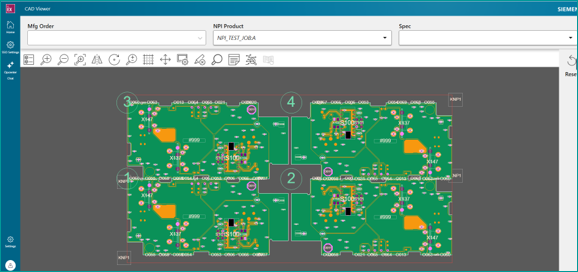
NPI Product Viewer based on Mendix
- New Mendix UI that provides equivalent functionality to the NPI Product Viewer page in the Opcenter Portal
- Supports opening the CAD visualization for an NPI Product by choosing a Mfg Order or Product
Operator time tracking
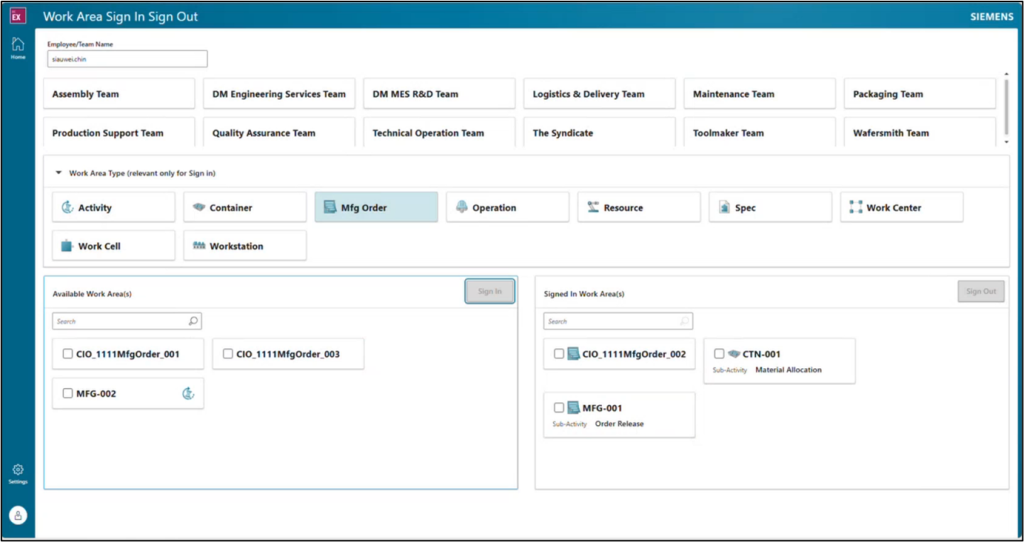
- Supervisors can assign, unassign or review operator and team assignments to/from specific work areas, such as containers or manufacturing orders
- Operators or teams can sign into or sign out of work areas to track time against value work or non-value activities
- Allows sub-activity tracking within an activity group for containers or manufacturing orders
- The activity groups can be assigned to containers, manufacturing orders, products or factories
- Permits signing into a non-value activity while keeping the value work signed in
Electronic Procedures: Mendix module
- Enables additional actions from the menu on the left, including:
- Perform change quantity, hold and release transactions on the container
- Record a production event
- View the container status
- View and download the device history record report
- Supports team tracking capabilities where an operator or team can sign into or out of the container and/or activities
- Activities can be created to track non-value work
- Supports computation tasks, including electronic signatures and process timers on those tasks
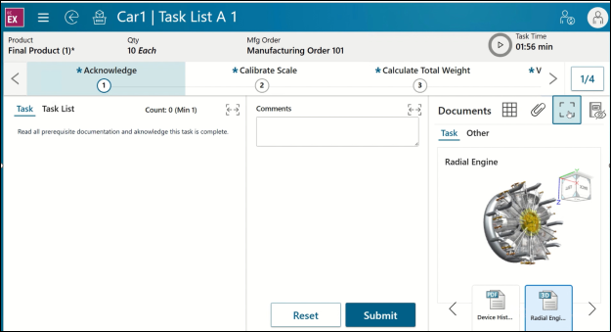
- Introduces enhancements to the document viewer, such as:
- Preview mode, which gives you the ability to see a preview of the document without having to download or open the file in a new tab
- Can also be viewed on the full screen
- Easily switch between list view and preview mode
- Carousel to display all documents and select the document to preview
- Supports various image file types, 3D images, Word, PDF and text files
- Quickly attach one or multiple documents
- Preview mode, which gives you the ability to see a preview of the document without having to download or open the file in a new tab
OC CN EL integration improvements
- Support over-consumption of bulk containers when component issue is received from Connect Electronics
- Add support for performing Scrap of a container during the Muli Container Defect service which is used for messages coming from test equipment
- Update for visualizing all error messages in the Mendix Real Time Mfg Operation page
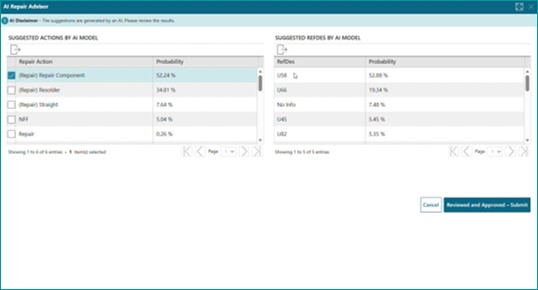
AI Repair Advisor
- Guide the operator how to repair or scrap a product based on historical defect & production data.
- Using machine learning to advise how most likely repair or scrap
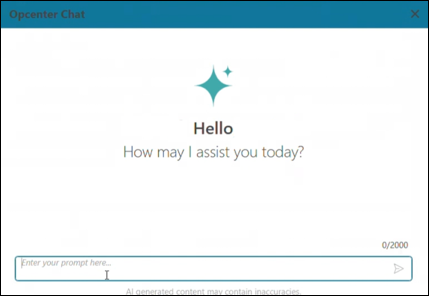
Artificial intelligence (AI): Opcenter chat
- Conversational AI interface, enabling uses to engage with Siemens technical documentation
- Uses natural language queries, supported by AI-generated responses and follow-up interaction
- Accessible from the Portal and Mendix
- Can be globally enabled or disabled, along with giving access to specific users
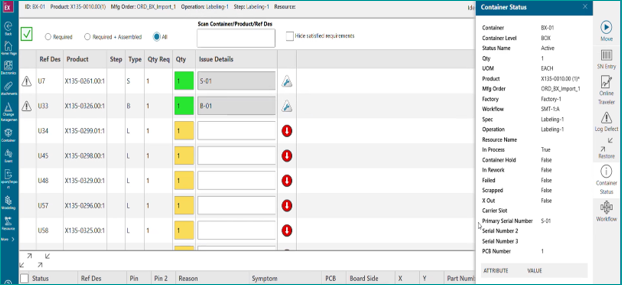
Production Client improvements
- Enhance the Production Client to support panelized containers when using the Use Material Setup option and the Box mode display
- Bulk containers used for Material Setup are now checked to see if the quantity will be able to issue to each PCB of the Panel and if not, a new row is added to support entering an additional bulk container
- New button to clear all existing Material Setup values when the Spec is configured with the option Use Material Setup
- New column in the Box grid to display the current Qty of any container saved in the Material Setup
- Add new Spec option “Show Move Popup” to always display the Move popup in Production Client to allow an operator to optionally specify a To Resource and the Path to use to move on. E.g., rework station sends SN to selected step
- New Spec option “Use First Item Scanned SN for Box Product” that will assign the Primary Serial Number of the first Container (Serial) material item issued to the Box container
- When enabled, the first validated serialized item´s Primary SN becomes the Box Container Primary SN if the container box doesn’t already have one
- Prevents inconsistent / manual SN assignment and reduces effort in production
Operational Reports
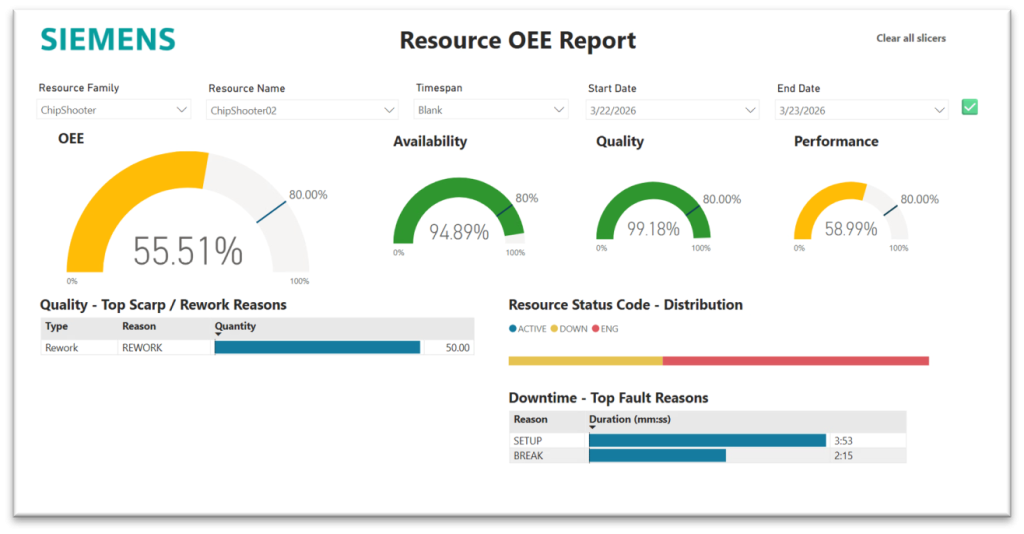
- Resource OEE
- Present OEE, including Availability, Quality, and Performance metrics, for a selected resource or resource family within a specified time range
- Enabling analysis of equipment productivity and efficiency.
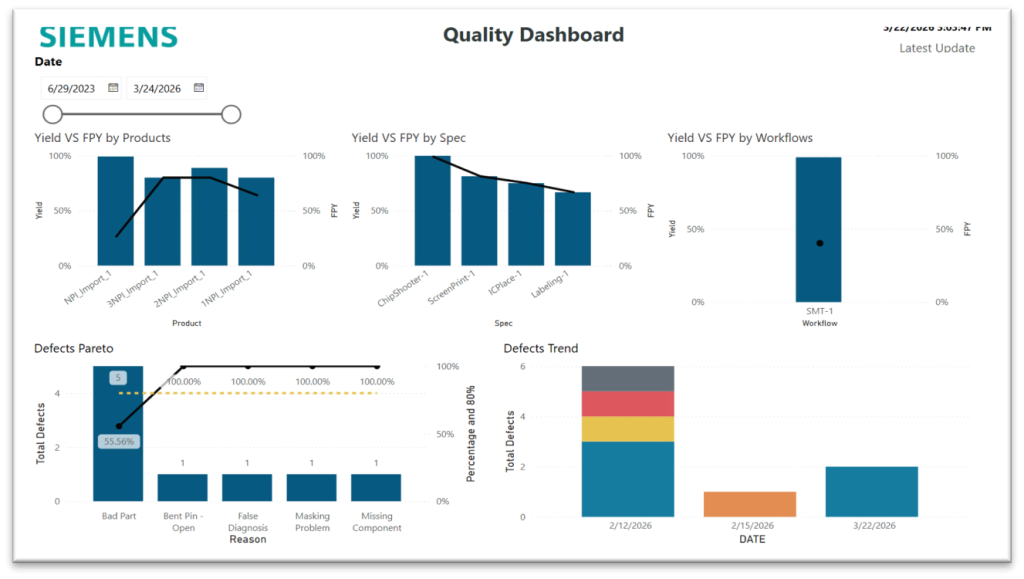
- Quality Dashboard
- Provides a comprehensive overview of manufacturing quality performance.
- Enable to monitor FPY and overall yield for products, specs and workflows.
- Monitor defect trends and defect pareto
Process Prep Viewer integration enhancements
- Interact with PCB views, defect logging, issue, mechanical views
- Add support for embedding the Process Prep 3D Board Viewer inside the Production Client and NPI Product Viewer portal pages
- Supports two-way communication between the Process Prep Board Viewer and the Portal pages so component selections made in one are reflected in the other viewer
IPL Integration Enhancements
- Enhance the Split Qty container Portal page to support specifying a Primary Serial Number for each new container being split from the existing container
- Enhance the Split service to generate new Primary Serial Number for containers when no Serial Number is provided
- Update the CIO Outbound to send the “Container Started” message to IPL for each new container created
Core & technology enhancements
Laboratory information management system (LIMS) integration
- Provides seamless integration between Opcenter Execution Core (MES) and Opcenter Research, Development & Laboratory (RD&L)
- Sample tests defined in LIMS are synchronized to the MES for selection of which test to be executed against the sample
- MES can send a sample request to the LIMS system
- LIMS creates the sample and returns the sample identifier and test results to the MES
Dynamic purge tool
- Installation can now use Amazon RDS-supported database role grant
- Can be used standalone against previous release of Opcenter Execution Core (2210 to 2604)
- Available for Microsoft SQL Server only
Technology enhancements
- Chrome 146+
- Edge Chromium 146+
- Microsoft .NET 10
Battery enhancements
OC EX Battery Bundle
- The OC EX Battery Bundle will be a separate installable over Opcenter Execution Electronics to provide Battery Industry specific pre-configured solution scalable to GIGA factories – available from 2510.0001 onwards.
- Shopfloor connectivity with Battery specific machine types
- Support configurable Data Sink in User Data Collection for automated data collection
- Unified Shopfloor User experience
- Perform Start Container and send order information to PAC
- Select Manufacturing Order dispatch list based on Resource

- Support compound transaction WIP Complete for automated processing
- Supporting auto material consumption automation
- Support updating traceability data
- Perform container attributes update
- Perform container move
- Full Material traceability from Material to Battery Pack
- Support full traceability through the Battery Manufacturing Flow – from Battery Cell, back to Coated roll and to Mixing Slurry batch
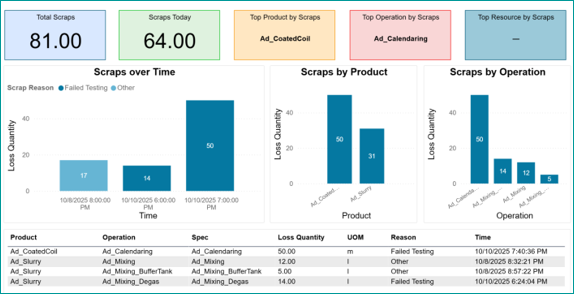
- Predefined dashboard and operational report
- Support pre-configured dashboard for each level of Factory Hierarchy – Enterprise Area, Cell, and Equipment level.
- Dashboards cover various areas like
- Quality
- Inventory
- Availability
- Thruput
- OEE
Excel Master Data loader
- Help speed up customer specific implementation
- Master Data can be adopted to speed up customer specific implementation within Service project
Sampling Lot Management for Battery MFG
- Sampling Lot Management provides operators and supervisors with a unified and centralized interface to manage all containers of a sampling lot.
- Data collection for all containers of a Sampling Lot can be managed in a single page for Counted and Measured tests
- Supervisors can take decisive lot disposition actions – to move containers to next step or to rework or to scrap by providing authorized overall sampling result
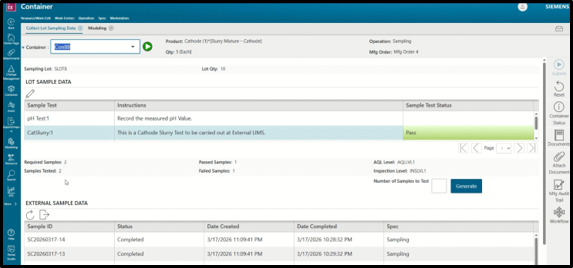
LIMS Integration with Opcenter EX Core
- Provide seamless integration between Opcenter Core and Laboratory Information Management System (LIMS) of Opcenter Research, Development & Laboratory (RD&L) to support offline sample tests.
- LIMS & MES integration can be summarized in the following inbound/outbound flows:
- Sync Sample tests between MES and LIMS (Manual in this release)
- Request for Sample Test
- Create Sample Test and return Sample Test ID
- Provide Sample Results back to MES
Please see Opcenter Execution Core and Medical Device and Diagnostics and Opcenter Execution Semiconductor 2604 What’s New materials for more details on new core functionalities.
Want to learn more? Opcenter Execution Electronics is a comprehensive manufacturing execution system (MES) for electronic printed circuit board (PCB) and box build.
It is designed specifically to help electronics manufacturers respond efficiently to frequent design modifications, short product lifecycles and increased product and production complexities, all while improving quality and reducing the cost of operations.
Opcenter Execution Electronics enables PCB and box assemblers to meet traceability requirements, control production, and integrate the shop floor into their product lifecycle management (PLM) and enterprise resource planning (ERP) system. Learn more about Opcenter Execution Electronics.