What’s new in NX for manufacturing (December 2512)
The latest version of NX for manufacturing is here, packed with powerful enhancements that help CAM programmers work smarter and boost part manufacturing efficiency.
AI-driven programming cuts time required up-front. Improved additive capabilities facilitate consistent builds and prints. Advanced on-machine programming and inspection lead to better accuracy. Robust data management strengthens collaboration and traceability. All of these capabilities and more in NX 2512 empower manufacturers to produce high-quality parts faster, smarter, and more efficiently.
New NX X Manufacturing features also enhance collaboration, helping stakeholders work with consistent, up-to-date, and traceable information, improving communication between CAM programmers and shopfloor.
Let’s take a closer look at what’s new in NX 2512.
What’s new in NX X Manufacturing
NX now offers a cloud-based software-as-a-service solution with NX X Manufacturing, transforming how part manufacturers collaborate, manage, and access software efficiently.
It’s simple to deploy and install on your devices, with flexible access—offline on a desktop or streamed remotely to suit your workflow.
With software updates taken care of by Siemens, manufacturers like you can focus on what matters most: making high-quality parts and bringing them to market faster.
NX X Manufacturing is available in 4 different products tiers- Essentials, Standard, Advanced, Premium with the flexibility to expand capabilities through floating NX X Manufacturing Value-Based Licensing Add-ons.
We have introduced a host of new NX X Manufacturing enhancements, including:
- AI-powered machining suggestions with automatic feature recognition and automated process generation to accelerate programming.
- Immersive 3D manufacturing data review for faster, clearer decision-making across stakeholders.
- A simpler way to manage the customer-order process, connecting quote-to-production information seamlessly.
- New UI improvements that make everyday work more intuitive.
- Two new applications:
- NX Manufacturing Viewer for interactive visualization that bridges CAM programming and the shopfloor.
- NX X Manufacturing Connect for sharing manufacturing data with colleagues who do not need full NX X Manufacturing access.
NX Manufacturing Viewer
Sharing CAM data through PDFs or paper documents can be challenging. It is slow, prone to errors, and often difficult for shop floor operators to interpret. That’s why we are excited to introduce the NX Manufacturing Viewer, a standalone application that brings interactive visualization of manufacturing data directly to the shop floor.
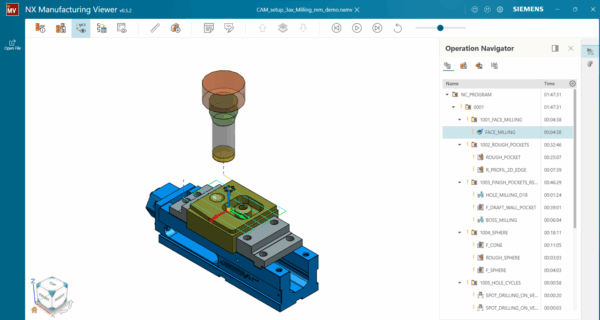
CAM programmers with access to the fully integrated NX Manufacturing Viewer Extractor can easily create machining instructions for the shop floor.
All manufacturing data can be exported in a simple and efficient way. The Manufacturing Viewer Extractor is available under the File > Export tab. With a single click, all relevant CAM data can be exported into an .nxmv file, including details such as part numbers, material information, and additional comments for the shop floor.
You can share the .nxmv file with shop floor operators. By opening the .nxmv file in NX Manufacturing Viewer, they can access interactive 3D manufacturing data.
Shop floor operators can:
- View parts in interactive 3D
- Access tool and operation details
- Perform real-time measurements
- Explore dynamic section views
With NX Manufacturing Viewer, shop floor operators get the right information every time. This allows them to reduce errors, save time, streamline workflows, and produce higher-quality parts, bridging the gap between CAM programming and shop floor execution.
NX X Manufacturing Connect
Not all stakeholders in your team may need the full NX X Manufacturing software, but many—such as quality engineers, shop floor supervisors, program managers, and clients still require access to part manufacturing data. Without this access, reviewing toolpaths, understanding manufacturing intent, and providing feedback can be slow and lead to errors.
We are introducing NX X Manufacturing Connect, a part manufacturing data access application that allows these users to access the NX X Manufacturing Viewer and consume manufacturing data directly, without requiring a full installation.
Viewer functionality can be extended with NX X Manufacturing tokens to unlock additional capabilities tailored to specific needs.
Users can:
- Review toolpaths and operation sequences
- Understand manufacturing intent
- Provide feedback on parts and processes
- Access data without a full NX X Manufacturing installation
This enables organizations to expand access cost-effectively, improve collaboration across teams, and leverage existing NX X Manufacturing subscriptions, ensuring correct and up-to-date data is available to all stakeholders who need it.
Order Management for NX X Manufacturing
The new Orders Management for NX X Manufacturing simplifies the entire customer order process, from quote to production. It provides a centralized hub where customer requests, quotes, and orders flow seamlessly, replacing manual and disconnected workflows.
You can automate quote preparation using real machining times, simulate machining processes for accurate cost calculations, and keep sales, engineering, and shop floor teams aligned with the same data.
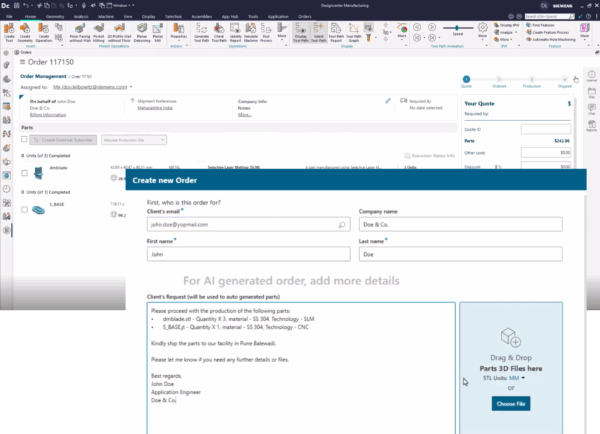
This results in faster quotes, more accurate pricing, and smoother order-to-production workflows, helping organizations manage orders smarter and produce more efficiently.
Immersive Explorer and Immersive Explorer Collaborate
Manufacturing data review goes fully 3D with NX Immersive Explorer, a 3D manufacturing visualization and collaboration tool now available in NX X Manufacturing. You can review, explore, and collaborate on manufacturing processes in a fully interactive 3D environment, making it easier to identify issues, understand complex setups, and communicate with stakeholders.
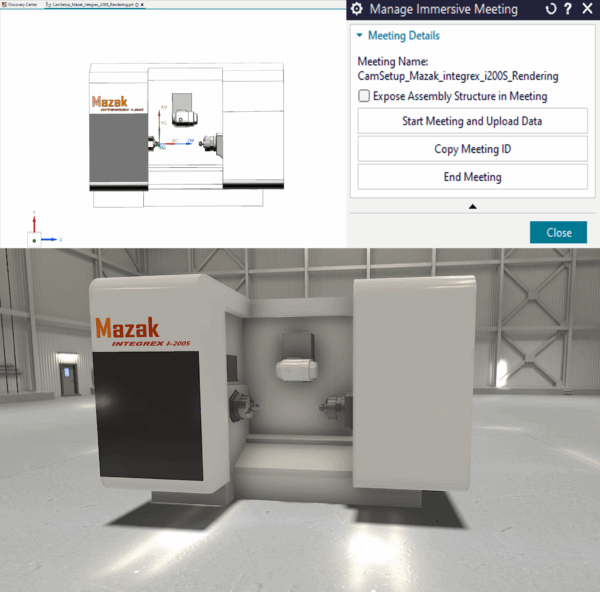
We have introduced two new features that transform how manufacturing data is reviewed, shared, and collaborated on in immersive 3D environments:
- Immersive Explorer brings manufacturing data to life, replacing static 2D drawings and standard 3D models. Shop floor supervisors, engineers, and clients can understand manufacturing intent, validate setups, and provide feedback—without programming skills.
- Immersive Explorer Collaborate enables teams to review toolpaths and manufacturing logic together in the same virtual space. Real-time collaboration is intuitive and efficient, reducing errors, accelerating decision-making, and keeping everyone aligned throughout the production process.
Admin Console UI update
We have made a significant enhancement to the Admin Console to make administration faster and easier.
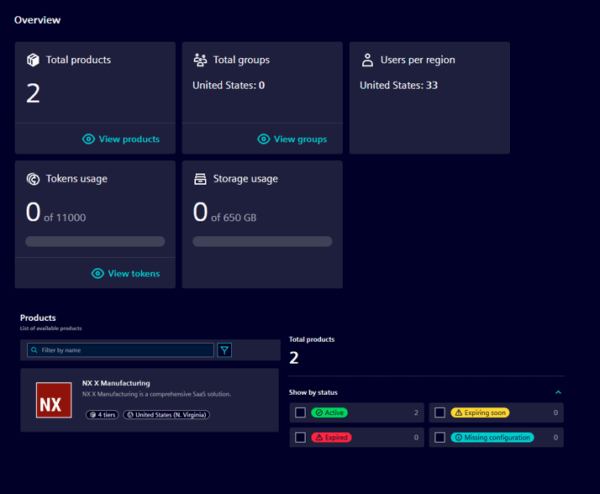
Redesigned Navigation: Finding product settings and user configuration options is now more intuitive, eliminating the need to hunt through menus.
Group-Based User Management: Users can now be organized into logical groups, and rules, policies, and configurations applied to entire groups at once. Instead of managing each user individually, groups such as “Manufacturing Engineers” or “Shop Floor Operators” can be defined, with settings applied collectively.
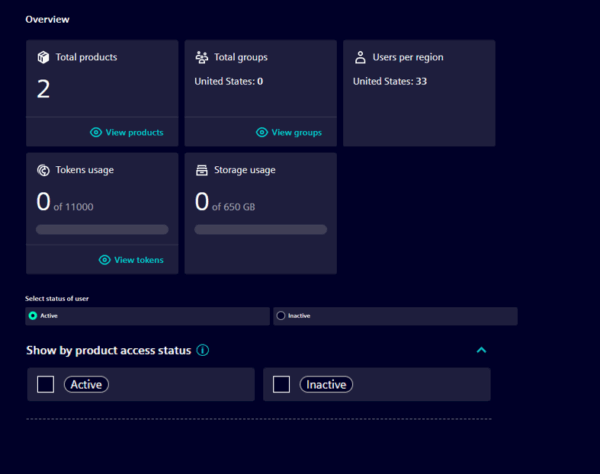
Active vs Inactive users
We have introduced a smarter approach to user management that provides greater flexibility. Users can now be flagged as active or inactive: active users can sign in and count toward the subscription, while inactive users do not. T
his allows you to manage more users without purchasing additional licenses, giving flexible control over access and licensing.
AI-Make Machining Suggestion
We have taken manufacturing automation to the next level with AI-powered Make Machining Suggestion capability. It brings intelligent guidance into machining workflows, reducing manual effort and improving consistency.
You can now simply select a face and let the AI process feature information to generate multiple comprehensive machining suggestions. These suggestions include recommended operations, toolpaths, tools, and cutting parameters such as cut patterns, stepovers, and tool diameters—automating toolpath creation while maintaining programming consistency.
What makes this capability unique is its ability to learn from historical data, ensuring suggestions align with established programming styles and shop standards. This represents a significant improvement in manufacturing automation, reducing programming time while ensuring consistent, high-quality results.
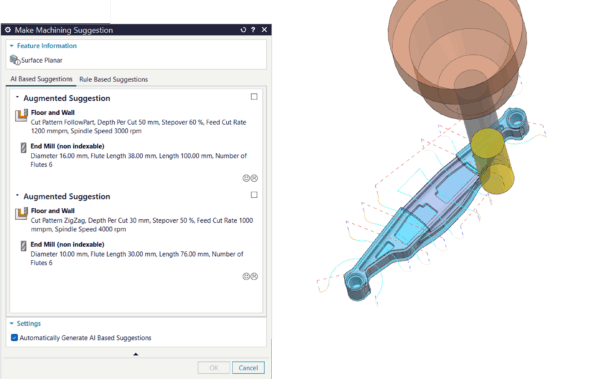
To activate this capability, the selection filter must be set to Face, allowing NX to recognize the selected geometry. The Make Machining Suggestion command can be accessed by right-clicking on the face or added as a button on the home ribbon.
Once triggered, feature recognition is initiated, and within seconds NX delivers multiple comprehensive machining options. You can then select the most appropriate option and provide feedback on the suggestions, enabling continuous improvement and optimization of this capability.
What’s new in NX CAM
We’ve added new enhancements in NX CAM focused on automation and intelligent Machine Powered Programming, enabling faster workflows, improved accuracy, and higher-quality parts.
Fixture automation
We’ve slashed fixture setup time from hours to minutes with NX CAM’s new intelligent, automated fixture positioning. The updated, simplified dialogs make adding fixtures to the library and inserting them into setups effortless.
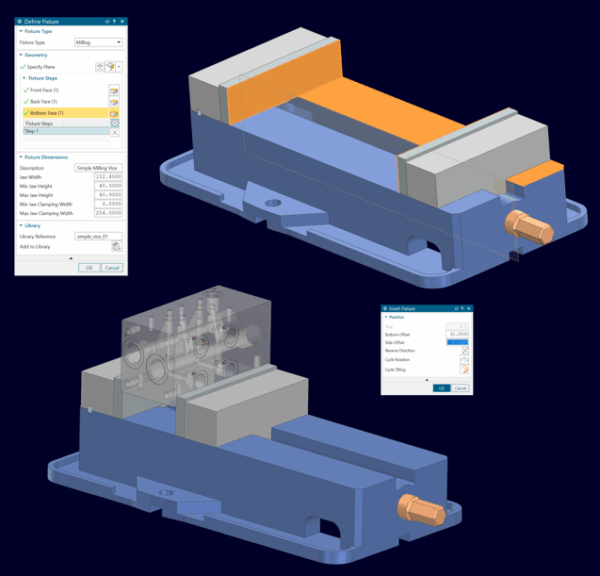
When parts are dynamically repositioned within fixtures, NX CAM provides instant visual feedback, making setups faster, more flexible, and highly accurate than ever.
Background Generate
To make programming and manufacturing teams more productive, the new Background Generate feature creates toolpaths in the background using a secondary NX process, so you can keep working in the main session without interruptions.
With real-time status indicators showing progress and queued operations, you stay informed every step of the way.
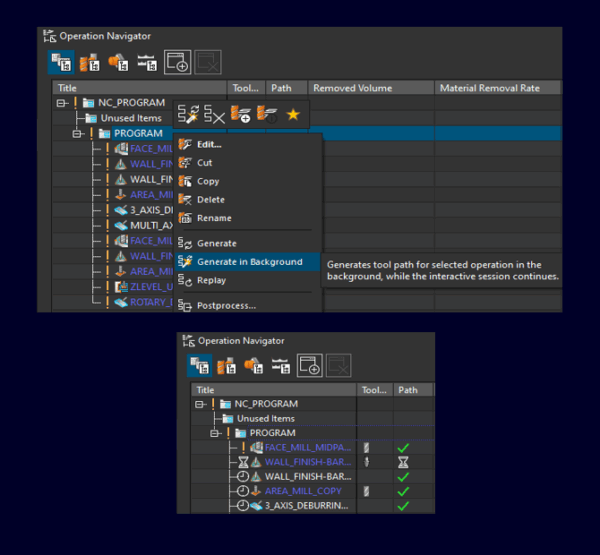
Intelligent dependency management protects parent operations from unintended changes while background generation runs, and you can easily start or stop the process through the context menu.
Machine Powered Programming
We’ve taken machine programming to a whole new level. NX CAM now provides greater control, visibility, and intelligence in CAM operations, ensuring setups are accurate from the start.
Four new enhancements have been added to help you program machines more efficiently, avoid errors, and achieve higher-quality results.
Integrated work holding device management
You can now create, manage, and simulate workholding devices with ease. The new Fixture Automation system automatically aligns fixtures with parts, provides instant visual updates during repositioning, and simplifies fixture management.
Setups are faster, more flexible, and highly accurate, letting you focus on programming rather than repetitive manual tasks.
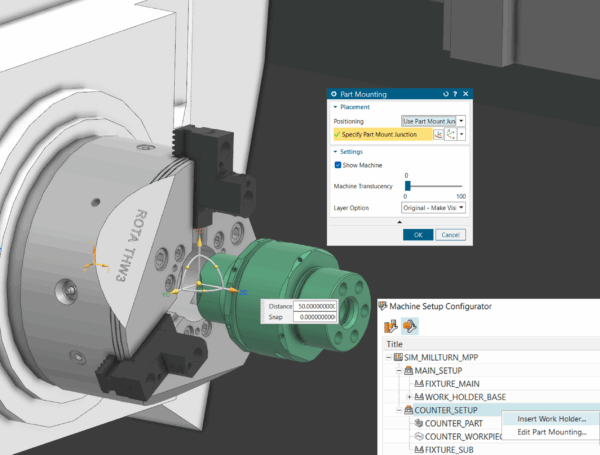
Instant multi-channel machine viz
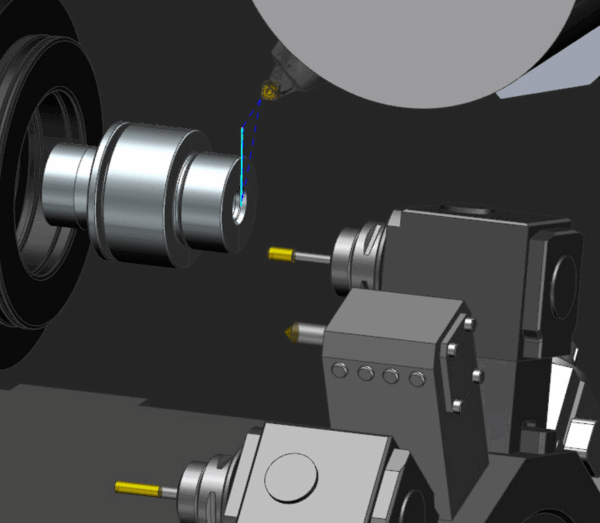
Monitoring complex multi-channel operations is now simple and intuitive. NX CAM provides dynamic, channel-specific visualization and real-time machine state previews, making setups easier to understand, validate, and execute with confidence.
Real-time Machine Axis Control
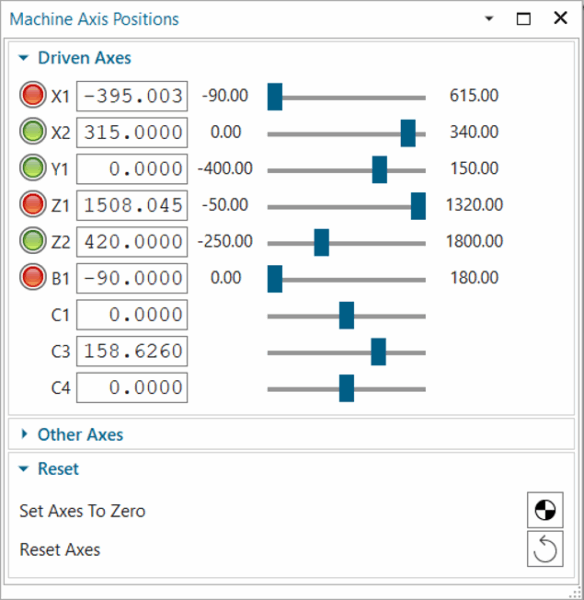
While programming, you can now adjust machine axis positions in real time using controls in the Machine tab. Each movement updates instantly on screen, giving immediate visual feedback and helping you validate programming decisions as you work.
The feature supports all machine setup variants, including complex configurations with workholding or tool-holding devices, so it fits seamlessly into existing workflows and improves overall programming accuracy.
Machine-Aware CAM operations
NX CAM is now more intelligent and machine-aware. As soon as a machine is loaded, NX interprets its real capabilities, including spindle ranges, axis limits, travel boundaries, and coolant options, and applies them directly to operations.
You don’t have to worry about manually setting parameters, and errors such as exceeded travel limits or invalid spindle speeds are automatically avoided.
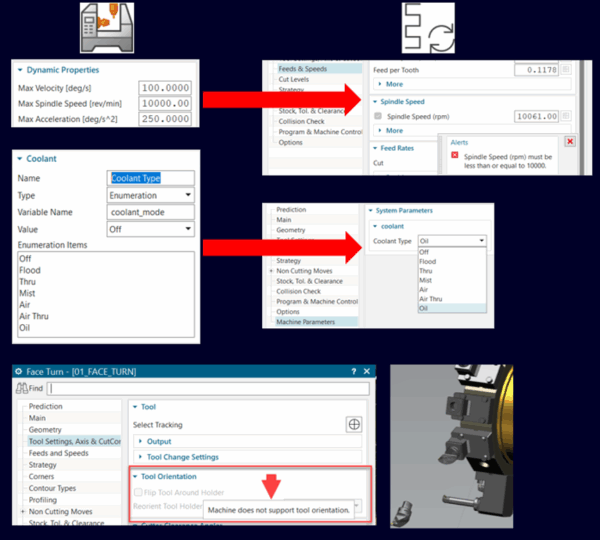
Every operation begins with machine-aware settings, resulting in programs that are more reliable, more consistent, and far less prone to last-minute fixes on the shopfloor.
What’s new in NX Additive Manufacturing
We’ve introduced a range of new enhancements in additive manufacturing to give greater control over build preparation, deliver more reliable and high-quality prints, and accelerate part production for improved efficiency across operations.
Profile Slicing and Infill Ramp Enhancements for Rotary Buildup
The latest updates to profile slicing, ramping, and infill patterns deliver smoother, more consistent rotary buildup. As a result, defects at slice boundaries are now virtually eliminated. By simplifying machine motion and improving slice quality, these enhancements ensure reliable, void-free results across all additive operations.
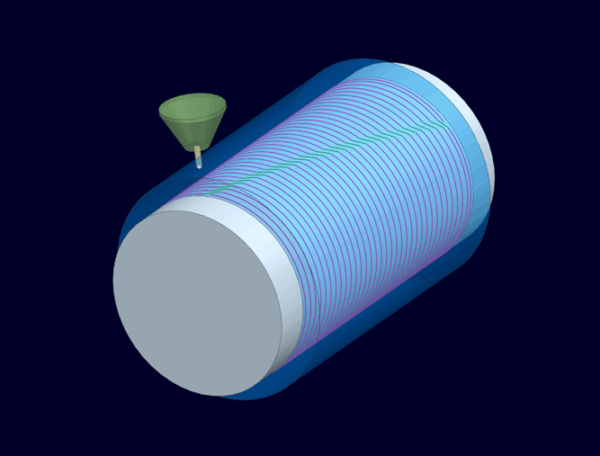
Builds are more predictable and easier to validate before production, so focus can remain on designing parts rather than troubleshooting print issues.
Build Style Enhancements for Multi-Axis Additive Manufacturing
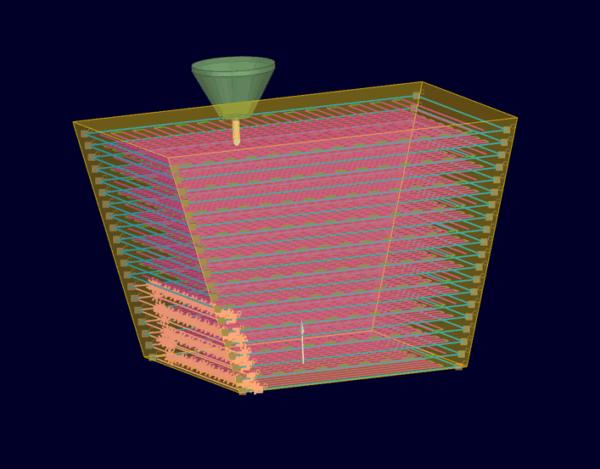
Custom parameters can now be applied to corners, overhangs, and other critical areas, making multi-axis additive prints more consistent and reliable. You can fine-tune power, feed rate, and related settings, and easily visualize these areas to validate and refine builds for stable, high-quality results.
Enhanced Multi-Body Support
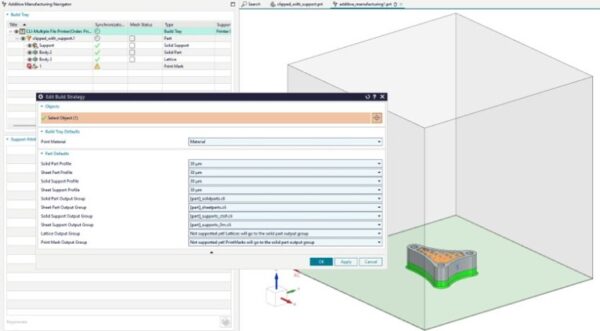
Enhanced Multi-Body Support makes build preparation easier and gives greater control over complex parts. You can define each body as solid, support, lattice, or sheet, applying different build strategies for critical areas and speeding up support setup.
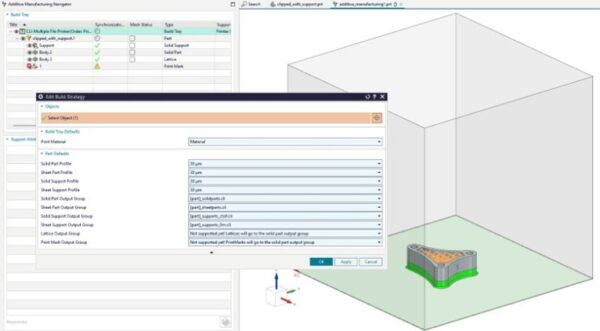
Bodies can also be grouped, split, or merged as needed, simplifying multi-body builds within a single part
Laser Assignment for Renishaw Multi-Laser Systems
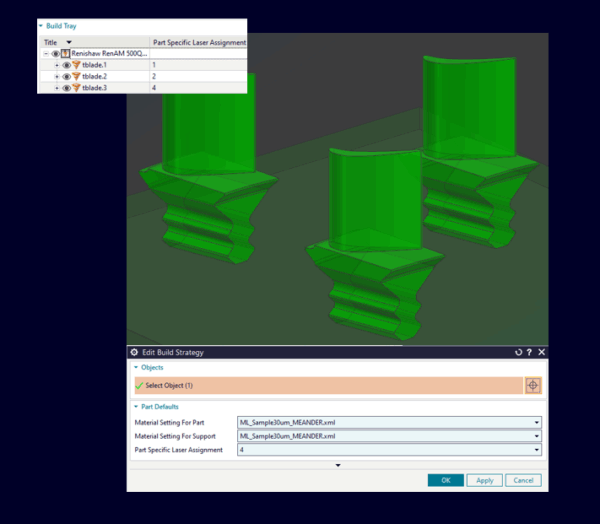
For multi-laser Renishaw machines, you can now assign specific lasers to different build regions, ensuring each area is scanned under optimal conditions.
The Build Strategy navigator lets you view and edit assignments, giving precise control and helping produce consistent, high-quality parts.
Path Preview for Renishaw Systems
A new laser path preview for Renishaw machines is now available in NX. You can simulate the laser scanning path before production using the familiar NX Path Viewer interface for intuitive visualization.
This works with all Renishaw printers supported by the Siemens Build Processor, giving an accurate representation of the build path to catch potential issues and validate build strategies before manufacturing.

Part-Specific Mesh Scaling and Material-Specific Mesh Scaling
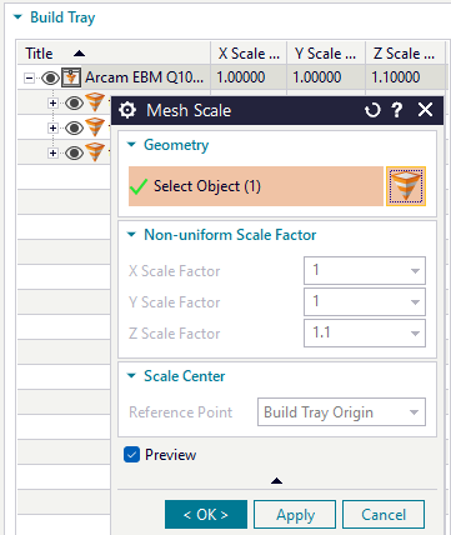
Part- and material-specific mesh scaling has been introduced in the latest version of NX Additive Manufacturing to ensure parts maintain their correct size and shape while accounting for material-specific shrinkage during cooling.
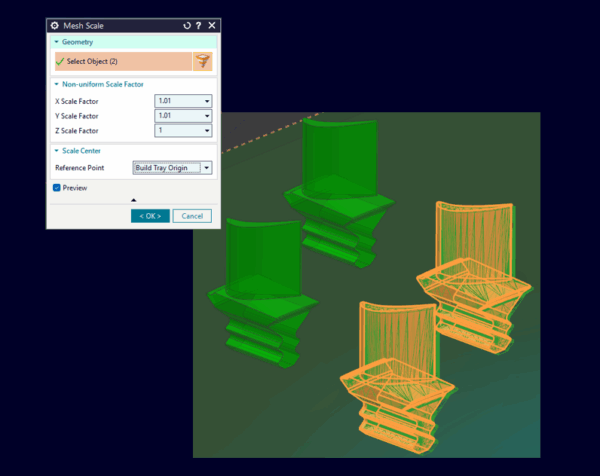
Part dimensions can now be precisely controlled using mesh scale factors for each part. You can adjust and preview scales in real time through the Mesh Scale navigator, ensuring every part, regardless of geometry or size, comes out exactly as intended.
With material-specific mesh scaling, shrinkage is automatically compensated to ensure parts reach their intended size and shape. You can preview the scaled output mesh before generation, and scale factors are applied during output to maintain dimensional accuracy.
What’s new in Part Manufacturing Data Management
The latest updates to Part Manufacturing Data Management make it easier to access, organize, and manage the information needed to plan and produce parts. With tighter integration across Teamcenter, Active Workspace, and the Manufacturing Resource Library, these enhancements streamline workflows, improve collaboration, and give you more control over part manufacturing operations.
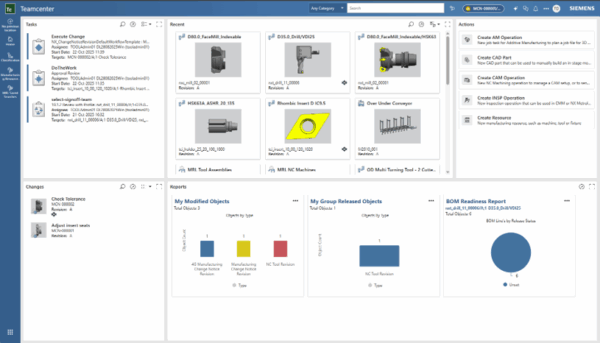
New Manufacturing Home Page
With the new Manufacturing Home Page, you don’t have to hunt for frequently used tools or essential data. A centralized hub brings everything together, speeding up daily workflows, simplifying navigation, and letting manufacturing engineers like you customize your workspace for faster, more efficient work.
Search Category for Part Manufacturing Data
Active Workspace now offers a dedicated search filter for Part Manufacturing data, making it faster to find the right information. By removing unrelated results, you spend less time searching and more time on critical manufacturing tasks, improving overall workflow efficiency.

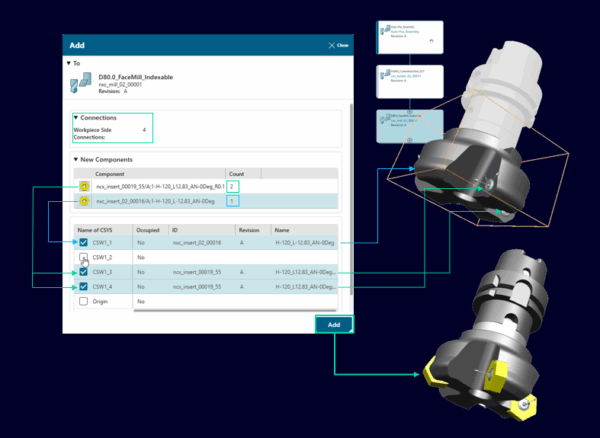
Tool Assemblies Advanced Auto-Positioning
Complex tool assemblies are now much faster to build with the new Auto-Positioning capability. By preselecting multiple components, you can assign each to the correct connection coordinate system and complete precise, one-step positioning directly in the Matching Components Add dialog.
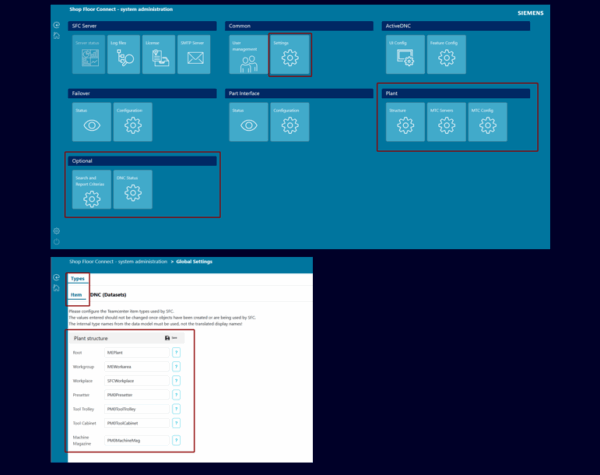
New administration
A new admin UI for Shop Floor Connect makes managing machine connections and Teamcenter integration easier than ever. From a single, central interface, you can read, create, or migrate machine configurations directly into the Teamcenter plant structure.
The intuitive interface eliminates manual file edits, and all configurations are stored in the SFC Cache database, providing a single, reliable source of truth.
What’s new in NX CAM On-Machine probing
The latest enhancements improve on-machine probing workflows with smarter coordinate setup, clearer motion visualization, faster tool selection, and automated geometry interpretation. These improvements make probing setup more efficient, measurement cycles more accurate, and the overall workflow smoother.
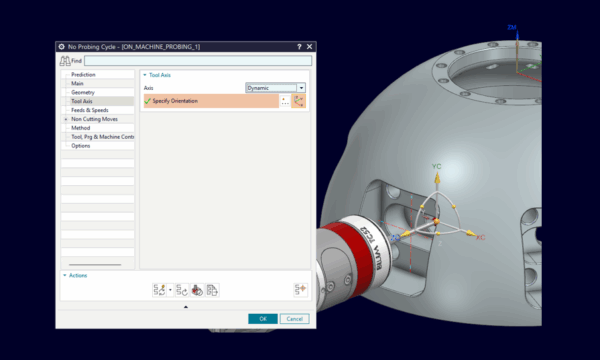
Tool Axis-Based Coordinate System Definition
Coordinate system definition is simplified, so you don’t need separate local systems for each alignment.
NX automatically positions and orients your tool along the machining path, speeding up programming while maintaining full control and precision over tool movements.
True Circular Movement Implementation
Circular movement calculation is completely revised. Arcs calculate as true circular motion instead of approximating with multiple straight-line segments, so you can see exactly how your machine will move. This delivers faster processing and more accurate toolpath visualization.

Enhanced Reference Tool Dialog
Tool selection now includes descriptive details. Tool specifications appear alongside descriptions in the Reference Tool dialog, making it easier to choose the right tool, reduce selection errors, and make decisions faster and more accurately.
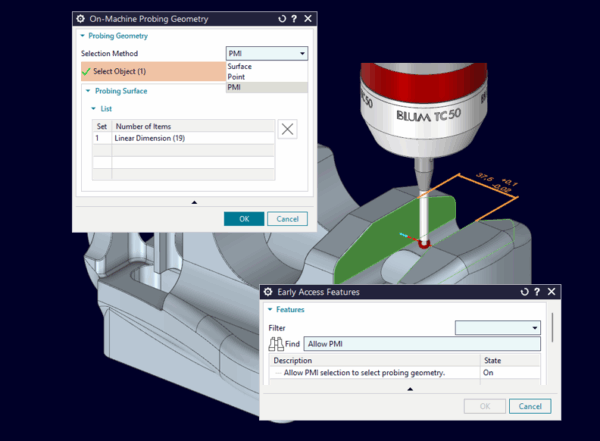
PMI-Driven Geometry Selection
Manual geometry selection for features such as holes, edges, or surfaces is replaced by Intelligent Feature Recognition. NX automatically identifies the correct geometry and inherits tolerance values, turning setup into a faster, more precise, and error-free workflow.
What’s new in NX CMM Inspection Programming
We’ve added new capabilities to make inspection programming faster, more accurate, and easier to manage. These enhancements help streamline workflows, reduce measurement errors, shorten cycle times, and deliver more consistent, reliable results.
Chebyshev Analysis Method and Gaussian Analysis Method
Latest CMM inspection programming enhancements introduce advanced feature analysis with two new filtering methods: Chebyshev and Gaussian.
Chebyshev filtering quickly and accurately analyzes minimum–maximum deviations on cylinders and circles, delivering consistent, reliable results for critical features.
Gaussian filtering provides ISO16610-compliant statistical evaluation, reducing measurement noise, limiting outliers, and producing more stable feature fits. Postprocessor support applies the correct settings automatically, keeping workflows smooth and efficient.
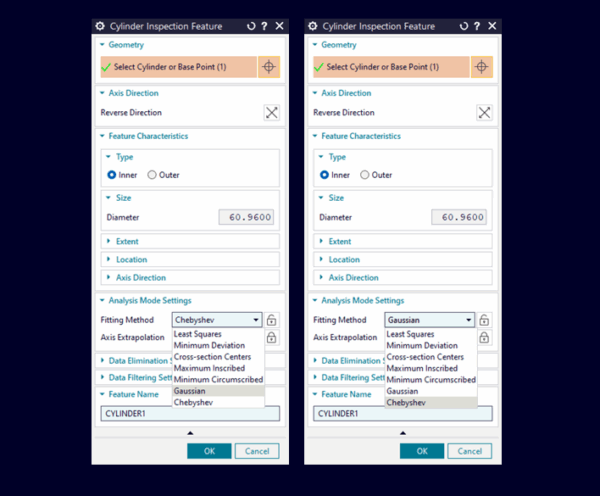
Together, these filters enable faster, more accurate inspections with less noise, more reliable results, and greater confidence in meeting quality standards.
Automation Studio for Metrology: Constructed Features
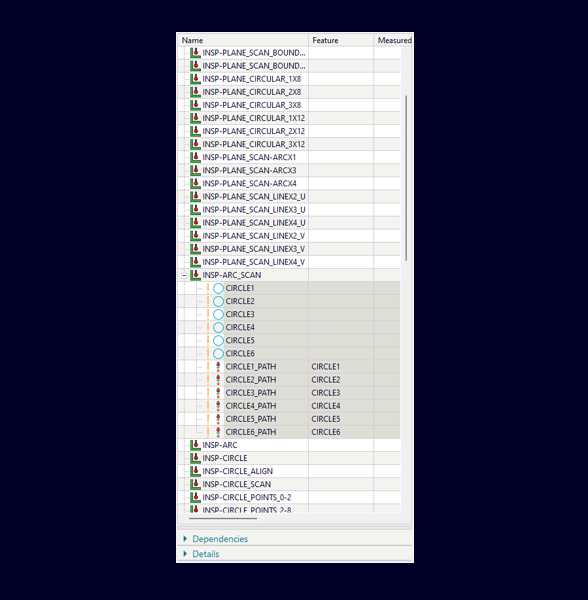
We’ve added automation to inspection programming to handle complex and repetitive tasks. With automated feature construction, you can create complex geometric features, generate patterns, and manage intersections or best-fit calculations using Logic Editor, all without manual programming.

Drag & Drop Inspection Method Changes
With one click, you can now update inspection methods across multiple features more intelligently. The new drag-and-drop capability lets you change methods for several features in a single action, instantly switch between touch-probe and scanning approaches, and apply standardized inspection strategies across your part or assembly.
NX automatically regenerates all paths, eliminating repetitive edits and ensuring consistent inspection results.
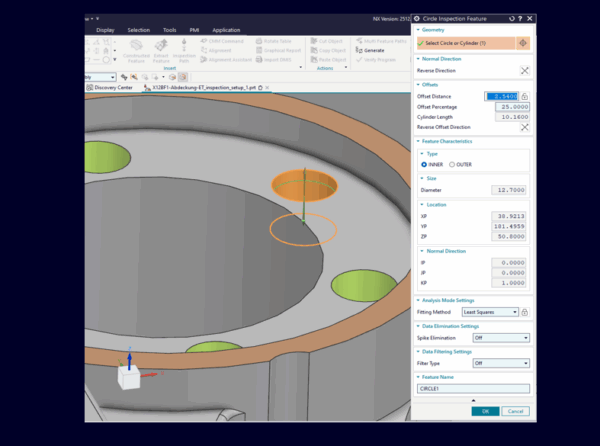
Circle Feature Generation from Cylinder Input
Circle feature creation is faster and more intuitive. Select a cylinder, and NX automatically generates the corresponding circle feature with the correct parameters, eliminating manual extraction and multi-step setup.
This enhancement handles complex cylinder ends and automatically inherits parameters from design to inspection, enabling quicker, more consistent circle programming.
What’s new in NX Assembly Line Planner X
The latest version of NX Assembly Line Planner X comes with enhancements that help optimize production line design, enable more effective collaboration, and provide integrated planning for complex assemblies, resulting in a more streamlined line-planning process.
These capabilities are also available as a high-value add-on with NX X Manufacturing solutions.
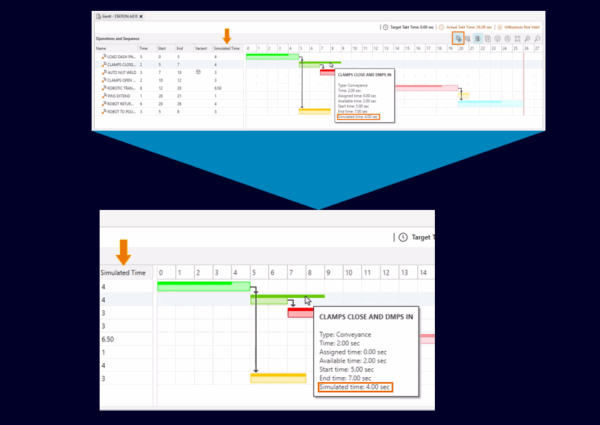
Simulated Time in Gantt View
Planning accurate assembly schedules is now easier. You no longer have to guess how long each assembly operation will take. NX ALP simulates your assembly line using real workflows, line configurations, and operation sequences.
The simulated times appear directly in the Gantt chart, giving you realistic task durations. As a production planner, you can plan with greater confidence, build more accurate schedules, and reduce surprises and guesswork.
Manufacturing Features Panel in Product Navigator
The new Manufacturing Features Panel in the Product Navigator gives complete visibility into all manufacturing features across your assembly line. You can track assigned features, spot unplanned items instantly, and focus on what still needs attention.
Every joining feature, from welds to fasteners, is captured and assigned correctly, reducing delays and helping ensure products are built right the first time.

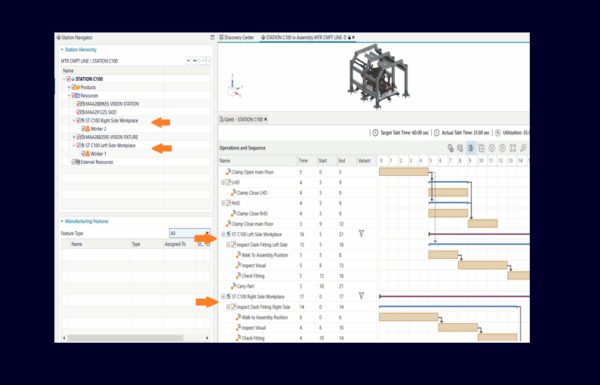
Support For Workplace Resource
Workplace-level planning is now possible. You can model operations at a granular level by breaking large stations into multiple workplaces or work zones.
These workplaces sync automatically with Teamcenter Easy Plan, ensuring your data stays up-to-date. You can track detailed operation sequences, including preparatory steps, apply product-specific variants, and connect workplaces with station operations to create clear, accurate workflows across your entire assembly line.
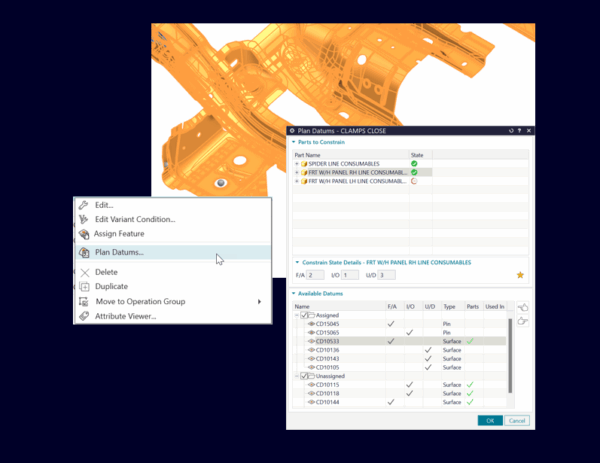
Datum Planning
To ensure build quality and consistency across your assembly line, you can plan datums strategically by assigning reference points to clamps, pins, rests, or combinations and reusing them across multiple stations.
We have provided a built-in constraint checker that validates every part is fully constrained, removing guesswork and supporting reliable, repeatable setups.
What’s new in NX Line Designer X
We have added new capabilities with Line Designer X to streamline layout planning, simplify workflows, and enable better collaboration through a visual interface that eases navigation and task completion. With enhanced integration between NX and Tecnomatix, layout planning stays connected across platforms more than ever.
These capabilities are also available as a high-value add-on with NX X Manufacturing solutions.
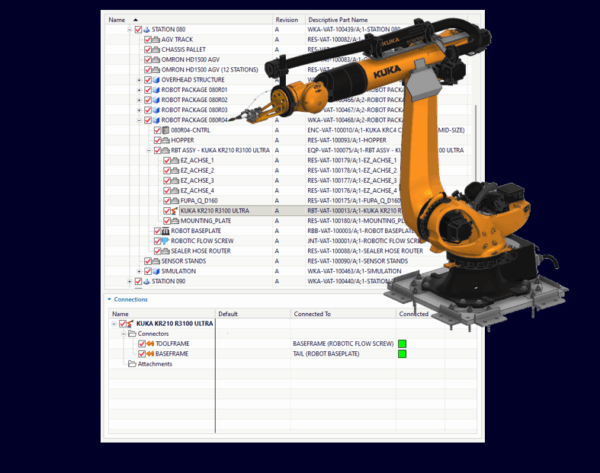
Mount and Connect resources under different parents
To accurately model your assembly layout, you can now connect components across different parent assemblies. For example, you can mount a tool to a robot assembly and then place that robot assembly onto a riser, even if the parts exist in separate hierarchical nodes.
NX Line Designer and Process Simulate maintain a seamless connection, ensuring your design intent is preserved across applications.
Connector Expression Propagation
With the new Propagate Parameter feature, connecting components is simple and efficient. Parameter values are automatically propagated between components, even when their expressions differ, eliminating tedious manual mapping.

It works seamlessly with drag-and-drop and Connect Components operations, and once an expression mapping is set up, it’s cached and applied automatically whenever similar components are connected, reducing repetitive work and speeding up layout planning.
Learn more
Explore NX’s advanced capabilities for NC programming by signing up for the NX X Manufacturing trial. No installation is required meaning you can run NX in your browser, in just a few minutes.
Eager to learn more about the NX for manufacturing features? Check out the step-by-step tutorial videos on our online community.