What’s new in Designcenter NX | June 2025 | Advanced Capabilities

Another edition of What’s New in Designcenter NX™ software is here! As we continue to bring you content highlighting the updated capabilities from the June 2025 release of Designcenter NX, we hope you’re seeing massive improvements to your own workflow. In every release of Designcenter NX we strive to bring you specifically tailored features that continue to drive you and your company’s innovation, all whilst giving you a more streamlined workflow.
And with that, let’s take a look at what’s new in Designcenter NX’s advanced capabilities.
Performance Predictor
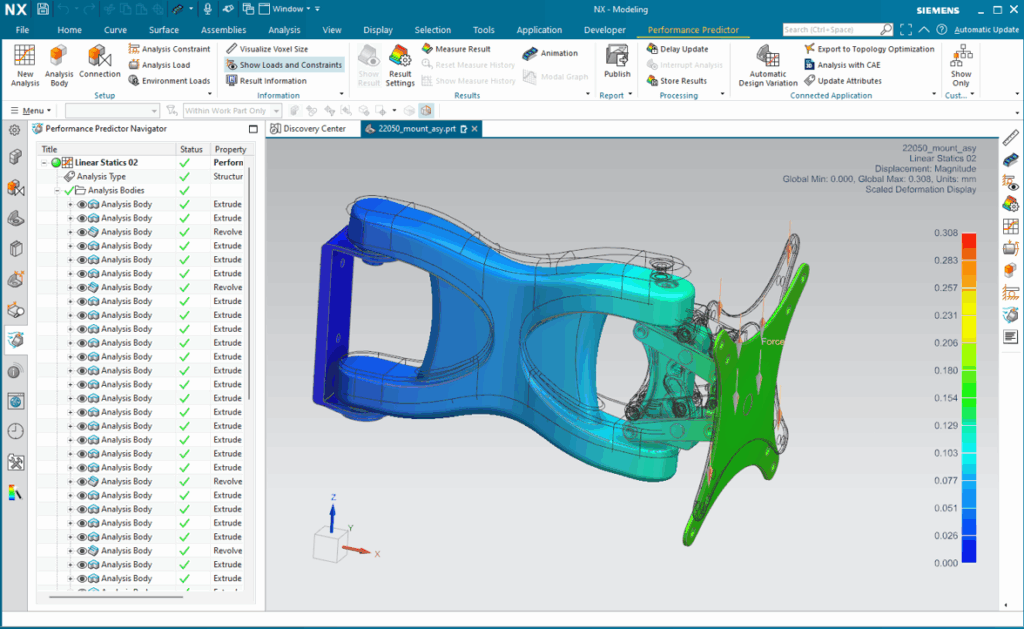
One of several tools that we’re focusing on in the June 2025 release is Performance Predictor, with key enhancements to assembly design with bonded simulation connections. This update allows you to experience significant overall cost savings, reducing your time to market, and improving product quality. Advanced assembly support can seamlessly handle any complex assembly with multi-material and bonded connections. We understand that managing multi-parts can be challenging, especially when working with such large models. This is why with advanced assembly design, you can now efficiently manage your assembly regardless of it being in separate parts or combined in a single part file. In addition to improved management, you’re now able to get ‘per body results’. Meaning Designcenter NX can now provide you with detailed results for each individual body within your assembly.
Other key updates around bonded simulation connections include:
- Automatic or Manual Bonded Connection Definition to suit your workflow
- GPU & CPU Acceleration: Leverage the power of both GPU and CPU for faster computations and enhanced performance
Improved connectivity with NX Topology for Designer
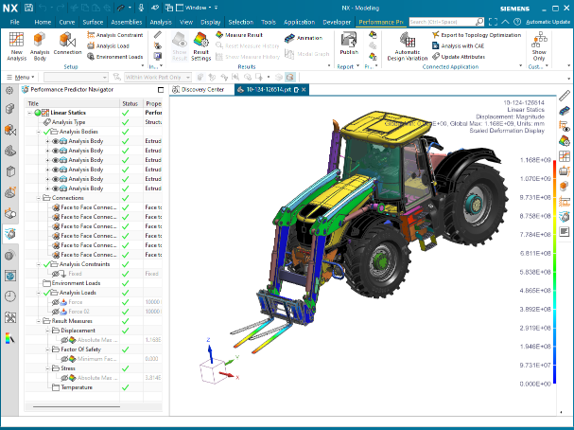
Whilst the focus is always kept on improving your user experience and a more streamlined workflow, we have also made improvements to NX Topology for Designer. With enhancements made to the connectivity between NX Topology for Designer and Performance Predictor, your data transfer is now more streamlined than ever. This ensures that your optimized designs and analysis set ups are accurately maintained throughout your entire process.
These enhancements also continue into Export Analysis Bodies and Load Constraints, where you can now easily export both of these from NX Topology for Designer to Performance Predictor.
Better-configured default parameters
The Designcenter NX team’s commitment to accuracy ensures that every update brings you closer to perfection in your analysis and design tasks. This is why we have enhanced your workflow with better-configured default parameters that streamline the application behavior right from the moment you open your files. Now with better configured default parameters you can get default material a visibility of the results when you are opening a part, accompanied with our Continuous Accuracy Improvements. This update guarantees that we keep accuracy at the heart of our solution, ensuring reliable and precise results for you, every time.
NX Designer for Manufacturing Advisor
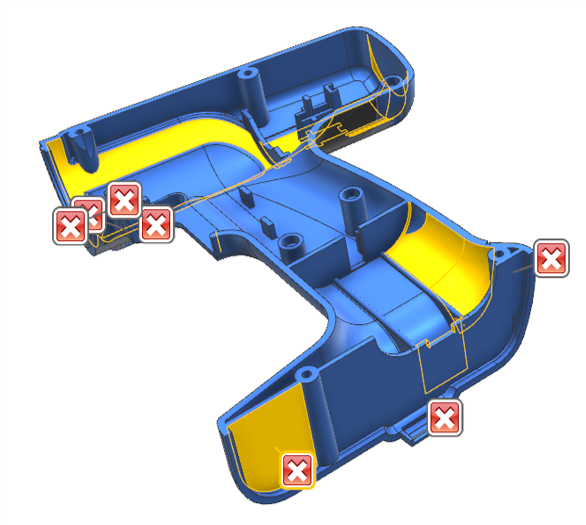
Automate early manufacturability assessments with the new NX Design for Manufacture (DFM) Advisor. It can analyze your data, identify potential challenges and provide actionable feedback. When you leverage Teamcenter Integration for NX, you can generate reports to share with colleagues and partners, while using the insights to drive additional workflows.
Improved checker execution performance
Improved checker performance will reduce the time it takes to evaluate your design for manufacturability. Additionally we have made improvements to Injection category checkers, where execution time has been reduced by 70%.
All other checkers have also been improved:
- Undercut Detection – 70% improvement
- Minimum Draft Angle – 70% improvement
- All other checkers – 20% improvement
Here are some other additional checkers that have been added in this release to continue improving your entire workflow:
- Holes intersecting Cavities – determines if any cavity intersects a hole
- Flat Bottom Holes – evaluates the contour of the hole bottom
- Standard Hole sizes – evaluates size against customer standards
- Angular Milling Faces – evaluates side and bottom face for perpendicularity
Advanced Shape Design
Report repaired self-intersecting faces for Offset Surface
Offset Surface will now report to you, the NX user, if any patches were created to avoid self-intersections. You will receive an alert message that will be shown during feature creation and in the Part Navigator. This message can be removed using the “Clear Information Messages” option if needed. Features created in prior releases may be renewed in order to detect the repaired faces.

High quality output for mesh surface commands
Split Output along Boundary Curves option allows you to create high quality multi-face output with a single-through Curve Mesh and Studio Surface feature (i.e. mesh type). The output will be split into multiple surfaces according to input section segments and interior curves. Please note that the interior continuity between each surface will be maintained.
Additional information here:
- Same option implemented in Through Curves and Ruled commands in NX 2412 (i.e. loft type)
- Consistent behavior across all NX surfacing commands
Conclusion
Thanks for checking the latest in Designcenter NX, looking specifically at advanced capabilities. We’ll be diving deeper into all the topics mentioned today in upcoming Tips & Tricks, so be sure to keep an eye out for those! If you can’t wait until then, then don’t worry, there’s other Designcenter NX content that you can check out today!