What’s new in Designcenter X NX Essentials | June 2025
A new AI Chat Copilot highlights the June release of Designcenter X NX Essentials, transforming the way users interact with NX. This built-in assistant lets users simply ask questions in everyday language and get instant, context-aware support — complete with links to launch relevant commands. Whether someone is new or seasoned with NX, the Copilot accelerates learning and keeps the focus firmly on design rather than searching through manuals.
The June release also continues to refine workflows, enhance modeling, bolster assembly tools, elevate drawing controls and broaden collaboration — all aimed at making design faster and easier.
AI Chat Copilot: Your Conversational Guide to NX
The product’s AI Chat Copilot is a natural‑language assistant that provides quick, clear answers straight from official NX documentation. Think of it as your built-in guide — ask a question in plain language, and it gives you instant, context-aware answers pulled straight from NX documentation. Even better, it includes direct links to launch commands — no more digging through menus. The more it’s used, the smarter it gets, helping users ramp up faster and stay immersed in design instead of troubleshooting.
A Smoother User Experience
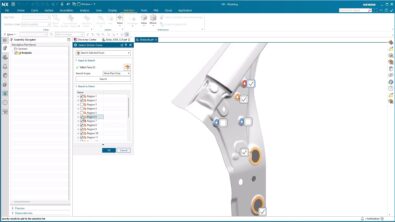
The user experience has been refined to streamline everyday workflows. New designs can begin directly from the landing page without setting up a full project. A modeling settings panel is now accessible within the design environment, allowing quick adjustments without context changes.
Switching between 2D drawings and 3D models is more seamless with the improved multi-document interface. Selection tools have been updated with clearer filtering options, a more intuitive Quickpick and a deselection button to minimize errors during commands.
Expanded Modeling Capabilities
Modeling tools get smarter and more versatile. New options let users create perspective views, helical and spiral curves and sweep features along edge chains — great for detailed shapes like lips and grooves. Sketching is also upgraded — mirror and offset tools help precision, live constraint previews offer clarity, and there’s an option to show sketches through bodies for better visibility.
Assembly Modeling Enhancements
Assembly work gets a boost too. A new toggle hides high-level components — perfect when users need to zero in on specific areas. Updated icons and tooltips make constraint states (fixed, fully constrained, unconstrained) immediately apparent, helping pinpoint issues at a glance.
Drawing Improvements
The drawing environment has been enhanced to support more detailed documentation. Multiple drawing sheets can be managed within a single file for improved organization. New view types such as stepped sections and circular details highlight complex features with greater clarity.
Other updates include alignment snapping for view placement, expanded settings for view control and better management of notes and parts lists across multiple sheets.
Enhanced Collaboration Tools
Sharing is more flexible than ever. Users can now share individual folders for download — even if recipients don’t belong to the same project — making it easier to involve external stakeholders or partners securely and without friction.
Lightweight, cloud-native CAD for modern teams
The software combines the power of Siemens CAD technology with the flexibility of the cloud. It’s part of a broader push toward accessible, on-the-go productivity — helping teams innovate faster, collaborate smarter and adapt to change more easily.
The product 2506 advances cloud-based design with practical enhancements that deliver immediate value. AI assistance, improved modeling, better assembly and drawing tools and more flexible collaboration all work together to help teams design more efficiently in a fully browser-based environment.
The continuous release cycle ensures the delivery of those tools and functionalities as soon as possible, allowing you to move faster and get the most out of your design data.
Learn more about Designcenter
NX X is the leading, next-generation mechanical engineering solution that delivers advanced 3D design capabilities to the Designcenter portfolio. Seamlessly integrating across disciplines, including electrical and electronic systems, to enable more iterations and utilize the latest manufacturing and simulation methods to ensure you build the richest, most comprehensive digital twin of your product and ultimately deliver the best designs to market faster.
Continue your journey with Designcenter X NX Essentials
Explore the future of design with a flexible, browser-based solution that moves as fast as your ideas.